DSH ACE
Beyond the obvious.
An AI next-move advisor for DeepSeek Harness. It reads the recent conversation and shows one card: it restates the thing you are answering, names the relation behind it, points at one other place that relation shows up, and ends with a checkable move. Press Tab to insert only that move; nothing is sent automatically.


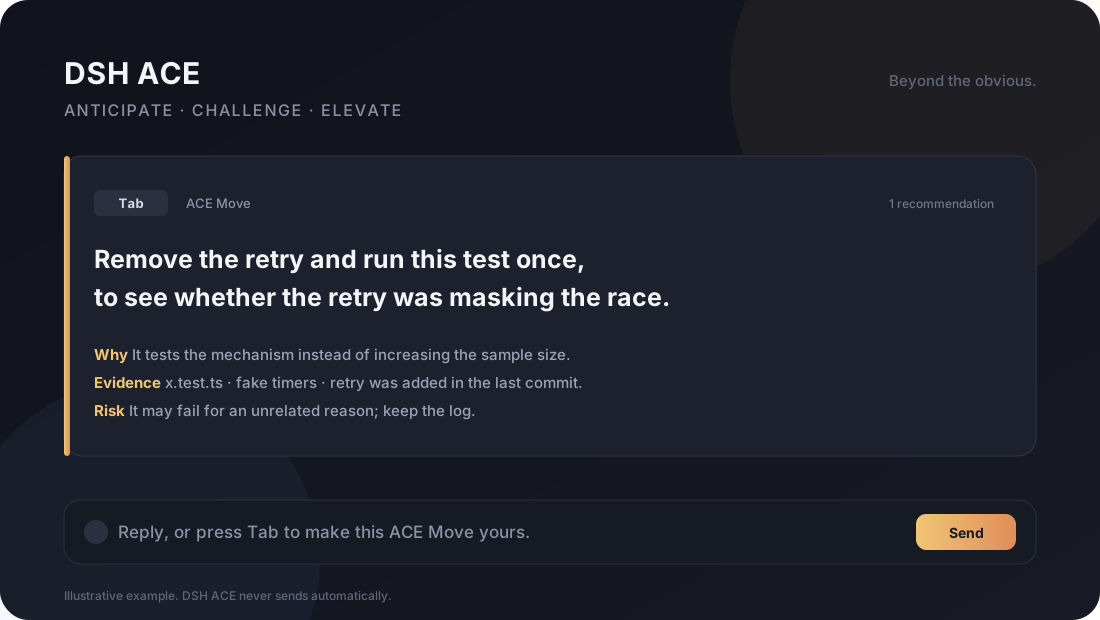
Rendered example, not a recording. A real screen capture replaces it before the first release.
The difference, in one line: autocomplete guesses what you would type; ACE reorders something you already know until the reaction is "right, why didn't I see that" — and shows nothing when nothing wins.
Install
The npm name dsh-ace is taken by an unrelated project, so the package is scoped as @ghoscro/dsh-ace. Until it is published, the tarball on Releases is the install path:
# in the DSH profile directory
pnpm add file:/absolute/path/to/ghoscro-dsh-ace-0.5.23.tgz
Then add "@ghoscro/dsh-ace" to dsh.profile.bundles, materialize the profile (DSH plugin page or pnpm install), and restart DSH. The composer row shows ✦ ACE (✦ 深度预测 in the Chinese UI).
If an install goes wrong, INSTALL.md has the two-step recovery: remove the bundle entry, restart. A failed entry does not stop DSH from booting. Developer install (copy this directory into sakura/packages/) is also there. Verified host: DSH 0.2.1-rc.2; other versions are unverified.
What it does
Most next-message tools optimize for what you would probably type. ACE optimizes for whether this move is worth sending, and whether it lets you see the next layer yourself.
The four-beat card:
You just said X → the line behind it is Y → so Z will behave the same way → try W first; if you see such-and-such, I was wrong
By default the card shows only W, the line you can send. X/Y/Z, the three plain lines and "wrong if" sit behind Show details in the footer: the card answers "send it or not" first, and "why" on request.
- X restates the concrete thing in your own words (usually the assistant line you are answering).
- Y states the relation in one human sentence: why it works or fails. At most one abstraction.
- Z gives one other place the same relation shows up. If it does not look alike on the surface, the card carries a separate line saying how it maps; if it cannot, this beat scores zero.
- W is a checkable action for today: engineers get a file or command, everyone else gets something they can see ("refresh and look whether the badge is still red").
- Wrong if: what result would prove the card wrong.
Three plain lines on every card:
- Now: what is happening and where it is stuck, in symptoms you can see.
- Why: the result this step is for, not the action.
- After: what you will see or get, specific enough to judge "is this what I want".
One missing line and the card is not shown. Wild mode is included: the line Tab inserts must be readable at the current level, not a stack of unexplained terms.
- It generates 3 directions internally: advance, use an existing tool, reframe, verify, clarify, constrain, close.
- It scores them for
value,novelty,worth_extra_step, and action type. The relation beat is judged by the host, not scored by the model: a surface-alike example needs no mapping line, and a surface-unlike example with no written mapping is not shown at all. - Level: the card reads the user's own messages and adapts — everyday language and one action at a time for non-engineers, shorthand and judgement for engineers. Override it with
levelin the plugin config. - The default mode answers a specific line of the assistant's last message (
reply_to, quoted verbatim), but picks the answer worth sending, not the smoothest one. - It shows one card, with X/Y/Z/W and its falsifier.
- If nothing beats the obvious “continue”, it shows nothing. A quiet card is a feature.
Tabinserts only W. You can edit it. ACE never sends for you.
Composer
ACE also works inside the input box:
- While you type, a ghost completion appears at the caret;
Tabaccepts it. `(backquote) orF1toggles the ghost.F1also prints one diagnostic line per press, newest at the bottom.Alt+1…Alt+4picks one of the alternative card rows;Escapedismisses the card or the settings panel.- The loaded build is exposed as
<html data-ace-version>; quote it in a bug report.
Demo
The card above is the intended loop:
- The assistant asks, “run the full suite?”
- The obvious next line is “run it”.
- The card: X “run the full suite?” → Y the retry swallows the flake, so a full run only spreads the odds → Z upload retries and CI flaky reruns are the same mechanism → W “remove the retry and run this one case once”.
- “Wrong if”: one clean run means the retry was not masking anything.
Tabinserts only W; you decide whether to send.
Quick start
- Install as above; restart DSH.
- Open a conversation. The composer row shows ✦ ACE; click it, or wait for the next completed turn if automatic ACE is on.
- Press
Tabon the card to fill the draft.
If you are migrating from dsh-composer-predict, read MIGRATION.md first. Do not load both packages at once.
A missing card is not a failure. It means nothing beat the obvious "continue" for that turn. Silent turns are logged as no-card, and the score threshold can be swept offline with npm run sweep instead of being tuned on live chats.
Three cases
These are examples, not a controlled benchmark. They show the kind of added value ACE is aiming for.
1. A test that may be hiding the bug
- Obvious: “Run the full suite.”
- ACE Move: “Remove the retry and run this one test once; compare repeated runs with and without retries; a higher failure rate would support the masking hypothesis.”
- What it adds: it tests the mechanism instead of increasing the sample size.
- Risk: the test may fail for an unrelated reason.
2. A cheaper implementation path
- Obvious: “Write a small script to batch this.”
- ACE Move: “Use the existing CLI’s
--jsonoutput and pipe it; no new script to maintain.” - What it adds: a smaller surface area and a faster path to the same outcome.
- Risk: the CLI may not expose the field you need.
3. A task that is drifting
- Obvious: “Keep polishing the current card.”
- ACE Move: “The card is not the bottleneck; the install step still fails on a fresh profile. Fix that before the visual polish.”
- What it adds: it names the real constraint and changes the order of work.
- Risk: the install failure may be environment-specific.
How it works
- The browser sends the recent transcript and the session
cwdto the host route. - The host builds a bounded, read-only evidence pack:
gitstatus, diff stat, last commit and a bounded diff, plus the project's top-level tree and its dependency/script names, so a structural claim can land on a real module. - A deterministic situation block is built from the last user goal, the assistant’s last offer, and explicit constraints. There is no separate situation-model call.
- One generation call returns 3 line-delimited JSON candidates plus a selection line.
- The host scores and selects exactly one move. Fixed slot order is gone;
verify/constraincandidates are penalized so “check again” cannot win by default. The winner then goes through one bounded review call: X/Y/Z, the relation, the analogue and the falsifier are checked against the evidence, and a card that cannot support them is rejected rather than silently downgraded. - If the best score is below the threshold, the plugin returns no card.
Tabfills the draft. The card’swhy/evidence/riskare not sent with the message.
The parser scans balanced JSON objects and skips a truncated or malformed line while keeping valid earlier candidates. A bad line does not discard the whole response.
Settings and cost
- Modes:
safe,standard,brainstorm,wild(labelled ACE) are equal-status modes, not a volume dial. Each changes the prompt policy and the output budget, the card shows which mode produced it, and the settings panel switches it. No mode collapses intosafe. - Cache: the rules and the voice samples form a byte-identical head, the conversation is appended instead of re-windowed every turn, and only the volatile tail (mode, situation, evidence) changes, so the provider's automatic prefix cache can hit on most of the prompt.
- Pause: stops automatic suggestions;
✦ ACEstill works on demand. - Text size: one slider in the settings panel drives
--dsh-fs-w/--dsh-fs-meta/--dsh-fs-x. The value is stored inchrome.storage.localwhen the container exposes the extension API (localStorageotherwise) and set ondocument.documentElement.style, so changing the size never needs a rebuild. - Model: uses the active DSH agent default, or the plugin’s configured route.
- Privacy: the recent transcript and the local evidence pack go to the selected model. Nothing is written back to the DSH session.
captureSamples: falsedisables prediction samples only;ledger: falseseparately disables the local conversation ledger. Existing files are not deleted by these switches. Rejected-card feedback and usage/error diagnostics are separate local records; this is not a zero-retention mode. - Ledger: each session keeps an append-only record of what the predictor saw; the prompt is rebuilt from it, so the prefix only grows, and past
ledgerMaxEntriesthe oldest part is written to an archive file and replaced by a deterministic digest.ledger: falseturns it off. - Samples: the last 50 expert predictions (candidate moves, the raw answer, the last user line) stay in
diagnostics/dsh-ace-samples.jsonl;npm run sweepre-scores them offline at every threshold, with no model calls. - Accounting: every prediction appends one row to
diagnostics/dsh-ace-usage.jsonlwith the session, turn index, token counts, cache hits and a priced cost using the configurablepricingblock. - Cost: normally two model calls per ACE card: candidate generation and one bounded reasoning review. Recovery may add a generation retry. Generation caps are
safe1600,standard2600,brainstorm3200,wild3600 tokens, also bounded byexpertMaxTokens. Review and recovery each cap output at 2400 tokens. These are output limits, not total usage estimates. - Waiting and review: elapsed seconds do not identify the backend stage. A review timeout retains the candidate with a visible unreviewed warning; content rejection returns no card. Default model-stage budgets are 25s generation + up to 12s recovery + 12s review. History and evidence work add time; the browser cancels an expert request after 58s. These limits are not a latency promise.
- Trial feedback: use the trial and latency report to distinguish installation, waiting, and card-quality problems. A restart loads the installed package; it does not download a new release.
- Automatic ACE: generates and reviews a card after each completed turn. Pause it to use only the ✦ button.
Development
npm test
Measure real provider token usage against a running DSH instance. macOS and Linux:
COMPOSER_PREDICT_BASE=http://127.0.0.1:13770 node scripts/token-tiers.mjs
Windows (PowerShell):
$env:COMPOSER_PREDICT_BASE='http://127.0.0.1:13770'
node scripts/token-tiers.mjs
The suite covers prompt/parser behavior, JSONL bad-line salvage, selection scoring, no-card behavior, route envelopes, and the single-card UI interactions.
Compatibility is declared in package.json.dsh.compatibility. Treat a version not listed there as unverified; do not assume a package-manager success is a runtime acceptance.
Uninstall
Remove the bundle and dependency from the profile, restart DSH, and delete the package directory. The old composer-predict route and settings key are kept for migration; removing the new package does not delete your local settings.
Author
A DSH plugin by micker.
License
MIT. Contributions use DCO sign-off; no CLA. See CONTRIBUTING.md and SECURITY.md.
No comments yet. Be the first to write one.