Training Lens · 训练视窗
A local, read-only training dashboard for DeepSeek Harness (DSH). Turn existing TensorBoard scalar logs into a focused view of progress and trends, without changing your trainer.
简体中文 · DSH plugin documentation
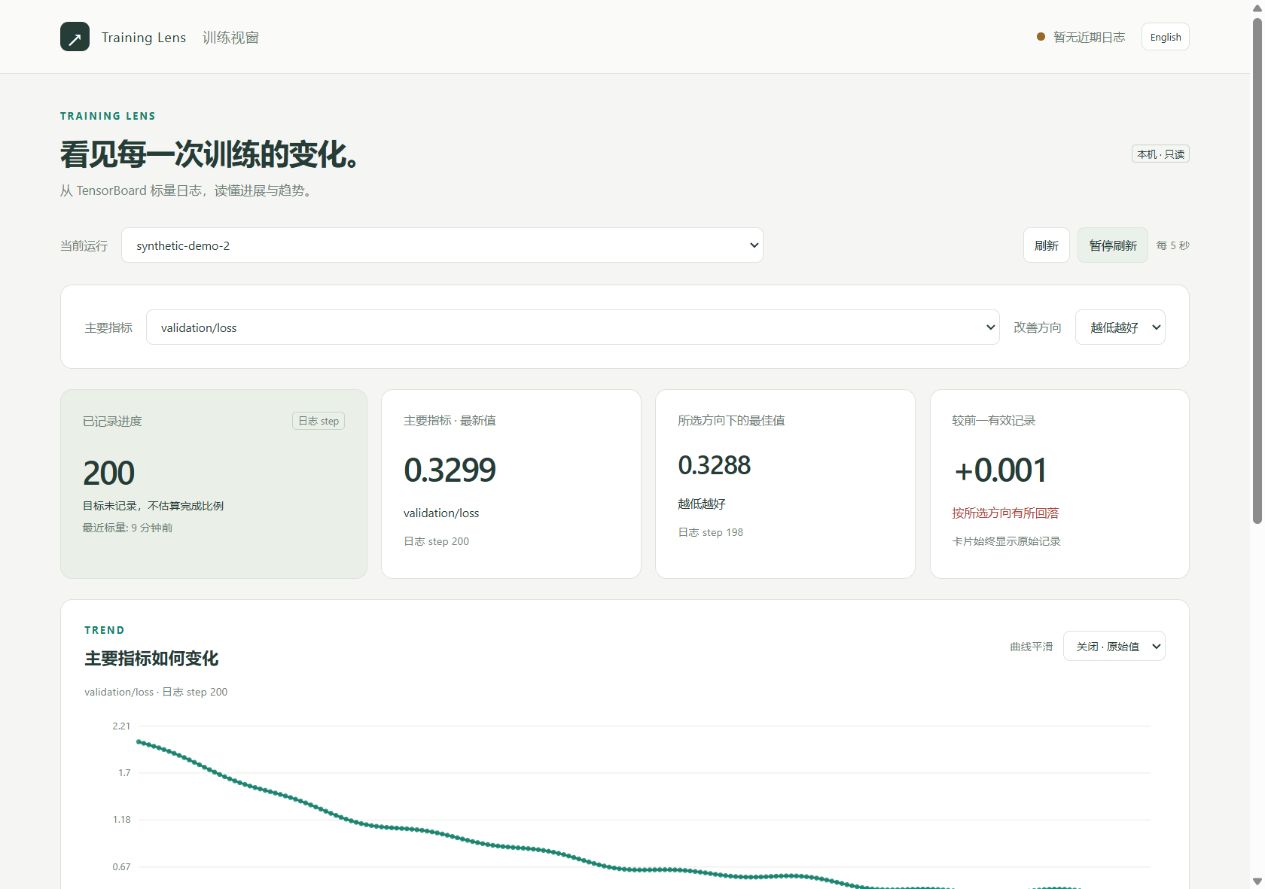
Screenshot uses generated demonstration data, not a training result.
Features
- Choose any primary and secondary scalar: reward, validation loss, accuracy, learning rate, or a custom tag.
- Explicit higher / lower is better selection. By default, show the observed range without declaring improvement.
- Raw values, optional EMA smoothing, per-metric steps and expandable diagnostics.
- Chinese / English UI, responsive layout, automatic refresh and run selection.
- DSH tool starts, inspects and stops only its own dashboard. No trainer controls, telemetry or cloud upload.
- Works even when the TensorBoard web server is not running. No browser extension, front-end build or CDN required.
Install
Requires DSH 0.2.1-rc.2 (tested), Node 22+, and Python 3.10+ with TensorBoard. Compatibility outside the declared DSH 0.2 range is not assumed.
Install the versioned release artifact:
dsh plugin --profile desktop add https://github.com/GU143312/dsh-training-lens/releases/download/v0.1.0/dsh-training-lens-0.1.0.tgz
Or install the source bundle (plain JavaScript, no install-time build):
dsh plugin --profile desktop add github:GU143312/dsh-training-lens#v0.1.0
Reload the plugin or restart DSH once when convenient. Use your own profile name in place of desktop if needed. For local testing: dsh plugin --profile lens-test add /absolute/path/to/dsh-training-lens-0.1.0.tgz.
The Python helper uses your existing training environment. If TensorBoard is missing, install the optional Python dependencies with that interpreter, from a source checkout:
python -m pip install -r requirements.txt
The plugin never runs pip automatically. npm registry publication is separate from these GitHub installation methods; do not assume npm install dsh-training-lens is available until an npm release exists.
Use in DSH
Ask DSH:
Use training_lens to open my TensorBoard logs at
/absolute/path/to/runs, using Python/absolute/path/to/venv/bin/python.
On Windows, provide the training environment's ...\.venv\Scripts\python.exe. The tool returns a local URL; open it to choose a run and metrics.
Tool parameters:
| Field | Meaning |
|---|---|
action |
start, status, or stop |
logdir |
Absolute event directory or parent directory of runs |
python |
Existing Python executable, not a shell command |
port |
0 chooses a free port; an occupied fixed port fails without stopping its owner |
The process remains tied to the plugin instance. Disabling/reloading the plugin or closing DSH stops its dashboard. Stopping the dashboard leaves the training process and event files untouched. Only one dashboard is owned by a plugin instance; stop it before changing the root/interpreter.
Configuration
Optional defaults in your profile's cordis.patch.yml:
- id: training-lens
  config:
    python: /absolute/path/to/venv/bin/python
    logdir: /absolute/path/to/runs
    port: 0
    staleSeconds: 120
    startupTimeoutMs: 60000
All runtime paths are provided by the user. No project-specific paths or datasets ship in the package.
Standalone use from a source checkout:
python python/server.py --logdir /absolute/path/to/runs --port 6008
Interpretation and limits
- Status means recent scalar timestamps, not trainer liveness. A completed target is not proof of successful training or saved checkpoints.
- Standard TensorBoard scalar and TF2 scalar-plugin tensor summaries are supported. Unknown tags are selectable; success rate is never inferred from reward.
- The default x-axis is the writer's step. Known MCTS tag combinations may expose epoch progress from numeric
training_epochsinconfig.yaml; genericTrain/lossis not assumed to use epochs. - Metrics may be logged at different frequencies. The card and point tooltip identify the metric's own step.
- NaN and Infinity are gaps, not zeros. Duplicate steps use the newest event after TensorBoard's restart-purge behavior.
- Charts above 1,600 points retain bucket endpoints/extrema/gap markers. Cards use the full parsed series; EMA is applied to displayed points.
- Event readers are cached for up to four runs. Very large mixed-media event files can use substantial memory. Use a focused log root.
- Hidden/cache/checkpoint directories and symlink entries are skipped. No arbitrary-file HTTP endpoint exists. Only loopback hosts are accepted; this is not an authenticated remote hosting service.
- In remote DSH environments the URL refers to the DSH host. Use your normal SSH/editor port forwarding; the plugin does not open a public tunnel.
Development
npm ci --ignore-scripts
npm run check
npm test
python -m unittest discover -s tests -p 'test_*.py' -v
npm pack
Set TRAINING_LENS_TEST_PYTHON to a Python executable with TensorBoard to enable the Node end-to-end lifecycle test. Python integration tests explicitly skip if optional dependencies are unavailable; CI installs them. No real training is run in tests. npm pack contains an allowlisted set of source/assets/docs, with no install lifecycle scripts.
MIT license. Python TensorBoard and PyYAML, and npm runtime dependencies, retain their own licenses; they are installed separately rather than vendored.
No comments yet. Be the first to write one.