mol4agent
Turn molecular structure files in an agent harness from "a wall of plain text" into a 3D page that humans can preview and agents can operate directly.
- Human preview: open a
.pdb/.cif/.sdf/.mol2/.xyz/.grofile, including.gzvariants, in the harness file previewer and get Mol*'s official 3D UI instead of text. The previewer's Open with menu still offers plain text/code. - Agent operation: the LLM uses
mol_*tools to change representations, colors, highlight residues/ligands, focus the camera, measure, and capture screenshots while the human watches the page change. - Agent-initiated open: naming a file opens its structure preview automatically.
- Cross-harness: rendering and the command protocol live in
@gcszhn/mol4agent-core; each harness gets a thin adapter package.
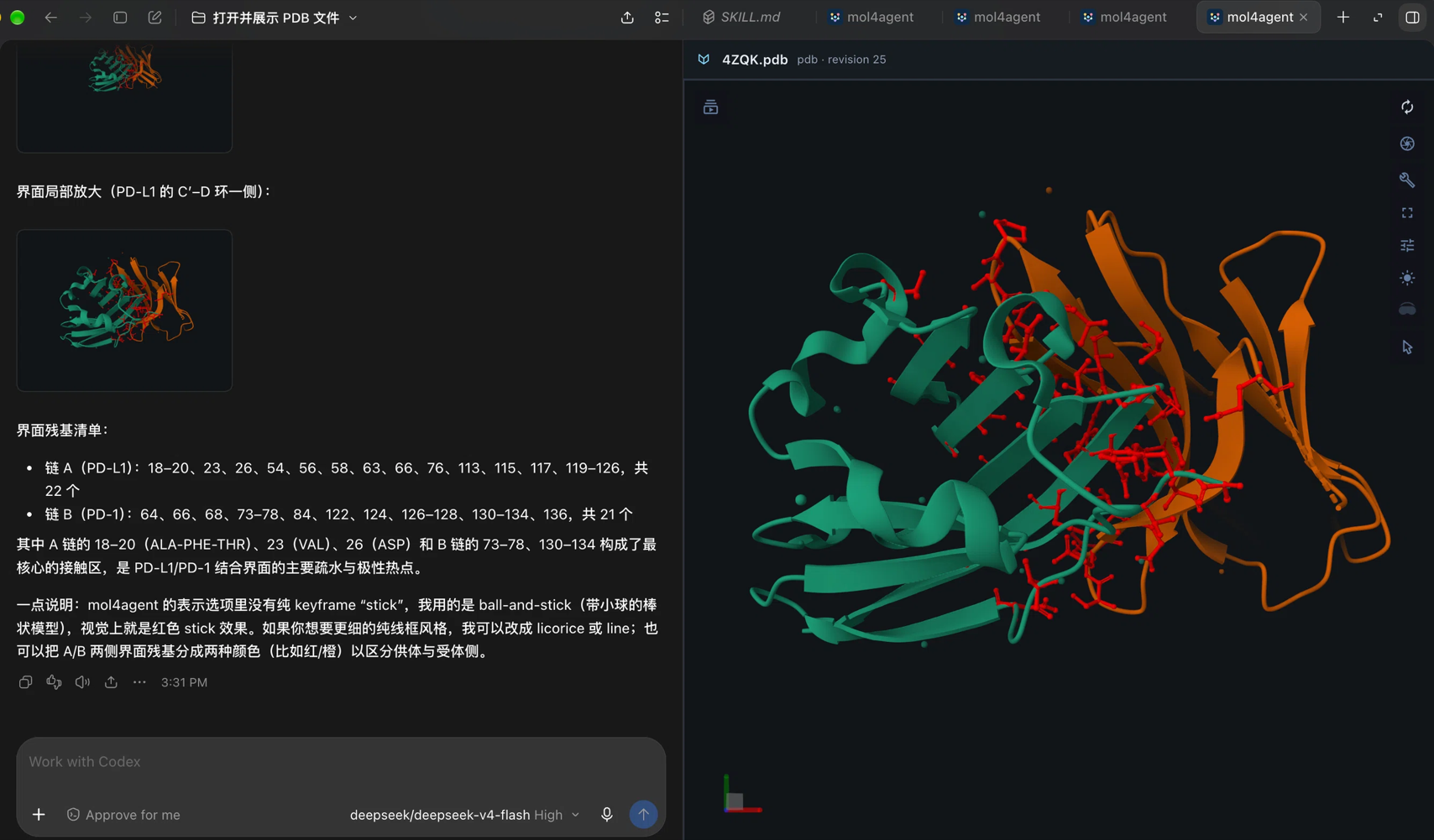
ChatGPT/Codex: the agent annotates the PD-L1/PD-1 interface in a side-panel Mol viewer.*
Architecture
flowchart TB
  subgraph Harnesses["Agent harnesses"]
    DSH["@gcszhn/mol4agent-deepseekharness<br/>DSH adapter"]
    OA["@gcszhn/mol4agent-chatgpt<br/>ChatGPT/Codex adapter"]
    OC["@gcszhn/mol4agent-opencode<br/>OpenCode adapter"]
  end

  subgraph Core["@gcszhn/mol4agent-core"]
    Proto["protocol + formats + selectors"]
    Viewer["Mol* official UI viewer"]
    Parse["byte-oriented summarizers"]
  end

  DSH -->|"path → bytes + MolFormat"| Proto
  OA -->|"path → bytes + MolFormat"| Proto
  OC -->|"path → bytes + MolFormat"| Proto
  Proto --> Viewer
  Proto --> Parse
  Viewer --> Capture["PNG capture"]
Core boundary (the most important rule): core receives bytes plus an explicit format only:
viewer.load({ data: bytes, format: 'pdb', label: '1crn.pdb' })
- DSH gets a path from its preview API and reads bytes with its own APIs;
- ChatGPT/Codex gets a path from
mol_*tool calls and reads bytes in the MCP server; the MCP App receives only bytes plus format; - suffix detection (
.pdb -> pdb), authorization, filesystem access, sessions, and UI all live in the adapter; - core contains no path logic and imports no harness package.
Packages
| Package | Purpose | Status |
|---|---|---|
@gcszhn/mol4agent-core |
Harness-neutral Mol* engine, command protocol, selectors, byte summaries, database source plans, PNG capture | Implemented; verified with real 1CRN/1ATP/aspirin |
@gcszhn/mol4agent-deepseekharness |
DSH adapter: right-sidebar document preview, session projection, mol_* tools, screenshot delivery |
Implemented and installed in the Desktop profile |
@gcszhn/mol4agent-chatgpt |
ChatGPT/Codex adapter: MCP App viewer, mol_* tools, long-poll scene updates, screenshot round trip |
Implemented; local marketplace install, protocol tests, and a real MCP Apps smoke test |
@gcszhn/mol4agent-opencode |
OpenCode 2.2+ adapter: side-panel Mol* viewer, mol_* tools, RPC scene updates, screenshot round trip |
Implemented; server + GUI verified end-to-end in the OpenCode desktop app (2.3.0) |
Quick start (DSH Desktop)
Install / reinstall
From a checkout of this repository:
cd /path/to/mol4agent
pnpm build
dsh plugin --profile desktop add link:"$PWD/packages/deepseek-harness"
dsh plugin forwards to pnpm in ~/.dsh/profiles/<profile>. The bundle must
also be listed in dsh.profile.bundles in that profile's package.json; the
DSH Plugin manager does this when it installs/enables a bundle. Restart DSH after
installing or updating the Host bundle.
npm form (0.2.0, published):
dsh plugin --profile desktop add @gcszhn/mol4agent-deepseekharness@0.2.0
Remove with dsh plugin --profile desktop remove @gcszhn/mol4agent-deepseekharness
(and drop it from dsh.profile.bundles).
The current desktop profile already has it installed and enabled:
- Open
fixtures/1crn.pdb(orfixtures/1atp.pdb,fixtures/aspirin.sdf,fixtures/1crn.cif) from the file tree.- The default renderer is Structure; the previewer's Open with menu can switch back to plain text/code.
- Ask the agent:
Open fixtures/1atp.pdb, use cartoon representation and chain-id coloring, highlight the ATP ligand, focus it, and capture a screenshot.
- Captures are saved under
.mol4agent/captures/in the workspace. If the current model route declares image input, the image is also returned to the model.
Rollout: a Host-side change (lib/host.js) needs a DSH restart; a client-side
change (lib/client.js) only needs a page refresh.
Quick start (ChatGPT/Codex)
Install from the GitHub marketplace
Codex reads the marketplace manifest in .agents/plugins/marketplace.json.
The installable plugin payload is published to the generated plugin-dist
branch when the ChatGPT package version changes on main, so this path does not
use npm and does not require a local build:
codex plugin marketplace add GCS-ZHN/mol4agent
codex plugin add mol4agent@mol4agent-github
Start a new conversation (or restart the app if the plugin list does not refresh) and ask:
Open fixtures/1atp.pdb, use cartoon with chain-id coloring, highlight ATP, focus it, and capture a screenshot.
The first preview of a molecular file asks whether to use mol4agent for that extension; choose Yes once. Open with still offers the built-in text/code viewer, and every structure tab keeps its own scene.
Local development install
Build the plugin and register the built copy through a local marketplace:
pnpm --filter @gcszhn/mol4agent-core build
pnpm --filter @gcszhn/mol4agent-chatgpt build
node packages/chatgpt/scripts/install-local.mjs
codex plugin marketplace add ~/.codex/mol4agent-marketplace
codex plugin add mol4agent@mol4agent-local
You can also click fixtures/1atp.pdb in the file tree. The first open asks
whether to use mol4agent for .pdb files; choose Yes once, and the structure
opens in the side panel by default. Open with still offers the built-in
text/code viewer. Each structure tab stays on its own scene; opening another
structure does not reload existing tabs. See the
ChatGPT adapter README for the tool reference and
file-handler details.
Quick start (OpenCode)
Requires OpenCode 2.2+ (the ./gui plugin API; verified on 2.3.0). Install the
adapter into the global configuration:
opencode plugin add @gcszhn/mol4agent-opencode
For a local checkout, build it and add the package directory to the global
opencode.json(c) instead (opencode plugin add only accepts npm/Git specs):
pnpm --filter @gcszhn/mol4agent-core build
pnpm --filter @gcszhn/mol4agent-opencode build
# "plugins": ["/path/to/mol4agent/packages/opencode"]
Open a structure with Ctrl+P (/open) file search or the Open molecular
structure command; the built-in file tree does not route .pdb clicks to
plugins. Then ask the agent:
Open fixtures/1atp.pdb, use cartoon with chain-id coloring, highlight ATP, focus it, and capture a screenshot.
For a remote (SSH) session, install the plugin on both the desktop machine
(global config: the panel and picker) and the server (the mol_* tools). The
viewer RPC is routed to the session's own server, and paths are resolved there.
A remote-only install exposes the tools without a desktop panel. The browser app
(opencode serve) is tool-only: the Mol* panel depends on the desktop app's
local GUI-plugin host, so mol_open works there but no viewer mounts and
mol_capture times out. See
Remote servers and the web.
Each structure tab keeps its camera, style, and selection while it stays open; close unused tabs (each live viewer holds a WebGL context). See the OpenCode adapter README for tools and limitations.
Development
pnpm install
pnpm typecheck   # builds core first, then typechecks every package
pnpm build       # every package: core, DSH host/client, ChatGPT server/app, OpenCode server/GUI/RPC
build produces:
lib/host.js— DSH Host, ESM,@deepseek-ai/*external;lib/client.js— DSH lazy-CJS browser bundle with Mol*'s official UI, about 3.65 MiB. One bundle, no lazy chunk.
Documentation
- Core API:
createMolViewer,StructureData, commands, selectors, summaries, capture, React binding. - DSH agent interface:
mol_*tools, session projection, document preview, screenshot loop. - ChatGPT/Codex adapter: MCP App, file-tree
structure preview,
mol_*tools, long-poll scene updates, capture rendezvous, local install. - OpenCode adapter: side-panel viewer,
mol_*tools, RPC scene updates, capture rendezvous, local install. - Architecture design / 中文: product goals, layers, the cross-harness contract, and high-level flows. Package details live in the package docs.
- DSH adapter details: tool behavior, selector examples, limitations.
Chinese translations: README_zh.md, core, DSH adapter.
No comments yet. Be the first to write one.