Switchboard for DeepSeek Harness
中文
看哪些 dsh 会话在等你、要你做什么,一键去回答。
移植自 Fstrategy/switchboard(原作者 Lumir,MIT)。本项目是社区插件,非 DeepSeek/dsh 官方出品;原始许可和来源保留在 LICENSE 与 NOTICE。
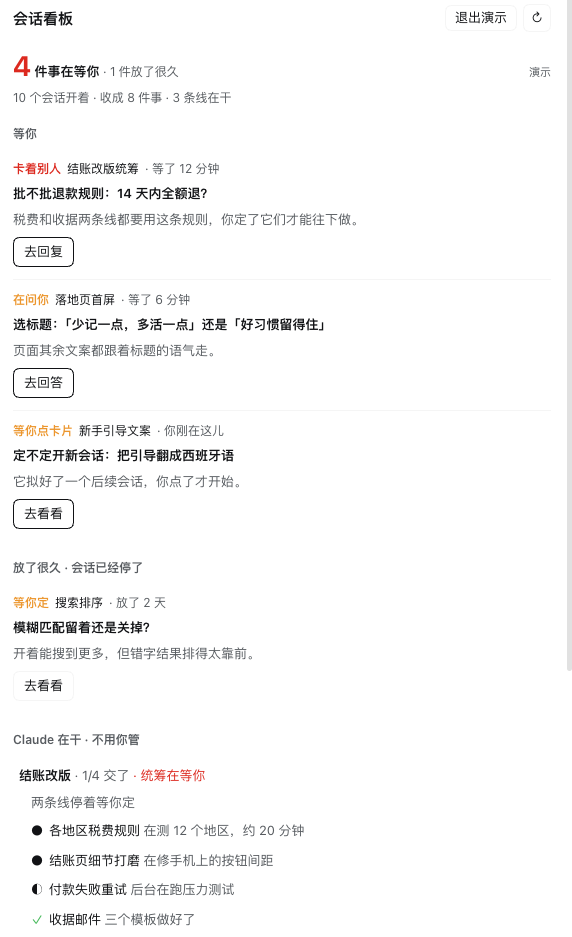
这是真实 dsh 界面中的 demo 面板裁剪,不是独立网页或 mock;仅保留虚构会话面板,聊天、头像和本机会话信息不公开。
在 dsh 插件页直接安装
需要 dsh 0.2.2-rc.1(目前仅此版本经过验证)。
- 打开 插件 → 添加插件(Add plugin)。
- 粘贴下方的完整公开
.tgz链接,点击安装。 - 安装完成后点击 立即启用(Enable now)。若直接关闭安装结果页,包会保持未启用。
https://github.com/Fstrategy/switchboard-dsh/releases/download/v0.1.0/fstrategy-switchboard-dsh-0.1.0.tgz
这是 GitHub Release 的公开安装包,不需要 npm 账号,也没有在 npm 注册表发布这个包名。不要只输入包名或 GitHub Release 页面地址。也可以使用 CLI:
dsh plugin --profile web add https://github.com/Fstrategy/switchboard-dsh/releases/download/v0.1.0/fstrategy-switchboard-dsh-0.1.0.tgz
把 web 换为你的实际 profile。Desktop 使用其自带的 dsh 命令,先彻底退出应用,再用 --profile desktop 安装后重新打开。
已有本地原型? 请先卸载 @local/switchboard-dsh,再安装公开版 @fstrategy/switchboard-dsh;不要同时启用,两者使用相同的看板服务/命令/存储域。正常会话日志不会被删除。更新 Git/tarball 安装时使用卸载再安装新版本的方式。
使用
/switchboard:打开聊天旁的原生右侧看板。/switchboard demo:切入/切出演示数据;演示中的跳转不会打开任何会话。- 输入框上方常驻一行,只数其他会话;没有等待也保留看板按钮。
- 看板显示:等你(优先挡住其他任务的统筹、问题、决策、卡片)、放了很久、统筹与子任务、停着/做完了。
- 看板设置:中英文、短句、自动打开、可选底部命令。
默认不调用模型。 summaries=false,开发模式为本地 fake。关闭短句时只使用原生会话记录,旧语义缓存不参与展示;demo 使用预写数据。只有用户明确开启 live 并配置可用小模型 provider/model 时才发送短摘录,不继承聊天模型,不自动回退到昂贵模型;可能产生所选提供方的费用。
发现列表与兼容范围
公开链接已经可以用于“添加插件”;这不等于自动出现在所有人的默认发现列表。dsh-plugin 是 GitHub topic,不是官方认证或自动收录。可选的自有社区索引需要用户启用“自定义插件索引”并主动添加来源;详见 分发说明。
- 测试只用假模型;不为发布调用真实模型。
- 当前兼容声明为精确的
0.2.2-rc.1,不建议绕过版本检查。 - Windows/Linux 原生安装、深色像素外观、真实计费模型、跨 Host/跨进程聚合未完成实测。
- dsh 没有通用的 Claude 桌面版 post-turn verdict 或新会话建议卡片,真实数据不捏造这些字段;关闭模型后,普通回复中的语义提问不作 AI 推断。
完整数据映射与已知差异见 PORTING-dsh。
English
See which dsh sessions are waiting on you, what they need, and jump to reply. A native right-side tab and a persistent composer band show waiting actions, stopped work, coordinators/subagents, and idle sessions.
Community port of Fstrategy/switchboard, originally by Lumir (MIT). Not an official DeepSeek/dsh product.
Install from Plugins
Tested with dsh 0.2.2-rc.1. Open Plugins → Add plugin, paste the exact public .tgz URL below, install, then choose Enable now:
https://github.com/Fstrategy/switchboard-dsh/releases/download/v0.1.0/fstrategy-switchboard-dsh-0.1.0.tgz
No npm login is required. The package identity is @fstrategy/switchboard-dsh, but it is distributed through GitHub Releases, not published on the npm registry. Remove the earlier @local/switchboard-dsh prototype before installing this public package; they must not run side by side. For Git/tarball upgrades, uninstall then install the new version.
Use /switchboard or /switchboard demo. Short-line summaries are off by default; off means no summary model calls. Fake mode stays local, demo uses prewritten facts, and live mode requires the user's explicit opt-in and configured small-model route.
Public installation does not imply automatic inclusion in the default discovery catalog. See distribution options and official references. Untested native targets include Windows/Linux, dark-mode pixels and real paid models; read the porting map before changing supported runtime versions.
Develop from source
CLI development needs Node >=24.9.0. Build tools are pinned; the runtime tarball has no install lifecycle/build scripts. Clone this repository rather than developing inside an installed runtime tarball:
git clone https://github.com/Fstrategy/switchboard-dsh.git
cd switchboard-dsh
pnpm install --frozen-lockfile --ignore-scripts
pnpm run build
pnpm test
pnpm run typecheck
pnpm run check
pnpm run upstream:check
node scripts/release-check.mjs --source-only
The three reusable upstream modules remain byte-for-byte unchanged. Tests inject fake collectors/models/transports and make no paid model calls. Prebuilt artifacts are committed for Git-source installs; normal users should prefer the versioned Release tarball. See release procedure and privacy/security notes.
No comments yet. Be the first to write one.