dsh-web-visualuiconfig — DSH Web GUI visual configuration plugin
English | 中文
A standalone, hot-pluggable DeepSeek Harness (DSH) Web GUI plugin that layers switchable visual configuration over the official look — backgrounds, scrim, translucent panels, accent palettes, fonts, scrollbars, selection color, favicon and page title. Styling runs browser-side; the configuration persists (by default) to a machine file under ~/.dsh served back through the plugin's own /personalization/* routes, with a browser-only fallback. The plugin mounts only through cordis.patch.yml and the profile mechanism, without modifying DSH source.
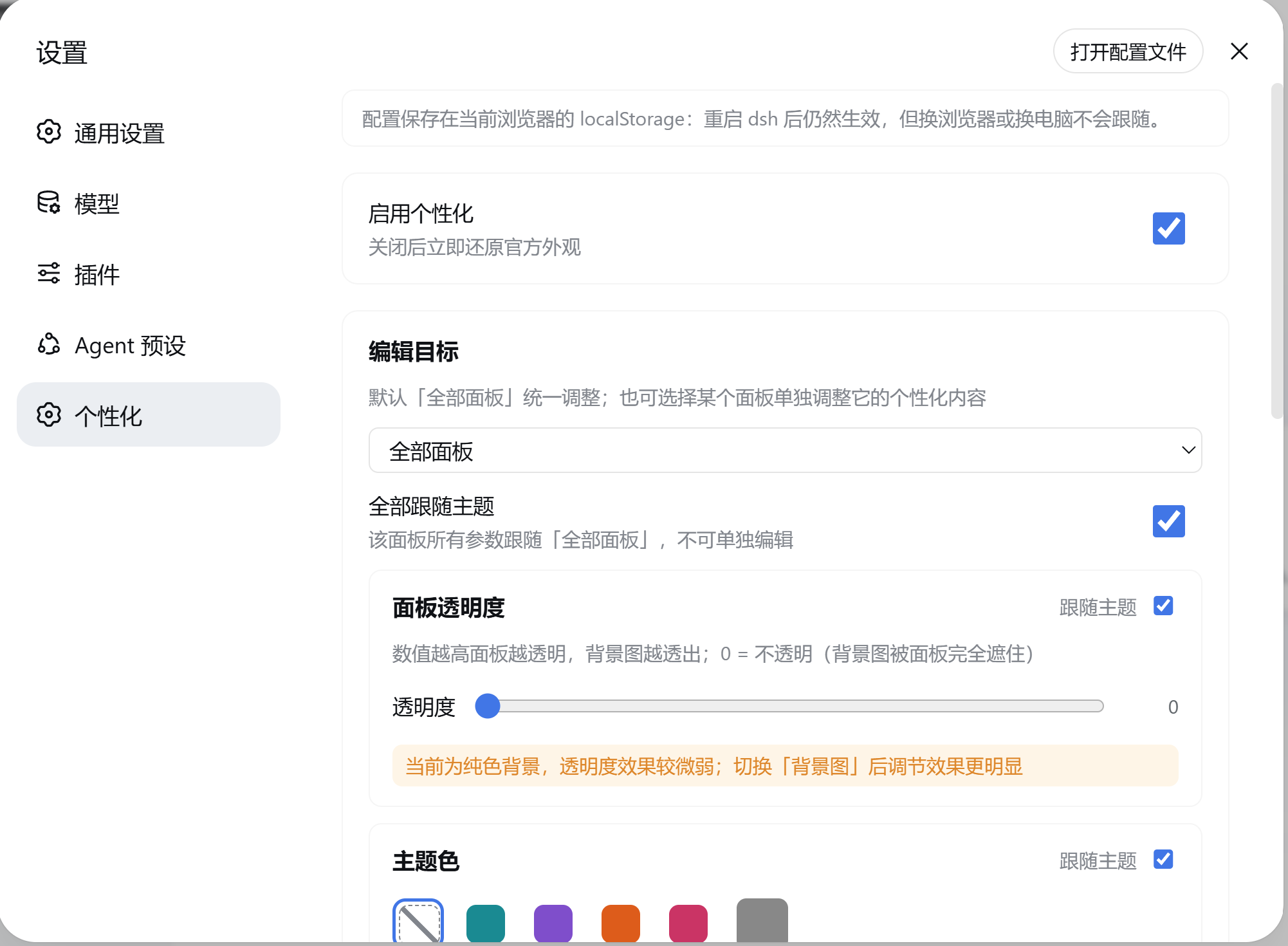
Capabilities
| Capability | Description |
|---|---|
| Background settings | Every panel (unified between the "all panels" and single-panel targets) has its own background group: solid color (default — the panel shows its base color, transparency still applies) or image (rendered at the panel's layer, scrim adjustable, fit: cover / contain / stretch / tile). The "all panels" upload is a source bridge: it only compresses, never crops — each panel crops via background-size: cover at render time and shows it only while its background knob follows the baseline (panels with an independent background get a hint) |
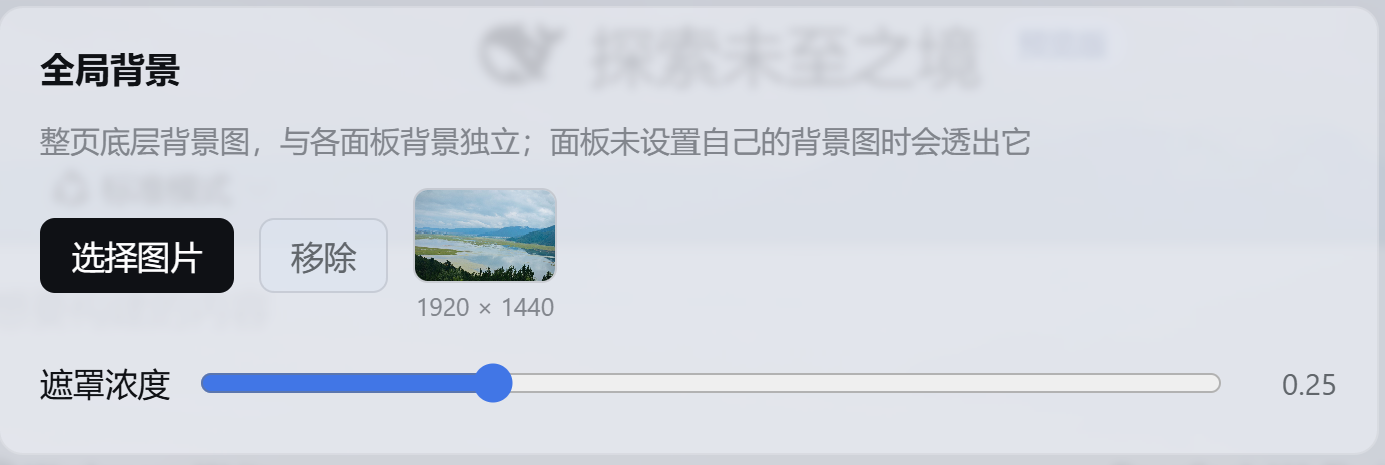
| Global background | A page-level group outside the edit target: a page-wide bottom-layer backdrop (rendered on body), independent of panel backgrounds — panels without their own image show it through, panels with their own image cover it. Supports fit (cover/contain/stretch/tile) and blur (0–60px, applied as filter on the standalone fixed backdrop layer — never a column, so it traps no fixed overlays) |
| Panel transparency | 0–0.9 slider: 0 = official opaque (the backdrop is fully covered), right = more transparent and the backdrop shows through; floating layers (menu/dialog/input) stay more opaque for readability. No backdrop-filter: blur on the official frame columns traps fixed overlays (the settings modal etc.), a boundary the dsh-web-ui skin system documents |
| Accent palette | 4 built-in global theme presets (Ocean / Violet / Ember / Rose) plus a custom hex accent (color-mix derives the full ramp), overriding --dsw-static-deepseek-* and the aionui panel's --aion-* tokens; light/dark auto-adapt. The 21 deepseek-harness-skin palettes and 4 Catppuccin flavors are kept as internal colour art assets (SKIN_PRESET_ASSETS / CATPPUCCIN_PRESET_ASSETS in src/shared/presets.ts), not exposed to users |
| Typography | Rounded / Serif / Mono presets, or a custom font-family stack |
| Scrollbar | Rounded scrollbar, light/dark palettes |
| Selection color | Custom ::selection background |
| Page chrome | Favicon (≤128px), page-title override, and a running status text (replaces the official "Deep diving...", injected into [role="status"] via a DOM observer; clearing restores the official label) |
| Panel-level personalization | Runtime detection of present panels; the "edit target" selector defaults to "all panels", editing the baseline appearance that every follow knob inherits from. Every module (transparency / palette / font / scrollbar / selection / background) carries a "follow theme" switch — a single-panel view flips that panel's knob, the "all panels" view flips every panel's knob at once — plus a "follow all" master switch in both views. Current panels: sidebar, conversation, details, right file/preview panel (aionui), task board, SSH panel |
| Config storage | A "Config storage" section chooses where settings live: follow this machine (default — persisted to ~/.dsh/dsh-web-personalization.json through the host half, so they survive restarts and follow you to another browser) or this browser only (the original localStorage behavior). Images are stored as files under ~/.dsh/personalization/ and served as short same-origin URLs, so they escape the localStorage quota and the 2 MB CSS url() limit |
| Character themes | Give an anime character art image + a short introduction; the agent reads the art, derives the look (accent/preset/font/transparency/scrollbar/selection/background/title) and applies it, producing a GUI that matches the character. Themes are saved in a library (themes) with list/switch/deactivate/remove; deactivating restores the pre-theme official look |
Screenshots
Background-image effect (before / after):
| Before | After |
|---|---|
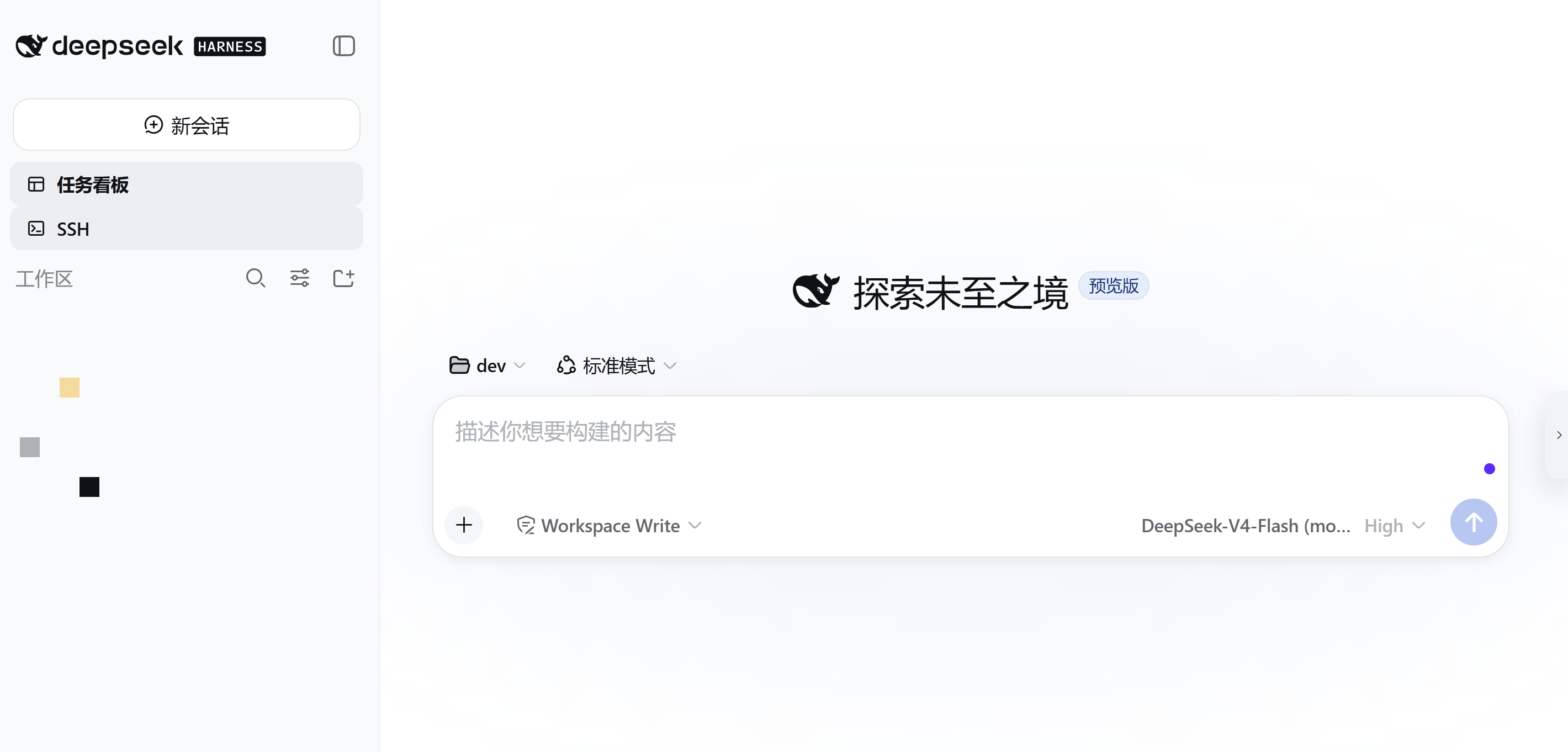 |
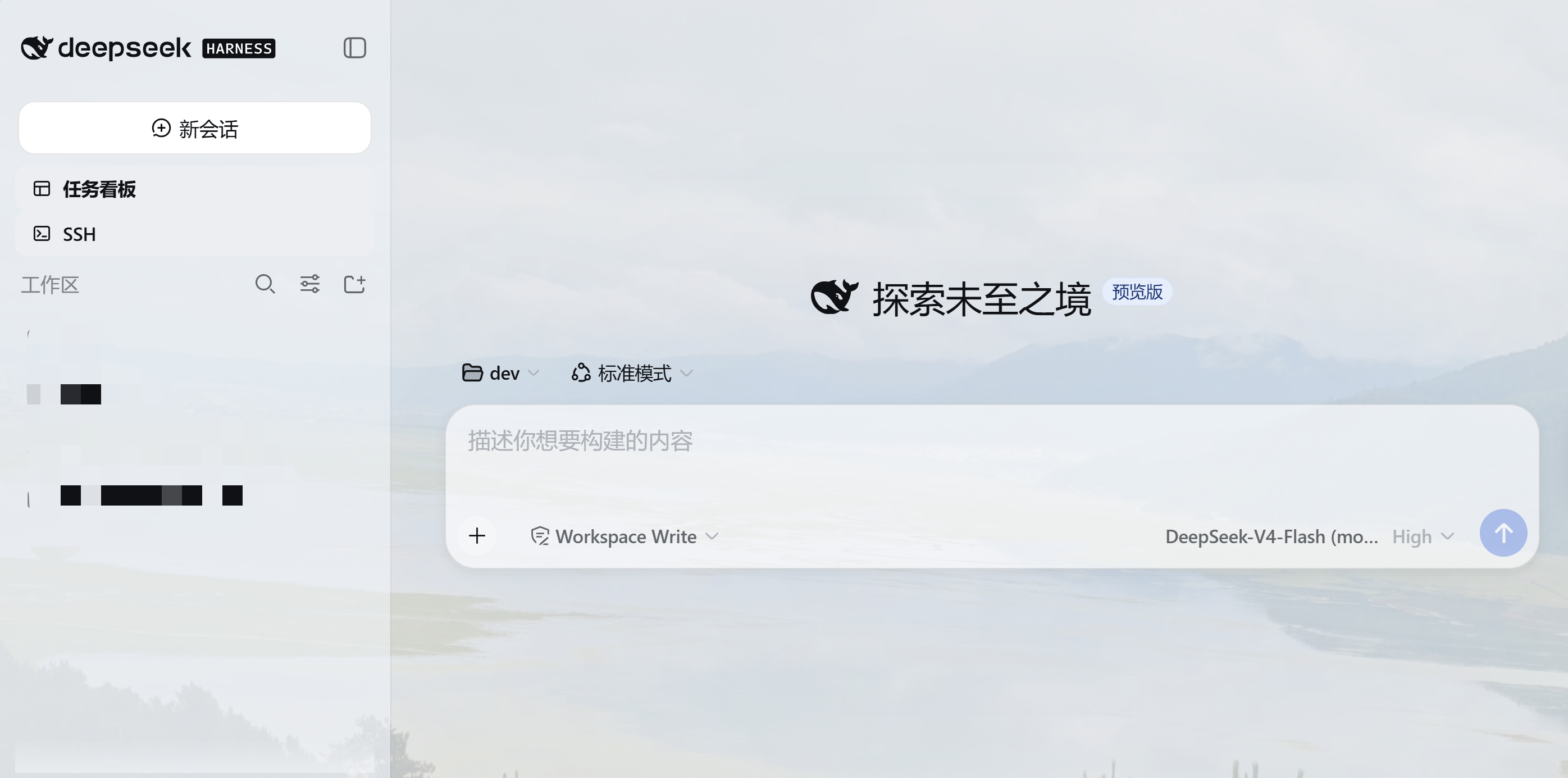 |
Uploading a background in the settings page:
Install
Link the local source for development, then restart dsh web — the settings panel gains a "Personalization" page.
### 从本地源码安装(开发调试)
dsh plugin --profile web add link:C:/path/to/dsh-web-visualuiconfig
Install via the DSH agent
No terminal needed: in a DSH conversation, just ask the agent to install the plugin for you — it clones the repository, mounts it into the web profile with a link: entry, and reminds you to restart dsh web:
Please install the dsh-web-visualuiconfig plugin.
The agent runs the equivalent of:
git clone https://github.com/Foo1Moon/dsh-web-visualuiconfig.git
dsh plugin --profile web add link:<cloned repo path>
Configuration storage
The config defaults to follow this machine: the host half persists it to ~/.dsh/dsh-web-personalization.json (images as files under ~/.dsh/personalization/) and serves it to every browser through the /personalization/* routes — the settings survive a dsh web restart and follow you to another browser or machine. The settings page's "Config storage" section can switch to this browser only, which keeps the original localStorage behavior (dsh.personalization.v1 is still written as a cache either way). The browser half degrades gracefully to browser-only persistence while the host half is unavailable (e.g. before a restart after upgrading).
This needs no ~/.dsh/settings.yaml change and is not affected by the dsh-host-apiproxy WEB_SETTINGS_NAMESPACES whitelist — the plugin owns its file and its routes.
Uninstalling the plugin leaves the config file and asset directory behind (deleting them on plugin dispose would also wipe them on every dsh web restart). To clean up, either delete ~/.dsh/dsh-web-personalization.json and ~/.dsh/personalization/ manually, or call POST /personalization/uninstall.
Programmatic control
Four ways to drive the settings without the GUI (every change is broadcast to all open tabs over SSE):
- Agent tool — the model can change the theme from natural language ("make the accent warm orange", "set this background image"): it sees a
personalizationtool with structured arguments (accent,preset,transparency,font,storage,backgroundImage,removeBackground,enabled,reset) and applies the change immediately. Character themes go through thecharacter_theme(apply/create) andcharacter_theme_manage(list/switch/deactivate/remove) tools — see the next section. - HTTP — the full surface:
GET|PUT|PATCH /personalization/config,POST /personalization/reset,PUT /personalization/assets(raw image bytes,Content-Type: image/jpeg|png|webp|gif).PATCHdeep-merges a partial update, so an agent or script only sends what changed:curl -X PATCH -H 'content-type: application/json' \ -d '{"base":{"palette":{"accent":"#ff8800"}}}' \ http://127.0.0.1:3080/personalization/config - Command —
/personalizationin the chat input (no model round-trip):show,set accent #hex,set preset ocean|violet|ember|rose,set glass 0-0.9,set font default|rounded|serif|mono,set storage host|browser,background set <local image path>,background remove,reset. - Service — other plugins
inject: ['personalization']to callread(),update(patch),reset(),onUpdated(cb).
Character themes
Give an anime character art image + a short introduction and the GUI takes the character's style:
Build a "Frieren" theme from this image:
C:\pics\frieren.png. She is a thousand-year-old elf mage — gentle, long-lived, understated.
The agent follows a two-phase confirm-before-apply protocol:
- reads the art with
read_imageand the introduction withread(requires an image-capable model); - Phase 1 — propose (nothing is applied): derives 2–3 candidate schemes, each with a different hook into the character (hair / eyes / outfit …). Every candidate presents its four palette seeds (accent: that hook's color as a hex, keeping panel contrast; secondary: a second voice; surface: the page background; text: the text anchor), the scheme (light/dark, which pins the UI while the theme is active), font from personality (cute/soft →
rounded, elegant/classical →serif, cool/tech →mono), transparency/scrim from the mood, whether scrollbar/selection follow the palette, and a one-line vibe summary; by default the art is not used as a backdrop (a full-bleed character image hurts readability; passbackgroundexplicitly), and the page title becomes the character name. The agent asks which candidate the user prefers; - Phase 2 — discuss and iterate: the proposal is revised from feedback (too dark / too pink / too rounded …) until the user is satisfied —
character_themeis never called before an explicit confirmation, so the UI is untouched during the discussion; - Phase 3 — apply: only after the user confirms, calls
character_theme(seeds are preferred over a bare accent — the engine derives the whole contrast-preserving ramp from them) to apply and save the theme, andcharacter_theme_manageto list / switch / deactivate / remove. Fine-tuning or deactivation are offered as follow-ups.
Shortcut: when the user explicitly says to skip the discussion ("直接做吧", "you decide"), the agent applies a single recommended scheme directly. The settings page's local extraction wizard follows the same rule: it shows the extracted scheme as a preview and applies only on the user's confirmation.
The engine works on the skin discipline: the four seeds go through deriveSkin (OKLab, ported from deepseek-harness-skin) into the full 73-step --dsw-static-* ramp (neutral steps reproduce upstream's contrast ratios, accent steps pin the seed), all rules live under the html body[data-dsh-personal] attribute scope, and no layout-structure rules are written; the page-wide backdrop rides an independent fixed layer instead of body inline styles. A readability contract (body 4.5 / outline 3 / button text 4.5, …) is audited during derivation, so illegible model-chosen colors are corrected by construction.
Semantics:
- At most one theme is effective at a time: switching A→B replaces A's look entirely; deactivating restores the pre-theme official look (the theme stays in the library).
- Re-applying the same name replaces the theme (patch updated and re-activated).
- Theme art reuses the sha256 asset store (
sourceImage); deleting a theme garbage-collects its art. - Activation bakes the overlay into
base/panels/globalBackground/chrome— the engine applies it directly, and the settings page shows the effective values. - The settings page's Personalization → Character themes section lists every saved theme (thumbnail + introduction) with Apply / Turn off / Delete buttons — fully equivalent to
character_theme_managein chat (samethemesdocument).
Relationship with the skin system
This plugin coexists with dsh-skins skins (e.g. Blue Fantasy): a skin restyles the whole site (background included), this plugin is a visual-configuration overlay — both work through attribute-scoped CSS (this plugin's html body[data-dsh-personal] scope outranks a skin's body[data-dsh-<skin>] at equal specificity), with no body inline styles. When both are enabled, the higher-specificity/later writer wins. Turning off the plugin's "Enable personalization" master switch restores the official look completely.
Development
pnpm install
pnpm build:stock -- --harness <deepseek-harness-root>  # regenerate stock.generated.ts (re-run after a DSH upgrade)
pnpm build      # produces lib/index.js (host half) and lib/client.js (browser bundle)
pnpm watch      # incremental build
pnpm typecheck  # tsc --noEmit
pnpm test       # node:test + tsx (no vitest dependency)
Structure:
src/index.ts                    # host half: mounts store + asset store + routes (webServer service)
src/host/store.ts               # ~/.dsh/dsh-web-personalization.json: atomic writes, corrupt backup, revision
src/host/assets.ts              # image files under ~/.dsh/personalization/: sha256 naming, whitelist, GC
src/host/routes.ts              # /personalization/* routes, SSE revision channel, uninstall cleanup
src/host/commands.ts            # /personalization command (registered lazily via ctx.inject)
src/host/tool.ts                # personalization agent tool (registered lazily via ctx.inject)
src/host/character-tool.ts      # character_theme / character_theme_manage tools + derivation guidance
src/host/patch.ts               # deepMerge for partial config updates (re-exports the shared impl)
src/host/types.ts               # minimal type bridges for webServer/commands/personalization services
src/shared/config.ts            # config model + sanitize + storageMode + asset refs + theme/seeds types
src/shared/presets.ts           # preset catalog (4 built-in global themes) + skin/Catppuccin colour art assets
src/shared/theme.ts             # theme library logic: activate/switch/deactivate/remove/snapshot/patch
src/shared/patch.ts             # deepMerge (environment-agnostic, inlined into both bundles)
src/shared/color.ts             # OKLab/OKLCh colour math (ported from deepseek-harness-skin, MIT)
src/shared/derive.ts            # 4 seeds → full --dsw-* ramp derivation + readability-contract audit
src/shared/extract.ts           # pixel extraction (histogram → 4 seeds + scheme + extremes) + veil tuning
src/shared/render.ts            # derived skin → attribute-scoped CSS text
src/shared/stock.ts             # upstream palette data types (StockStep/StockData)
src/shared/stock.generated.ts   # generated data: 73-step palette + 89 semantic aliases (build-stock.mjs)
src/client/index.ts             # browser half: registers the settings page, wires engine + host sync (SSE)
src/client/engine.ts            # effect engine: attribute-scoped derived palette / fixed backdrop layer / fonts / chrome
src/client/status-injector.ts   # running status text: MutationObserver rewrites [role="status"] (official Deep diving...)
src/client/settings.ts          # localStorage cache over the shared model (legacy migration in shared/config.ts)
src/client/host.ts              # browser → host transport (fetch wrappers)
src/client/PersonalizationSection.tsx  # settings page component
src/client/image.ts             # image compression (canvas → JPEG data URL)
src/client/locales.ts           # zh / en copy
Known limitations
- In "this browser only" mode, persistence is browser-local and the
localStoragequota (≈5 MB) bounds how many large backdrop images can be kept. In the default host mode, images live on disk and the quota does not apply. - Backdrop images render through short
blob:URLs (data URLs) or direct host URLs (asset:refs): Chromium's CSS parser silently dropsurl()values longer than 2 MB, so the engine decodes stored data URLs into Blobs at apply time. Host-stored assets are short same-origin URLs and are exempt from this limit. - The host half needs a
dsh webrestart after install/upgrade; until then the browser half transparently falls back to browser-only storage. - The character-theme chat flow depends on an image-capable model (
read_image): on a model without image input the tool errors with a hint to switch models. The settings page's "Generate from image" wizard is the model-free fallback (browser-local palette extraction + contrast-preserving derivation,src/client/character-wizard.ts). - Manual knob edits made while a theme is active are not saved with the theme: deactivating or switching away restores the appearance from the moment the theme was activated.
- A theme that pins its scheme rewrites the
data-ds-dark-themeattribute: toggling the app's light/dark preference while such a theme is active may be overridden until the theme is re-applied or turned off. - There is no host first-paint injection (
tapIndex) for a plugin: the theme applies once the plugin loads, so the first frame may flash briefly. - Diagnostics log: on every apply the browser engine reports the applied knobs (palette/glass/font/backdrop/scheme pin), the emitted CSS, and live layout measurements to
~/.dsh/personalization-diagnostics.jsonl(POST /personalization/diagnostics, throttled, last 40 entries kept). Reproduce a layout bug and hand that file to the agent for diagnosis. stock.generated.tsis pinned to the harness'sdesign-platform.css: after a DSH upgrade re-runpnpm build:stock -- --harness <root>(--checkverifies drift).- The "edit target" panel list is detected once when the settings page mounts: the aionui right panel appears only after a project session opens, so reopen the settings page to select it.
- Panel transparency is most visible with an image background; on a solid panel the effect is subtle (the page hints at this).
- When a skin and this plugin are both enabled, the later writer wins; turn off the master switch to fully restore the official look.
License
MIT. Do not package art assets you do not have the rights to.
No comments yet. Be the first to write one.