dsh-session-focus
Focus marks for DeepSeek Harness.
The sidebar already tells you which Session is running, which one is waiting for an answer, and which one has something new. What it cannot know is what you decided to work on, and how long a Session has been sitting there. When you keep twenty workspaces open, that gap is where tasks get lost.
This plugin adds the missing layer. It does not replace the sidebar, add a floating ball, or open a window you have to remember to check.
What it does
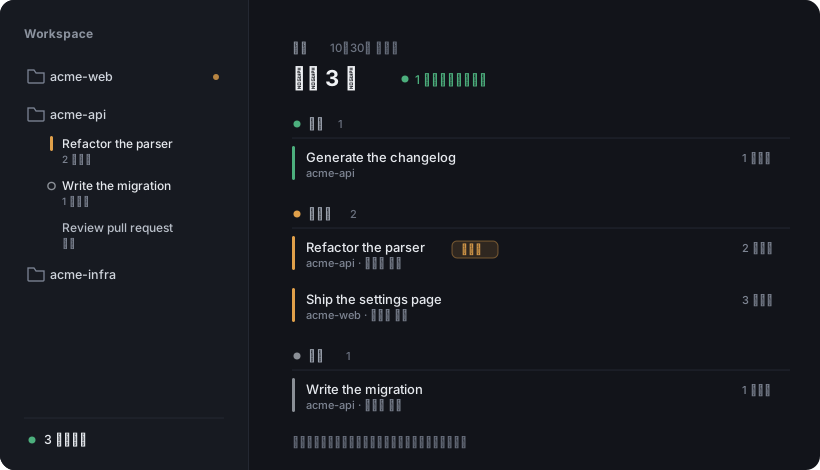
Illustration, not a screenshot: the names above are invented.
Mark a Session, one click, three places. The 16px cell before a Session's title cycles none → focus → parked → none. The same cycle is on the hover card and on a chip in the conversation header.
- Focus — an amber bar. This is what you are pushing on now.
- Parked — a hollow ring. Waiting on someone, or set aside on purpose.
A count that survives collapse. Folding a workspace group hides every row inside it, marks included. The folder name gets a small dot when it holds something, and hovering that row turns the dot into the count. There is also a readout at the foot of the sidebar — ● 6 条在手上 — which opens the full list when clicked.
A page, when you want everything. The panel icon in the sidebar strip opens a cross-workspace list grouped by state. It reads the shipped useSessionStatus snapshot, so its groups are exactly the ones the sidebar's own status dots mean: waiting for approval, waiting for a review, waiting for an answer, running, finished-unread. Your own marks come after those.
Install
dsh plugin --profile <profile> add dsh-session-focus
Or from a local checkout:
dsh plugin --profile <profile> add /absolute/path/to/dsh-session-focus
In the Desktop app, install by absolute path from the Plugins page.
How it is built
Client-side only. Marks live in localStorage under dsh-focus.marks.v1 (the key predates the package rename and is kept so existing marks survive), synced across tabs through a BroadcastChannel. The Host half registers no route, no tool and no service — there is nothing to authenticate, migrate, or clean up. Undoing a wrong mark costs one click.
The workspace dot is a stylesheet rule keyed on the row's own data-row-key, not an injected node. That matters: React drops foreign nodes on every commit, and re-adding them blinks forever. A ::after rule has no lifecycle of its own.
Limits
- Marks are per browser. Another machine, or another browser, starts empty.
- The workspace-name dot depends on a structural hook the shipped sidebar publishes (
data-row-key="workspace:<id>"). If that changes upstream, the dot disappears; everything else keeps working. - The conversation header carries no
workspaceId, so workspace ownership is resolved by normalizing the Session'scwdagainst the workspace registry paths.
License
MIT
中文说明
给 DeepSeek Harness 加上「我这一轮到底在做哪几条会话」这一层。
标记:会话标题前那 16px 格子点一下循环 无 → 进行中 → 挂起 → 无,琥珀竖条是进行中,空心环是挂起。悬浮卡和会话头的胶囊也能切换。
折叠可见:工作区收起时,文件夹名字后面会有个小圆点表示里面有东西,鼠标移上去变成条数。侧边栏底部还有一行 ● 6 条在手上,点它直接打开完整列表。
完整列表:侧边栏面板区的靶心图标进入,按状态分组,其中系统状态(等待审批、计划待审、等待回答、在跑、已完成未查看)直接读原生 useSessionStatus,和你熟悉的状态点完全一致。
实现:纯客户端,标记存在 localStorage,多标签用 BroadcastChannel 同步。Host 侧不含任何路由、工具或服务。
No comments yet. Be the first to write one.