README来源: main@b304ec72
简体中文 | English
dsh-plugin-restart-desktop
一个极简的 DSH Desktop 插件:只做一件事——在侧边栏左下角添加一个「重启Desktop」按钮,点击后有序重启 DSH Desktop。
除此之外没有任何其他功能。代码量小、行为单一,非常适合:
- 验证插件安装流程:profile 注册 →
pnpm install→ 重启生效,装完立刻能在界面上看到按钮; - 作为自研插件的最小示例:参考它的五件套包结构、
cordis.patch.yml的insert补丁、host/client 双侧与 Typert Remote 写法。
界面预览
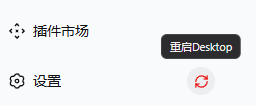
上图:中文语言下的按钮效果(位于左下角设置行、齿轮右侧,悬停显示「重启Desktop」提示)。 切换为 English 后的效果见 英文版 README 中的截图。
功能一览
- 按钮注入在侧边栏底部设置行内(齿轮右侧),永远位于可视区,不会因脚部操作堆叠而被裁剪;
- 点击弹二次确认框,确认后调用桌面主进程
desktopActions.requestRestart()(Electron relaunch)有序重启,并显示「正在重启…」等待层; - 文案接入 DSH 语言系统(设置 → 通用设置 → 语言),中文 / English 自动切换、切换立即生效;
- 仅 desktop profile 生效;headless
webprofile 下返回{ ok: false }并弹出友好错误提示。
安装(desktop profile)
本插件为桌面专用,只需注册进 desktop profile:
把本目录加入 desktop profile 的
dependencies与dsh.profile.bundles:// ~/.dsh/profiles/desktop/package.json "dependencies": { "dsh-plugin-restart-desktop": "file:F:/path/to/dsh-plugin-restart-desktop" }, "dsh": { "profile": { "bundles": [ "@deepseek-ai/dsh-base", "@deepseek-ai/dsh-web-app", "dsh-plugin-restart-desktop" ] } }在 profile 目录执行
pnpm install;重启 DSH Desktop,左下角设置行即可看到「重启Desktop」按钮。
License
MIT。见 LICENSE。English docs: README.en.md。
还没有评论,来写第一条。