Download and install progress (DSH plugin)
English | 中文
A progress card above the message box in the DSH Web GUI, covering two tasks:
- plugin installs and updates started by the agent with the
plugin_managertool; - large file downloads started by the agent with the
download_filetool this plugin adds.
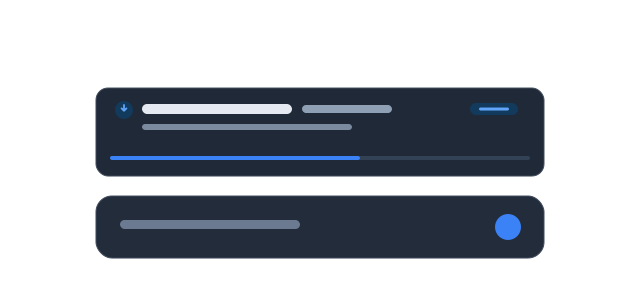
The card follows the composer width, disappears by itself about 3 seconds after the task
settles, and can be hidden immediately with the × in its corner. Parallel tasks show
“N more running”.
No third-party dependencies, no build step. For DeepSeek Harness (DSH) Web.
Install
Pick one of three ways:
- Let the agent install it: ask it to run
plugin_manager→install_bundlewithgithub:Exceptions-del/dsh-plugin-install-progress. - Plugins page: DSH sidebar → Plugins → Add plugin → paste
https://github.com/Exceptions-del/dsh-plugin-install-progress. - Local directory: clone this repository and choose the directory in Add plugin (with this form, edits take effect immediately).
Updating: reinstall when installed from GitHub (or remove and install again). For a local
directory, switch the plugin off and on in the Plugins page after editing client.js,
then reload the page.
What it shows
While installing a plugin
- The package spec being installed (for example
@acme/foo@1.2.0). - The stage: preparing → downloading and installing → applying changes → done / cancelled / failed.
- A percentage derived from pnpm's package progress (
resolved/reused/downloaded), plus “source 1/2” when more than one registry is tried. - Packages resolved and downloaded, and elapsed time.
- The failure cause: the package manager's kind (
not-found,network,build-blocked, …) or the run's own error.
While downloading a file
- The file name (the full path is in the hover tooltip).
- Bytes received / total size, throughput, percentage and elapsed time.
- The outcome: finished, or the HTTP status and failure reason.
The download_file tool
The plugin also registers this tool so the agent can download large files with real byte progress:
| Parameter | Required | Meaning |
|---|---|---|
url |
yes | Absolute http(s) URL. |
path |
no | Destination file, relative to the session working directory or absolute inside it; defaults to the file name in the URL. |
overwrite |
no | Replace an existing file; defaults to false. |
expectedBytes |
no | Total size used for the percentage when the server sends no Content-Length. |
It follows redirects, streams the body to disk while writing, removes the partial file on failure, keeps the destination inside the session working directory, and reports size, path, duration and average throughput back to the model.
Why the tool exists: DSH's tool pipeline has no progress channel, and curl, wget and
Invoke-WebRequest print no progress in non-interactive captured output. A reliable
percentage therefore needs a downloader that reports bytes itself. The tool description
tells the agent to prefer download_file for large files.
How it works
- Installs: the
plugin_managertool callsinstallBundlewithout arequestId, and the Host only streamsplugin-manager/install-state/install-logfor installs that carry one. The Host half wrapsinstallBundle, adds an id only when the caller named none, and brackets the run with two marker log chunks (start/end). Arguments, return values and errors pass through untouched, so installs started from the Plugins page (which bring their own id) are unaffected. - Downloads:
download_filestreams the response body and reports bytes received, throttled to one update every 150 ms. - Both send their chunks over the one forwarded event this app exposes for streamed output
(
plugin-manager/install-log), each under its own marker command line. Every other consumer filters byrequestId, so the Plugins dialog never sees these chunks. - The browser half subscribes to both events, keeps the entries in one store, and renders
the card in
conversation.input.dock(the row above the message box).
Data and privacy
- Nothing is stored or uploaded: progress state lives in page memory and is cleared by a reload or a disconnected Host.
- No session-log records, no model requests, no extra Host calls.
download_filewrites with the Host process's permissions, restricted by path to the session working directory, and asks for no per-file approval. Do not use it when a download is not wanted.
Known limitations
- Only two sources are covered: installs started by the agent's
plugin_managertool and downloads started bydownload_file.dsh pluginin a terminal, installs started in the Plugins page, and shell downloads (curl,wget,Invoke-WebRequest) keep their own output and show no card. - Install percentages count packages, not bytes: a large package advances the track only when pnpm reports it, and a fully cached install stays indeterminate until pnpm finishes.
- The card is read-only: it cannot cancel an install or download.
- The card lives in the conversation, so it is not visible while another main panel, such as Plugins or Settings, is open.
- Downloads performed inside MCP tools (for example Blender asset imports) cannot report
progress, because they do not go through
download_file.
Repository layout
| File | Role |
|---|---|
index.js |
Host half: wraps installBundle, registers the download_file tool, emits marker events. |
client.js |
Browser half: event subscriptions, progress model, the card above the message box. |
package.json |
Bundle manifest: dsh.bundle.patch and dsh.client. |
cordis.patch.yml |
Inserts the plugin row into a profile. |
locale/en.json, locale/zh.json |
Title and description shown in the Plugins page. |
icon.svg, docs/ |
Plugin icon and the detail-page illustration. |
test/*.test.mjs |
Tests for the Host wrapper, the download tool (against a local HTTP server) and the browser progress model. |
Development
After an edit, apply the update step above. Run the tests (Node built-ins only; the download test talks to the loopback interface only):
npm test        # the three test files
npm run check   # syntax check for both entry files
License
MIT © 2026 Exceptions-del. Use, modify, redistribute and sell freely; keep the copyright and license text.
No comments yet. Be the first to write one.