dsh-glm-quota-dock




DeepSeek Harness (DSH) 插件:在会话输入框下方的统计行内,常驻一个 GLM Coding Plan 额度 pill,实时显示各窗口用量百分比。
A lightweight DeepSeek Harness plugin that shows your GLM Coding Plan quota as an always-visible pill in the composer stats row.
◔ GLM 5h 9% · 周 45% · 工具 7%
截图
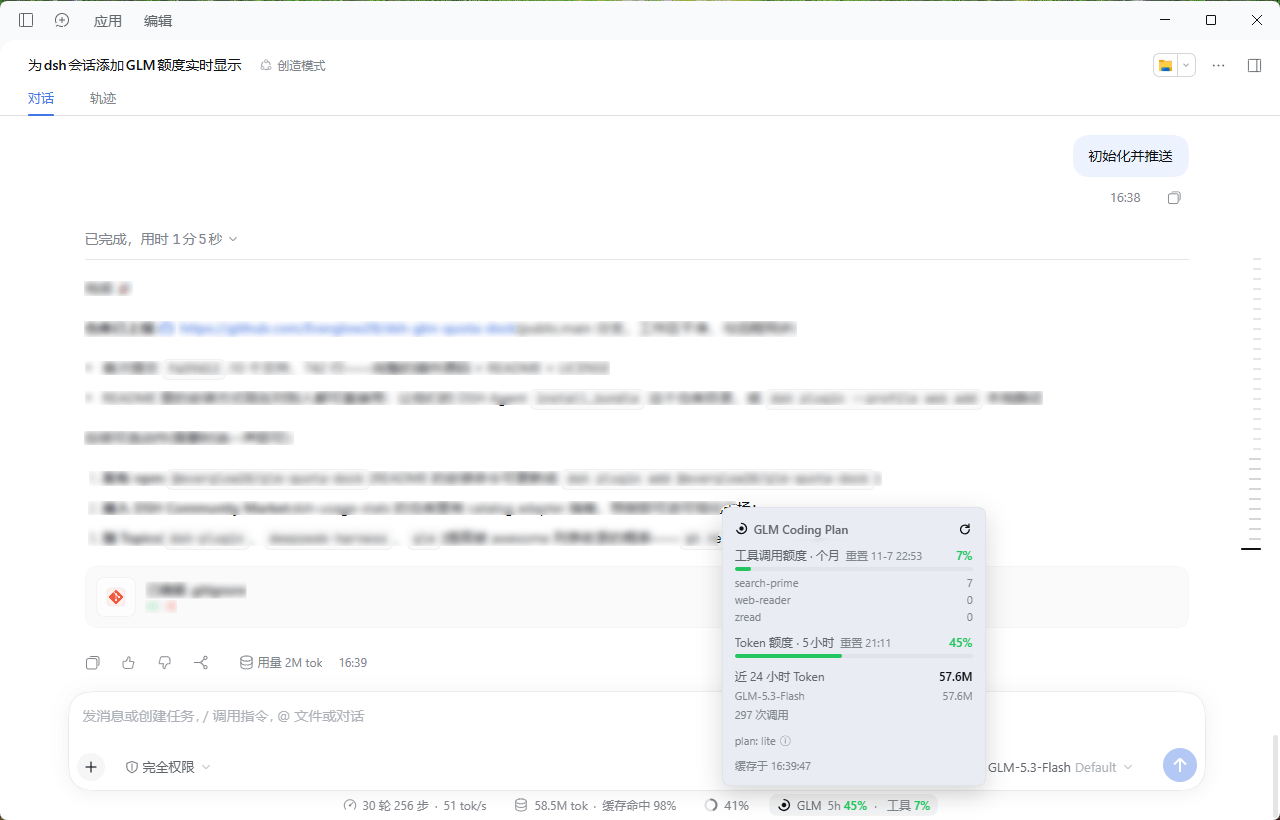
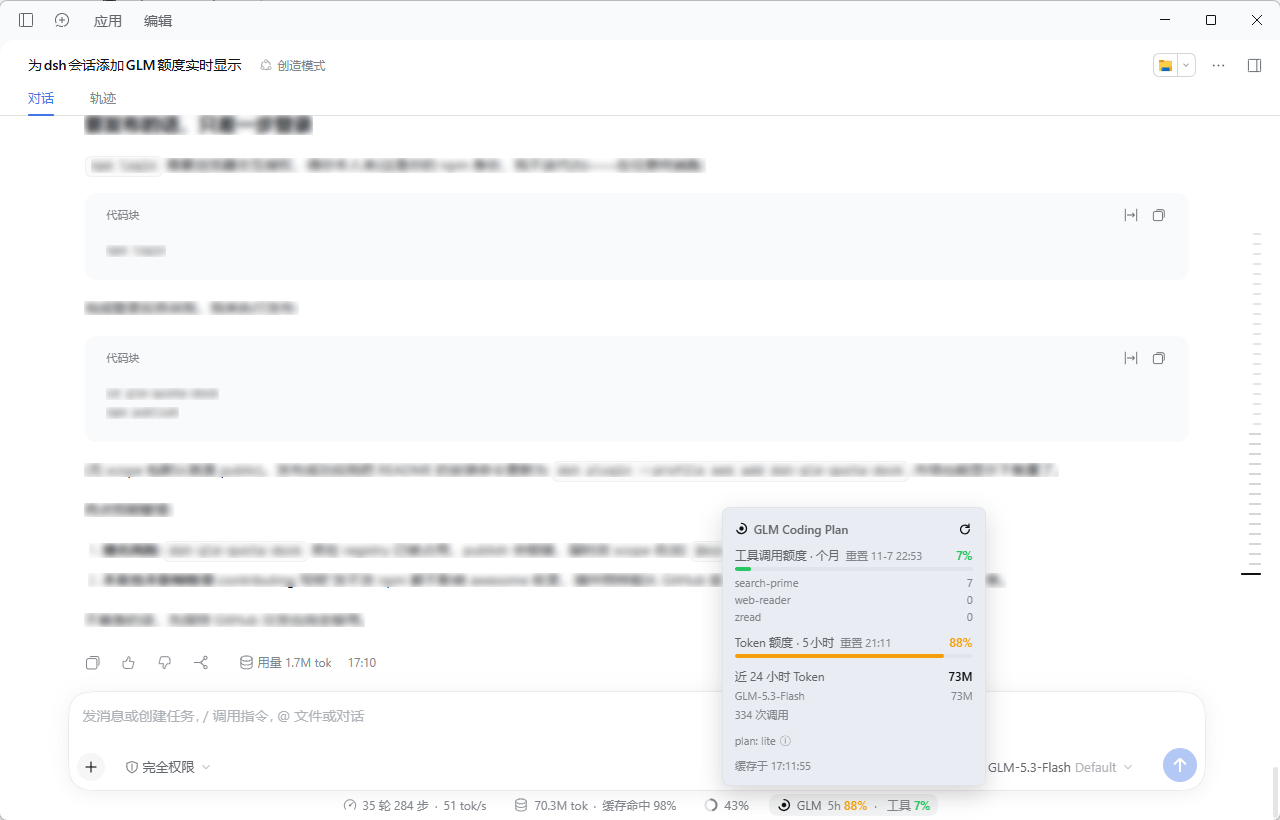
详情面板(底部统计行内可见 pill),三种额度状态独立着色:
| 正常(<80%,绿) | 告警(≥80%,黄) | 临界(≥95%,红) |
|---|---|---|
 |
 |
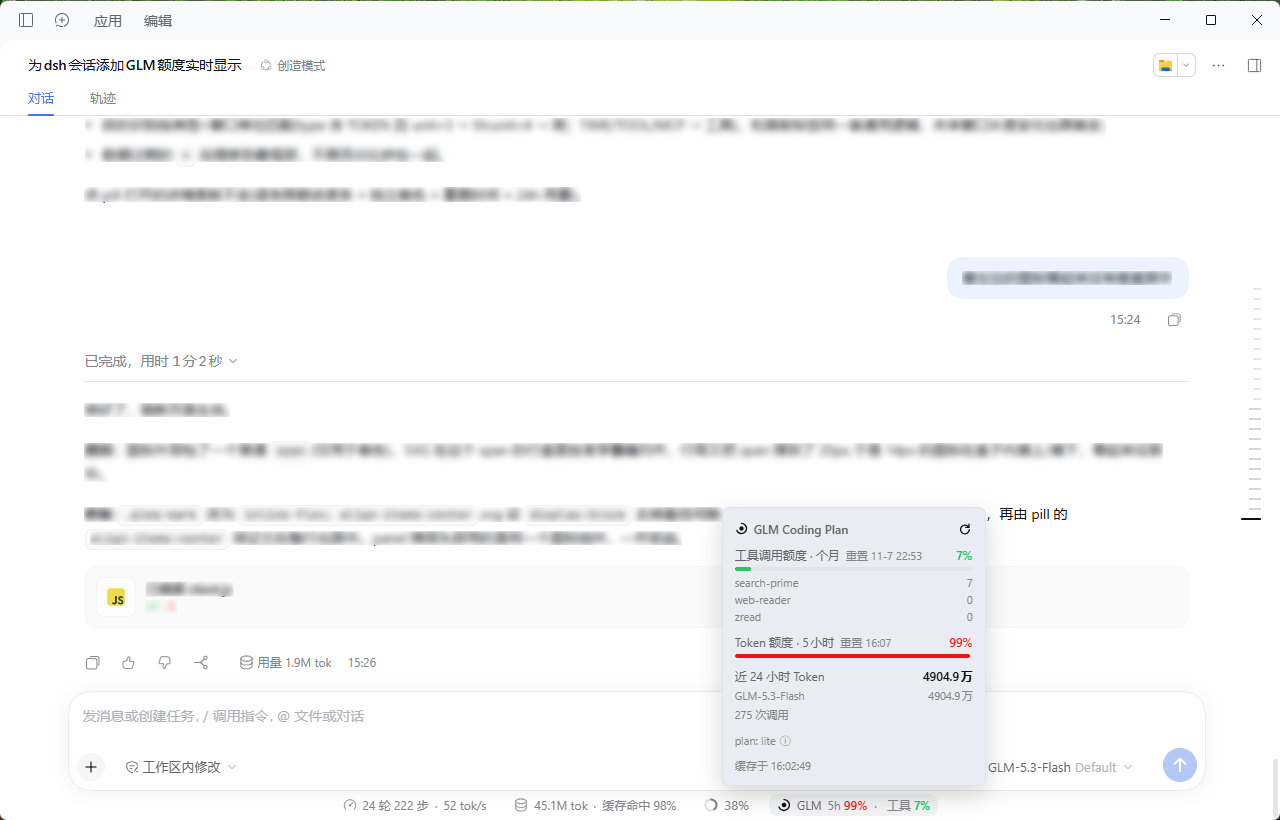 |
三张图分别为 5 小时窗口 45% / 88% / 99% 的状态: pill 与对应进度条随窗口阈值同步变色;面板含逐条限额、重置时间、近 24 小时按模型用量与套餐档位。
特性
- 实时额度:输入框统计行内常驻 pill,30 秒轮询;每个窗口(5 小时 Token / 周额度 / 工具月度额度)独立着色 —— <80% 绿、≥80% 黄、≥95% 红
- 仅在 GLM 会话显示:通过会话的模型选择投影判断,只有当前会话走 Coding Plan 路由 且使用
glm-*模型时才渲染;纯 API 计费路由(消耗余额而非套餐)不会误亮,非 GLM 会话完全零请求 - 点击详情:逐条限额进度条(独立着色)、重置时间(悬停看倒计时)、近 24 小时按模型 Token 用量、套餐档位与版本说明、手动强制刷新
- 空闲降频:页面可见但 5 分钟无操作时自动降为 5 分钟一轮,恢复操作立即刷新;最小化/切走完全停止
- 套餐版本自适应:V1(5h + 月度)、V2(含周窗口)、新版积分制均按响应字段自动识别展示,未知形状优雅回退
- 密钥不出本机:API Key 只在 Host 进程内解析与使用,浏览器仅拿到聚合后的百分比;路由挂在 DSH
/api信任栅栏与浏览器鉴权之后
要求
- DeepSeek Harness(Desktop 或
dsh web,建议较新版本) - 已在 DSH 模型页配置 GLM Coding Plan 供应商(如
zai-coding-cn),其 API Key 会通过凭据引用自动解析(默认ZAI_CODING_CN_API_KEY)
[!NOTE] 作者仅在 Lite 档(历史版本 V1:5 小时窗口 + 月度工具额度) 上实际验证过。V2(含周窗口)与新版积分制是按官方响应字段做的适配,逻辑上兼容但未经真机验证;如显示异常,欢迎提 issue 附上返回结构。
安装
插件零构建、零依赖,已发布到 npm,最简单的安装只需一条命令。
方式 A:npm(推荐)
dsh plugin --profile <你的profile> add dsh-glm-quota-dock
方式 B:让 DSH 会话里的 Agent 安装(任何 profile 通用)
把仓库地址交给 DSH 会话里的 Agent:
请用 plugin_manager 的 install_bundle 安装 https://github.com/Everglow28/dsh-glm-quota-dock
Agent 会克隆仓库并把 bundle 装进当前 profile,安装成功后按提示重启 DSH + 刷新网页即可。
方式 C:dsh CLI + git clone
git clone https://github.com/Everglow28/dsh-glm-quota-dock.git
dsh plugin --profile <你的profile> add <克隆目录的绝对路径>
方式 D:手动
把仓库克隆/复制到 ~/.dsh/profiles/<profile>/node_modules/dsh-glm-quota-dock/,并在该 profile 的 cordis.patch.yml 追加:
- insert:
    - id: glm-quota-dock
      name: 'dsh-glm-quota-dock'
      config:
        endpoint: https://open.bigmodel.cn
        minIntervalSec: 60
安装后重启 DSH(Host 半部需要随进程加载),再刷新网页(Client 半部)。
配置
在安装时生成的 Cordis entry 的 config 下调整(改完重启):
| 字段 | 默认 | 说明 |
|---|---|---|
endpoint |
https://open.bigmodel.cn |
全球站用户改为 https://api.z.ai |
minIntervalSec |
60 |
上游最小请求间隔(秒),下限 30 |
apiKeyRef |
ZAI_CODING_CN_API_KEY |
凭据引用名(与模型页写入的引用一致) |
apiKey |
无 | 直接内联 key(不推荐,优先用凭据引用) |
cwd |
\ |
上游请求(curl)的工作目录,一般不用改 |
工作原理
凭据服务解析 API Key(与 zai-coding-cn 模型路由同一把 key)
        │
        ▼
Host 半部调用官方监控端点(裸 key 鉴权,与官方 glm-plan-usage 一致):
  GET {endpoint}/api/monitor/usage/quota/limit     ← 各窗口百分比/重置时间
  GET {endpoint}/api/monitor/usage/model-usage     ← 近 24h 按模型用量
        │  60s 内存缓存 + 并发去重
        ▼
注册认证路由 GET /api/glm-quota(DSH /api 信任栅栏 + 浏览器签名 cookie)
        │
        ▼
Client 半部:同源 fetch,30s 轮询(空闲降频),渲染 pill 与详情面板
数据来自智谱官方监控接口(与官方 glm-plan-usage 插件同源),轮询频率保守,不触碰任何非公开接口。
卸载
dsh plugin --profile <你的profile> remove "dsh-glm-quota-dock"
或让 Agent 调 plugin_manager remove_bundle。移除后重启 + 刷新页面。
常见问题
- pill 不显示? 确认当前会话使用的是 Coding Plan 路由下的 glm 模型;确认凭据引用已配置(面板报错时悬停 "GLM !" 可看原因);Host 半部改动需要重启而非刷新
No comments yet. Be the first to write one.