dsh-token-dashboard 📊



DeepSeek Harness 设置里的 Codex 风格用量档案:累计 token、一整年活动热力图、缓存命中率与最常用模型 —— 数据全部来自本地会话日志,只读、不联网。
🚀 快速开始(安装)
桌面应用(Electron 版) —— profile 填 desktop:
dsh plugin --profile desktop add @etheslay/dsh-token-dashboard --registry=https://registry.npmjs.org/
dsh web —— profile 填 web:
dsh plugin --profile web add @etheslay/dsh-token-dashboard --registry=https://registry.npmjs.org/
装完重开 DSH,打开 设置 → 用量。要求 DSH 0.2.x、Node ≥ 22.18。
💡 想更新?把上面那条命令再跑一次,
@latest会取到新版本。
💡 懒得自己敲?把这句发给能执行终端命令的 agent:「把 DSH 插件 @etheslay/dsh-token-dashboard 装进我的 desktop profile,装完用
dsh --profile desktop --dump-config确认一下」(dsh web用户把desktop换成web)。
💡
--registry建议保留:国内默认走 npmmirror,新发布的 scoped 包在镜像上有同步延迟,省掉它可能报 404。
✨ 功能特性
- 五个累计数字 ——
累计 Token 数·Token 使用峰值·最长任务用时·最长连续天数·当前连续天数。都是累计值,所以没有区间选择器 - 一年活动热力图 —— 上下两块各六个月,
每天/每周/累计总量三种模式,少 ▢▢▢▢▢ 多色阶,悬停读出当天用量 - 洞察 —— 最常用的推理强度 · 最常用的模型(按 token 排名,不按回复条数)· 已探索技能数 · 使用的技能总数 · 总会话数 · 总轮次 · 缓存命中率
- 最常使用 —— 调用最多的技能与次数
- 中英双语 —— 跟随 DSH 界面语言;数字与时长也跟着变,显示
3.7亿、46分59秒,不是370M、46m 59s - 只读、零成本 —— 只读
$DSH_HOME/sessions下的会话日志:不写盘、不调用模型、不发送提示词或消息内容 - 无运行时依赖 —— 宿主侧只用
node:*,浏览器侧从 DSH shell 的模块表取 React 与 UI 基础组件 - 版式像 Codex,数据是 DSH 的 —— 复刻 Codex analytics Overview 的版式与格式化规则,但不编造 DSH 量不出来的东西:额度、套餐、速率窗口一个都没有
📸 截图
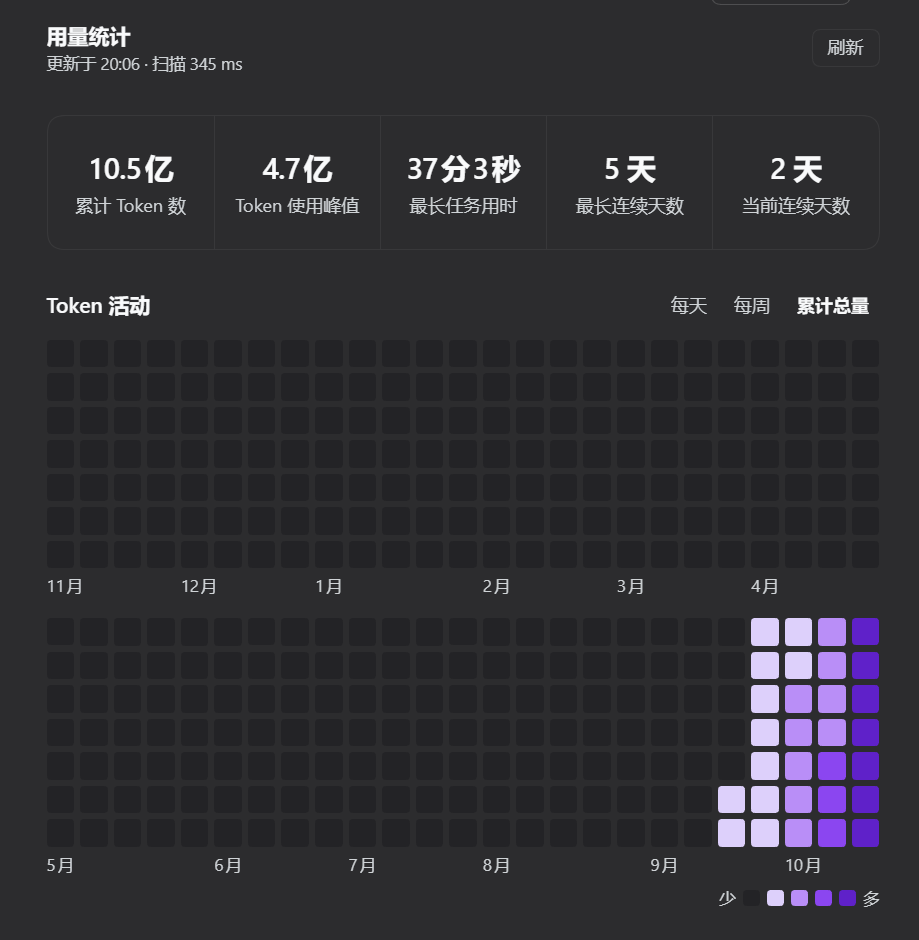
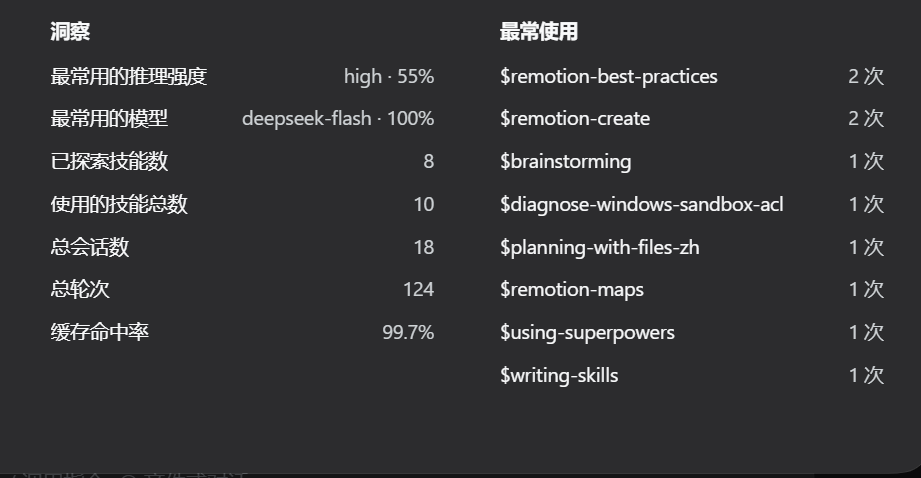
取自真实运行中的 DSH:本机 18 个会话、10.5 亿 token 的读数,深色主题。数字与时长跟随界面语言。
📦 其它安装方式
- npm 页面 ——
@etheslay/dsh-token-dashboard:版本、发布时间、文件清单都在那里 - 插件市场 —— 设置 → 插件市场 → 搜索安装;市场会替你维护
dsh.profile.bundles - 手动 ——
npm install @etheslay/dsh-token-dashboard,再把包名登记进该 profilepackage.json的dsh.profile.bundles。两件事都要做:只在 bundles 里声明而实际没装,会让 DSH 下次启动失败 - 从源码 —— 克隆仓库后
npm install && npm run build,再npm run refresh:profile(见「开发」)
🗑️ 卸载
桌面应用(Electron 版):
dsh plugin --profile desktop remove @etheslay/dsh-token-dashboard
dsh web:
dsh plugin --profile web remove @etheslay/dsh-token-dashboard
记得同时把这个包名从该 profile package.json 的 dsh.profile.bundles 里删掉。插件不留用户数据 —— 它只读会话日志,从不写盘。
🩺 排查
- 装好了但设置里没有 —— 先确认 profile 填对了(桌面应用是
desktop),再dsh --profile desktop --dump-config看配置树里有没有dsh-token-dashboard - 宿主半侧是否挂上 —— 浏览器打开
http://127.0.0.1:<你的 DSH 端口>/dsh-token-dashboard/api/health,返回{"ok":true,…}就是正常 - 提示「插件已更新,需要重启 DSH」 —— 正常现象。浏览器半侧会热替换,宿主半侧是 Node 进程里缓存的 ES 模块,必须重启 DSH 才会换
🧑💻 开发
npm install
npm run build            # lib/index.js + lib/client.js + lib/types
npm run typecheck
npm test                 # 折叠、格式化与渲染、双语 README、浏览器包、真实日志交叉验证
npm run preview          # 用你自己的会话库生成 docs/panel.html
npm run check:layout     # 在无头 Chrome 里实测面板几何
npm run refresh:profile  # 重新打包并装进 app 实际加载的 profile
改 src/ 不等于改了 app 跑的东西。 app 加载的是 profile 里那份打好包的副本,npm run refresh:profile 才会覆盖它;改动宿主半侧还要重启 DSH。开发工具见 tools/README.md。
设计细节、折叠规则、色阶推导与测试策略见设计说明。
No comments yet. Be the first to write one.