dsh-mcp-installer
Install and manage MCP servers from Settings → dsh-mcp-installer in DSH.
The plugin writes them into the current profile's cordis.patch.yml.
Install
Check the current version on npm:
npm view dsh-mcp-installer version
Then add it to the profile you use. Replace web with your profile name:
dsh plugin --profile web add dsh-mcp-installer
You can also pin or track a version:
dsh plugin --profile web add dsh-mcp-installer@1.2.0
dsh plugin --profile web add dsh-mcp-installer@latest
Restart that profile, then open Settings → dsh-mcp-installer.
The desktop profile of DSH Desktop is managed by Desktop itself. Start Desktop
once, then run the command inside the shell Desktop provides:
dsh plugin --profile desktop add dsh-mcp-installer
Do not manage Desktop's profile with a separately installed dsh CLI.
Installed tab
This lists the MCP servers that DSH has loaded. It includes servers from other sources, not only the ones this plugin wrote. Each row shows its source layer, transport, enabled state, connection state and tool count. You can filter by name, command or URL, and click a row to see details. The top of the page shows the target file, whether it is writable, the file fingerprint and the backup count.
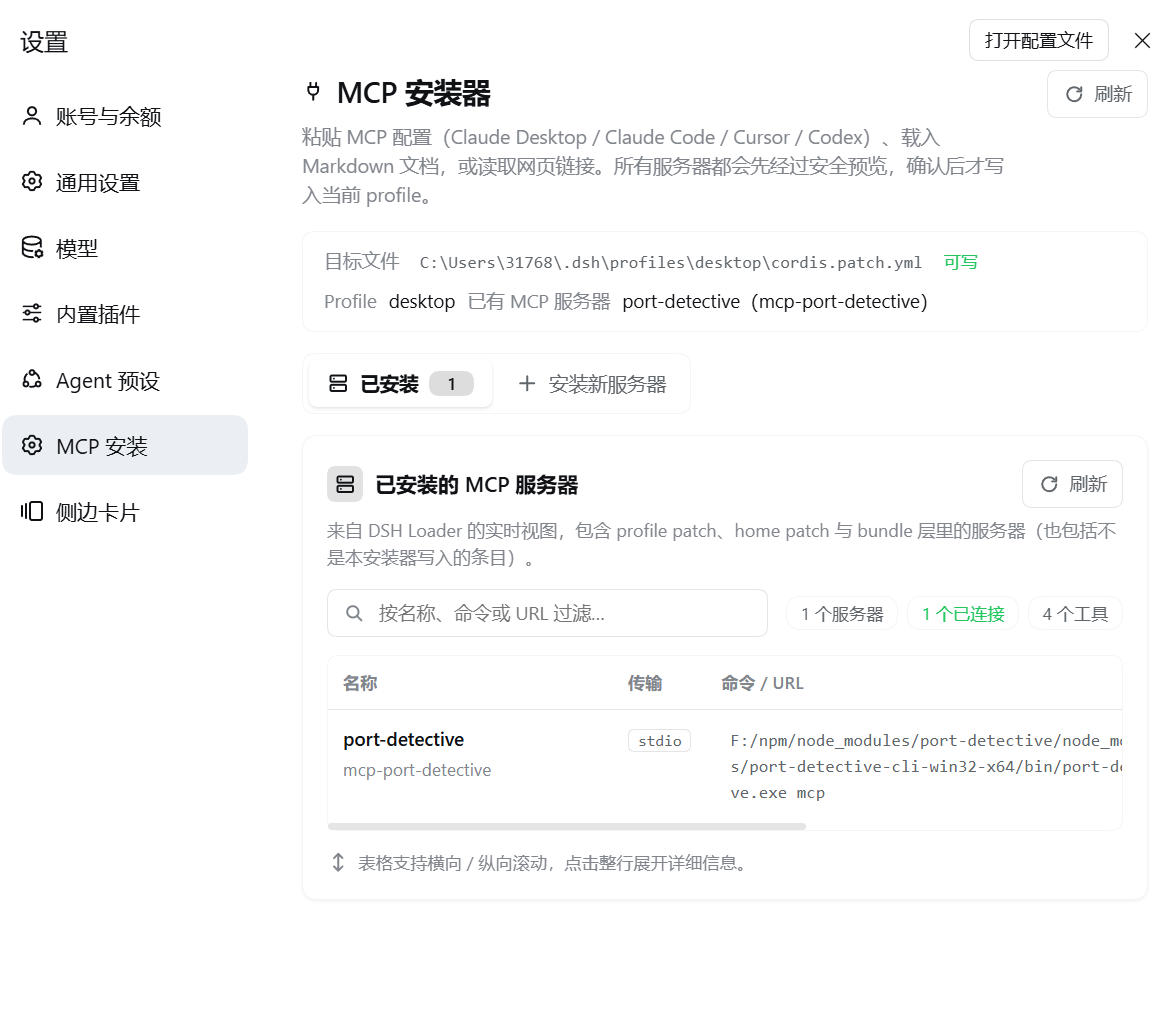
The screenshots show the Chinese UI of an earlier version. The layout is the
same, and the page is now titled dsh-mcp-installer.
Each row offers:
- Test connection — starts the server, runs a real MCP handshake, and reports the result: which step failed, how long it took, the server name and version, the tool list, and the stderr output. It cannot prove credentials work, because the browser never receives secret values.
- Enable / disable — keeps the row and writes
disabled: true, so you can turn a server off while debugging. - Edit / delete — only for rows this plugin added to the profile patch. Servers from the home patch or a bundle layer must be changed where they are defined.
Install new tab
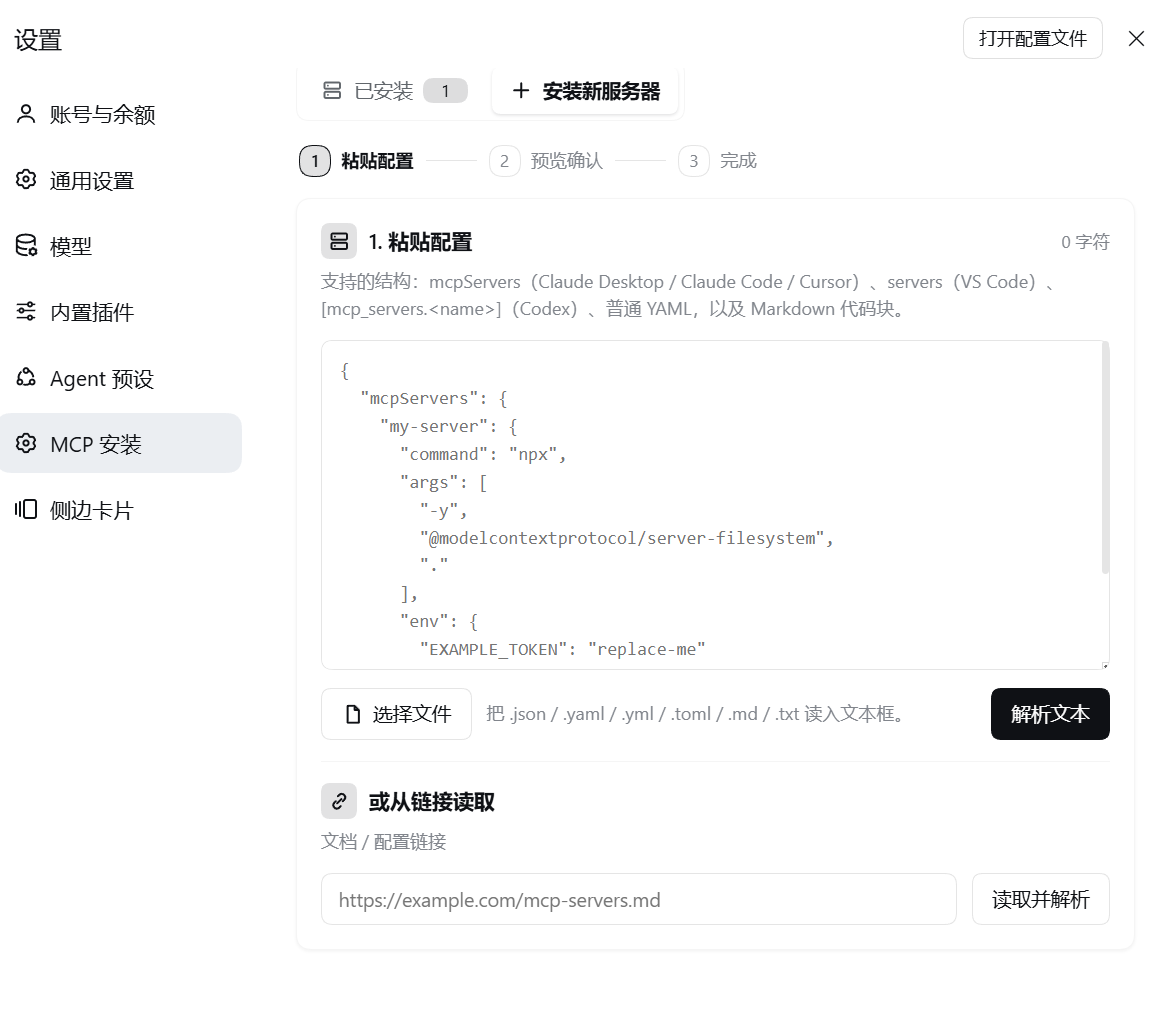
- Paste or load a config. Paste text, choose a file (
.json,.yaml,.yml,.toml,.md,.markdown,.txt), or enter a URL and use Fetch and parse. - Review the result. Each server is listed with its name, transport, command or URL, and risk level.
- Fix what you need. You can rename a server, change
command,argsorurl, and add or removeenvandheadersentries. Secrets are hidden by default. Risk is re-checked as you edit, and a blocked row cannot be selected. - Remove secrets from the file. If a value is a
${VAR}placeholder or looks like a live key, use Use an environment variable instead. It becomes!!js process.env.VAR, so the secret never lands in the config file. - Choose what happens to existing names:
- Skip existing (default) — install the rest.
- Overwrite profile rows — replace rows this plugin wrote to the profile patch. Rows from other layers are skipped.
- Fail the whole batch — write nothing if any name exists.
- Install. The patch is backed up first, then written. The page then waits up to 15 seconds for the servers to become active, and tells you if they did not.
Supported input:
mcpServers— Claude Desktop, Claude Code, Cursorservers— VS Code[mcp_servers.<name>]— Codex- Plain YAML and Markdown code blocks
claude mcp addandcodex mcp addcommands
Supported transports are stdio and streamable-http. SSE is not supported.
Example:
{
  "mcpServers": {
    "filesystem": {
      "command": "npx",
      "args": ["-y", "@modelcontextprotocol/server-filesystem", "."]
    }
  }
}
New MCP tools appear as mcp__<serverName>__<toolName>. Open a new session (or
restart DSH) to load them.
One batch can hold up to 50 servers. Pasted or fetched text is capped at 2 MB.
Backups and rollback
- Every write first saves a copy next to the patch, named
cordis.patch.yml.bak-<timestamp>. The very first write makes no copy, because there is nothing to overwrite yet. - The newest 20 copies are kept. Older ones are deleted automatically.
- The Backups panel lists them and can restore any one. A restore replaces the whole file, and it backs up the current file first, so a restore can be undone.
Redacted export
Export produces a portable mcpServers block you can paste on another
machine. Any value that looks like a live secret is replaced with a ${VAR}
placeholder.
Concurrent edits
Several tools can write the same patch: Config Editor, Plugin Manager, this plugin, or your own editor.
Install and restore send a SHA-256 fingerprint of the file the page read. If the file changed in the meantime, the write is refused and the page offers to retry against the new content. Nothing is silently overwritten. Edit, delete and enable/disable work on one located row and do not send a fingerprint.
Safety
- Secrets are detected by value, not only by key name. Values shaped like
sk-…,ghp_…,AKIA…, a JWT or a bearer token are flagged. Random-looking high-entropy strings are flagged too. The page shows key names only, never the values. - High-risk rows need confirmation. Each one must be confirmed by name before it can be installed. Renaming a server clears its confirmation.
- Docker and podman are checked.
--privileged, bind-mounting the host root, mountingdocker.sockorpodman.sock,--network hostand host PID/IPC namespaces are high risk.--cap-addis a warning. - Unpinned packages are reported.
npx,uvxandbunxwithout an exact version can change under you, so they raise a supply-chain warning. - URL import is restricted. Loopback and private addresses are refused. The whole redirect chain shares a 20-second deadline. DNS is resolved again right before the request to reduce rebinding attacks.
Development
npm install
npm run typecheck   # tsc --noEmit
npm test            # build, then 190 tests
npm run verify      # check the built bundles end to end
Tests cover parsing, the safety rules, config writes and rollback, connection probing, and the 12 HTTP routes.
License
MIT
No comments yet. Be the first to write one.