Neural Ledger · 神经账本
English | 中文
One-liner: A zero-patch DSH plugin that turns your AI collaboration sessions into a beautiful work ledger — token analytics, smart insights, trend forecasting, and one-click daily / weekly / monthly reports. Live data from your own sessions, no DSH source touched.
Features
- 📊 Living dashboard — Session counts, turns, tool calls, token usage, and AI time in one glance.
- 💡 Smart insights — Auto-generated findings: which session burned the most tokens, what took the longest, how much subagent collaboration matters, and overall conversation efficiency.
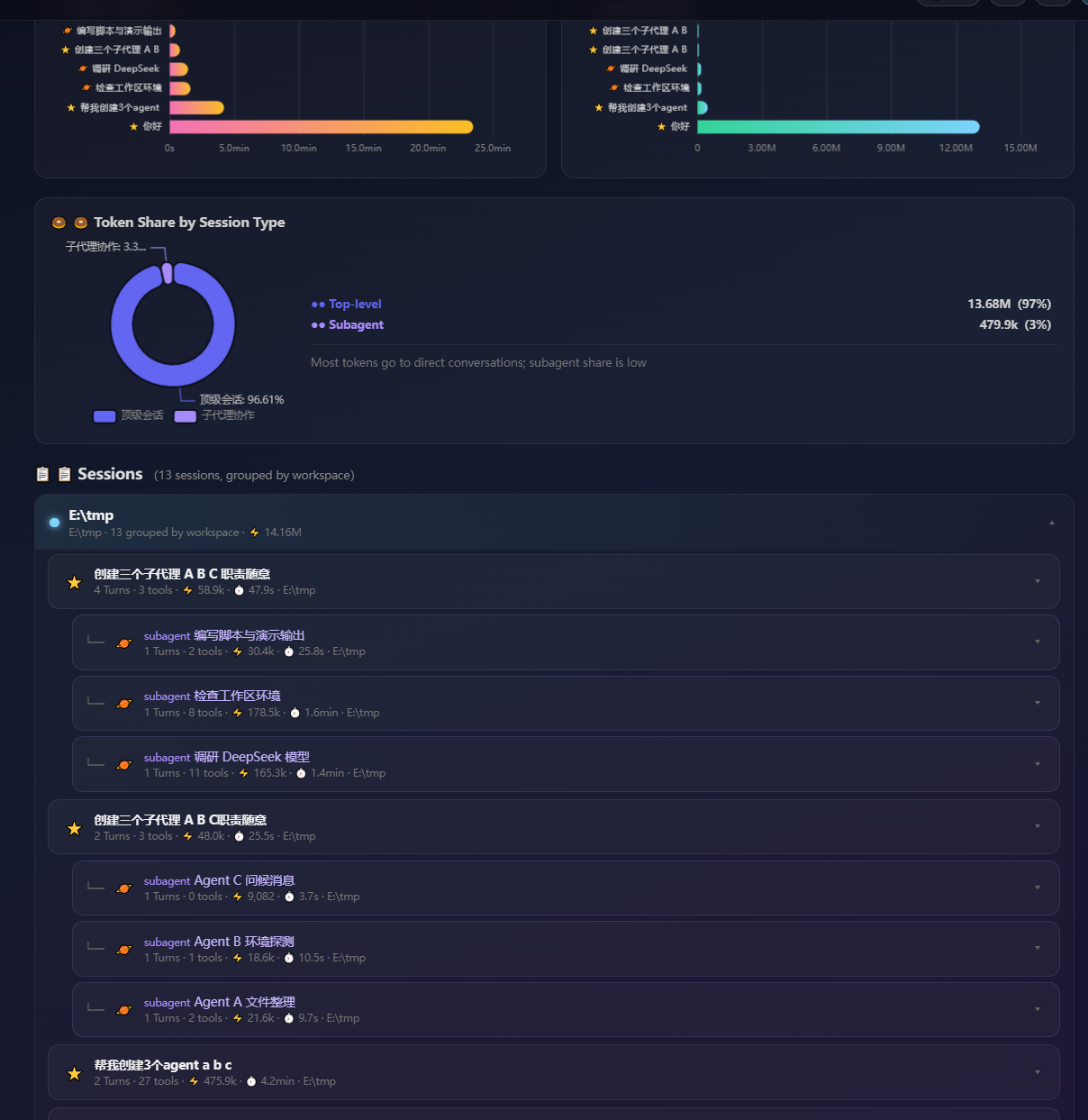
- 📈 Token analytics — Daily token bars, token composition donut (uncached input / cache read / output), per-session token & time rankings.
- 🔮 Trend forecasting — Linear-regression prediction of the next 7 days, monthly estimates, and a budget-overrun warning (default 50M tokens/month).
- 🗂 Workspace breakdown — Compare token consumption across projects; tree drill-down
workspace → parent agent → subagent. - 📋 One-click reports — Export daily / weekly / monthly reports as Markdown, with per-turn demand → outcome storylines and subagent task details. Copy to clipboard or download.
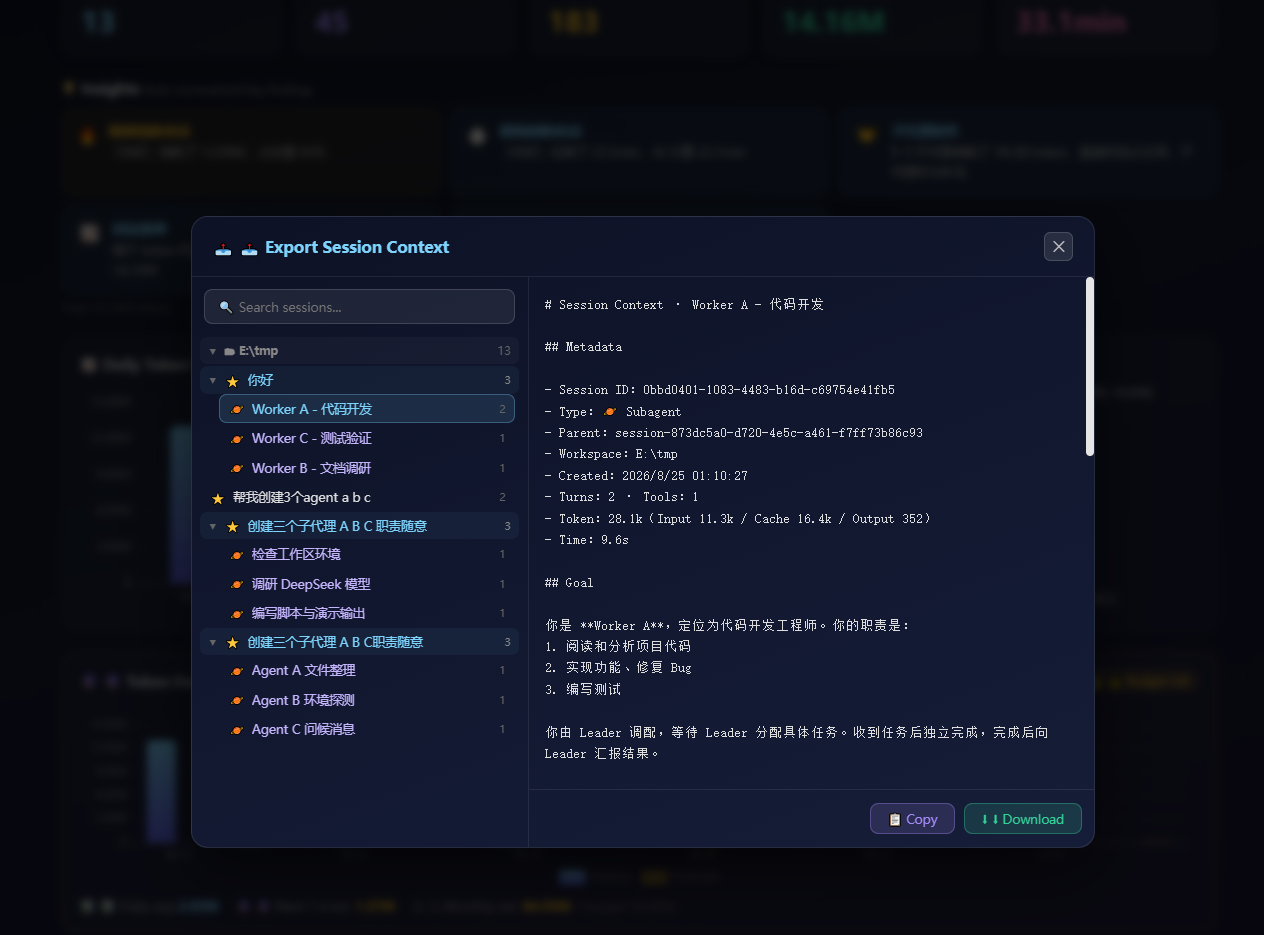
- 📤 Export session context — Tree picker (workspace → parent agent → subagent, collapsible, fuzzy search incl. workspace) → generates a distilled context (prompt-like): metadata, goal, per-turn demands/outcomes, tool summary, and a continue-work prompt ready to feed another agent.
- 🌐 i18n — Toggle Chinese / English for the whole UI and exported reports (remembers your choice).
- 🎬 Sample mode — Built-in mock dataset for previewing the whole dashboard without waiting for real data.
- Draggable FAB — The floating action button is draggable, position is remembered, and a hover label follows it live.
- No DSH source modification — Only DOM-level integration; DSH files are never touched.
Quick Start
Install from GitHub
dsh plugin --profile web add github:Elpsycoogroo/dsh-work-report
pnpm blocks build scripts by default: installing from GitHub runs the project's own build script, and pnpm refuses until you allowlist it. Run the command once — pnpm prints the key to add under
allowBuildsin~/.dsh/profiles/web/pnpm-workspace.yaml. Add it and run again.
Install from npm (once published)
dsh plugin --profile web add dsh-work-report
Manual install in this repo
Clone/symlink the plugin at dsh/plugins/dsh-work-report and build once:
cd dsh/plugins/dsh-work-report
npm install
npm run build
⚠️ Don't manually copy only
lib/into the profile'snode_modules/— a copy missingpackage.json(andcordis.patch.yml) cannot be resolved by the DSH loader. Copy the whole package. For ongoing development usenode dev.mjs(watch src/ → auto-build → auto-sync the whole package into the profile).
Usage
- Open DSH, click the 🧠 floating button (bottom-right by default, draggable anywhere).
- The Neural Ledger overlay opens with real data from your sessions.
- Pick a report type (日报 / 周报 / 月报 — auto-switches daily window 1/7/30 days).
- Hit 📋 Copy or ⬇ Download to get the Markdown report.
- 📤 Export Context — pick a session from the collapsible tree (workspace → parent → subagent) or fuzzy-search it, then copy/download the distilled context as a prompt for another agent.
- 🌐 EN — toggle the whole UI (and exports) between Chinese and English.
⚠️ Read before forking/self-hosting (war stories)
package.jsonmust export"./package.json": DSH's client-modules reads a plugin's manifest viarequire.resolve('<pkg>/package.json'). Ifexportsdoesn't expose that subpath, it throwsERR_PACKAGE_PATH_NOT_EXPORTEDand the plugin shows in the plugin list but its client.js is never injected into the page.- All three names must match: the
nameinpackage.json, in the plugin's owncordis.patch.yml, and the name referenced from your profile bundle. - You MUST restart dsh after changing the manifest/reinstalling: client-modules caches the "not a client plugin" verdict for the process lifetime.
sessionPersistence.readFrom()may be unavailable: the server falls back to projcache (storages/session_projcache.json); token totals for subagents missing from the cache are aggregated from eventusageblocks.
Contributor Docs / 给开源作者
Local dev, debugging and integration guides are in DEVELOPING.md / DEVELOPING.zh.md.
How It Works
Architecture
browser (client plugin)
  ReportView ── StatCards / Insights / TokenCharts / ForecastCard
            ├── WorkspaceChart / EfficiencyCharts / ToolRanking
            └── SessionTimeline (workspace → parent agent → subagent)
                │
                └── fetch('/api/work-report?days=7&mock=1')   ← requested by ReportView, shared by all cards
Host (server plugin) [ctx.webServer.register({ kind: 'exact', path: '/api/work-report' })]
  ctx.get('sessions')                → attached (in-memory) sessions
  ctx.get('sessionPersistence')      → cold (persisted) sessions + events
  storages/session_projcache.json    → tokenUsage / sessionStats / contextPressure / subagent labels
  → buildReport(config) → { sessions, token, time, insights, forecast, dailyTokens, workspaceTokens }
Data sources
- Active sessions —
ctx.sessions.list()(attached, in-memory). - Cold sessions —
persistence.list()+persistence.readFrom(id, 0)for events andparentSessionlinkage.readFromis optional; when absent, metadata comes from projcache. - Token / stats — projcache projections (
tokenUsage.totals,sessionStats,contextPressure) with event-usageaggregation as fallback. - Subagent labels — projcache
subagent.identity.label(e.g.Worker A - 代码开发); parent linkage viameta.parentSession. - Archived sessions — filtered using
workspace.json'sglobal.archivedSessionIds; blank sessions (0 tokens & 0 time) are filtered out too.
Report generation
- Recursive text extraction — demand / outcome text pulled from any message nesting shape, skipping
<system-reminder>,Current runtime context., and other noise. - Turn storyline — each turn records user demand, AI outcome, tool calls (✓/✗), and token usage.
- Forecast — linear regression over daily tokens, with fallback base for sparse data; 7-day projection + 30-day estimate vs budget.
Files
dsh-work-report/
├── package.json
├── tsconfig.json
├── tsdown.config.ts
├── cordis.patch.yml
├── README.md            # English docs
├── README.zh.md         # 中文文档
├── DEVELOPING.md        # English contributor guide
├── DEVELOPING.zh.md     # 中文开发者指南
├── CONTRIBUTING.md      # 中文贡献指南
├── CONTRIBUTING.en.md   # English contributing guide
├── GITHUB_SETUP.md      # GitHub repo setup checklist
├── pull_request_template.md
├── pull_request_template.en.md
├── mock-report.json     # built-in sample dataset (🎬 Sample mode)
├── screenshots/         # README screenshots (dashboard previews)
├── .github/             # ISSUE_TEMPLATE (bug_report.yml / feature_request.yml)
└── src/
    ├── index.ts             # Host entry (re-exports)
    ├── server/
    │   ├── index.ts         # webServer route /api/work-report
    │   └── report-data.ts   # data collection, aggregation, insights, forecast
    ├── client/
    │   ├── index.ts         # client entry: draggable FAB + overlay mount
    │   ├── i18n.tsx         # zh/en dictionaries + language provider
    │   ├── ReportView.tsx   # main dashboard
    │   ├── StatCards.tsx    # stat cards
    │   ├── Insights.tsx     # smart insight cards
    │   ├── TokenCharts.tsx  # daily bars + composition donut
    │   ├── ForecastCard.tsx # trend prediction + budget warning
    │   ├── WorkspaceChart.tsx # workspace token comparison
    │   ├── EfficiencyCharts.tsx # per-session time & token rankings
    │   ├── ToolRanking.tsx  # session-type token share
    │   ├── SessionTimeline.tsx # 3-level tree session list
    │   ├── ContextExporter.tsx # export session context (tree picker + search)
    │   ├── markdown.ts      # daily/weekly/monthly report generator
    │   └── report-api.ts    # API fetch + formatting utils
    └── types/
        └── dsh-env.d.ts     # ambient type declarations
Build & Publish to npm
Build locally
cd dsh/plugins/dsh-work-report
npm run build     # tsdown: host ESM (lib/index.js) + browser CJS (lib/client.js)
node dev.mjs      # watch mode: auto-build + auto-sync whole package to profile
Browser bundle inlines echarts (kept in
devDependenciesso tsdown bundles it; module-table externals are onlyreact/@deepseek-ai/*).
Publish to npm (once you own the package name)
npm login
exports_subpath=./package.json   # keep exports["./package.json"] — DSH client-modules needs it
npm version patch -m "chore(release): v%s"
npm publish --access public
# verify the tarball contains everything the runtime needs:
npm pack --dry-run | grep -E "package.json|cordis.patch.yml|lib/(index|client)\.js|mock-report"
The published files are controlled by
package.json'sfilesfield (lib,src,mock-report.json,cordis.patch.yml, docs). Before the first publish make surefilesincludes every runtime file — the DSH loader resolvespackage.jsonandcordis.patch.ymlat runtime, not justlib/.
Console Logs
| Source | Level | Description |
|---|---|---|
client/index.ts |
log | Version loaded (v0.1.0 loaded) |
server/index.ts |
log | Route registered (host plugin loaded) |
server/index.ts |
error | Report build failure |
License
MIT
No comments yet. Be the first to write one.