dsh-default-workspace
Inspect, repair, and relocate DeepSeek Harness's default Workspace — the folder every new Session opens in — from inside a running Host, without restarting and without hand-editing ~/.dsh/storages/workspace.json.
default_workspace {"action": "status"}
default_workspace {"action": "switch", "path": "D:\\work", "dryRun": true}
default_workspace {"action": "switch", "path": "D:\\work", "moveFiles": true}
default_workspace {"action": "repair", "dryRun": true}
Why this exists
Every new DSH Session opens in the default Workspace, and the Host pins that
path when the Workspace is registered. On a fresh install the folder is
<Documents>/deepseek-harness/default-workspace; on Windows Documents resolves
through the shell's MyDocuments known folder, which is
C:\Users\<you>\Documents unless something — OneDrive's "back up Documents", a
roaming policy, a profile move — redirected it. So the one folder that every
Session writes into starts out on the system drive, which is usually the
smallest disk in the machine.
That is a real problem in three ordinary situations:
- The system drive fills up. Sessions write their output — code, datasets, screenshots, package caches — into the default Workspace, and it grows with no visible knob. Moving it to a data drive is the obvious fix, and there is no supported way to do it.
Documentsgets redirected. Enabling OneDrive's folder backup, or moving the user profile, silently changes where the known folder points. The Workspace record keeps the old path, so the default Workspace no longer exists — and Sessions whose logs already lived under it stop opening.- You want one canonical directory. Pinning new Sessions to
D:\workinstead of a per-user profile path is a normal housekeeping decision, but the Workspace API has nopathsetter and the UI offers no such control.
What makes it sticky:
- the built-in
initializeDefaultcreates<Documents>/deepseek-harness/default-workspace, and its own documentation says "The Host never renames or relocates an existing default"; - the Workspace remote API has
create,rename,delete,insertBefore,archive,pin,follow— nothing that changespath; createmakes an ordinary Workspace; the default is the single record named bydefaultWorkspaceId, and pointing it somewhere else is not offered anywhere;- hand-editing
~/.dsh/storages/workspace.jsononly takes effect after a restart, and the Host then refuses every stored Session log whose headercwdno longer matches the directory the log sits in —corrupt session log "…": header id "…" and cwd identify "…"— so those Sessions disappear from the list; - dragging the folder in Explorer is the worst case: the record still points at the old path, the log directories still encode it, and the new location is invisible to the Host. The old folder is gone and the new one is not used.
This plugin does the whole relocation inside the running Host: record rewrite,
optional file move, Session log relocation (header cwd and its directory),
and a repair pass for logs the Host is already skipping. For scale: the migration it
was written for moved 446 entries / 13,280 files / 668 MB to another drive and
carried 22 stored Session logs across, with no restart and a byte-for-byte check of
every rewritten log.
What the tool does
One tool, default_workspace, with three actions.
| Action | Behaviour |
|---|---|
status |
Which Workspace is the default, whether its directory exists, how many Sessions are attached, how many are live right now; plus a health scan of every stored Session log. |
switch |
Rewrites the Workspace record through the Host's own storage domain (entity.mutate), so memory and disk stay in step and no restart is needed. Optionally moves the old directory's contents, and by default relocates every stored Session log whose header still points at the old path. |
repair |
Re-frames stored logs the Host is silently skipping because their first Zstandard frame is not exactly one header line (see below). |
Parameters:
| Parameter | Meaning |
|---|---|
action |
status, switch or repair (required). |
path |
switch only: the absolute directory that becomes the default Workspace. Created when missing. |
moveFiles |
switch only: also move the old directory's contents into the new one. Default false. Refused while a live Session works in the old directory. |
migrateSessions |
switch only: rewrite stored Session headers to the new path and move their logs. Default true. |
dryRun |
switch and repair: report the plan without changing anything. Default false. |
Safety
- Preview first.
switchandrepairboth acceptdryRun;statusis read-only. - Plans are computed before anything moves: name conflicts, live Sessions, missing logs and unreadable logs are all listed first.
- Logs are rewritten by re-compressing frame 0 only. Every later frame is copied byte for byte, so no event payload is ever re-encoded.
- Every new log is verified before it replaces the old one: header id and
cwdmust be right, frame 0 must be exactly one header line, and the remaining event bytes must match the source exactly. If verification fails, nothing is swapped in. - Nothing is deleted. Old Session directories are renamed into
<sessions root>/../backups/session-reframe-<timestamp>/(repair) or the per-run backup directory reported in the result (switch). - Live Sessions are never relocated — their log handle, lease and in-flight tool calls are pinned to the old path. They are reported instead, and their Workspace does not move under them.
- The target path is rejected when another Workspace already claims it, or when the two paths nest inside each other.
How it works
The record
WorkspaceEntity.mutate() is the only write path for a Workspace record, and it prunes sessionIds down to the Sessions that still match the new path. So the plugin first registers each relocating Session under the new path (registry.host.rememberSessionPath), then mutates path — otherwise the Host would drop every Session of the old Workspace from the record.
Operations always use the spelling the record holds — that is what stored headers and project directories are keyed by — but every comparison (same path? one inside the other? whose log is this?) runs on the realpath form, so an 8.3 short name, a junction or a symlinked documents folder is still recognised as the same directory.
The logs
A stored log lives at
<sessions root>/<projectKey(cwd)>/<encodeSegment(session id)>/session.v4.jsonl.zstd
projectKey folds /, \ and : into a single - and escapes everything else as ~XXXX (UTF-16 code unit, uppercase hex); encodeSegment additionally maps . to ~002E and .. to ~002E~002E. Moving the header's cwd without moving the file — or the reverse — produces
corrupt session log "<path>": header id "<id>" and cwd identify "<expected path>"
so switch moves both in one step, writing the new file, verifying it, and only then renaming it into place.
Why repair exists
Before reading a log, the Host decompresses only the first Zstandard frame and requires that frame's plaintext to be exactly one header line:
// dsh-session-persistence-jsonl/lib/index.js
function assertZstdHeaderFrame(plaintext) {
  if (plaintext.length === 0 || plaintext.indexOf(10) !== plaintext.length - 1)
    throw new Error('corrupt Zstandard session log: first frame is not exactly one header line');
}
The resulting SessionPersistenceCorruptionError is caught by listArtifacts and silently swallowed (metadata = undefined). A log written as one single frame — perfectly valid Zstandard, but not what the Host asks for — therefore vanishes: the Session cannot be listed or opened while the file sits intact on disk. repair re-frames such logs: frame 0 is a freshly compressed header line, and the events are split into newline-aligned chunks after it. The original file stays in the backup directory.
Node's own zstdDecompressSync decompresses only the first frame of a multi-frame stream and createZstdDecompress throws ZSTD_error_prefix_unknown on the second, so lib/zstd-multi.js walks the frame container itself.
GUI panel
The bundle also ships a browser half, so the same three actions are reachable as a panel: a Workspace row at the top of the sidebar (the same slot the task board uses) opens Default workspace in the main area.
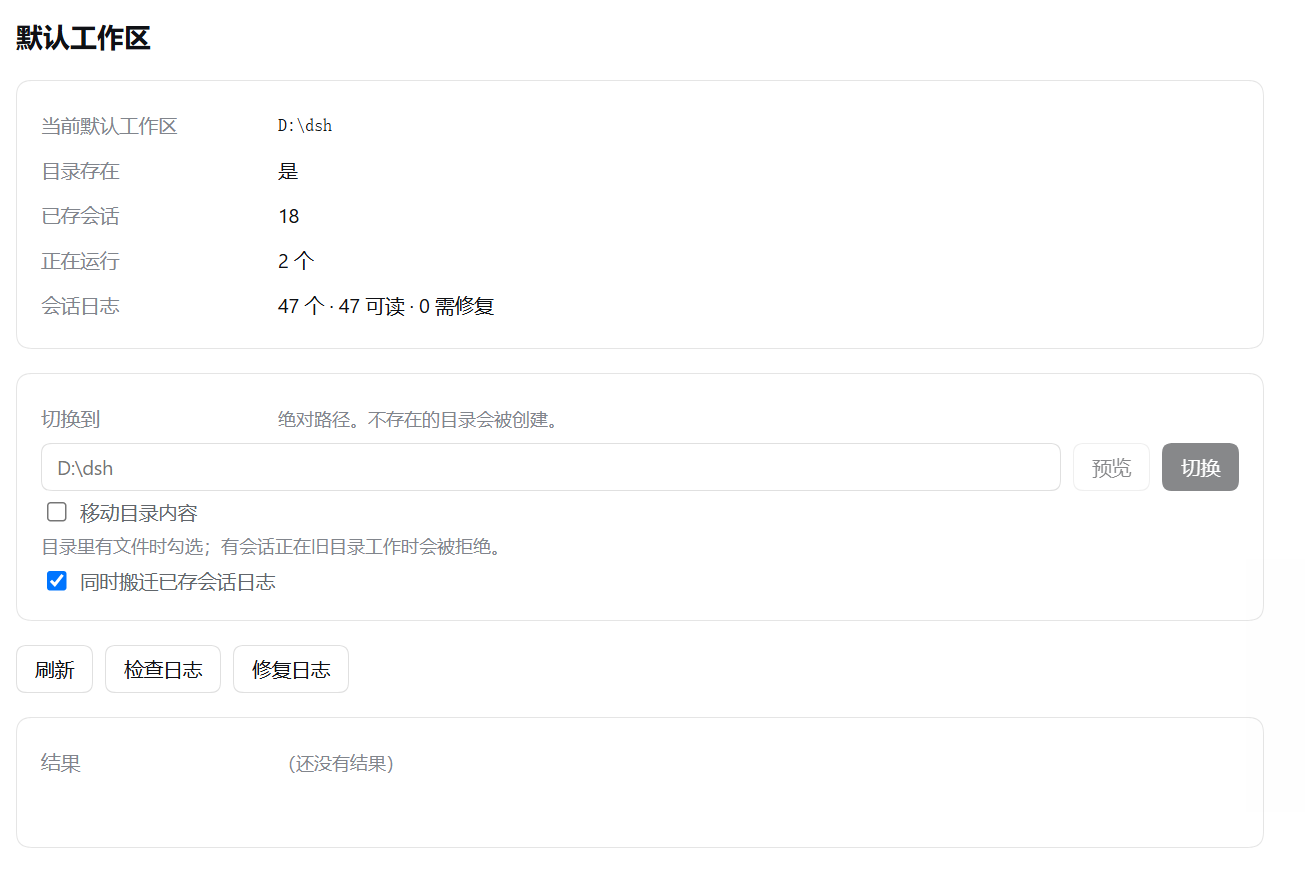
The panel in Chinese — every label follows the Host's language.
The panel shows the current default path, whether the directory exists, the stored
and live Session counts and the log health scan, and it offers a path field with
Preview (a dry run) and Switch (armed: the button asks for a second click),
plus Check logs and Repair logs for the re-framing pass. Paths travel as
query parameters and every call goes through the platform's own trust fence, so the
routes answer only the DSH page (401 for anything else).
This half is a hand-written bundle for DSH's lazy-CJS client loader — no build step.
lib/client.js registers window.__ModuleLoader__.load({ id, factory }), and
package.json declares it as exports["./client"] plus
dsh.client: { platform: "web" }. Editing it is picked up by the client HMR poll,
but dsh.client / exports metadata is cached until the Host restarts — after
the first install, restart DSH once to make the panel appear.
Install
dsh plugin add https://github.com/Elefseus/dsh-default-workspace
Or wire it into a profile by hand — ~/.dsh/profiles/<profile>/package.json:
{
  "dependencies": { "dsh-default-workspace": "github:Elefseus/dsh-default-workspace" },
  "dsh": { "profile": { "bundles": [ /* … */ "dsh-default-workspace" ] } }
}
From a local checkout, link the directory instead and point bundles at the package name. On Windows a junction works without the symlink privilege:
node -e "require('node:fs').symlinkSync('D:/code/dsh-default-workspace', process.env.USERPROFILE + '/.dsh/profiles/desktop/node_modules/dsh-default-workspace', 'junction')"
The desktop app enables HMR, so appending a line to the profile's cordis.patch.yml triggers a recomposition and the tool appears without a restart.
Bundle config
cordis.patch.yml:
- insert:
    - id: dsh-default-workspace
      name: dsh-default-workspace
      config:
        sessionsRoot: '' # empty = the Host's sessionPersistence root (usually ~/.dsh/sessions)
Layout
lib/index.js       plugin wiring: the Host's defineTool, ctx.get services, tool registration
lib/tool.js        the default_workspace definition: parameters, execute, text renderers
lib/web.js         the panel's three JSON routes, behind the platform trust fence
lib/client.js      the browser half: sidebar row + main panel, hand-written for the lazy-CJS loader
lib/switch.js      status / switch / repair: record rewrite, directory move, log relocation, health scan
lib/paths.js       Session log path rules (projectKey, encodeSegment), mirrored from the Host
lib/zstd-multi.js  multi-frame Zstandard walker, first-frame checks, header rewrite, re-framing
test/              dependency-free harnesses, run with `npm test`
Tests
npm test
test/engine.test.mjs— 40 assertions against a fake registry that mirrorsWorkspaceRegistry/WorkspaceEntitysemantics (mutatepruning,candidateMatches,rememberSessionPath): status counts, live-Session refusal, path claimed by another Workspace, dry runs, compressed and plain logs, re-framing of single-frame logs, repair backups and idempotency, plus a junction/symlink scenario where the record's spelling differs from itsrealpath.test/tool.test.mjs— 22 assertions on the tool contract: required parameters, render output as content blocks, lossless-JSON results, and a full status → dry-run → apply → repair cycle.test/web.test.mjs— 19 assertions on the route actions and the trust fence: path validation, boolean defaults, dry runs leaving the record alone, the 401/403 fence, and the loopback fallback.test/client.test.mjs— 20 assertions on the browser half, loaded the way the shell loads it: the factory id, the exported plugin, the two slot registrations, the locale dictionary, the rendered panel and the document-relative route calls.
CI runs all four on Linux and Windows, Node 22 and 24.
Compatibility
The default Workspace lives in the desktop Host's storage, so this plugin needs workspaceRegistry and (for logs) sessionPersistence. Verified against DSH 0.2.1-rc.3 (Node 24).
@deepseek-ai/dsh-tools is a peer dependency, and the range carries an explicit >=0.2.1-rc.1 branch on purpose. node-semver only lets a prerelease version satisfy a range when some comparator in that range shares its exact major.minor.patch and carries a prerelease tag, so a broad-looking >=0.1.0-rc.1 <0.3.0-0 does not match 0.2.1-rc.3. When the peer range does not resolve, the Host's compatibility preflight disables the entire bundle row silently — the plugin simply never appears.
License
MIT
No comments yet. Be the first to write one.