dsh-remote-editor
A DeepSeek Harness (DSH) Web plugin that opens the current session's workspace in Cursor, VS Code, VS Code Insiders or Windsurf on the computer running your browser, connected to the DSH server over Remote-SSH.
Why
DSH's built-in "Open In..." button launches applications on the machine that runs the DSH server. That works when the browser and the server share a desktop. When you reach DSH from another computer (a devbox, a VM, a lab server), the button is hidden because the server has no display, and if it were shown, the editor window would open on the server where you cannot see it.
A web page cannot start applications on your computer. It can follow a link whose scheme your operating system hands to an installed app. Cursor and the VS Code family register such schemes, and they accept Remote-SSH folder links:
cursor://vscode-remote/ssh-remote+<host><absolute path>
vscode://vscode-remote/ssh-remote+<host><absolute path>
This plugin puts that link on the session header, built from the session's working directory.
What you get
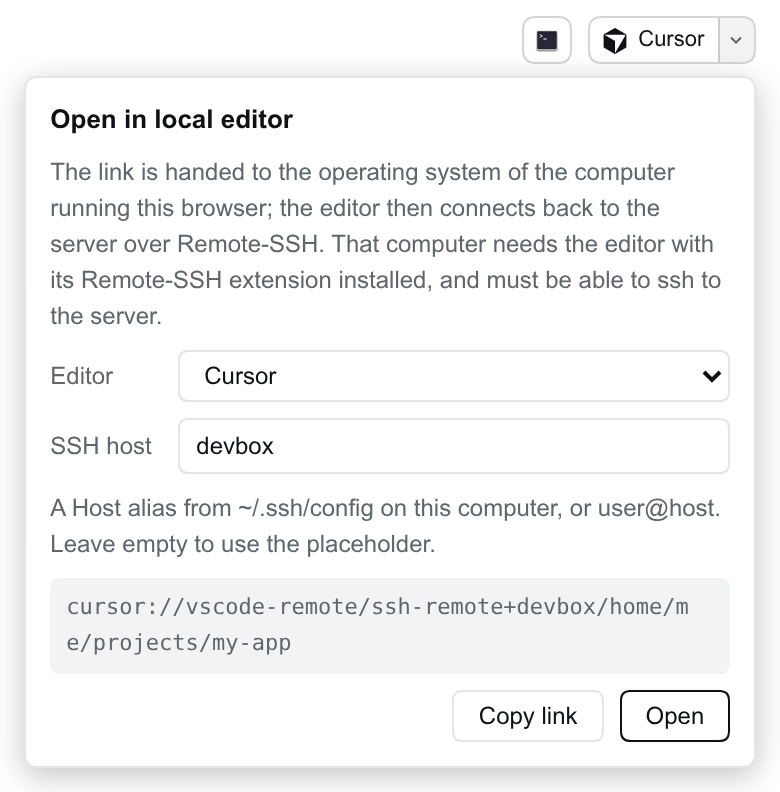
- A button next to the official "Open In..." control, showing the chosen editor's logo. Clicking it opens the workspace in your local editor.
- A drop-down panel to choose the editor and the SSH host, preview the link, and copy it.
- The editor and host are stored in the browser's
localStorage, because they describe your computer, not the server. Different computers can use different settings against the same DSH server. - The default host is
<server account>@<address in the browser's location bar>. Put an~/.ssh/configalias there instead when you need a specific key, port or jump host. - English and Chinese UI, following the DSH language setting.
Requirements
On the computer running the browser:
- The editor, with its Remote-SSH extension (Cursor and VS Code ship or offer it).
- Working
sshaccess to the DSH server under the host you configure.
The first time a browser follows a cursor:// or vscode:// link it asks whether to open the app; allow it. If clicking does nothing, the editor is not installed or did not register its URL scheme.
DSH >=0.2.2-alpha.2 <0.3.0-0 (0.2.x, including its prereleases), Node >=22.19.
Usage
Open any session. Click the button with the editor's logo in the top-right header to open the workspace; click the arrow beside it to change the editor or the SSH host.
Install
# from npm
dsh plugin --profile web add dsh-remote-editor

# from GitHub
dsh plugin --profile web add github:Edison-A-N/dsh-remote-editor
The package ships its own bundle patch (dsh.bundle.patch + cordis.patch.yml), so the CLI and the Web UI's Plugins page load it in one step. Restart DSH, reload the page and open a session.
How it works
- Browser half (
lib/client.js): registers one entry in theconversation.session.header.utilitiesslot. It reads the session'scwdfrom the slot'suseSessionsprop, the same source the official button uses, and renders a plain<a href="cursor://...">. A real link keeps the click a user gesture, so browsers hand the scheme to the OS without navigating the page. - Server half (
lib/index.js): oneGET /plugins/remote-editor/api/inforoute behind DSH's login check, returning the server account name for the default host. The server never launches anything. - Hosts are limited to letters, digits and
. _ - @ : [ ], and each path segment is percent-encoded, so a host or path cannot break out of the link. Paths with.or..segments and hosts starting with-are refused.
Development
pnpm install
pnpm run build   # bundles client/src into lib/client.js
pnpm test
lib/client.js is committed, because DSH loads it as-is; rebuild it in the same commit as any change under client/src.
Bug reports and pull requests are welcome on GitHub. Please include the DSH version, the browser and OS, and the link shown in the panel.
License
MIT. Editor logos are from Simple Icons (CC0-1.0); the names and logos are trademarks of their owners and are used only to identify the editor that a link opens.
No comments yet. Be the first to write one.