Theme studio for DeepSeek Harness
Choose preset palettes or create custom HEX themes from Settings → General → Custom themes, beside Appearance. Includes color, sidebar and surface-effect controls without replacing the native settings panel.
Category: UI & Experience · Package: dsh-theme-studio · Version: 0.4.0 · License: MIT for original plugin code; see third-party notices for adapted palettes.
Independent community plugin; not affiliated with DeepSeek AI.
Install from GitHub
Requires DeepSeek Harness >=0.2.2-rc.1 <0.2.3-0, a managed Web or Desktop profile and Node.js 24.11+. The range admits rc.3, later 0.2.2 release candidates and stable 0.2.2; it excludes 0.2.3, including its prereleases.
Web profile
dsh plugin --profile web add github:EdgarSantiago/dsh-theme-studio
Desktop profile
dsh plugin --profile desktop add github:EdgarSantiago/dsh-theme-studio
Run the command for the profile you actually use. Follow Plugin Manager's activation/restart instructions, then open Settings → General → Custom themes. In Portuguese: Configurações → Geral → Temas personalizados.
This is GitHub source-only distribution, not an npm release. private: true intentionally prevents npm publication; it does not make the GitHub repository private. The committed dist/ artifacts let the package load without a development build or package install hooks. No install, prepare or prepack script builds code on the user's machine. Do not install a source revision that lacks its matching compiled artifacts.
To disable/remove it, use Plugin Manager. Removing the plugin does not erase saved browser palettes. Updates are not automatic; install a reviewed revision through the same manager and follow its reload guidance. Do not edit the packaged Harness application or use a second server to update an existing Desktop session.
Use
- Choose System / Light / Dark, a preset, or a saved palette in the Custom themes selector.
- Open the editor to set a name, light/dark base and six HEX colors. Three or six digits, with or without
#, are accepted. - Adjust the sidebar color/opacity or optional panel/chat effects, then save. Saving an edited preset creates a personal copy.
- Delete only your own palettes, after confirmation. Escape/backdrop/Close dismiss the native modal; reopening discards unsaved editor drafts.
Presets are limited adaptations of Dracula, Nord, Tokyo Night, Catppuccin Mocha, Rosé Pine Dawn and Solarized Light, not complete upstream themes. Original licenses and attributions are retained in third-party notices and licenses.
The UI and plugin metadata support all eight native Harness languages: English (en), Brazilian Portuguese (pt, with a pt-BR resource alias), Simplified Chinese (zh), Japanese (ja), Spanish (es), French (fr), German (de) and Russian (ru). Both the settings row and an open editor follow Harness language changes immediately through the native slot-injected translation function. There is no plugin language selector or language-preference write. User palette names and colors are not translated or changed.
Screenshots
These are real screenshots supplied by the user, showing the English interface. The first has a red outline added around the button that opens the editor; the remaining screenshots are unchanged apart from removing image metadata.
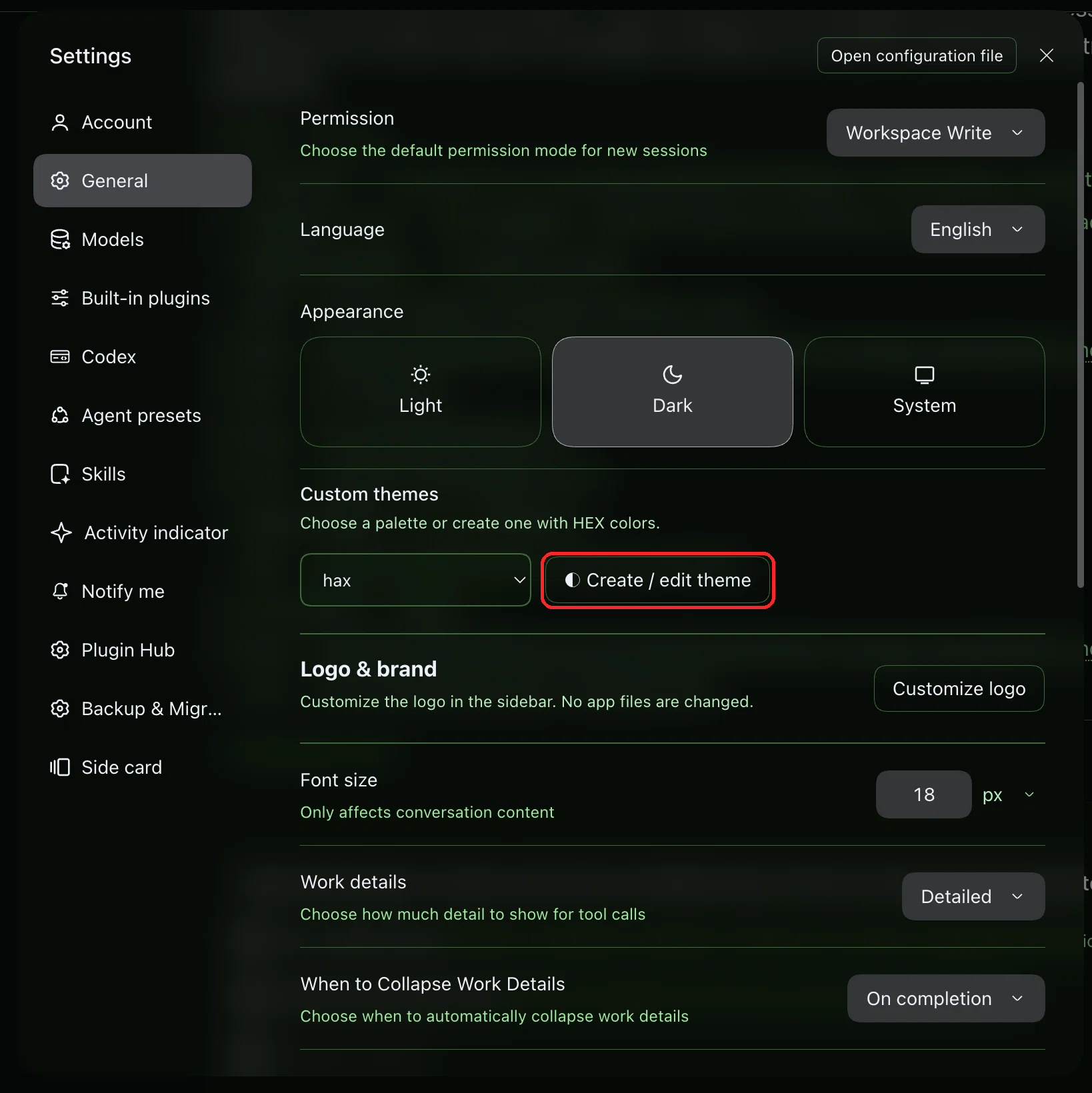
1. Open the theme editor
Go to Settings → General → Custom themes and click Create / edit theme, highlighted in red.
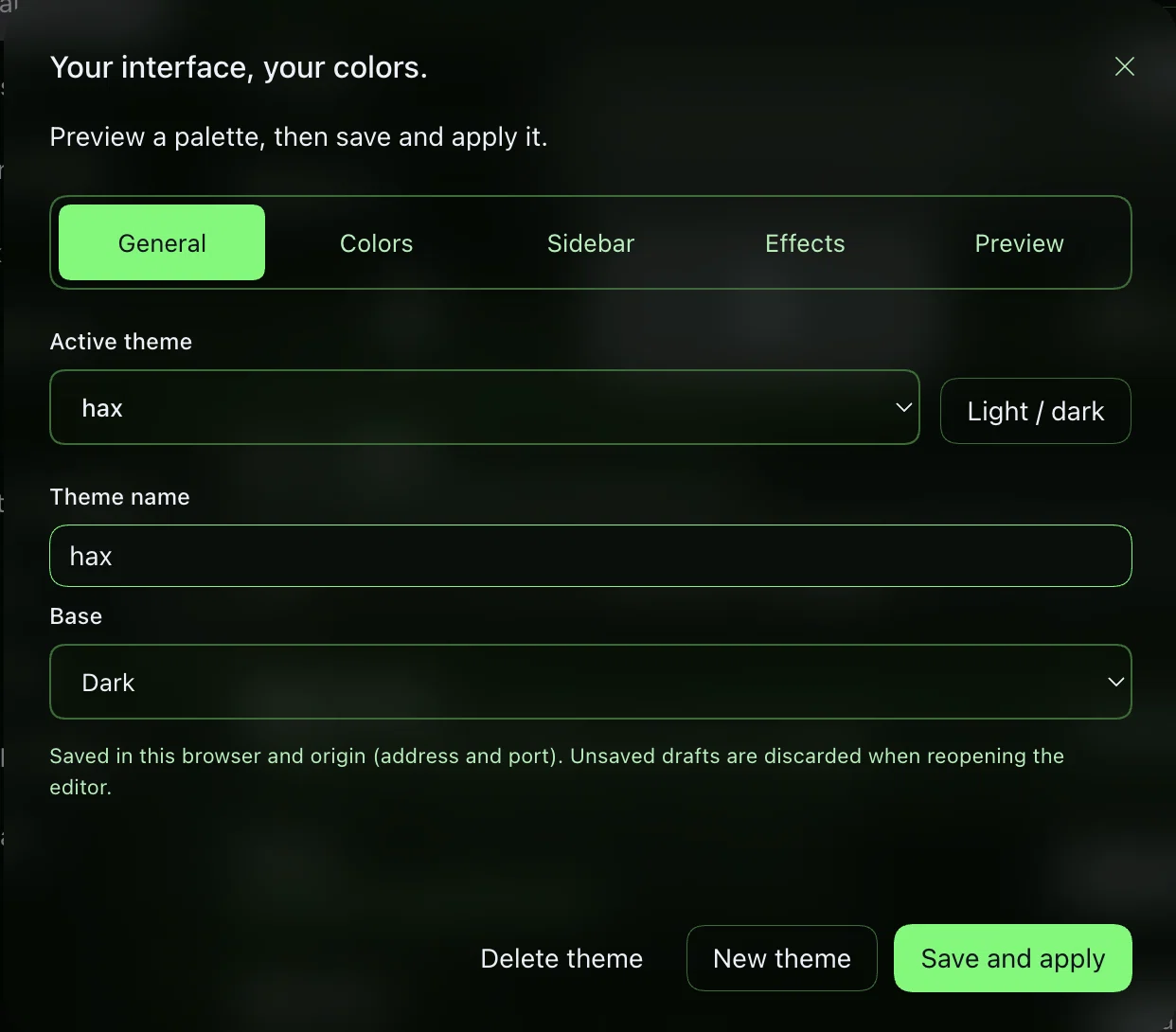
2. General settings
Choose the active palette, edit its name and select the light or dark base. Save with Save and apply.
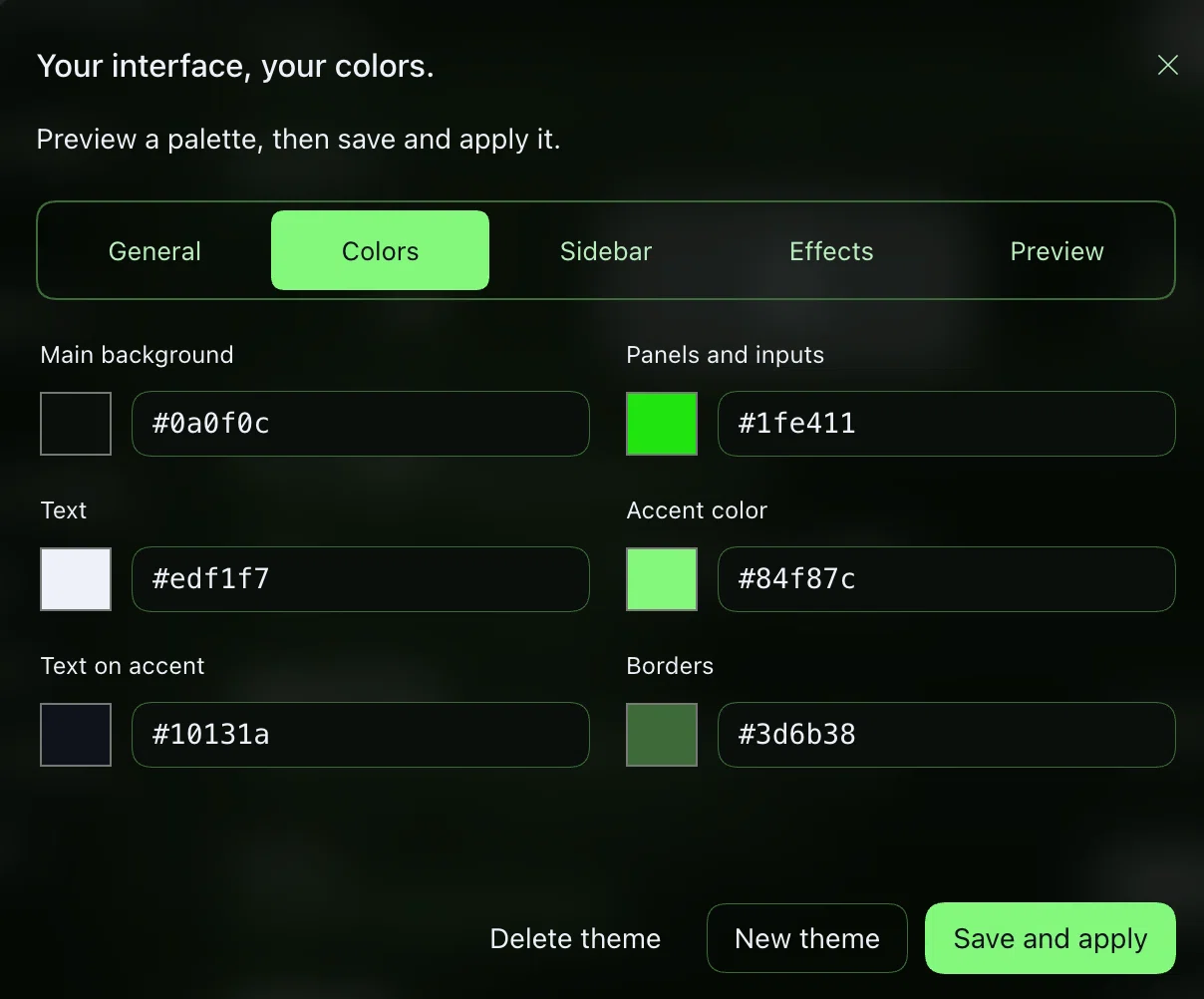
3. Colors
Adjust the six palette colors using the color picker or a HEX value, then save and apply the theme.
Permissions, data and limitations
- Browser-side customization only. The Host entry has no business services, model tools, prompts, terminal execution, filesystem access or external service calls.
- Reads/writes its palette library in browser
localStorageunderdsh-theme-studio:v1, plus a recovery-backup key when needed. State is local to a browser origin; different devices, ports and Desktop/Web origins do not automatically share it. - Uses the native theme service and additive
settings.general.item/shell.overlayslots. Styles affect selected surfaces, sidebar, text, accents and borders, not all syntax/semantic colors. Some surface overrides depend on current Harness markup, so a future release may need an update. - Up to 50 custom palettes. Future-format data stays read-only. Quota/storage failures remain visible; cross-tab merges preserve different palettes, but conflicts on the same palette are last-writer-wins, without a transaction/CAS guarantee.
- The contrast preview checks three color pairs, not full WCAG/accessibility compliance. Transparent or blurred surfaces can reduce readability; verify your chosen settings.
- A real native theme preference change overrides the custom layer. Selecting the already-active native mode may be a no-op; use the plugin's System/Light/Dark selector to remove the layer. Disabling releases its styles, listeners, slots and theme layer, while saved palettes remain.
- Plugins run with the Harness process's trust. Install only reviewed code; a browser-only feature is not a sandbox and does not certify the security of Harness or its dependencies.
Compatibility and actual verification
The manifest uses the controlled compatibility range >=0.2.2-rc.1 <0.2.3-0, rather than an allowlist that blocks every new 0.2.2 release candidate. Development SDK packages remain pinned to rc.1 for regression coverage. The rc.3 compatibility review checks installed theme, locale, slot and shared Client contracts; no feature or stored palette migration is part of this metadata change. Admission of future 0.2.2 builds is a compatibility policy, not proof that their APIs or visuals cannot change. Windows/Linux and future Harness versions are not visually certified.
The rc.2 compatibility pass inspected live Client registrations for theme-studio in settings.general.item, along with the installed API surface. Unit/contract tests exercise real palette/controller logic and compiled bundles with test doubles; they do not certify every browser interaction. The user-provided screenshots above illustrate the English interface; they are not automated browser captures or certification of the latest local translations. No mock preview or new live GUI test is claimed by this preparation. Real automated output is recorded below after the release checks; the optional detail image is omitted rather than fabricated.
Compatibility metadata checks (2026-11-13)
The four TypeScript programs passed with managed Node.js 24.21.0. That managed executable could not load the existing third-party native Rolldown/Lightning CSS addons under macOS library validation: npm test stopped during the pretest build, and direct tests passed 37 cases while two native-dependent test files failed to load. No dependency, signature or runtime repair was attempted.
Using the already installed, native-capable Node.js 24.16.0, tsdown --config-loader native rebuilt all four tracked artifacts without a content diff, and the full node --test tests/*.test.ts suite passed 47 tests, 0 failed. This includes manifest/lockfile/documentation consistency coverage. No profile install or browser interaction was performed by these checks.
Actual automated output (2026-11-12)
The local localization and README screenshot checks ran the commands below on the existing checkout, without installing the plugin, changing a profile or launching a browser:
npm test: build + four TypeScript programs passed
Node tests: 46 tests, 46 passed, 0 failed
npm pack --dry-run --ignore-scripts --json: 28 runtime/resource files, including three README screenshots
npm pack --ignore-scripts --json --pack-destination node_modules/.cache: local archive only
Compiled Client: all locale dictionaries + both native locale seats registered and disposed
Native SDK LocaleRuntime: stable t switches across eight languages; pt-BR browser tag resolves to pt
Rebuilt all dist artifacts; inline CSS virtual-module path remains package-relative
The earlier publication clean-copy check had no package-local node_modules and verified basic loadability. The localization pass adds complete 61-key coverage, placeholder parity, non-English-content checks, metadata/pack coverage and the real SDK locale-runtime switching contract. It uses no new React/DOM renderer. Browser control was unavailable: no live visual interaction, open-modal switch or screen-reader behavior was exercised. Source and compiled registration checks do not certify rendered layout or remote GitHub installation. The inline CSS module stays package-relative; all distributed code/maps are checked for developer paths.
Develop and validate
npm ci
npm test
npm run build
npm pack --dry-run --ignore-scripts --json
npm test rebuilds, typechecks Host/Client/tests/tooling, and runs Node's built-in runner. No Harness server is launched. There is no npm publish step.
When changing runtime source, regenerate and version all of dist/, including its maps, in the same change. Keep the manifest, patch, locales, icon, licenses and compiled artifacts together. Never version node_modules, archives, browser/test output, logs or personal palette data. AUDIT.md documents the verification scope and security boundaries, not a current vulnerability certification.
Runtime entry points: Host, Client, editor, palette logic and build configuration. React and native store/UI primitives stay external and are provided by the running Harness. The unused greeting-tool example is retained for its existing tests but is not exported or activated.
Community listing
Submission follows dsh-plugin.org's requirements: a public repository, GitHub topic dsh-plugin, installation instructions, permissions, compatibility and a clear license. Repository publication/topic configuration are separate maintainer actions. Source-only repositories can be indexed on the website; the in-app Plugin Hub additionally requires an npm package. No marketplace listing or review status is claimed here.
No comments yet. Be the first to write one.