Spinner studio
Customize the DeepSeek Harness activity indicator with icons, original GIFs and your own rotating verbs, without changing the chat messages.
Category: UI & Experience · Version: 1.1.0 · License: MIT · Profiles: Web / Desktop
An independent community plugin, not an official DeepSeek or Anthropic product.
Language support: the source and prebuilt Client include all eight native Harness languages. Updating an existing installation still requires Plugin Manager's reload/restart guidance; publishing source changes does not update profiles automatically.
Install from GitHub
Requires DeepSeek Harness >=0.2.2-rc.1 <0.2.3-0 and Node.js 24.11+. The range admits rc.3, later 0.2.2 release candidates and stable 0.2.2; it excludes 0.2.3, including its prereleases.
Web profile
dsh plugin --profile web add github:EdgarSantiago/dsh-spinner-studio
Desktop profile
dsh plugin --profile desktop add github:EdgarSantiago/dsh-spinner-studio
Follow the plugin manager's reload/restart instructions. Open Settings → Activity indicator (Portuguese: Configurações → Indicador de atividade), choose an icon and verbs, preview, then save. Changes apply to the profile's sessions. Discard leaves the saved preferences unchanged; disable personalization or restore defaults to use the native indicator.
This is GitHub source distribution, not an npm release. The package name remains @local/dsh-spinner-studio; private: true prevents accidental npm publication and does not require a private GitHub repository. Generated client.js, gif-presets.js and GIF assets are included in the repository/package. Installation needs no build, Python, development dependencies or install scripts; the package manager resolves its normal Schemastery runtime dependency.
Features
- Native whale, spark, orbit, code, emoji or a local PNG/JPEG/WebP/GIF image (up to 250 KiB).
- Four original transparent GIF presets: dots, orbit, equalizer and pulse, with palette-aware masks and still frames for reduced motion. No CDN.
- Icon size 12–40 px; verb interval 2–60 seconds; editable list of up to 500 verbs.
- Includes all 179 attributed source verbs plus
Deep diving(180 initial choices). - The initial verb varies across replies, including short replies; longer replies rotate at the chosen interval.
- Monochrome icons and text follow the current theme accent. Uploaded images and emoji keep their own colors.
- Preview, save, discard, defaults, and an enable/disable switch. Controls, accessibility text, validation, feedback, elapsed-time units and metadata follow all eight Harness languages: English, Portuguese, Simplified Chinese, Japanese, Spanish, French, German and Russian.
pt-BRaliases Portuguese. No separate plugin language selector or preference write is added. - The unchanged built-in list has display translations for all 180 entries in every supported language, including the preview and editor. Storage keeps the canonical source list. Editing that list creates custom user text, which stays exactly as entered across language changes; restoring the built-in list restores automatic language following. Changing language alone never saves or rewrites preferences.
Screenshots
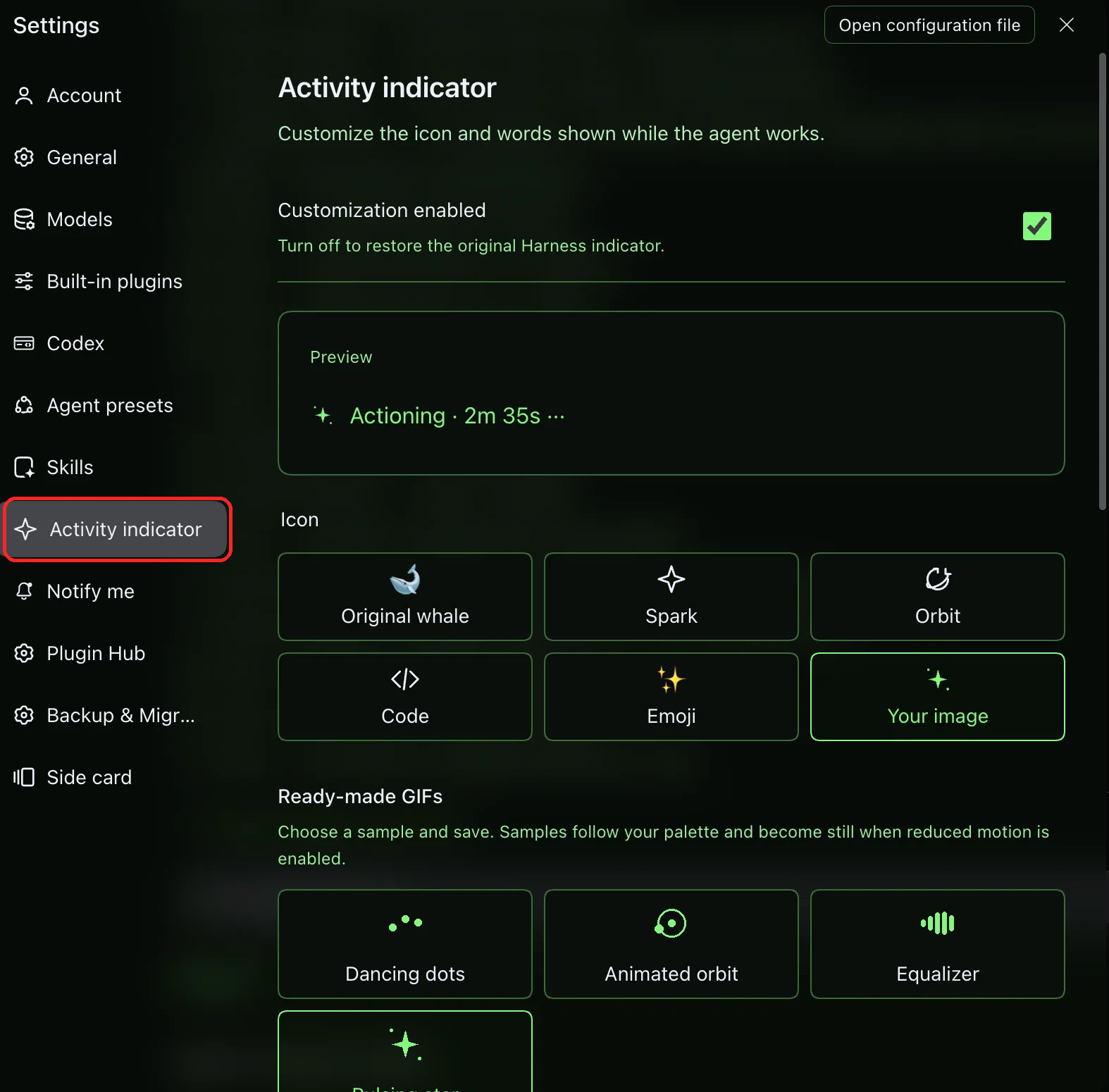
These are real screenshots supplied by the user, showing the English interface. The settings screenshot has a red outline added around the sidebar entry; the running indicator is unchanged apart from removing image metadata.
1. Open Spinner Studio
Go to Settings → Activity indicator, highlighted in red in the sidebar. Choose an icon or a ready-made GIF, review the preview, then save your changes.
2. Activity indicator in the main chat
A custom icon, activity verb and elapsed time appear while the agent works. This is a still screenshot, not an animated preview.

Permissions and data
- Preferences are persisted in the current Harness profile through its
configEditor, not by editing YAML directly. They apply across sessions, not just the current conversation. - Local uploaded image data and custom verbs are saved in those preferences; do not put secrets in custom text or images you share/export.
- The authenticated
api/plugins/spinner-studioendpoint andapi/plugins/spinner-studio/watchSSE stream serve the panel. Thespinner_studioAgent tool can read, update, restore verbs or reset the same settings. Tool responses redact saved image bytes. This is a persistent profile-setting capability; no extra plugin-specific confirmation gate is added. - The plugin itself does not call a model, execute shell commands, inspect workspace files or send telemetry. Normal Harness model/provider use is separate. No external service or API key is required by the plugin.
- Save failures are shown as localized errors, not reported as successful saves. Feedback is kept as a message key and translated at render time, so an existing notice follows later language changes. Unknown backend diagnostics use a localized generic message rather than exposing raw text. Disabling/uninstalling the plugin releases its registrations and styling; saved profile configuration is managed by Harness.
Compatibility and limitations
The declared range is >=0.2.2-rc.1 <0.2.3-0, rather than an allowlist that blocks every new 0.2.2 release candidate. The rc.3 compatibility review checks installed locale, slot, chat, tool, connection and configuration-editor contracts; no feature, asset or saved-preference migration is part of this metadata change. Admission of future 0.2.2 builds is a compatibility policy, not proof that their APIs or visuals cannot change. Earlier runtime and Client registration checks were on macOS Desktop, not cross-platform visual certification.
There is no dedicated native icon/text slot. The plugin adds settings.section and a conversation.composer.dock adapter that renders a lifecycle-owned React style element. It targets the semantic [data-chat-running] marker, not hashed class names. It does not replace the root, chat flow, messages, approvals or renderers, or observe/mutate the DOM. Timeline projections provide elapsed time.
The adapter is for the main chat. Multiple chats mounted in one document are not CSS-isolated by session and may share the last-mounted verb/time styling. Native holding/accessible status and conversation controls are preserved. The whale preview is illustrative; chat retains the native animated whale. A future change to the indicator markup may require a plugin update.
The user-provided screenshots illustrate the English interface; they are not automated browser captures or certification of the latest local translations. Automated logic/resource tests and live registration checks do not certify rendered light/dark appearance, animation or actual pointer/keyboard interactions; check those in your running Harness.
Compatibility metadata checks (2026-11-13)
With managed Node.js 24.21.0, npm run build, npm run check and npm test completed: 34 tests passed, 0 failed, including the new manifest/lockfile/documentation consistency regression. The rebuild left tracked Client artifacts unchanged. These checks did not install the plugin, change a profile or exercise the live browser.
Reproducible checks and real output
npm run build
npm run check
npm test
npm pack --dry-run --ignore-scripts
node --input-type=module -e "import { createSpinnerService } from './service.js'; const s=createSpinnerService(()=>({}),async()=>{}); const {preferences:p}=await s.operate({action:'read'}); console.log(JSON.stringify({icon:p.icon,size:p.size,interval:p.interval,verbCount:p.verbs.length}));"
The original publication preparation on macOS with Node.js 24 produced this historical test summary (not the count for the later local translation revision, and not browser certification):
ℹ tests 21
ℹ pass 21
ℹ fail 0
The current local translation and README screenshot pass completed npm run build, npm run check and npm test: 33 tests passed, 0 failed. The package dry-run contains 33 runtime/resource files, including both README screenshots. These checks do not install the plugin or change a profile.
The last command produces real default-service output, not a screenshot or a simulated UI:
{"icon":"native","size":18,"interval":6,"verbCount":180}
The local translation tests additionally verify all eight catalogs and placeholder sets, nine metadata files, default/custom-list preservation, editor round-trips, render-time feedback keys, safe backend-error mapping and localized elapsed units. They are logic/contract tests, not proof of rendered switching, text wrapping or native-speaker review in the connected app.
For development, install the pinned dependencies from package-lock.json before running checks. client-source.js is the Client source; build.mjs uses Node built-ins to generate client.js, without bundling another React. Keep the generated artifact tracked. generate-gifs.py uses Pillow only when intentionally regenerating original assets/gifs/ and gif-presets.js; it is unnecessary for installation/build/test.
License and attribution
Project-authored code and original artwork are MIT-licensed in LICENSE. The 179-word verb list comes from Claude Code: The Spinner — shanraisshan/claude-code-best-practice, consulted on 2026-11-12. Its MIT copyright/permission notice and dependency information are preserved in THIRD_PARTY.md. Claude-specific tips are not imported as Harness features.
Community catalog
For publication, make this repository public and add GitHub topic dsh-plugin (recommended additional topics: deepseek-harness, spinner, personalization). The community submission requirements distinguish source-only website indexing from the in-app Plugin Hub: this GitHub-only package can be indexed on the website, but an npm release would be required for its npm-only in-app marketplace. No marketplace listing or verification badge is claimed.
Português
Abra Configurações → Indicador de atividade, personalize o ícone/verbos e salve. Preferências ficam no perfil e valem para todas as sessões; não há chamadas de IA, CDN nem telemetria do plugin. Para instalar, use o comando GitHub do perfil acima, não o nome npm. Compatibilidade declarada >=0.2.2-rc.1 <0.2.3-0: inclui rc.3 e futuros candidatos da série 0.2.2, mas exclui 0.2.3, inclusive prévias. Isso não garante APIs futuras imutáveis; a conferência visual na sua instalação continua necessária.
No comments yet. Be the first to write one.