@Echo-Note/dsh-hindsight-settings
English | 中文
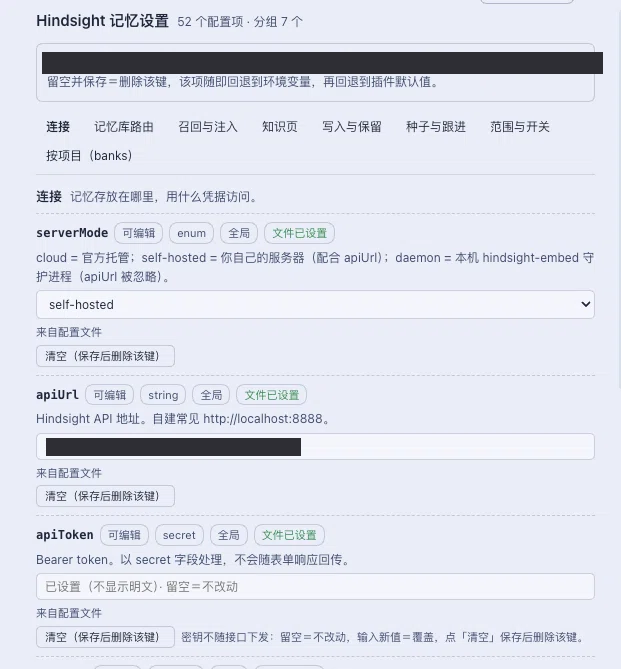 A DeepSeek Harness (DSH) companion plugin that adds a Hindsight 记忆设置 page to Settings, so
~/.hindsight/coding-agent.json can be edited from the GUI instead of by hand.
It is a companion on purpose. @vectorize-io/hindsight-coding-agents mounts as a subpath row
(…/coding-agents/dsh), and DSH's client module system only attaches a browser half to the row whose
specifier is the bare package name — so that package cannot carry a settings page without changing how
every existing user mounts it. Nor does it declare any Config: it imports nothing from dsh and
resolves its settings from its own file, which the shipped settings form (schema-derived, persisted
into the profile patch) cannot reach. This package therefore ships its own page and its own host
service, and leaves the plugin untouched.
Install
From GitHub — the package is consumed straight from this repository, and its
@vectorize-io/hindsight-coding-agents dependency is installed with it, so one install gets both:
# Any profile except a packaged Desktop one, whose profile the CLI refuses to write:
dsh plugin --profile <profile> add github:Echo-Note/dsh-hindsight-settings
In the desktop app (the profile the Electron shell owns) the CLI refuses by design; install from the GUI instead — Settings → Plugins → install, and paste the same spec:
github:Echo-Note/dsh-hindsight-settings
The 40-character commit this resolves to is pinned by the package manager's lockfile, so a later
git push does not silently change what you run: re-install (or update) to move it. Git installs
build nothing — the compiled lib/ is committed — so the install is a checkout, not a build.
Naming it with the scope is optional. github:Echo-Note/dsh-hindsight-settings installs it under the
name in this package's package.json; to force a different key, use the npm alias form, which is what
this repository's own dry-run used:
dsh plugin --profile <profile> add '@Echo-Note/dsh-hindsight-settings@github:Echo-Note/dsh-hindsight-settings'
From a local checkout (while editing this package):
git clone https://github.com/Echo-Note/dsh-hindsight-settings.git
cd dsh-hindsight-settings
npm install          # dev dependencies only; nothing is needed at runtime but the peer packages
npm run build        # optional: refreshes lib/ from src/
dsh plugin --profile <profile> add link:"$PWD"
link: (not file:) is the right spec for a package you may edit: file: copies a snapshot into the
profile, link: symlinks it, so a rebuilt browser half is picked up on the next page load.
The one manual step
A package's bundle is mounted only when the profile selects it in dsh.profile.bundles, and dsh's own
plugin-manager README states that "an unselected plain dependency is left out" — the manager lists
bundles a dependency supplies but does NOT select them. So after installing this package, enable
Hindsight once in Settings → Plugins (installing the bundle by name,
dsh plugin --profile <profile> add @vectorize-io/hindsight-coding-agents, does the same thing).
dsh has no bundle-depends-on-bundle field to express this (DshManifest carries only
manifestVersion, bundle.patch, client, engines.dsh), and the alternative — our patch inserting
Hindsight's row directly — would compose the same row twice when its own bundle is also enabled,
because patch insert appends without deduplicating entry ids.
The host half, the ./typert manifest and the browser bundle are all read at startup, and dsh's
plugin manager notes that "package replacements require restarting the process to load a fresh
JavaScript module generation" — so restart once after installing.
How it works
~/.hindsight/coding-agent.json          ← the one file every Hindsight harness reads
        ▲            │
        │ apply()    │ describe()                     (host, src/service.ts + src/typert.host.ts)
        │            ▼
   ctx.provide('hindsightSettings')  ──Remote──▶  POST /api/hindsightSettings/<method>
        ▲                                                  │
        └──────────────────────────────────────────────────┘
                                    browser (src/client/index.tsx)
                       page in Settings, mounted via ctx.remote.$mount(contribution)
- The host publishes one Cordis service; its
./typertmanifest exposesdescribeandapplyto the page (docs/api-gateway.md). - The page renders every field from
src/fields.ts— the single declaration of the config surface — and writes back only what changed. A field the user clears is sent asnull, which removes the key so the setting falls back to the environment variable, then to the plugin's own default. - Fields are grouped into one tab per section, plus a 按项目(banks) tab. A bank tab edits
banks.<id>, which is how upstream lets one repository differ from the shared top level; opening a bank callsdescribe({ kind: "bank", id })and saving callsapplyScoped(...).paths.<dir>is listed read-only. - A field the file does not set is still shown with its effective value — the plugin default — labelled as such, while a cleared cell still means "remove the key". Nothing is written until a cell actually changes.
- Secrets are never sent to the page:
apiTokenshows as set-but-blank ("已设置(不显示明文)"), typing replaces it, and only the explicit 清空 button removes it. This mirrors dsh's own settings service, where arole('secret')value is kept out of form responses. - Nothing goes through the DSH settings form or the profile patch. An earlier revision tried to mirror
the file into this plugin's own
Configso the shipped form would show it; a real install refused that write with "HMR transactions cannot be nested" (the row is mounted inside the loader's transaction, anAsyncLocalStoragescope that even timers inherit), and the form never served the namespace. Talking to the file directly is both simpler and the documented path for host state.
Safety
- Managed keys only: keys this package does not know, and the nested
banks/paths/harnessessections, are preserved verbatim. nullremoves a key; there is no other way to delete, and a field the page never sends is untouched.- Writes go through a temp file + rename, at mode
0600— the file can holdapiToken. - A file that cannot be parsed is never overwritten: the page reports it and disables saving.
- An invalid value (wrong type, unknown key, a file-only nested map) is refused before the disk is touched.
Interface fields
mapPathToBank, pages, customPages, recallOptions, retainMetadata, defaultBankConfig,
harnesses and the deprecated autoReflect are shown read-only in a group tab: they are nested
maps a single form field cannot express, and upstream documents them as file-only. The page says so
per field rather than hiding them. banks and paths are not read-only: the bank tab edits
banks.<id> through a scoped write, and the file's paths sections are listed read-only.
Precedence and when an edit takes effect
Upstream resolves defaults → HINDSIGHT_* → the file's top level → harnesses.<name> → banks.<id> / paths.<dir>, later winning. The page writes the top level, so a harnesses.dsh entry for the same key
still wins — the page badges those fields. Upstream reads the file once per workspace, at plugin load,
so an edit reaches a running session after a dsh restart; apiToken is the exception (its client
re-reads the credential on the next call after a server rejection, so rotating it needs no restart).
Troubleshooting
The host half appends what it did to ~/.hindsight/dsh-settings-status.json:
{
  "events": [
    {
      "at": "…",
      "step": "apply",
      "provided": "hindsightSettings",
      "entryId": "hindsight-settings",
    },
    { "at": "…", "step": "describe", "path": "…/coding-agent.json", "error": null, "fields": 52 },
    { "at": "…", "step": "apply", "changed": true, "removed": [] },
  ],
}
No describe line after opening the page means the browser never reached the service: check that the
Settings → Hindsight 记忆设置 entry exists, then the plugin list's page-local sync message. apply
with changed: false means the file already said that.
Development
npm install --legacy-peer-deps   # pinned in .npmrc: npm's arborist crashes on vitest's peer set
npm test                         # host service, the file rules, the field table's drift guard
npm run build                    # lib/index.js + lib/typert.host.js (host) and lib/client.js (browser)
npm run test:smoke               # bundle shape / laziness / registration smoke test
npm run typecheck
npm run format                   # prettier, the repo's .prettierrc
Both halves land in lib/, so npm run build removes lib/ once and then builds host → client; use
npm run build:host / npm run build:client only when you mean to rebuild one half.
src/fields.ts is the single declaration of the config surface. src/upstream.test.ts checks it
against the installed Hindsight plugin (its bundle keeps the source shape), so upgrading that
plugin fails this package's tests instead of silently hiding a new setting.
License
Apache-2.0 — see LICENSE.
No comments yet. Be the first to write one.