READMESource: main@0a6f4fbb
dsh-plasticity-plugin
DeepSeek Harness(DSH)× Plasticity 3D 直连插件:让 AI 直接在你的 Plasticity 里做原生 CAD 建模。 自建 Electron CDP 桥,不 patch 磁盘文件、不重签名;所有写操作走 Plasticity 自己的命令管线(可 Undo)。 单位全部 mm,几何是真正的 Parasolid B-rep(不是网格近似)。
AI (DSH) ──tools──▶ 插件 (Node) ──loopback CDP 127.0.0.1:9223──▶ Plasticity 渲染进程
                                                              └─ editor.commands / *Factory / commit()
功能
- 读:场景快照(body id / 名称 / bbox / face & edge id + 拓扑摘要)、原生 B-rep 测量(体积 mm³、表面积 mm²、包围盒、native 校验码)
- 建:box / cylinder / sphere;面拉伸、闭合轮廓拉伸(自动生成原生 region)
- 改:布尔(union / difference / intersection)、圆角 / 倒角、平移 / 绕轴旋转 / 缩放、删除、undo / redo
- 出:STEP / STL / 3MF / OBJ;相机取景(iso/front/top…)+ 视口截图
- 兜底:
plasticity_script在 Plasticity 渲染进程里执行 JS(带editor/api/find等预置)
环境要求
| 项 | 要求 |
|---|---|
| 系统 | Windows 10/11 x64(当前实测平台) |
| Plasticity | 26.1.3(命令/工厂名按此版本锁定;EnableNodeCliInspectArguments fuse 必须为开启) |
| DSH | >= 0.1.0-rc.7(插件 bundle 机制) |
| Node | >= 22(仅打包/测试用;插件运行时由 DSH 提供) |
安装
推荐用 tarball 安装(pnpm 解包成真实目录,不产生 Windows junction,最稳):
# 1) 打包(读 package.json version,按 files 收集)
npm run pack          # 产物:<outdir>/dsh-plasticity-plugin-<ver>.tgz

# 2) 在 DSH 里安装 bundle(会写 profile 的 dependencies,并保留 dsh.profile.bundles)
#    plugin_manager install_bundle target=".../dsh-plasticity-plugin-<ver>.tgz"

# 3) 完全退出并重开 DSH Desktop;启动日志应出现:
#    [dsh-plasticity-plugin] v0.2.0 registered 16 tools
也支持从 GitHub 安装(需 DSH 的插件管理器支持 git 源):
# plugin_manager install_bundle target="https://github.com/EEEtPn/dsh-plasticity-plugin"
细节(含手动开发安装、回滚、卸载)见 docs/INSTALL.md。
快速开始
1. plasticity_status                      # 看桥是否连上、当前场景
2. plasticity_launch                      # 没连上就启动(isolated:true = 临时实例,不动你正在编辑的文档)
3. plasticity_scene                       # 读 body id / 拓扑
4. plasticity_create / extrude / boolean / fillet / transform
5. plasticity_measure                     # 体积 / 面积 / 包围盒 / native 校验
6. plasticity_view → plasticity_screenshot # 取景后截图
7. plasticity_export {format:"step"}      # 出 STEP 给 SolidWorks / Fusion / 切片器
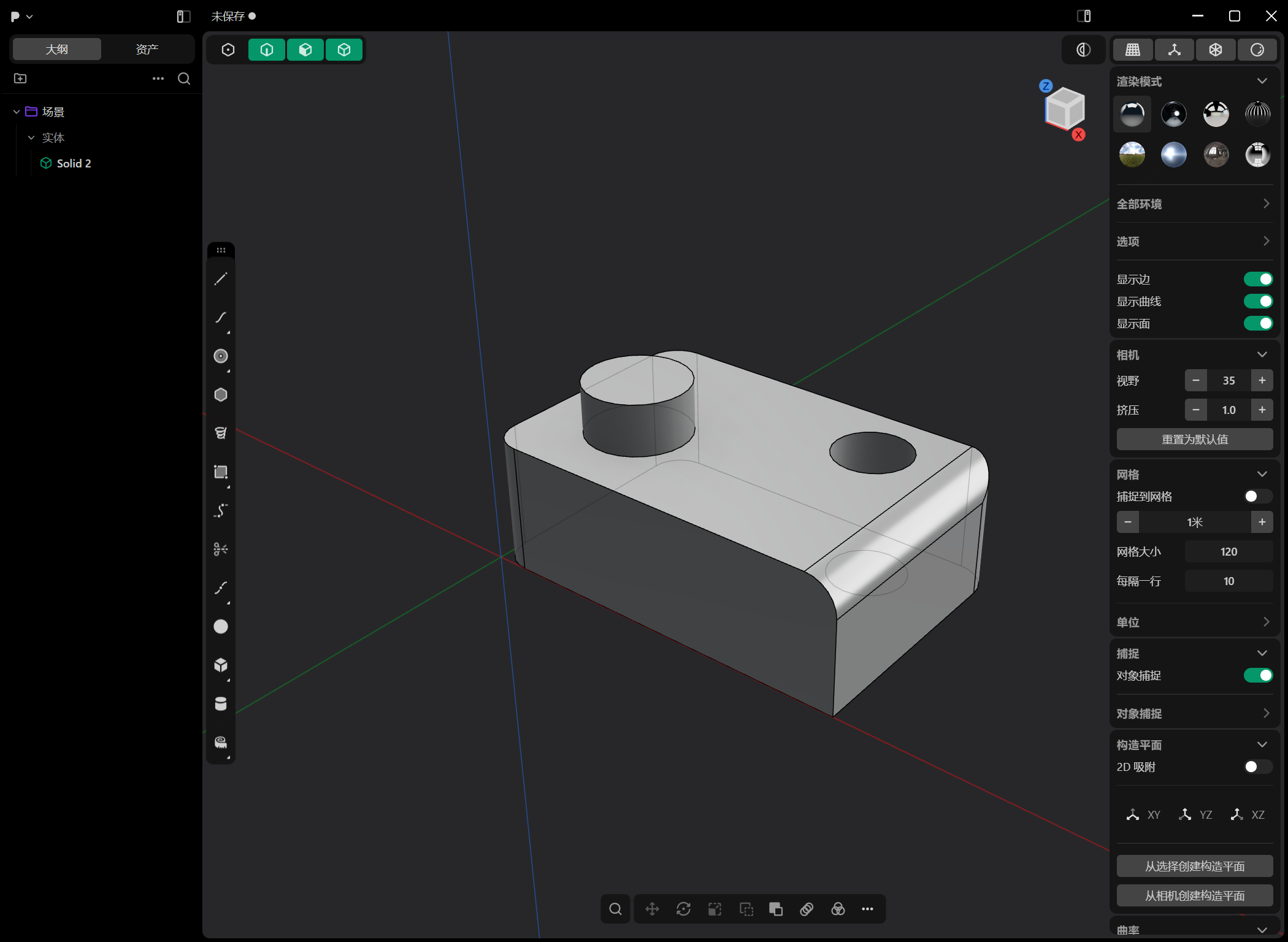
一句话示例:「做一个 60×40×20 的板,右后方开 Ø12 通孔,左前方加 Ø16×8 凸台,四角 R5,导 STEP」 —— AI 会依次调用 create / boolean / fillet / export,并在需要时截图确认。
工具一览(16 个)
| 工具 | 作用 |
|---|---|
plasticity_status |
连接状态 + 场景摘要(先调它) |
plasticity_launch |
带回环调试端口启动 Plasticity(isolated:true 临时实例 / false 驱动你自己的窗口) |
plasticity_scene |
场景快照:body / bbox(mm) / face & edge id(含拓扑摘要) |
plasticity_measure |
原生 B-rep 测量:体积 mm³、表面积 mm²、包围盒、native 校验码 |
plasticity_create |
box / cylinder / sphere |
plasticity_extrude |
面拉伸(bodyId+faceIds)或闭合轮廓拉伸(pointsMm → 原生 region) |
plasticity_boolean |
union / difference / intersection(可 keepTools) |
plasticity_fillet |
圆角 / 倒角(chamfer=true) |
plasticity_transform |
平移 / 绕轴旋转 / 缩放 |
plasticity_delete |
删除 body(可 Undo) |
plasticity_history |
undo / redo |
plasticity_export |
STEP / STL / 3MF / OBJ |
plasticity_view |
相机预设 / 显式 from-target / 按包围盒自动取景 |
plasticity_screenshot |
视口 PNG(先关掉半开的工具弹窗再截) |
plasticity_shutdown |
关掉插件启动的实例并断开桥 |
plasticity_script |
在 renderer 执行 JS 的 escape hatch |
参数与返回结构见 docs/TOOLS.md;实现原理见 docs/ARCHITECTURE.md。
单位与坐标约定
- 工具边界一律 mm / 度;Plasticity 内部是米(页面端
toM()换算)。 box:originMm是角点,sizeMm是三边长度。cylinder:centerMm是底面圆心,heightMm沿axis(默认 +Z)。sphere:centerMm是球心。extrude轮廓模式:点在 XY 平面(planeZMm指定高度),自动补成逆时针闭环(Plasticity 只对闭合 CCW loop 生成 region)。plasticity_export相对路径按会话工作区解析;截图落在<workspace>/.dsh-plasticity/shots/。
安全说明
- CDP 只监听 127.0.0.1(回环),不接受外部连接;不要改成
0.0.0.0。 plasticity_script能在 Plasticity 渲染进程执行任意 JS —— 只在你信任的会话里使用。- 插件不会修改 Plasticity 安装目录或注册表;
--inspect-brk只在启动时用于注入回环调试端口。
已知限制
- 版本绑定 26.1.3:Plasticity 升级到 26.2+ 后命令/工厂名可能变化,需要更新
lib/ops.js的候选名表与lib/session.js的 discovery 谓词。 - 体积质心(center of mass)暂未提供:需要 Parasolid kernel 命名空间,本机存在双候选,插件主动绕开。
- 单实例锁:驱动你正在使用的窗口前必须先退出 Plasticity;实验请用
isolated:true。 - 共享恢复文档:Plasticity 把崩溃恢复副本写到固定
%TEMP%\plasticity\backup.production.plasticity(--user-data-dir不覆盖)。isolated:true会使用私有 TEMP + 启动前快照,避免影响你自己的会话。
开发
npm test      # 无需 Plasticity:mock 宿主校验 16 个工具注册、schema、状态工具
npm run pack  # 打 npm 兼容 tarball
npm run verify# 需要本机 Plasticity:起隔离实例跑一遍烟雾(launch/scene/create/measure/export)
目录:
lib/protocol.js   CDP 客户端 + Plasticity 启动器(--inspect-brk、主进程补丁、等 page target)
lib/session.js    Editor 发现、按名字解析 Factory/Vector/Quaternion、bootstrap shim
lib/ops.js        CAD 操作(页面端 JS 体;移植自 community plasticity-mcp, MIT,已适配扁平 store)
lib/index.js      16 个 defineTool + 结果消毒(lossless JSON)+ 串行队列 + 相机/截图/关闭
test/             mock 宿主测试(node:test)
scripts/          pack / verify
docs/             安装、架构、工具参考、故障排查
致谢
渲染进程内的命令/工厂调用模式参考了 MIT 项目 plasticity-mcp, 并按 Windows 版 26.1.3 的扁平 store 与「按名字解析工厂」方案重写。
No comments yet. Be the first to write one.