dsh-swiftUI
A native macOS shell for the DeepSeek Harness (dsh) web UI.
dsh ships its product as a CLI that boots a local HTTP server and serves a SPA front-end. dsh-swiftUI wraps that experience in a native SwiftUI application: it owns the window, the menu, the lifecycle, and (by default) forks dsh web itself. The dsh SPA is rendered inside a WKWebView; the native side stays out of dsh's way.
Pure shell. dsh-swiftUI does not modify dsh, does not bundle dsh, and does not write any dsh client plugin. It talks to dsh the same way a browser does: a single HTTP/WebSocket origin on
127.0.0.1.
This first milestone delivers the main panel only — the WKWebView pointing at the dsh SPA, with a transparent titlebar and a floating status badge. The roadmap for future native panels (Git, file tree, in-process terminal) is captured in docs/ROADMAP.md; that work is intentionally deferred.
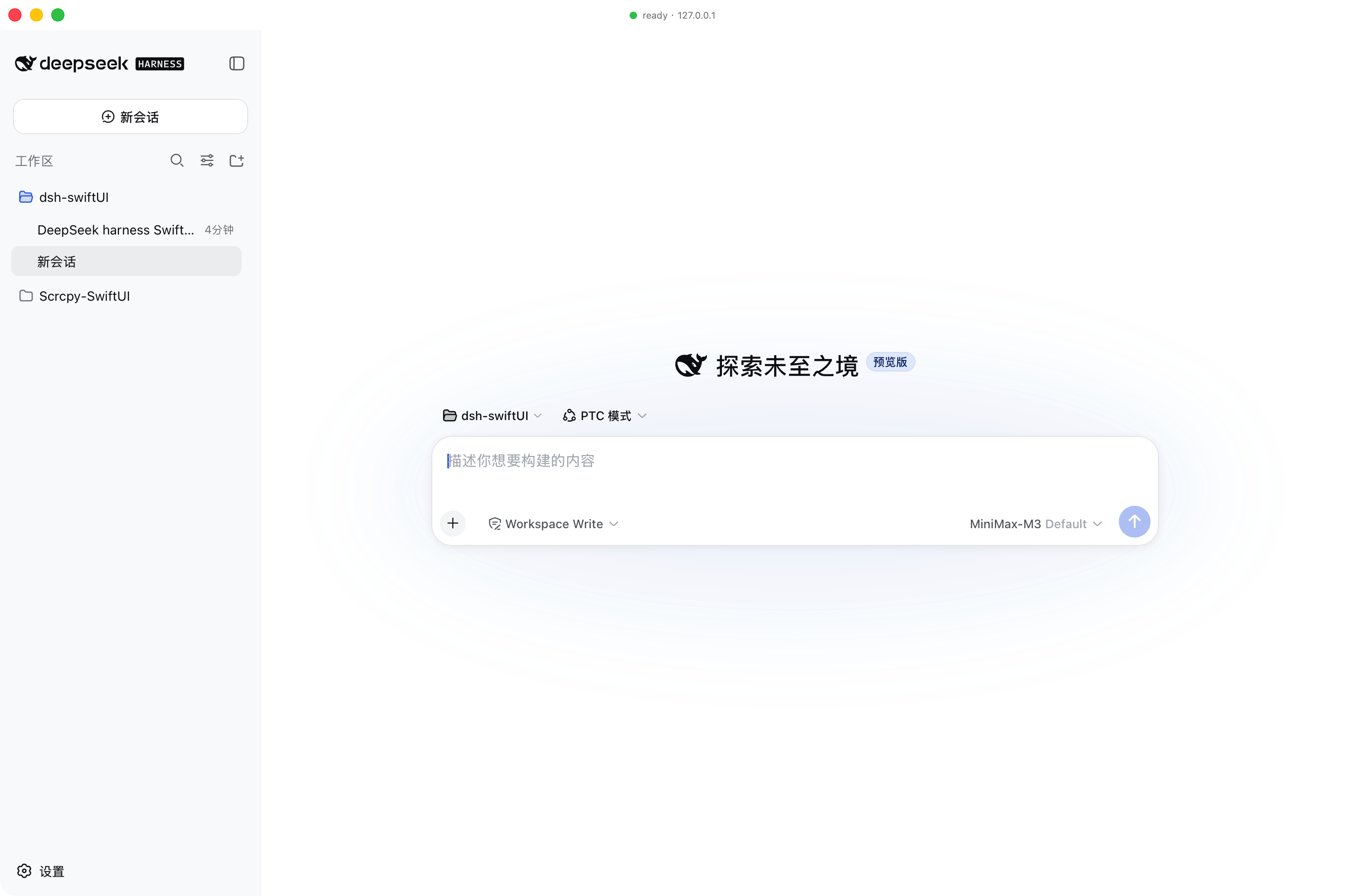
What works
| Stage | State |
|---|---|
| Repository skeleton + docs | ✅ |
| SwiftPM package + Xcode project (XcodeGen-generated) | ✅ |
DSHShellCore framework — process manager, endpoint resolver, health/attach probes, settings store |
✅ |
SwiftUI DSHShell app — AppDelegate-owned AppCoordinator, native window, WKWebView surface |
✅ |
DSHProcessManager — fork dsh web, capture URL, crash-time auto-restart, clean shutdown via kill/waitpid |
✅ |
launchMode == .attach fallback (scan loopback for an existing dsh) |
✅ |
| App icon, transparent titlebar, floating status badge | ✅ |
| Preferences (binary path, listen host/port, trusted hosts, timeouts, auto-restart) | ✅ |
Unit tests for DSHShellCore |
✅ 10/10 |
swift build and xcodebuild both clean |
✅ 0 warnings, 0 errors |
| Git / File tree / Terminal panels | ⏳ Roadmap only |
Requirements
- macOS 15+ (built and tested on macOS 27 with the Xcode-beta SDK)
- Xcode-beta (the bundled Swift 6.4 toolchain is the target compiler)
- A working dsh install —
dsh --versionshould print0.1.0-rc.6or later.
The first launch needs the dsh front-end dist to be built (npm install -g @deepseek-ai/dshpnpm run buildfrom the dsh repo). dsh-swiftUI does not ship the dsh dist.
If you have multiple Xcode versions installed, point the active developer directory at the beta once:
sudo xcode-select -s /Applications/Xcode-beta.app/Contents/Developer
Building
Option A — Xcode
brew install xcodegen              # one-time
./scripts/generate-xcodeproj.sh    # regenerates DSHShell.xcodeproj
open DSHShell.xcodeproj
Then ⌘R. The first build expects a signing identity. For a local-only build, set the team to "None" and enable "Sign to Run Locally"; the project already disables Hardened Runtime because ad-hoc-signed frameworks would otherwise fail dyld library validation (no shared Team ID).
Option B — Swift Package
swift build -c release           # builds DSHShellCore + DSHShell
swift test                       # runs the 10 unit tests
To produce a .app bundle, use the Xcode project (Option A).
Configuration
Settings live at ~/Library/Application Support/dsh-swiftUI/settings.json. Defaults:
{
  "dshBinaryPath": "/Users/djx/.npm-global/bin/dsh",
  "launchMode": "spawn",
  "listenHost": "127.0.0.1",
  "preferredPort": 34247,
  "trustedHosts": ["127.0.0.1", "localhost"],
  "pollIntervalSeconds": 0.5,
  "spawnTimeoutSeconds": 60,
  "autoRestartOnCrash": true
}
| Field | Meaning |
|---|---|
dshBinaryPath |
Absolute path to the dsh executable. |
launchMode |
spawn → fork dsh web ourselves; attach → only connect to an already-running instance. |
listenHost |
Local host passed to dsh web --host. 0.0.0.0 is not supported (mirrors dsh's own policy). |
preferredPort |
Fixed port forwarded to dsh web --port. A fixed port lets the shell adopt the endpoint by probing when the URL line is late, and lets it reclaim the port from orphaned instances. 0 → OS-assigned (URL-line-only startup). |
trustedHosts |
Hosts appended to dsh web --trusted-host (repeatable). |
spawnTimeoutSeconds |
How long to wait for the dsh web: URL line on stdout before probing the fixed port as a fallback. |
autoRestartOnCrash |
One-shot exponential back-off restart on unexpected child exit. |
The shell forwards no working directory to dsh web — the dsh SPA picks its own workspace inside the browser UI.
Lifecycle
+-----------+   fork    +----------+    http   +-----------+
| DSHShell  | --------▶ | dsh web  | --------▶ | WKWebView |
| (macOS)   |           | (child)  |           |  + SPA    |
+-----------+           +----------+           +-----------+
       │                      │
       │  ⌘Q / terminate    │  crash
       ▼                      ▼
   kill+waitpid         respawn w/ backoff
- On launch the app forks
dsh web, captures thedsh web: http://127.0.0.1:NNNN/line, and points theWKWebViewat it. - If the child crashes, the manager schedules a single automatic restart with exponential back-off (capped at 30s).
- On
applicationWillTerminatetheAppDelegatecallsAppCoordinator.shutdownBlocking(): it signals the child withSIGTERM, escalates toSIGKILLafter 5s, and useswaitpidto confirm the child has reaped before the process exits. This is the path that prevents orphan dsh processes — a SwiftTaskwould not have run in time during runtime teardown.
Diagnostics
Lifecycle events flow through OSLog with subsystem ai.deepseek.dsh-shell. To see them:
log stream --predicate 'subsystem == "ai.deepseek.dsh-shell"' --info --debug
Or read the last minute:
log show --predicate 'subsystem == "ai.deepseek.dsh-shell"' --last 1m --info --debug
If a launch fails with EADDRINUSE, a previous dsh web is still bound to a port. The error message tells you to run pkill -f 'dsh web'.
Architecture
See docs/ARCHITECTURE.md for the layered view, the dsh integration boundary, the process model, and the App Sandbox stance. The roadmap for native panels lives in docs/ROADMAP.md.
License
MIT. See LICENSE.
No comments yet. Be the first to write one.