team-flowise
English | 中文
A multi-agent team plugin for DeepSeek Harness. Define roles, wire them into a node graph, run it — and watch it work.
One agent is fine until the job has parts. Then you want a planner, a coder, a reviewer, and someone to check the numbers. This gives you those, runs them in dependency order, lets a reviewer send work back, and shows you which step is stuck.
- Roles are records. Name, persona, model route, tool preset, timeout. Create them in Settings, or from a conversation with
team_create_agent. - The graph decides the order. Nodes declare
dependsOn; everything that is ready runs in the same wave, in parallel. - Review is a gate, not a suggestion. A node can name its own reviewer. Blocking findings go back to the worker verbatim, and rework is bounded — two rounds per node, three per run.
- Runs stick around. Roles, workflows, the task ledger and run history live in four durable storage domains. A run cut off by a crash comes back marked interrupted rather than quietly repainted as finished.
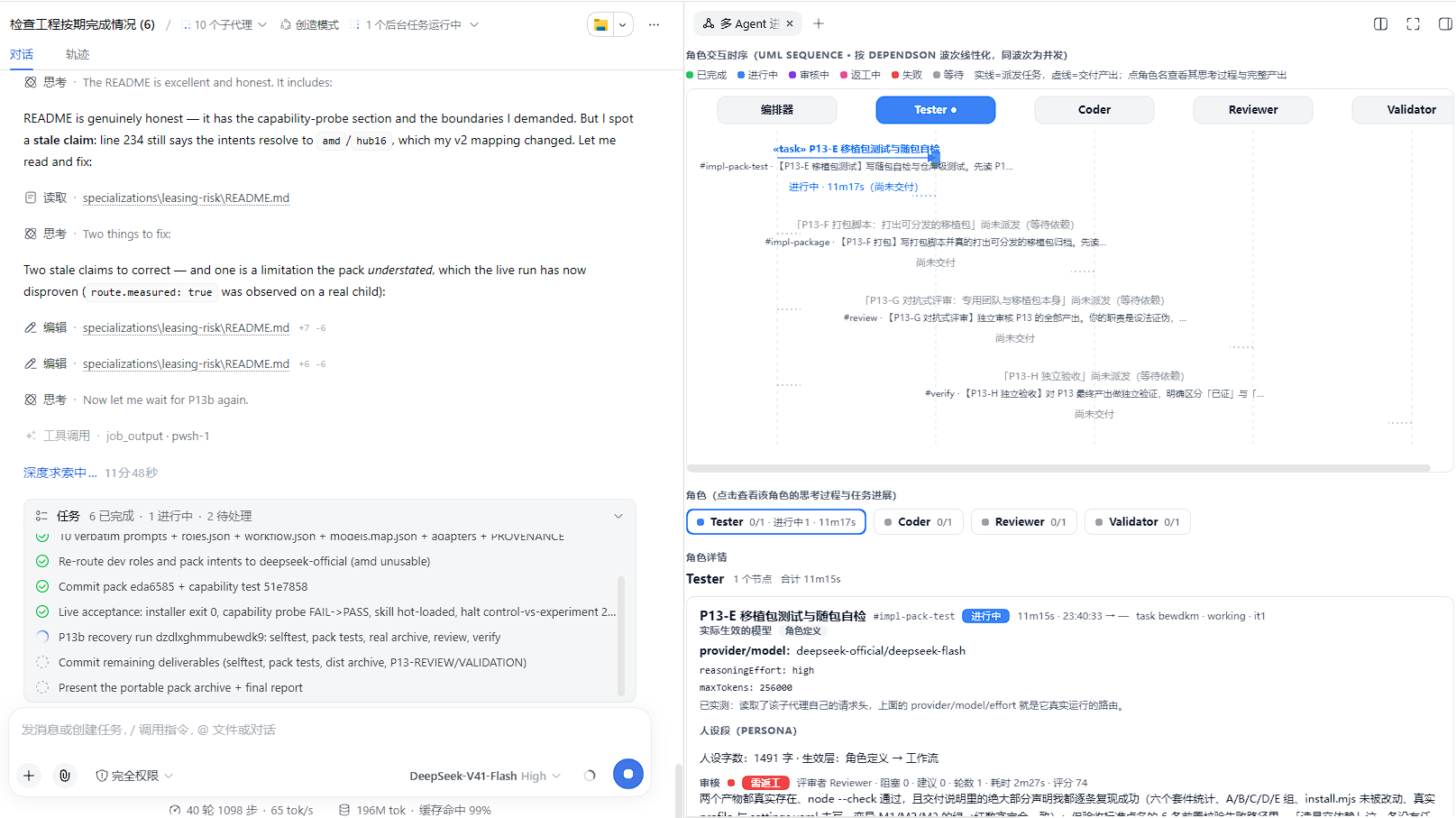
- You can watch it. The right sidebar carries the graph, each role's progress, and — for the node you select — the model, reasoning effort, output cap and persona it actually ran with, plus the reviewer's verdict.
Seven team_* tools drive all of it from the chat: team_create_agent, team_create_workflow, team_create_task, team_run_workflow, team_delegate_agent, team_list_agents, team_task_status.
Screenshots
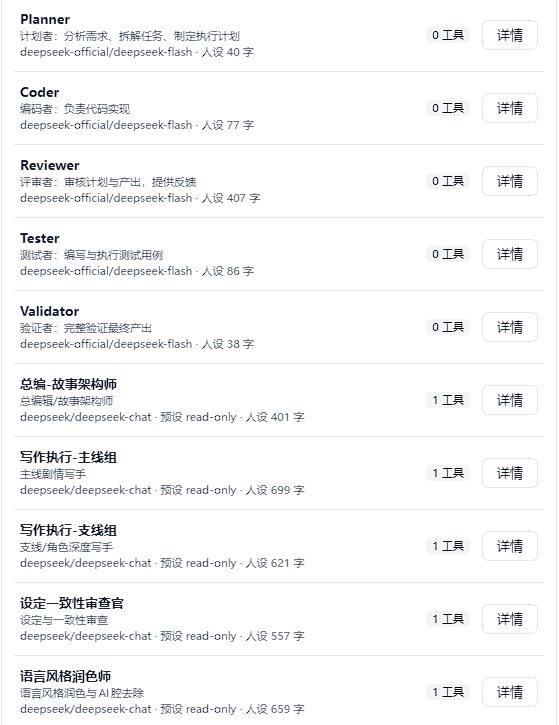
Roles. Every stored role, with the model route it will run under.
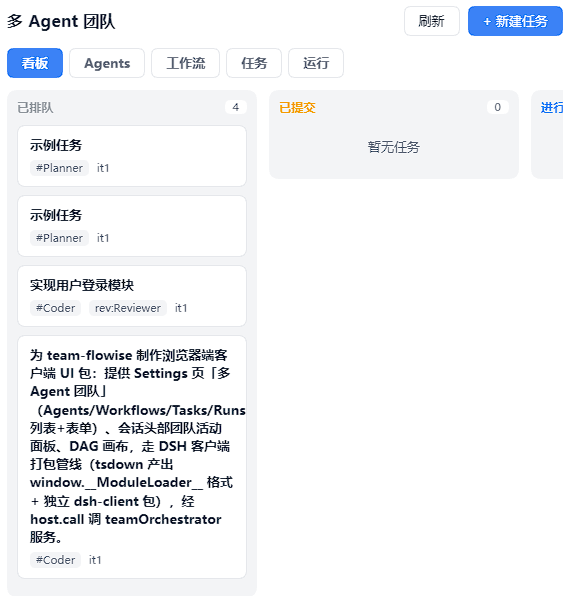
Task board. Each node of a run becomes one ledger task, so the board is the run's state. it1 means first attempt.
Run progress. The graph and its waves, each role's progress, and what the selected node actually ran with. The run below is this plugin building its own UI.
Install
You need DeepSeek Harness, and a profile that composes a web app — web is the usual one.
dsh plugin --profile web add "git+https://github.com/Drkoh-wz/team-craft.git#path:packages/team-flowise"
There is no build step, and nothing to approve.
Built and verified against DeepSeek Harness 0.1.5-rc.1, with the @deepseek-ai/* packages at 0.1.5-rc.2, on Node 24. That is the combination this release was tested on end to end, and what engines.dsh and the peer ranges in packages/team-flowise/package.json are written for. If a harness update ever leaves the plugin unmounted — the row never activates, or the team_* tools stop appearing — compare against those numbers before anything else.
Install into a profile that has a web app, so you actually get the UI. (The plugin mounts in a bare profile too; you just get no browser half.)
Now restart dsh. Host code and the client bundle are both read at startup, so nothing is live until you do.
Installing from a clone insteadThe repository's own installer additionally drops the agent-facing skill into a skill root, and needs no network:
git clone https://github.com/Drkoh-wz/team-craft.git
cd team-craft
node scripts/install.mjs
It is idempotent, it backs up every file it rewrites, and --help lists the rest:
node scripts/install.mjs --check           # exit 0 = installed and consistent, 3 = drifted
node scripts/install.mjs --dry-run         # show the planned changes, write nothing
node scripts/install.mjs --profile <dir>   # a different profile
node scripts/install.mjs --skill-root none # skip the skill
Did it work?
In this order. Do not trust the browser cache.
| # | Check | Expected |
|---|---|---|
| 1 | curl -s http://127.0.0.1:3080/api/team-flowise/ping |
{"ok":true,"pong":true,"domains":[…4…]} |
| 2 | A new agent session's tool list | the seven team_* tools |
| 3 | Settings | a team-flowise section: roles, workflows, runs |
| 4 | Right sidebar | a 多 Agent 进度 tab |
A 404 on 1 means it is not mounted — the host log says why, and a duplicate flowise-team row is the usual answer. If 1 works but 2 or 3 does not, it mounted and contributed nothing; the log will say that too.
Uninstall
dsh plugin --profile web remove @local/team-flowise
Or, from a clone, node scripts/uninstall.mjs — which also takes the skill back out with --remove-skill, and leaves everything it did not write alone.
Restart dsh afterwards, for the same reason as before.
How it works
Host half — packages/team-flowise/src/index.js |
Registers the team_* tools, publishes the teamOrchestrator service, owns the four storage domains, serves /api/team-flowise/*. |
Client half — packages/team-flowise/src/client/index.js |
The Settings section, the sidebar entry, the progress page. |
Skill — skills/team-flowise/SKILL.md |
Tells an agent when this is worth reaching for. |
A node is dispatched as a worker subagent carrying the persona, model route and tool preset its role declares. When it reports back, the node's reviewer is asked for a verdict, and blocking findings become the next round's feedback. A reviewer that cannot produce a readable verdict is recorded as an error — and an error never counts as a pass.
Repo layout
| Path | What it is |
|---|---|
packages/team-flowise/ |
The plugin: host half, client half, its patch layer |
skills/team-flowise/ |
The skill |
scripts/install.mjs, scripts/uninstall.mjs |
The clone-path installer and its inverse |
deploy/ |
How the plugin is wired into a profile, plus a portable profile snapshot |
specializations/leasing-risk/ |
A ready-made ten-role team for lessee repayment-risk assessment |
validation/ |
The test suites |
Contributing
- The host half is plain ESM JavaScript. The client half uses
React.createElementand has to keep thewindow.__ModuleLoader__.load({ id, factory })shape. Neither half may add a runtime dependency. deploy/web-profile/package.jsonis a portable template — its dependency path is relative to itself. Do not hand-edit a live profile; run the installer.node validation/preflight-install.mjsis the release gate: it installs the package every published way into throwaway profiles, then boots one and drives its whole HTTP surface. It needs network access and starts a temporary host on a free port.
License
MIT — see LICENSE.
No comments yet. Be the first to write one.