
dsh-prompt-customizer
DeepSeek Harness 的系统提示词与工具目录定制器。
按名称屏蔽 / 替换 / 注入 / 排序提示词段,按会话阶段与 agent 预设分层 —— 全部在侧边栏的独立「提示词管理」面板里完成。
English · 简体中文
安装 • 功能特性 • 使用说明 • 工作原理 • 已知限制






⭐ GitHub 仓库:DreamsTOF/dsh-prompt-customizer —— 觉得有用就点个 Star;问题与需求请提 Issue

一个 DeepSeek Harness (dsh) 插件,让你在侧边栏的独立面板里控制系统提示词和工具目录(仿宿主能力管理页:顶部 agent 预设 Tab、左栏勾选列表 + 底部三态过滤、右栏实时预览)。
其他插件注入的提示词段可能污染你的系统提示词。本插件让你按名称屏蔽、替换、注入、排序提示词段,并把工具从模型可见目录里隐藏 —— 全程实时生效,不需要改动任何其他插件。
两件事贯穿整个设计:
- 按会话阶段分层:引导期(未晋级)/ 常驻期(晋级后)/ 压缩受控期(压缩后仍未晋级)各有独立的屏蔽名单、独立的排序空间、独立的工具目录。同一个预设可以做到首轮只给模型 1 个工具和几段提示词,晋级后放开全套。
- 按 agent 预设分层:顶部预设 Tab 选「全部 Agent」改的是默认值;选中某个 agent 预设后,改动只对该预设生效(字段级覆盖,未设置的字段继续回落全局)。
会话阶段怎么流转
阶段不是固定三拍,而是由持久会话事件推导出来的:首个 durable 的 tool/call 或
assistant/message 触发晋级,一次 compaction/end 把晋级复位。面板上三个阶段部分
就分别对应这三种状态。
① 会话开始bootstrap引导期 |
→ | ② 首个 durable 信号tool/call · assistant/message常驻期 active |
→ | ③ 一次压缩compaction/end压缩受控期 compaction |
| ④ 压缩后再来一个 durable 信号 → 回到常驻期;只要再来一次压缩,又会落回压缩受控期 |
完整的转移关系(引导期也能不经常驻期直接进压缩受控期):
| 当前阶段 | 事件 | 去向 |
|---|---|---|
| 引导期 | 首个 durable tool/call / assistant/message |
常驻期 |
| 引导期 | compaction/end |
压缩受控期 |
| 常驻期 | compaction/end(晋级复位) |
压缩受控期 |
| 压缩受控期 | 压缩之后新的 durable 信号 | 常驻期 |
| 任意 | 子代理会话(delegationDepth > 0) |
恒为常驻期 |
| 任意 | 无会话的读取(清单、预览) | 恒为常驻期 |
每个阶段各解析出什么 —— 面板的三个部分与配置字段一一对应:
| 面板里的部分 | 生效的段屏蔽 | 注入段的 phase |
生效的工具黑名单 |
|---|---|---|---|
| 引导期提示词 / 引导期工具 | sectionsBootstrap |
bootstrap(+ always) |
tools.bootstrap.exclude,未配置则回落静态 |
| 常驻期提示词 / 常驻期工具 | sections |
active(+ always) |
tools.exclude(静态) |
| 压缩受控期提示词 / 工具 | sectionsCompaction |
compaction(+ always) |
tools.compaction.exclude,未配置则回落引导期,再回落静态 |
两点容易踩:
always注入段三个阶段都在,且各阶段的排序空间独立 —— 所以本插件产出的阶段条目排在always组之后(运行时按数组序后写覆盖前写,阶段序才压得住全局序)。- 阶段视图是"这个状态会解析成什么",不是"会话曾经是什么"。预设原生的阶段规则(zero-tool bootstrap、warmup 等)在同一时刻也在生效,并且可能在其它插件之后改动结果 —— 见已知限制。
界面
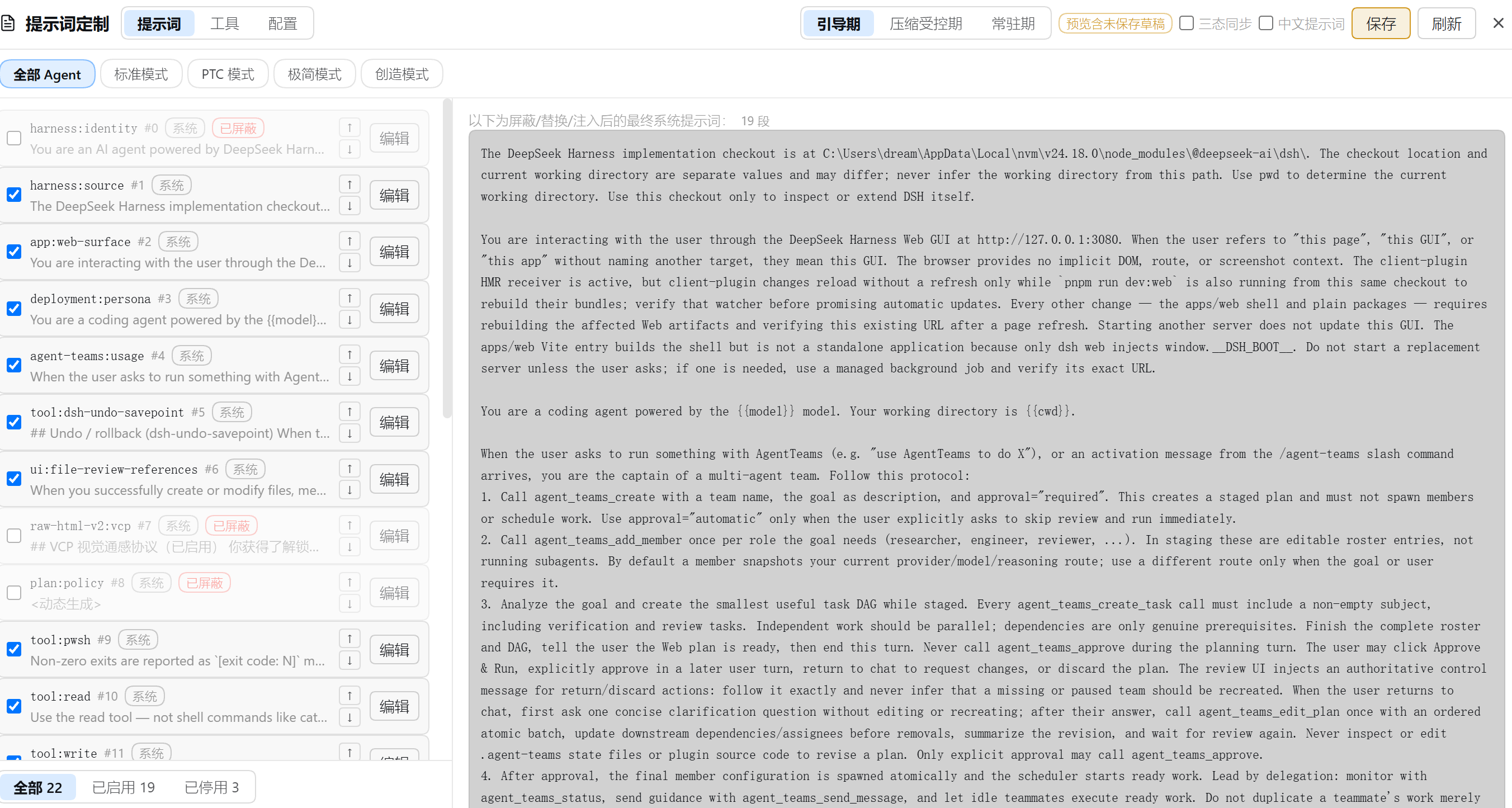
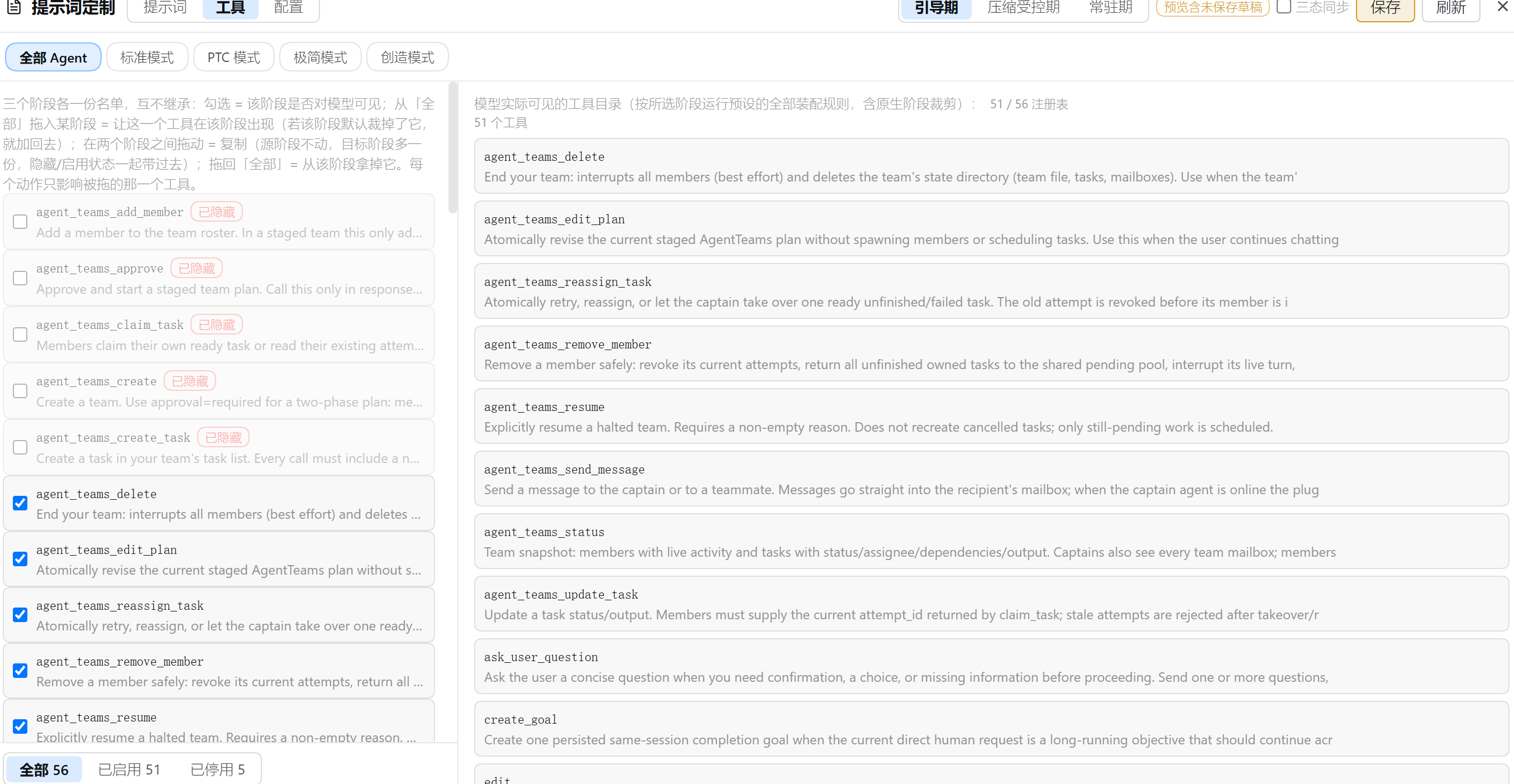
两张图覆盖全部功能 —— 侧边栏点 提示词定制 打开独立面板,头部是模式切换(提示词 / 工具 / 配置)+ 阶段 Tab(引导期 / 压缩受控期 / 常驻期,左右两栏联动)+ 三态同步与中文提示词开关;第二行是 agent 预设 Tab(「全部 Agent」+ 各预设)。
提示词模式:左栏当前阶段的勾选列表(屏蔽 / 替换 / 注入 / 排序,底部三态过滤),右栏实时预览装配后的最终系统提示词:
工具模式:左栏该阶段的工具目录勾选列表,「本系统全部工具」池可把注册表里仍有的工具加回该阶段;右栏是模型可见目录(含「模型可见 / 注册表总数」对照):
功能特性
提示词段
- 屏蔽:按名称从装配结果里移除该段。被屏蔽的行不会消失,仍可编辑、恢复 —— 屏蔽只意味着不注入模型。
- 替换:编辑该段文本,编辑框预填当前生效文本(动态段会尽力解析出真实内容再回显)。
- 注入:每个阶段里「+ 注入」展开表单,按名称 + 文本新建一段,带
手动徽标,随时可删除。 - 排序:行内 ↑/↓ 箭头。顺序以 0 起始的连续虚拟下标存储,不会出现重复或小数 order,也不需要手填数字。
- 每阶段独立:引导期屏蔽写
sectionsBootstrap,压缩受控期写sectionsCompaction,常驻期写sections;三份名单互不继承、互不影响,排序空间也互不干扰,因此「引导期只留 5 段、常驻期全开」可以分别表达 —— 在一个阶段屏蔽 / 恢复某段,绝不会改变它在其它阶段的状态。从「本系统全部提示词」池把段加入当前阶段即成为当前阶段的独立副本(带原文写入本阶段注入条目)。 - 强制覆盖(
forceSections,默认开):包装宿主的装配入口,最终提示词段直接从注册表原始段重建 —— 预设插件自身的阶段裁段(如 liangshen 引导期 20→1)与 persona 的complete: true整段接管都无法再改写本插件的屏蔽 / 替换 / 注入 / 排序结果;工具目录与动态上下文保持预设与宿主行为。设为false退回瀑布流内过滤(此时完整段接管仍会压制段级定制)。 - 中文提示词开关(面板头部工具栏,刷新按钮旁):开启 = 把名字对得上内置译本(
lib/zh/,全池 25 段中可静态翻译的 24 段)的段一次性覆盖为中文;关闭 = 清掉这些段的替换文本,回归英文原文。两个方向都写入编辑草稿,与手动编辑同一条保存路径;开关状态从配置探测,不新增字段。自定义段与对不上名字的段不受影响,段数与注入不增不减。{{...}}提示词变量(如 persona 的{{model}}/{{cwd}})、机器路径与代码块逐字保留;tools:sdk只替换前导散文,TS 代码块取自原文。 - 三态同步(头部开关,默认关):开启后提示词 / 工具两栏的屏蔽与解除屏蔽(含工具加回)对三个阶段一起生效,只作用于同名的那一项 —— 想让一段提示词 / 一个工具在三个阶段同时开或关时不用点三遍。
工具目录
- 勾选 = 该阶段对模型可见(
exclude):取消勾选即在该阶段隐藏这个工具,勾回来就恢复,被隐藏的行半透明原位保留。没有白名单模式 —— 它会让exclude整体失效,一次勾选就能悄悄关掉该阶段其它所有工具,而表达能力并不比反选更多。 - 「加回」名单(
add):被该阶段裁掉、但注册表里仍有的工具,可从「本系统全部工具」池加入该阶段 —— 装配时在过滤之后从注册表查回 schema 追加(exclude优先:同一名字两边都在 = 隐藏)。注册表里根本没有的工具(别的预设独有)加不进来,界面会明确说明。 - 阶段目录:引导期与压缩受控期各有独立的 exclude / add 名单,运行时优先级为 压缩受控期 > 引导期 > 静态 —— 压缩后仍未晋级且配了压缩目录就用它,否则未晋级时用引导目录,其余情况用静态过滤。
- 扩充的天花板是注册表:只能把注册表里已有的工具加回某个阶段;要让一个全新工具出现,得改预设的组成,不是这里。
- 只影响面向模型的目录;工具本身与路由照常工作。
模型视角预览
预览常驻面板右栏:提示词模式看最终系统提示词,工具模式看模型可见目录(右栏可切提示词 / 工具子视图),随头部阶段 Tab 联动切换。它展示经过所有插件过滤后的最终装配结果,所见即模型所见。工具视图给出「模型可见 / 注册表总数」的对照 —— PTC、Code Mode 这类预设会把整套目录包装成单个 run_code,只看注册表会误判。
提示词变量
宿主只注册 provider / model / cwd 三个变量,段文本里引用别的 {{name}} 会直接让整次装配失败。本插件经官方扩展点追加两类变量:
- 内置系统事实:
date/time/datetime/weekday/hostname/platform/arch/username/home/shell/locale/node_version,每次装配现算。 - 全量环境变量:
process.env的每个键映射为env_<小写,非法字符归并为 _>,如PATH→{{env_path}}、USER.NAME→{{env_user_name}}。
黑名单(envBlocklist):env 里常有密钥,进了提示词就会随请求发给模型,所以命中黑名单的键不注册。预填条目覆盖常见凭据类键(含 SECRET / TOKEN / PASSWORD / API_KEY / *_DSN 等),条目支持 * 通配、大小写不敏感;面板的环境变量黑名单卡片可随时增删,卡里的折叠列表给出当前实际注册的变量清单。黑名单变化在下次装配生效(面板改动或直接改 config.yaml 都一样)。
导出 / 导入随行:导出预设时当前黑名单随行写入文件;导入端按并集并入(只增不减),与快照库语义一致。
严格渲染的代价:段里引用了一个未注册的名字(如被黑名单挡下的键),整段装配失败而不是留空 —— 面板清单里没列出的名字不要用。
配置快照与 agent 预设
- 保存当前配置:把当前作用域的完整定制(含每阶段屏蔽名单、每阶段排序、阶段工具目录)存成一份可复用的配置快照。
- 应用:同名段被覆盖、快照名单之外的当前段被默认屏蔽;快照里当前系统匹配不上的段默认跳过(跨系统导入不凭空建段),快照里没有的阶段字段保留你当前的值,不会被抹掉。同一时间只有一份在用。
- 导出 / 导入:配置快照以 JSON 往返(Tauri 桌面走原生对话框,Web 走下载 / 文件选择),同名预设会被跳过。顺序以相对形式存储(每段记住它跟随谁),快照因此可跨不同段集合移植。
- 存为 agent 预设:整体复制当前编辑目标的预设目录(组成文件、伴生脚本、技能目录一并带走)到用户预设根,再把当前定制写进它的覆盖项。新预设随即出现在头部预设 Tab 里 —— 它是一个真正可切换的 agent 预设,而不只是一份配置副本。
跨预设的注册表池
「本系统全部提示词 / 本系统全部工具」不随编辑目标切换:它是一个跨预设、只增不减的并集(同名后见到者赢,新名追加),随你浏览各预设逐步长齐,存放在 catalog.yaml 这个派生缓存里,删掉会自行重建。
工作原理
一次改动从面板到模型的完整链路:
| ① 侧边栏面板 左栏勾选列表 / 右栏预览 只改内存草稿 |
→ | ② 插件自有路由/config · /config/apply/preview · /inventory · /presets |
→ | ③ config.yaml 全局字段 + overrides[预设]mtime 懒加载,手改即时生效 |
→ | ④ 装配瀑布流system-prompt/assemble 钩子按会话推导阶段,解析出生效配置并过滤 |
④ 内部依次是:mergeConfig(全局, overrides[会话所属预设]) → 段:屏蔽 → 替换 → 注入 → 按 order 排序;工具:pickToolsFilter(压缩 > 引导 > 静态)→ applyToolFilter |
||||||
⑤ 交卷前还有一手:宿主在瀑布流之后,若存在 complete: true 的段就把整份 sections 还原成那一条 —— 这就是面板会对这类预设亮黄标的原因(工具目录不受影响;forceSections 开启时本插件已在装配入口重建 sections,接管被绕过,不再亮黄标)
|
||||||
| ⑥ 模型收到:最终系统提示词 + 可见工具目录;右栏预览读的就是这一份结果 |
代码地图:
| 路径 | 作用 |
|---|---|
lib/index.js |
宿主端:装配钩子、五条 HTTP 路由、agent 预设 fork、遗留字段一次性清理 |
lib/effective.js |
纯函数:字段级 override 合并、阶段选取(注入段 / 工具目录)、黑名单过滤 |
lib/promotion.js |
由 durable 事件推导 {promoted, boundary},压缩复位、子代理恒已晋级 |
lib/vars.js |
提示词变量:内置系统事实 + env 全量映射 / 黑名单,装配入口按签名懒同步 |
lib/sectionOps.mjs |
面板与单测共用的阶段状态纯函数(名单写回目标、注入身份、重排、逐阶段持久化) |
lib/store.js / lib/catalog.js |
原子写 + last-good 回落的配置存储;跨预设段/工具累积登记表 |
src/client/ |
面板(React,无 JSX 语法糖依赖,h() 直写),构建进 client/client.js |
关键约定:阶段逻辑只有一份实现 —— lib/sectionOps.mjs 既被 tsdown 打进浏览器包,也被
node --test 直接 import 跑单测,所以「测试通过」和「界面行为」之间不存在第二套代码。
安装
dsh plugin --profile web add dsh-prompt-customizer
也可从本地检出安装:
dsh plugin --profile web add /path/to/dsh-prompt-customizer
安装后打开 dsh Web UI,侧边栏浏览区上方就是 提示词 入口(点击打开覆盖主区的「提示词管理」面板)。
使用说明
侧边栏浏览区上方点 提示词定制,打开覆盖主区的独立面板。头部:模式切换(提示词 / 工具 / 配置)、阶段 Tab(引导期 / 压缩受控期 / 常驻期 —— 左栏列表与右栏预览联动切换同一个阶段)、三态同步与中文提示词开关、保存 / 刷新 / 关闭;第二行是 agent 预设 Tab:「全部 Agent」改的是默认值,选中某个预设后改动只对该预设生效。
提示词模式
左栏列出当前阶段的段:
- 勾选框:该阶段是否注入模型(
未屏蔽/已屏蔽徽标);被停用的行半透明原位保留,随时勾回 - 编辑:按阶段替换该段文本,替换过的行带
已替换徽标与「还原」按钮 - ↑/↓:调整该阶段内的顺序;
#N是它当前的虚拟下标 系统/手动徽标标明段的来源,只有手动段可以删除- 「+ 注入」:展开表单按名称 + 文本新建一段(阶段锁定为当前 Tab)
- 底部三态过滤:全部 / 已启用 / 已停用,只统计当前阶段
「本系统全部提示词」只读池收在列表末尾的折叠区,每行三个小按钮把该段加入对应阶段。右栏实时预览当前阶段装配后的最终系统提示词 —— 编辑草稿的效果同步呈现,面板会标注「预览尚未保存草稿」。
工具模式
左栏列出该阶段进入过滤的目录 ∪ 你加回的工具:勾选 = 该阶段对模型可见,取消 = 在该阶段隐藏。「本系统全部工具」池收在折叠区,每行三个小按钮把该工具加入对应阶段。想看模型真正拿到几个工具,看右栏预览的「模型可见 / 注册表总数」对照。
配置模式
左栏是配置快照库(保存当前配置 / 导入 / 应用 / 导出 / 删除,正在使用的那份带「使用中」标记);右栏是存为 agent 预设(整体 fork 当前编辑目标的预设目录并写入当前定制)与全局设置:强制覆盖开关、环境变量黑名单(增删条目、查看当前实际注册的变量清单)、提示词变量参考、恢复初始状态(清空全部定制并关闭 forceSections,与卸载插件等效,无需重启,点击需二次确认)。
编辑目标与保存
预设 Tab 决定改动落在哪。提示词与工具模式共享同一份未保存草稿,保存按钮一次落盘;切到配置模式或切换编辑目标会丢弃草稿(脏草稿先弹确认)。也就是说:写坏的东西不点保存就不会进文件。
配置存放位置
~/.dsh/prompt-customizer/config.yaml—— 唯一权威配置。首次启动时若该文件不存在而旧版settings.yaml里有对应段落,会自动迁移一次(主文档原样保留,可回滚)。手工编辑即时生效,无需重启。~/.dsh/prompt-customizer/catalog.yaml—— 跨预设的段 / 工具累积登记表,纯派生缓存,删掉会随浏览重建。
已知限制
下面都是实测结论。面板在相关情况下会直接给出黄色警示,不需要你猜:
- 有些预设的提示词不由段组成。 若某个段以
complete: true注册(dsh-persona 的「整段接管」),宿主会在装配瀑布流之后把整份 sections 还原成那一条段。forceSections(默认开)已在装配入口绕开该机制,段级定制照常生效;只有把它设为false时,本插件的屏蔽 / 替换 / 注入 / 排序才会对这类预设无效(工具过滤不受影响),面板会写明「最终系统提示词由deployment:persona段整段接管」。 - 丢弃段的原因不止一种。除了
complete接管,也存在预设用自己的规则在特定阶段裁段(实测某预设引导期 20 段 → 1 段,而注册表里并没有 complete 段)。所以面板还做了一次机制无关的比对:把本插件产出的段名与最终装配逐名核对,不符时提示「产出 N 段,模型只见 M 段」。 - 预览的伪会话可能降级。阶段视图由一次合成会话驱动,个别预设插件会在这种会话上抛错;此时该阶段回退为无会话装配并标注「已降级」,即那个阶段看到的是不带原生阶段裁剪的结果。
- 替换动态生成的段会固定其内容。像
app:web-surface这类段在装配时实时生成(嵌入当前 Web 端口等)。替换后文本冻结为你编辑时的值,不再跟随运行时变化;想保持跟随请改用屏蔽。 - 动态段文本解析是尽力而为。面板读取动态段时会尝试调用其生成函数(只传最小上下文)来回显真实内容;依赖更复杂上下文、一调就抛的段会显示
<动态生成>,其余功能不受影响。另外,带{{model}}/{{cwd}}之类变量的段在列表里显示的是未替换的模板,右栏预览里才是替换后的最终文本。 - 导出依赖宿主允许下载。Web 回退走浏览器下载:若宿主 webview 静默丢弃下载,面板仍会提示「导出成功」而文件没有落地。导入(文件选择)不受影响。
- 工具目录的扩充以注册表为天花板,见前文「扩充的天花板是注册表」。
开发
npm install
npm run check   # typecheck + build + 全量单测
浏览器端用 tsdown 打包成 client/client.js(__ModuleLoader__ factory bundle),宿主端代码在 lib/。阶段状态逻辑集中在 lib/sectionOps.mjs:同一份纯函数既被 UI 打包使用,也被 node --test 直接覆盖,测试即上线代码。
License
MIT © 2026 DreamsTOF
Star History
⭐ 如果这个插件让你的系统提示词更干净、工具目录更听话,就给它一个 star 吧!
No comments yet. Be the first to write one.