dsh-session-delete


English | 中文
A DeepSeek Harness (DSH) plugin that adds a genuinely destructive "Delete session" action to the sidebar session row. After you confirm, it removes that session — and every subagent session spawned from it — from disk: the log directory, the projection cache, and the workspace accounting. Not just hidden from the list.
DSH's built-in "Archive" merely moves a session out of view; the records under ~/.dsh/sessions/ stay exactly where they were. When you actually want a session gone locally, this is the missing action.
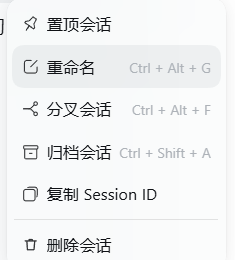
Table of contents
- What it deletes
- What it deliberately leaves alone
- Install
- Usage
- CLI
- How it works
- Compatibility
- Troubleshooting
- Development
- License
What it deletes
A single delete touches exactly three places, all inside $DSH_HOME (defaults to ~/.dsh):
| Location | Contents |
|---|---|
sessions/<project-key>/<session-segment>/ |
The session log directory, including all subagent sessions — usually just a session.v4.jsonl.zstd |
storages/session_projcache/sessions/<id>.json |
The session's projection cache, both the session- prefixed and unprefixed historical spellings |
storages/workspace.json |
Drops the id from sessionIds, archivedSessionIds, and pinnedSessionIds |
Subagent sessions are discovered through the parentSession field on persistence headers and live session headers — never through the UI's collapse state. The order is load-bearing: stop live work → delete from disk → strip accounting. Reverse it and a running turn writes the state straight back while you are deleting.
What it deliberately leaves alone
- The workspace directory itself and every file in it. Your code, notes, and build artifacts are untouched, byte for byte.
- The
attachments/content-addressed store. One image may be referenced by several sessions; deleting it would break the others. - Any other session's data.
- Workspace records inside
workspace.json. The workspace stays; it just holds one fewer session.
Install
From GitHub (recommended)
Open the Plugins page in the DSH sidebar and install from a Git URL:
https://github.com/DreamStars168/dsh-session-delete.git
Or wire it into your profile package.json directly:
{
  "dependencies": {
    "dsh-session-delete": "github:DreamStars168/dsh-session-delete"
  },
  "dsh": {
    "profile": {
      "bundles": ["@deepseek-ai/dsh-base", "@deepseek-ai/dsh-web-app", "dsh-session-delete"]
    }
  }
}
From a local checkout (development)
git clone https://github.com/DreamStars168/dsh-session-delete.git
cd dsh-session-delete
Then point the profile at the absolute path:
{ "dependencies": { "dsh-session-delete": "file:/absolute/path/to/dsh-session-delete" } }
Making it take effect
- Client side (
client.js): refresh the page.dsh-client-hmrpolls for the change. - Host side (
lib/): wiring changed, so restart DSH.
Usage
- Find the target session in the sidebar.
- Click that row's "…" button, or just right-click the row — right-click opens the very same native menu.
- Choose Delete session.
- Confirm in the dialog.
The new entry sits in its own section after "Copy Session ID".
If you delete the session you are currently viewing, the main view immediately opens a fresh empty session in the same workspace, so the chat pane never sits on a deleted record.
If an individual cleanup step fails (a cache file held open, say), the session is still removed and the UI reports "Session removed, but N item(s) could not be cleaned up". The failing entries are logged to the console so you can chase them one by one.
CLI
For when the host is not running — say you want a session gone before you launch:
# Dry run: list the paths and accounting hits, change nothing
node bin/dsh-session-delete.js session-abc123

# Actually delete (backs up workspace.json to _trash/session-delete-<timestamp>/ first)
node bin/dsh-session-delete.js session-abc123 --apply

# Delete from disk but keep the workspace.json accounting
node bin/dsh-session-delete.js session-abc123 --apply --keep-workspace

# List every session directory on disk
node bin/dsh-session-delete.js --list
Options: --dsh-home <dir> to point at another home, --json for machine-readable output, -h for help.
Dry run is the default, and that matters: every step before --apply is reversible, and nothing after it is.
How it works
The plugin ships two halves, both declared in the dsh field of package.json.
Host half (lib/) registers one named HTTP route, POST /session-delete/api, taking { "op": "delete", "sessionId": "…" }. The delete logic depends on zero official npm packages — every host capability is pulled softly off the Cordis service object, with a plain filesystem fallback. That means it works even when the profile cannot resolve the official node_modules.
The route has two gates at the door: POST only, and same-origin/loopback only (loopback peer, or a localhost Host with an Origin that is absent, null, app:, or same-origin). Everything else gets a 403, so no arbitrary web page can CSRF you into deleting files.
Browser half (client.js) registers a menu item into sidebar.workspaces.session.menu.item and a confirm dialog into shell.overlay. The right-click handler does not build a second copy of the menu — it locates the ellipsis button at the end of that row and synthesizes one click(), letting the host's own Menu component open. Items, shortcuts, separators, and permission checks are all the native ones, so nothing drifts as the host evolves.
client.js                    menu item + confirm dialog + right-click forwarding
  └─ POST /session-delete/api
       └─ lib/server.js      HTTP gates and error mapping
            └─ lib/delete.js stop live work → delete from disk → strip accounting
                 └─ lib/paths.js path encoding (same rules as the official backend)
Compatibility
- Node.js ≥ 18 (uses
node:test,fs.rmSync). - DSH ≥ 0.2.0. The host half hard-depends on
webServeronly;sessionPersistence,sessions,agents, andworkspaceRegistryare all soft-resolved. Missing ones skip their step instead of killing the route. - Works in both the desktop app and the web UI. Desktop requests are recognized via
app:origins.
Path encoding (encodeSegment / projectKey) is a same-rules reimplementation of the identically named functions in the official persistence backend, not an import — that is what lets the plugin compute the same directory without the official node_modules. If a host upgrade changes the naming scheme, the fallback path will compute the wrong directory; prefer the backend's locate() in that case, or open an issue.
Troubleshooting
No "Delete session" in the menu
Confirm the plugin actually loaded: dsh-session-delete should be enabled on the Plugins page. If you just changed lib/, restart DSH — a page refresh is not enough.
Delete reports a failure
Open DevTools and inspect the /session-delete/api response. Its errors array lists each failing path and reason. The usual cause is a file held open by another process; close it and retry.
The session reappears after deleting
Almost always a live handle still held by the host; restart DSH and it should be gone. If it persists, the accounting was not stripped cleanly: run the CLI --list to see the on-disk state, then --apply on the leftover id.
Want to see what would be deleted first
Always run the CLI without --apply. It is a pure dry run and changes nothing.
Development
npm run check   # syntax + manifest self-check + privacy/secret scan
npm test        # 46 unit tests, all inside temp directories
Four groups: path encoding (test/paths.test.js), the delete pipeline (test/delete.test.js), HTTP gates (test/server.test.js), and the CLI (test/cli.test.js). Every case runs in a mkdtempSync directory and never touches your real ~/.dsh.
npm run check includes a privacy scan: absolute user-home paths, API keys, private keys, GitHub tokens, and AWS access keys fail the build. Run it before committing; it catches the overwhelming majority of accidental leaks.
No comments yet. Be the first to write one.