@dsh-external/dsh-archive-session
A DSH plugin for browsing archived sessions and safely deleting them.
DSH officially supports archiving sessions, but it does not provide a way to view archived sessions, close them from memory, unarchive them, or delete them. This plugin fills that gap.
Features
- Browse archived sessions
- Lists sessions in the registry-global archive set with title, session ID, workspace path, creation time, live/running/persisted status, and log path.
- Close in-memory sessions without restarting DSH
- A finished conversation can still be held in memory by DSH.
archived_session_closeflushes and detaches an idle session so it becomes persisted-only immediately.
- A finished conversation can still be held in memory by DSH.
- Unarchive sessions
- Removes a session from the archive set so it reappears in the sidebar/grouping surfaces and can be closed normally.
- Delete archived sessions
- Physically removes the session log directory for JSONL backends after explicit confirmation.
- Settings UI
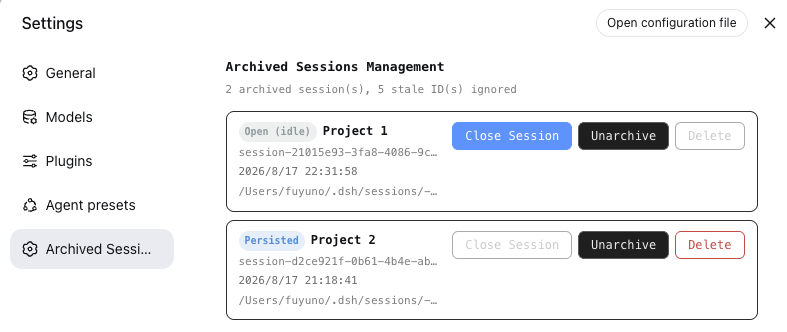
- A dedicated Archived Sessions page under DSH Web Settings.
- Host HTTP API
- Simple JSON endpoints for automation.
Agent Tools
| Tool | Description |
|---|---|
archived_sessions_list |
List archived sessions that still resolve to a real session. |
archived_session_close |
Close an idle in-memory archived session (flush + detach), no restart required. |
archived_session_unarchive |
Remove a session from the archive set so it becomes visible again in the sidebar. |
archived_session_delete |
Delete an archived session permanently. Requires confirm: true. |
Settings UI
Open DSH Web Settings and select Archived Sessions.
Each row shows:
- Title / session name
- Session ID and workspace path (full value on hover)
- Creation time
- Full log path
- Status badge:
Running,Open (idle), orPersisted
Available actions per row:
- Close session – turn an idle in-memory session into persisted-only
- Unarchive – make the session visible again in the sidebar
- Delete – permanently delete the session (enabled only after it is persisted-only)
Host API
Base path: /dsh-archive-session/api
| Method | Path | Body | Description |
|---|---|---|---|
| GET | /archived |
– | List archived sessions. |
| POST | /close |
{ "sessionId": "..." } |
Close an idle in-memory session. |
| POST | /unarchive |
{ "sessionId": "..." } |
Remove a session from the archive set. |
| POST | /delete |
{ "sessionId": "...", "confirm": true } |
Permanently delete an archived session. |
Installation
Prerequisites
- A DSH installation with the
dshCLI available, or the DSH source checkout for building. - Node.js and npm for building from source.
Install from a release tarball
dsh plugin --profile web add dsh-external-dsh-archive-session-0.0.9.tgz
After installation, restart DSH.
Install from source
git clone https://github.com/DreamStan/dsh-archive-session.git dsh-archive-session
cd dsh-archive-session

# Build host + client
bash scripts/build.sh
npm run build:client

# Pack a distributable tarball
npm pack

# Install into the web profile
dsh plugin --profile web add ./dsh-external-dsh-archive-session-0.0.9.tgz
If you use the DSH super-injector development toolchain, you can also run:
dev_build_plugin  {"dir": "/absolute/path/to/dsh-archive-session"}
dev_install_package {"dir": "/absolute/path/to/dsh-archive-session"}
Manual profile installation
Add the dependency and bundle entry to ~/.dsh/profiles/web/package.json:
{
  "dependencies": {
    "@dsh-external/dsh-archive-session": "link:/absolute/path/to/dsh-archive-session"
  },
  "dsh": {
    "profile": {
      "bundles": [
        "@deepseek-ai/dsh-base",
        "@deepseek-ai/dsh-web-app",
        "@dsh-external/dsh-archive-session"
      ]
    }
  }
}
Then create the profile link:
mkdir -p ~/.dsh/profiles/web/node_modules/@dsh-external
ln -s /absolute/path/to/dsh-archive-session ~/.dsh/profiles/web/node_modules/@dsh-external/dsh-archive-session
Restart DSH.
Uninstallation
Via dsh CLI
dsh plugin --profile web remove @dsh-external/dsh-archive-session
Restart DSH after removal.
Via super-injector dev tools
If the plugin was installed with the DSH super-injector toolchain:
dev_uninject_plugin {"match": "dsh-archive-session"}
Manual removal
- Remove the dependency and bundle entry from
~/.dsh/profiles/web/package.json:
{
  "dependencies": {
    "@dsh-external/dsh-super-injector": "link:/path/to/dsh-super-injector"
  },
  "dsh": {
    "profile": {
      "bundles": [
        "@deepseek-ai/dsh-base",
        "@deepseek-ai/dsh-web-app",
        "@dsh-external/dsh-super-injector"
      ]
    }
  }
}
- Remove the profile link:
rm -f ~/.dsh/profiles/web/node_modules/@dsh-external/dsh-archive-session
If a disabled patch entry for this plugin exists in
~/.dsh/profiles/web/cordis.patch.yml, remove it.Restart DSH.
Uninstalling the plugin does not delete archived session logs or workspace data.
Usage Notes
- Close before delete. DSH keeps session objects in memory after a conversation ends. You must either restart DSH or use
archived_session_closebefore deleting a live-idle session. - Unarchive to manage normally. Archived sessions are hidden from the sidebar. Use
archived_session_unarchiveif you want to open, close, or resume them through the normal UI. - Stale archive IDs are ignored. If an archived ID no longer resolves to a real session log, it is skipped and reported as an ignored stale ID.
- Deletion backend support. Deletion currently works with the JSONL persistence backend (
~/.dsh/sessions). SQLite backends are rejected with a clear error because DSH exposes no public deletion API for them.
No comments yet. Be the first to write one.