dsh-cursor-suite
English | 简体中文
One DeepSeek Harness plugin that ships two halves together:
- Cursor subscription provider — browser PKCE sign-in, model discovery, streaming Agent protocol, DSH tools instead of Cursor-native execs.
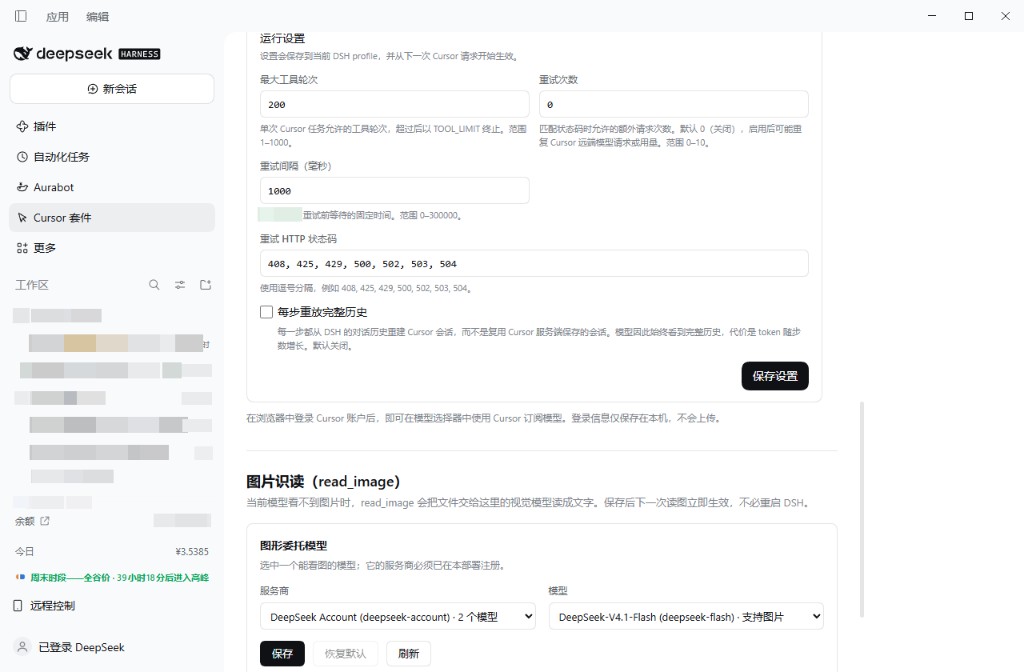
read_imagevision bridge — when the active route (including Cursor) cannot see pixels, forwards the file to a vision-capable subagent and returns text.
⚠️ The Cursor half talks to Cursor’s unpublished Agent protocol (
agent.v1.AgentService/Run). It is community reverse-engineering and may break when Cursor changes servers. Not affiliated with Anysphere or Cursor. Follow Cursor’s terms of service.
Features
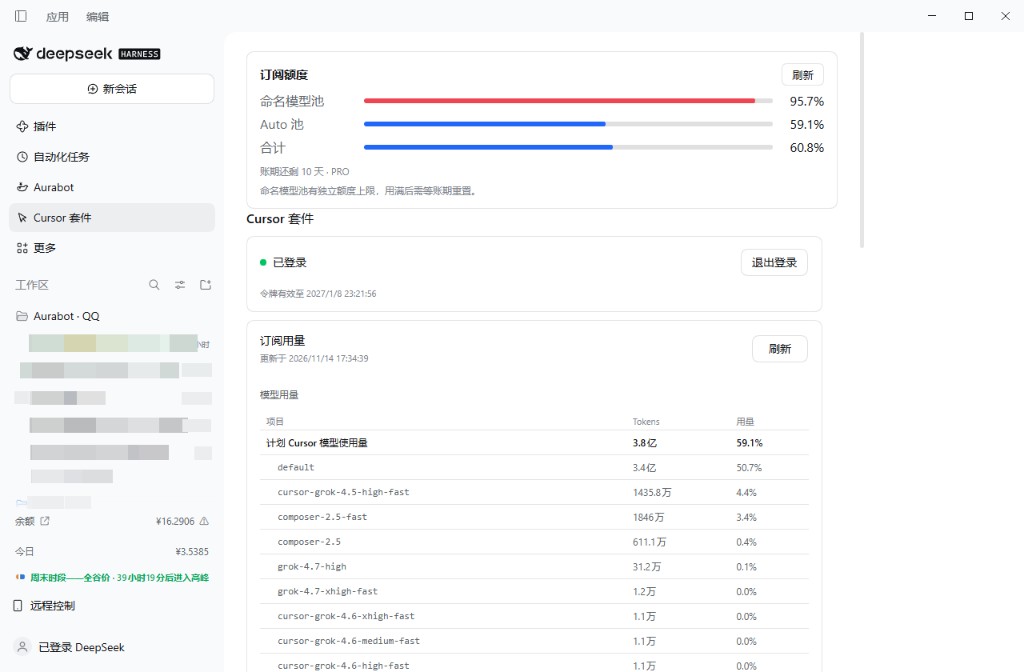
- Sign in with a Cursor account (no API key); credentials live in DSH’s store with automatic refresh.
- Model picker lists usable Cursor models; when the named/API pool is ≥95% used, the catalog keeps only Auto and stale named selections are remapped to Auto.
- Streams text and reasoning; DSH tools run locally. Native Cursor Shell/Read/Grep/… execs are declined with the same wording as dsh-cursor-subscription.
- Stream end matches upstream subscription: wait for
turnEnded(checkpoint alone does not finish an answer step). - Replaces the built-in
read_imageso image tools work on routes that advertise image input but drop pixels (Cursor). - Settings page under Settings → Cursor Suite (namespace
cursor-suite): sign-in, usage, models, tool-round / retry / replay options.
Screenshots
Subscription quota, sign-in status, and per-model usage
Runtime limits / retries, and read_image vision delegation
Installation
Plugin Market (dshmarket)
After this package is listed in awesome-dsh-plugin, install it from Plugins → Plugin Market as dsh-cursor-suite, or:
dsh plugin --profile desktop add github:Dream-swift/dsh-cursor-suite
Restart DSH after install. Do not install dsh-cursor-subscription or a separate read-image bridge in the same profile — this suite already includes both.
From GitHub (manual)
dsh plugin --profile desktop add github:Dream-swift/dsh-cursor-suite
dsh plugin --profile desktop list dsh-cursor-suite --depth 0
pnpm may skip a release younger than 24 hours (minimumReleaseAge). Pin a version or exempt the package name in the profile’s pnpm-workspace.yaml.
Local development
In the profile directory (e.g. %USERPROFILE%\.dsh\profiles\desktop):
pnpm add file:G:/DeepSeek_Sandbox/qqbot/_repo/dsh-cursor-suite
Add dsh-cursor-suite to dsh.profile.bundles in that profile’s package.json, then restart DSH.
Sign-in and usage
- Open Settings → Cursor Suite.
- Choose Browser Sign-in and finish the Cursor OAuth flow.
- Pick a Cursor model (or Auto) in the session model picker.
- When the agent needs files or a shell, it should use DSH tools (
pwsh,read,grep, …), not Cursor-native Shell.
Vision: when the model calls read_image under Cursor, the bridge may call a vision route (default deepseek-account / deepseek-flash). Configure the bridge under its own settings file ~/.dsh/read-image-bridge.json if needed.
Updating and removing
dsh plugin --profile desktop update dsh-cursor-suite
dsh plugin --profile desktop remove dsh-cursor-suite
Restart DSH after update or removal.
Relationship to dsh-cursor-subscription
dsh-cursor-subscription |
dsh-cursor-suite |
|
|---|---|---|
| Cursor provider | Yes | Yes (same protocol family) |
read_image bridge |
No | Yes |
| Settings namespace | cursor-subscription |
cursor-suite |
| Bundle row id | cursor-subscription |
cursor-suite |
Use one of them per profile.
Troubleshooting
- Still signed out after browser login: Finish the redirect page; polling waits ~2.5 minutes.
- Empty model list: Discovery can fail by account type; fallback models still accept a manual id.
- 401: Re-sign-in when refresh tokens expire.
patch: entry "cursor-suite" not found/ peer mismatch: Install a build whosepeerDependenciesmatch your DSH (0.2.0-rc line).- Images ignored on Cursor: Confirm this suite is loaded and built-in
tool-fs.readImageis off via the bundle patch.
No comments yet. Be the first to write one.