dsh-chat-export
DeepSeek Harness 会话可读导出 —— 把任意会话导出成可读的 Markdown / HTML / ZIP 文字稿。 官方 @deepseek-ai/dsh-session-log-export 只给你一份原始日志(session.v3.jsonl.zstd,二进制、多帧 zstd、events v3),人读不了;这个插件补上缺的那一半:会话头部菜单「导出文字稿」+ /export-md 命令,产出带标题、模型、用量、时间戳、思考块、工具调用与结果、代码块和图片的文字稿,HTML 还能直接打印成 PDF。
中文

▲ 会话头部:分享图标按钮,紧挨官方的 ⋯ 菜单
为什么需要它
官方会话导出给你的是 dsh-session-<id>.zip → session.v3.jsonl.zstd:一坨多帧 Zstandard 压缩的 JSONL。它能喂给工具,但不能读——想知道「当时到底聊了什么、模型调了哪些工具、那张图长什么样」,得自己写解析器。
这个插件把同一份会话日志渲染成人能读的文字稿,并且不改写任何内容:只读日志,原文照搬。
特性
- 两种入口 —— 会话头部的分享图标按钮(悬停显示「导出文字稿」),或
/export-md斜杠命令(避开官方的/export);命令解析出的选项会带进对话框,两边永远不会打架 - 五种格式 —— Markdown、HTML(单文件、自包含样式、可打印成 PDF)、纯文本(无任何标记,终端/记事本都能读)、ZIP(md + html + txt + 图片素材 +
meta.json)、会话日志 JSONL(可回灌的原始事件流) - 真导入 ——
/import-session <文件>把 JSONL 日志(或 Markdown 文字稿)变回一个真实会话:走宿主的sessions.create({ seed })+sessionPersistence落盘 +workspace.attachSession,导入后能直接接着聊,不是一份只读的"假聊天记录" - 内容齐全 —— 用户/助手消息、思考块(可折叠)、工具调用与结果(可折叠、超长自动截断并标注)、代码块(围栏长度自适应,正文里的 ``` 撑不破)、图片附件、时间戳、会话标题 / 模型 / 用量统计
- 提问有独立卡片 ——
ask_user_question不再是一坨 JSON:导出成「提问 · 2/2 已回答」卡片,问题正文、每个选项、以及你实际选中的那条(高亮 + ✓ 已选)都在,默认展开。提问嵌在run_code程序里也能认出来(解析代码里的对象字面量,答案按{id, selected}的形状在返回值里找) - 每行都有标题 —— 思考块用正文首行作预览(
思考 · 核对分支二的条件(32 字)),工具行用调用的description(run_code · 查看 core/compatibility.py …),跟聊天界面看到的一致 - 阅读宽度可调 —— HTML 顶栏一个按钮在「标准 / 宽 / 超宽 / 全宽」之间循环切换,选择记在本机浏览器里
- 记住上次的选项 —— 导出对话框记住格式、范围、内容开关和输出方式,下次打开直接沿用(目录、选中的文件和预览仍按会话重置)
- 对话框可缩放 —— 弹窗四边四角都能拖,宽度和高度随意;尺寸记在本机,双击任一手柄还原默认
- 导出前可预览 —— 对话框里点「预览开头」直接看 Markdown 开头
- 两种落盘方式 —— 浏览器下载,或写进指定目录(走官方
ctx.fs,受会话沙箱约束) - 范围可选 —— 「完整日志」按发生顺序导出全部内容(含后来被压缩或删除的历史);「仅当前上下文」只导出模型现在还能看到的部分
- 附件按内容去重 —— 同一张图在会话里出现多次,只存一份
- 没有装饰性图标 —— 产物里只有文字(
用户/助手/`bash` · 54ms · 结果 43 行),不把 emoji 塞进你的档案件 - 中英双语界面 —— 跟随 DSH 界面语言(zh / en)
- 零运行时依赖 —— 不 import 任何
@deepseek-ai/*,commands/connection/fs/sessionPersistence/sessionQuery/attachments全部在调用时通过 cordis 上下文获取;ZIP 写入器自研(node:zlib的 raw deflate),PDF 走浏览器打印 - 不用重启也能改浏览器半 —— 浏览器半是纯 ESM 源码,
client-hmr会热替换
安装
npm(推荐):
dsh plugin --profile web add dsh-chat-export
或从 GitHub 仓库直接安装:
dsh plugin --profile web add github:DDDMUC/dsh-chat-export
本地开发(改代码即时生效):
dsh plugin --profile web add link:/绝对路径/dsh-chat-export
装完重启 dsh web(宿主半的新插件行要重启才加载;之后改浏览器半不用)。
使用
方式一:会话头部图标按钮
- 打开一个会话,点头部的「导出文字稿」
- 选格式、范围、图片策略,按需要打开思考块 / 系统提示 / 注入内容 / 时间戳 / 用量
- 「浏览器下载」直接存文件;「保存到目录」填一个路径则写进磁盘
- 想先看看效果就点「预览开头」
方式二:斜杠命令
/export-md                           # Markdown,默认选项
/export-md html                      # 自包含 HTML,可打印成 PDF
/export-md txt                       # 纯文本,无任何标记
/export-md zip --images=embed        # 打包,图片内嵌
/export-md md --thinking --surface   # 带思考块,只导当前上下文
/export-md html --save=/tmp/导出     # 直接写进目录
/export-md log --save=/tmp/导出      # 原始事件流,之后能再导入
/export-md zip --with-log            # 打包时附带 log.jsonl,既能读也能导入
命令只解析参数,真正的导出在对话框里确认——所以敲错参数会当场报错并给出用法,不会悄悄导出一份你以为不一样的东西。
参数一览
| 参数 | 作用 |
|---|---|
md / markdown |
Markdown(默认) |
html |
自包含 HTML |
txt / text / plain |
纯文本(不带任何标记) |
zip |
打包(内含 md + html + txt + 图片 + meta.json) |
log / jsonl / json |
会话日志(原始事件流,可再导入;是文本,所以 --save 也能写盘) |
--input / --no-input |
用户输入(默认开) |
--output / --no-output |
模型输出(默认开) |
--thinking / --no-thinking |
思维链(默认开) |
--tools / --no-tools |
工具调用与结果(默认关,一次调用一行) |
--system / --no-system |
系统提示词(默认开) |
--injected / --no-injected |
注入内容,如插件/目标/指令注入的用户消息(默认关) |
--timestamps / --no-timestamps |
每条消息的时间戳(默认关) |
--usage / --no-usage |
表头的用量统计(默认关) |
--surface / --no-surface |
--surface 只导当前模型上下文;默认完整日志 |
--images=auto|embed|assets|none |
图片策略;auto 表示单文件内嵌、ZIP 放 assets/ |
--limit=N |
单条工具结果的字符上限(默认 4000,0 表示不截断) |
--with-log / --no-with-log |
ZIP 里附带 log.jsonl(默认关) |
--save[=目录] |
写进目录而不是下载;不填目录则用会话工作目录下的 dsh-chat-exports/ |
导入
导出的 JSONL 日志能变回一个真实会话:
/import-session /tmp/导出/dsh-chat-xxx.jsonl         # 直接导入
/import-session /tmp/导出/dsh-chat-xxx.jsonl --dry   # 只看会导入什么,不写盘
/import-session /tmp/导出/dsh-chat-xxx.md            # Markdown 也能导(只有文本)
/import-session ./log.jsonl --cwd=/Users/me/project  # 指定工作目录
/import-session ./log.jsonl --title=导入的历史       # 指定标题
它做的事:
- 读文件 → 按扩展名(再看首个字符)判断是 JSONL 日志还是 Markdown 文字稿
- 剔除机器相关记录(
subagent/descriptor、request/header、tool/ptc-dispatch*、compaction/*等),把剩下的seq重排成从 0 连续(宿主对种子事件有这个硬要求),并把session/title.messageSeqs、surfaceOp里的 seq 引用一起重写 sessions.create(id, { seed })让宿主逐条校验并建会话 →sessionPersistence.create(header)拿写句柄 →append全部事件 →closeworkspaceRegistry.create(cwd)拿到(或复用)该目录对应的工作区实体,再workspace.attachSession(id)挂进去,侧边栏立刻能看到
导入后的会话是正常可续聊的会话:新消息照常追加,不是只读快照。
两种来源的差别
| 来源 | 保留 | 丢失 |
|---|---|---|
JSONL 日志(/export-md log 或 ZIP 里的 log.jsonl) |
全部对话、思考、工具调用与结果、用量、时间戳 | 机器相关记录(见上)、图片二进制(引用还在,跨机可能失效) |
| Markdown 文字稿 | 用户/助手文本,按轮次重建 | 工具调用、思考、图片、真实时间(一律记为导入时刻) |
也可以走接口:POST /api/dsh-chat-export.import,body 为 { text } 或 { path },加 "dryRun": true 只返回计划不落盘。
产物长什么样
Markdown:
# AI 写作智能体项目概览

> 由 dsh-chat-export 从 DeepSeek Harness 会话导出

`session-5e6c2afd-…` · `/Users/example/Documents/Default Project`

| 项 | 内容 |
| --- | --- |
| 模型 | `deepseek-official/deepseek-flash` · `commandcode/…` |
| 时间 | 2026-09-21 00:38:16 → 2026-09-21 23:52:12(23h 13m) |
| 规模 | 116 轮 · 989 步 · 用户 89 条 · 助手 908 条 · 876 次工具调用 · 图片 16 张 |
| 用量 | 输入 1,107,646 · 输出 1,321,824 · 缓存读 310,001,920 · 合计 312,431,390 |

---

## 回合 1 · 27.8s

### 用户 · 00:38:25

任务正文……

### 助手 · 00:38:28 · `deepseek-official/deepseek-flash`

正文……

<details>
<summary>思考(312 字)</summary>

思考正文……

</details>

<details>
<summary>`bash` · 1.2s · 结果 42 行</summary>

**参数**

```json
{ "command": "ls -la" }
结果
输出……

**默认勾选四项:用户输入、模型输出、思维链、系统提示词** —— 导出的就是「对话本身」。

其余四项**默认不勾**:工具调用与结果、注入内容、时间戳、用量统计。
工具调用是这个日志里最吵的部分,读回来时也最没用;时间戳与用量是元信息,不是对话内容。
需要时逐个打开(时间戳与用量各只占一行)。

**产物里没有任何装饰性图标。** 参数和结果都收在同一个折叠里,默认展开的只有「谁在什么时候说了什么」。876 次工具调用的长会话,肉眼可见的就是 876 行 `▶ \`名字\` · 耗时 · 结果 N 行`,需要哪次再点开。

纯文本(`txt`,注意没有任何标记、图标、代码围栏,全靠分隔线和缩进):

```text
想办法让我用上jev模型
========================================================================

session-48310605-bb1a-4966-a207-380f947e220b
/Users/example/Documents/Default Project

模型  commandcode/deepseek/deepseek-v4.1-flash
时间  2026-09-21 21:51:26 → 2026-09-21 22:47:16(55m 50s)
规模  1 轮 · 52 步 · 用户 1 条 · 助手 31 条 · 85 次工具调用
用量  输入 78,004 · 输出 52,120 · 缓存读 4,302,080 · 合计 4,432,204

由 dsh-chat-export 从 DeepSeek Harness 会话导出
------------------------------------------------------------------------

回合 1 · 42m 00s

用户 · 21:51:45
  想办法让我用上jev模型

助手 · 21:51:51 · commandcode/deepseek/deepseek-v4.1-flash
  我先搞清楚 "jev 模型" 指的是什么,同时看一下 DSH 的模型/提供商配置。

  [工具] bash · 54ms · 结果 43 行
    参数  {
          "command": "pwd; echo \"--- workspace ---\"; ls -la"
        }
    结果  /Users/example/Documents/Default Project
        --- workspace ---
        total 1960
正文原样照搬(连 Markdown 标记一起)—— 宁愿保留几个星号,也不悄悄改你说过的话。
文件名:dsh-chat-<会话标题>-<日期>.<扩展名>(标题里的路径分隔符与控制字符会被中和,中日韩字符保留)。
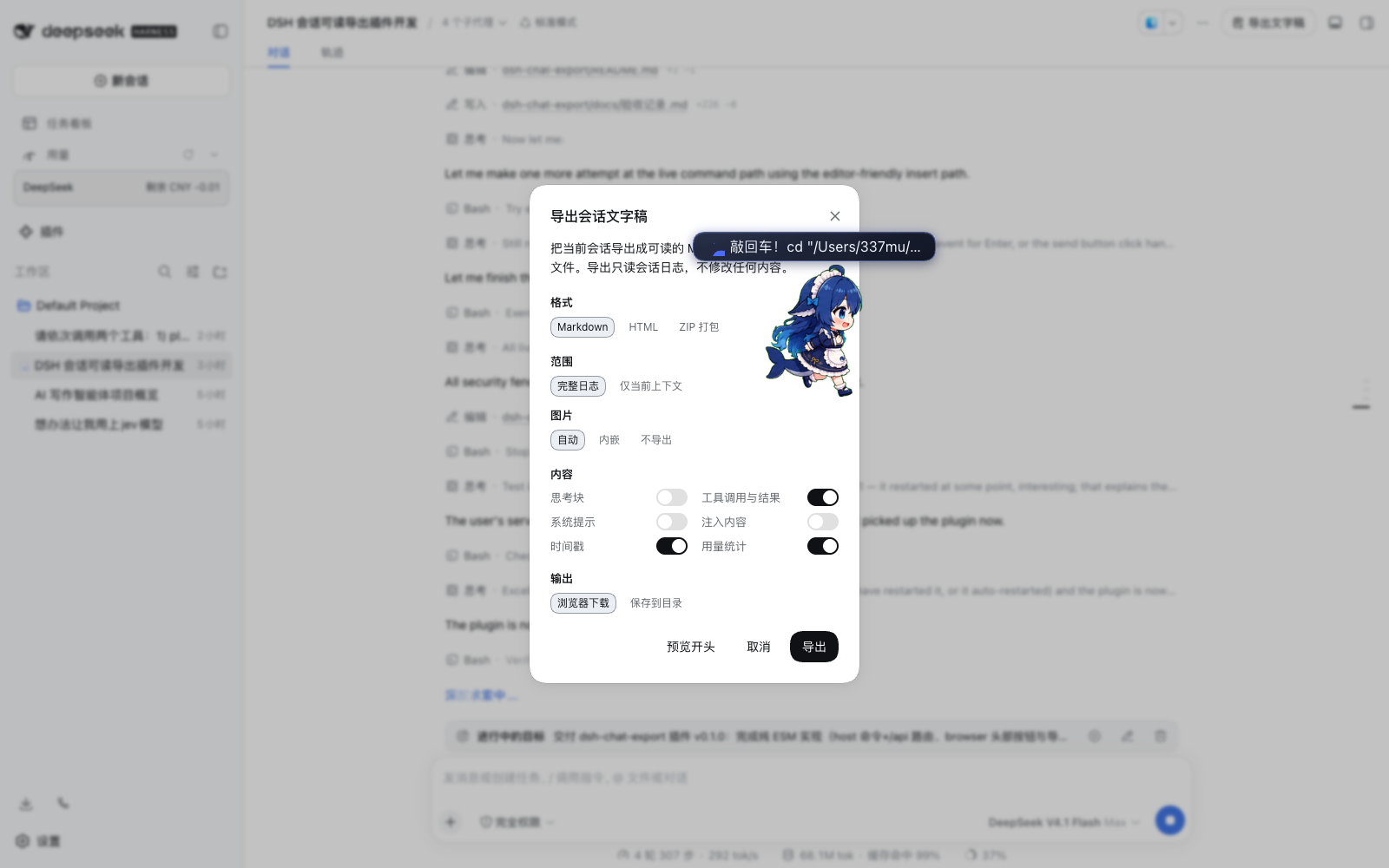
▲ 导出对话框:格式 / 范围 / 图片 / 内容 / 输出
它是怎么工作的
- 数据全部走官方服务:
ctx.sessionPersistence.open(id, 'read')读会话日志(和官方 ZIP 用的是同一个入口,自带多帧 zstd 解码、格式迁移、断尾修复),标题走ctx.sessionQuery.readTitle,图片字节走ctx.attachments.readImage。降级链:sessionPersistence→sessionQuery.readSession→readSurface→ 直接读会话文件(绕过服务层,官方读取器挂掉时仍然能导出),全都没有才报 503。 - 导出在宿主端做,不在浏览器里做:浏览器拿到的原始事件只是一个分页窗口(要靠
loadOlder()一页页翻到hasMore为 false),而且没有附件字节。宿主端一把拿全。 - HTTP 走
ctx.connection.fetch:挂在/api/dsh-chat-export.*下,白拿连接服务的鉴权与 Host/Origin 围栏(未登录 401,跨源 403)。不用webServer.register:它的 exact 路由会盖掉/api桥接并绕过鉴权。 - ZIP 是自己写的:条目少、结构平,用
node:zlib的 raw deflate 加本地头 + 中央目录 + EOCD 就够了,不值得为它引一个依赖。 - PDF 不引依赖:HTML 自带
@media print样式和「打印 / 另存为 PDF」按钮,用浏览器打印。无头 Chrome 那条路要拖进 puppeteer,不成比例。
三个从真实日志里挖出来的坑,插件都处理了(写成注释留在代码里):
session.v3.jsonl.zstd是多帧串联(9.6 MB 的样本有 39,968 帧)。zstdDecompressSync(整文件)会静默只返回第一帧;createZstdDecompress()解完第一帧就抛ZSTD_error_prefix_unknown。所以要么走持久化服务,要么逐帧扫边界。agent/inbox/spliced的data.inserted[]里可能有只此一份的用户消息(样本里 170 条里有 6 条在user/message里找不到)。必须按 message id 去重合并,否则漏话。user/message上没有turn/step字段,轮次只能靠turn/start边界推。
已知限制
- 「保存到目录」只支持 Markdown、HTML、纯文本和 JSONL 日志。 宿主的
ctx.fs只有文本写入、没有二进制写入;绕过它直接用node:fs会无视会话的沙箱策略。ZIP 请用浏览器下载(对话框里选 ZIP 时保存按钮会禁用并说明原因)。 - 导入会丢机器相关记录。
subagent/descriptor、request/header、request/context、tool/ptc-dispatch*、command/*、compaction/*这些要么指向另一台机器、要么指向被丢掉的事件,导入时会被剔除并在返回里逐类列出条数。对话、思考、工具调用与结果不受影响。 - 图片:JSONL 单独导入不搬二进制(附件引用原样保留,同机通常能取到,跨机缺失);ZIP 导入会把
assets/里的图片写回附件库并重连引用,所以跨机也能恢复。files/里的普通文件暂不写回。 - Markdown 导入是有损的。 只按轮次重建用户/助手文本;工具调用、思考、图片都回不来,时间统一记为导入时刻。要无损请用
log格式。 - 导入会写进工作区。 会话先经
workspaceRegistry.create(cwd)取得(或复用)该目录的工作区实体,再attachSession;目录已不存在时会退回注册表里的第一个工作区,并在返回里说明。 - 不导出子会话(subagent)。 v0.1.0 只导当前会话;子会话递归打包留给后续版本(官方 ZIP 的
includeDescendants是那块功能)。 - 纯文本里的图片只能给描述(
[图片] shot.png(640×480, 2.0 KiB)),txt 装不下二进制。 - PDF 是浏览器打印出来的,不是插件生成的。 产物是 HTML,点「打印 / 另存为 PDF」由浏览器负责排版。
- 用量数字来自
assistant/message.data.usage。 官方日志里没有费用字段,所以只能给 token,给不了钱;推理一栏在不上报该字段的 provider 上是 0。 - 正文会被做两处「不影响观感」的规整(否则一份带
# 标题的提问会把整份文字稿的目录结构顶掉):- 正文里的 Markdown 标题整体下沉到 4–6 级,让「回合 / 消息」始终是文档骨架(代码块里的
#不动); - 正文里出现的
<details>/<summary>会被反斜杠转义成字面量,免得对话里随口一句就把后面半篇内容折叠进去(转义后显示效果完全一样,还是那几个字符)。 其余文字一字不改,代码块内容原样保留。
- 正文里的 Markdown 标题整体下沉到 4–6 级,让「回合 / 消息」始终是文档骨架(代码块里的
兼容性
- DSH
>=0.1.6-alpha.2 - Node
>=22(用到node:zlib的 Zstandard 支持)
License
MIT © 2026 DDDMUC
English
▲ Session header: a share-icon button, next to the official ⋯ menu
▲ The export dialog: format / scope / images / content / output
Why
The official Session export hands you dsh-session-<id>.zip containing session.v3.jsonl.zstd: multi-frame Zstandard-compressed JSONL. Great for tools, unreadable for humans. This plugin renders the same log as a transcript a person can actually read, and never rewrites a byte of it.
Features
Four kinds of content are checked by default: user input, model output, reasoning, and system prompts — the conversation itself. Tool calls, injected context, timestamps, and the usage table are off until asked for. Tool calls are the loudest part of a log and the least useful to read back, so they are off by default; turn them on and each call becomes one collapsed line.
- Two entry points — a share-icon button in the Session header (labelled "Export transcript" on hover), or the
/export-mdcommand (which avoids the official/export). A typed line presets the dialog, so the two can never disagree. - Five formats — Markdown, self-contained HTML (printable to PDF), plain text (no markers at all; readable in any terminal), a ZIP bundle (
transcript.md+transcript.html+transcript.txt+assets/+meta.json), and a JSONL session log — the raw event stream, replayable. - Real import, not a mock —
/import-session <file>turns a JSONL log (or a Markdown transcript) back into an actual Session: the host validates it throughsessions.create({ seed }), it is written throughsessionPersistence, andworkspace.attachSessionputs it in the sidebar. You can keep talking in it afterwards. - Complete content — user and assistant messages, foldable reasoning blocks, foldable tool calls and results with truncation markers, code fences that cannot be broken by the body, image attachments, timestamps, and the Session title, models, and usage.
- One tool call is one line. Arguments and result share a single collapsed disclosure, so what you read by default is who said what and when; open a call only when you need it.
- Questions get their own card.
ask_user_questionno longer renders as raw JSON: it becomes a "提问 · 2/2 已回答" card with the question text, every option, and the one you actually picked (highlighted, marked✓ 已选). It opens by default — a question you answered is conversation, not tool plumbing. Questions asked from inside arun_codeprogram are recognised too: the object literal is read out of the code, and the answers are found by shape ({ id, selected }) wherever the program returned them. - Every row has a title. A folded reasoning block previews its first line (
思考 · 核对分支二的条件(32 字)), and a tool row shows the call'sdescription(run_code · 查看 core/compatibility.py …) — the same labels the chat view shows. - Adjustable reading width. One button in the HTML top bar cycles 标准 / 宽 / 超宽 / 全宽; the choice is remembered per browser.
- The dialog remembers your choices — format, scope, content switches, and output mode carry over to the next open. The directory, the chosen file, and the preview stay per-session.
- A resizable dialog — drag any edge or corner; width and height are up to you. The size is remembered per browser, and double-clicking a handle restores the default.
- Preview before exporting, and two outputs: a browser download, or a write into a directory through the host filesystem.
- Scope choice — the full log in order, or only what the model can still see.
- Attachment de-duplication, bilingual UI (zh/en), and zero runtime dependencies: no
@deepseek-ai/*imports, a hand-written ZIP writer, and PDF via the browser's own print dialog.
Install
dsh plugin --profile web add dsh-chat-export
Restart dsh web afterwards. The browser half needs no restart when you edit it.
Usage
Click "导出文字稿" (Export transcript) in the Session header, or type:
/export-md                           # Markdown with the defaults
/export-md html                      # self-contained HTML, printable to PDF
/export-md zip --images=embed        # a bundle with images embedded
/export-md md --thinking --surface   # reasoning on, current context only
/export-md html --save=/tmp/exports  # write straight into a directory
/export-md log --save=/tmp/exports   # the raw event stream, replayable later
/export-md zip --with-log            # bundle carries log.jsonl too
Flags: --thinking, --no-tools, --system, --injected, --timestamps, --no-usage, --surface, --images=auto|embed|assets|none, --limit=N, --with-log, --save[=dir].
Import
/import-session /tmp/exports/dsh-chat-xxx.jsonl         # import it
/import-session /tmp/exports/dsh-chat-xxx.jsonl --dry   # show the plan, write nothing
/import-session /tmp/exports/dsh-chat-xxx.md            # Markdown works too (text only)
/import-session ./log.jsonl --cwd=/Users/me/project     # choose the working directory
The import drops machine-local records (subagent/descriptor, request/header, tool/ptc-dispatch*, compaction/*, …), renumbers the surviving events contiguously from seq 0 — the host requires that of a seed — and rewrites the seq references those events carry. Message-producing events also get the surfaceOp: 'append' marker the store demands. Then it seeds the Session, writes it through a persistence handle, and attaches it to the workspace that owns its directory.
A JSONL log keeps the conversation, reasoning, tool calls and results, usage, and timestamps. A Markdown transcript keeps only user/assistant text; tool calls, reasoning, images, and real times are gone. Images are not copied by a JSONL-only import: their attachment references survive, so they usually resolve on the same machine and show as missing elsewhere. A ZIP import writes its assets/ back into the attachment store and relinks the references, so images survive a move to another machine.
How it works
Everything is read through the official services (sessionPersistence, sessionQuery, attachments) resolved from the cordis context at call time, and the exports are produced on the host, not in the browser — the browser only ever holds a paged window of the event log and has no attachment bytes. Routes live under /api/dsh-chat-export.* through ctx.connection.fetch, so they inherit the connection service's authentication and its host/origin fence.
Known limitations
- Saving to a directory supports Markdown and HTML only; the host's
ctx.fshas no binary write, and bypassing it withnode:fswould ignore the Session sandbox. Download the ZIP instead. - Sub-Session (subagent) export is not included in v0.1.0.
- PDF is produced by the browser's print dialog, not generated by the plugin.
- Usage is token counts only — the Session log carries no cost field.
- Message text is not Markdown-escaped (it is the conversation itself); the HTML renderer escapes before adding its own markup, so a Session cannot inject HTML into an export.
Compatibility
- DSH
>=0.1.6-alpha.2 - Node
>=22
License
MIT © 2026 DDDMUC
No comments yet. Be the first to write one.