DSH Desktop HUD




An always-on-top desktop card for DeepSeek Harness (DSH). It shows what DSH is doing — running turns, approval requests, questions waiting for you, finished tasks and errors — without making you switch back to the main window.
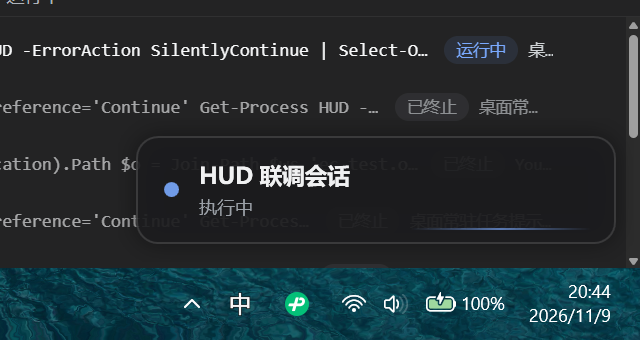
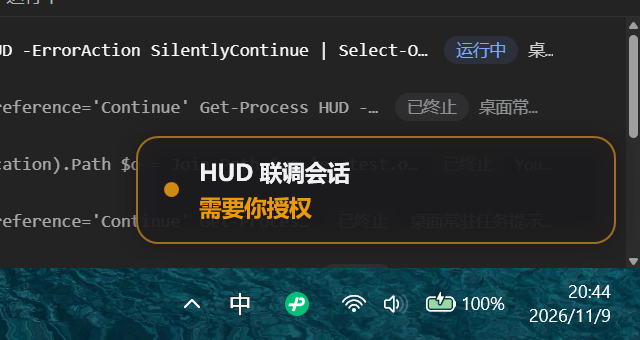
When DSH is idle the card collapses into a tiny pill (● DSH 空闲) in the bottom-right corner of your primary display. When a turn starts it expands into a card with the session title. When something needs you — an approval prompt or a question — it draws an amber (approval) or blue (question) pulse, and one click brings DSH back to the front.
The card's status text is currently Chinese (
执行中,需要你授权, …). Localization is on the roadmap; file an issue if you need another language first.
Features
Two shapes, no clutter — an idle pill, or a card while something is running. Same anchor point, topmost, hidden from the taskbar, never steals focus.
Six at-a-glance states with distinct colors and animations:
State Card shows Look Idle ● DSH 空闲pilldimmed pill, minimal footprint Running session title + 执行中blue breathing dot + shimmer line Approval needed session title + 需要你授权amber border pulse + outer glow Question waiting session title + 需要你回答blue highlight Turn completed ✓ 任务完成green flash, collapses after 15 s Error session title + 出错了red, stays until the next turn starts Multi-session task list — run several sessions at once? The card gets a count badge and a
⌄chevron. Expand it to see up to 4 tasks stacked vertically (extra ones collapse into a+N 个任务row). Child agents and workflows are folded into the session that owns them, so internal traffic never floods the list.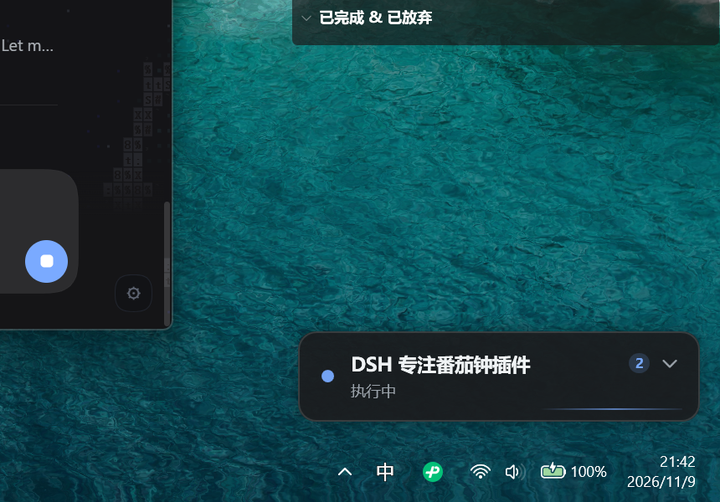
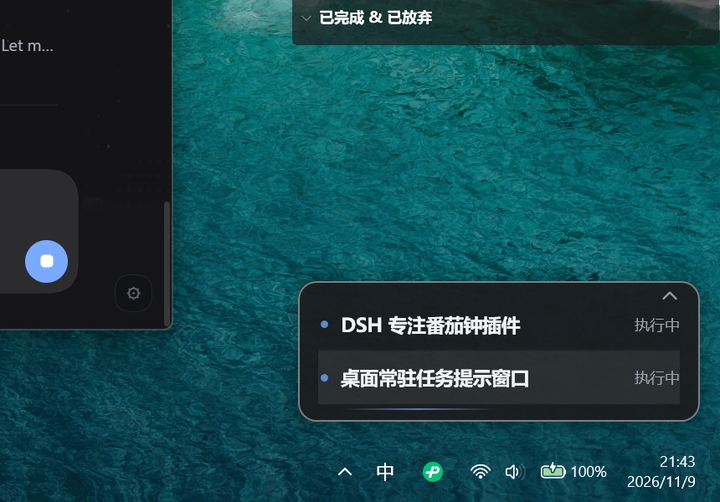
Click to return — click the card (or any task row) and DSH is restored from the taskbar and focused. Drag to move it anywhere; the position is remembered per user. Right-click for Focus DSH / Hide for 30 minutes / Quit HUD.
Side-channel only — the plugin observes events and never participates in the approval flow. A 600 ms debounce means auto-approved requests don't flash on screen. If anything goes wrong, the HUD simply stops updating; DSH is unaffected.
No runtime, no network, no admin — the overlay is a prebuilt C# WPF executable (
.NET Framework 4.8, bundled). The host plugin has zero npm dependencies; it writes one small JSON file that the overlay reads.
Requirements
| OS | Windows 10 or 11, x64 |
| Runtime | .NET Framework 4.8 (included in Windows 10/11 — nothing to install) |
| DSH | DeepSeek Harness 0.2.x (tested against 0.2.2-rc.1) |
| Display | any; the card anchors to the primary display bottom-right |
macOS and Linux are not supported: the overlay is a Windows WPF window.
Install
dsh plugin --profile desktop add github:D00023/dsh-plugin-desktop-hud
Replace desktop with the profile you actually use (dsh plugin --help shows the flag). DSH will ask you to restart the app — the HUD appears once the plugin is loaded, pinned to the bottom-right of your primary display.
Prefer a local checkout?
git clone https://github.com/D00023/dsh-plugin-desktop-hud.git
dsh plugin --profile desktop add ./dsh-plugin-desktop-hud
Uninstall:
dsh plugin --profile desktop remove dsh-plugin-desktop-hud
...then restart DSH. Quit the HUD window first (right-click → 退出小窗) if you want it gone immediately.
Usage
| Action | Result |
|---|---|
| Left-click the card / a task row | Bring DSH to the front (restores it if minimized) |
⌄ / ⌃ (appears when ≥ 2 tasks) |
Expand / collapse the task list |
| Drag | Move the card; position is saved to %LOCALAPPDATA%\dsh-desktop-hud\window-v1.json |
| Right-click | 回到 DSH / 隐藏 30 分钟 / 退出小窗 |
| Hover | Border brightens, so you know it's clickable |
If you choose 退出小窗, the HUD stays hidden until DSH restarts — that's intentional, so it can't come back while you're trying to get rid of it.
How it works
DSH host plugin (Cordis)                       HUD.exe (C# WPF)
──────────────────────────────                 ──────────────────────────
listens:  agent/status                                        reads on start,
          approval/request     ──writes──▶  state.json  ──▶  then FileSystemWatcher
          user-questions/request    (atomic, v3, 2 s heartbeat)  + 400 ms polling
          agent/error
          session/event                                   renders pill/card,
maintains a per-session state machine;                     animations, task list,
writes one state file and keeps it fresh                    focus DSH, position
                                                            memory, quit marker
- The host plugin derives a single ordered
tasksarray (per root session, sorted by urgency, then recency) and writes it atomically (*.tmp+ rename, with retries). A heartbeat re-writes the file every 2 s. - The overlay picks the file up, renders it, and reacts to interactions. If the file stops updating for 10 s (DSH quit, plugin disabled, crash) the overlay exits by itself — no orphan windows.
- State file and exit marker live in
%LOCALAPPDATA%\dsh-desktop-hud\. Abyemarker written by the overlay stops the plugin from respawning it for the rest of the session. - Everything is local to your machine. No network calls, no elevated permissions, no external processes besides
HUD.exe.
The wire format is documented in PROTOCOL.md; visual parameters are in overlay/UI-SPEC.md.
Development
# pure-logic state machine (16 tests)
node test/state.test.mjs

# state-file bridge + overlay supervision (8 tests)
node test/bridge.test.mjs

# rebuild the overlay from source (no .NET SDK needed — uses the C# compiler
# that ships with .NET Framework 4.8 and references the GAC assemblies)
powershell -NoProfile -ExecutionPolicy Bypass -File overlay/build.ps1

# preview states without DSH
overlay/bin/HUD.exe --demo                 # cycles all six states
overlay/bin/HUD.exe --demo --state=attention
overlay/bin/HUD.exe --demo-multi           # 2/3/6-task samples
overlay/bin/HUD.exe --state-file "%LOCALAPPDATA%\dsh-desktop-hud\state.json"
Repository layout:
index.js            Cordis host plugin: event listeners → state machine → file bridge
hud-state.js        pure multi-session state machine (no Cordis imports)
hud-bridge.js       atomic state-file writer, heartbeat, overlay supervision, quit marker
cordis.patch.yml    bundle patch that installs the plugin row
locale/             plugin-manager strings (en / zh)
overlay/src/*.cs    HUD.exe sources: WPF window, XAML, JSON, Win32 interop, state-file client
overlay/HudWindow.xaml
overlay/bin/HUD.exe prebuilt overlay (checked in — git installs don't build)
overlay/build.ps1   csc-based build script
overlay/UI-SPEC.md  visual spec, colors, spacing, animations
PROTOCOL.md         state-file protocol v3
docs/images/        screenshots used by this README
Contributions are welcome. Keep the host side free of npm dependencies, run both test files, and state in the PR whether the overlay changed (then include a rebuilt overlay/bin/HUD.exe).
Troubleshooting
| Symptom | What to check |
|---|---|
| Card never appears | %LOCALAPPDATA%\dsh-desktop-hud\hud.log (plugin lifecycle log, rotated at 256 KB). overlay started pid=… means the plugin launched it. You can also run overlay\bin\HUD.exe --state-file "%LOCALAPPDATA%\dsh-desktop-hud\state.json" by hand. |
| Card never appears after a DSH restart | Fixed in v1.0.2. Older versions wrote no state at startup, so the overlay read the previous run's stale file, exited, and the bridge gave up permanently. The bridge now writes a placeholder state, heartbeats from the start, and keeps retrying with backoff instead of giving up. Update the plugin and restart DSH once. |
| Card visible but frozen | state.json's ts should change every 2 s. If it doesn't, the host plugin isn't running (or was disabled). |
| Just updated the plugin | Restart DSH; plugin code is only reloaded at startup. |
| Card vanished after 退出小窗 | Intended. Restart DSH to bring it back. |
| Card in a strange spot | It was dragged there. Drag it back, or delete window-v1.json while the HUD is closed. |
| Two identical cards | Fixed in v1.0.1. Older versions could be mounted twice by DSH and spawn two overlays. Update the plugin: the overlay now holds a per-state-file named mutex (a second instance exits with code 42 without drawing), and the host half reuses a live bridge instead of creating another. hud.log records duplicate apply detected when DSH does try twice. |
Known limitations
- Primary display only — no per-monitor position memory yet.
- The outer glow is slightly larger than the window's transparent padding, so the shadow is clipped by ~1 px at the window edge (cosmetic).
- Requires write access to
%LOCALAPPDATA%\dsh-desktop-hud\. Without it you lose position memory and the quit marker, but state notifications still work. - The HUD does not offer approve/deny buttons on purpose: decisions stay in the DSH window, where the full context is visible.
- No sound or Windows toast notifications by design (visual only).
License
MIT © 2026 D00023
中文版 / Chinese: README.zh-CN.md
No comments yet. Be the first to write one.