@comecaramelos/dsh-hover-information
DSH plugin that makes the session hover card genuinely useful. The stock card was a whole-surface "copy the title" button — rarely valuable. Now its header row carries copy icons that sit in line with the status glyph and the elapsed time, plus a configurable metrics block, all gated by a Settings → Plugins card:
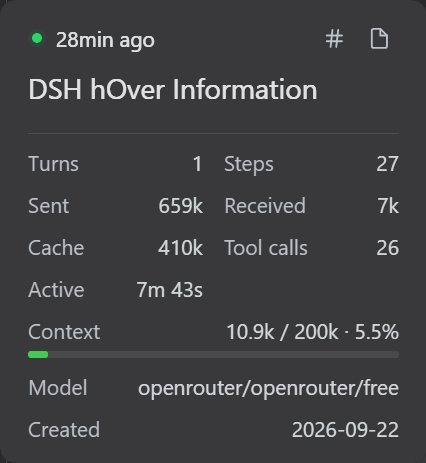
- Copy session ID / Copy workspace path icons on the card's header
row —
⧉ copy ID/⧉ copy pathbeside the status dot and the relative time, instead of the stock whole-card copy button. Clicking elsewhere on the card no longer copies the title (neutralized only on cards the plugin resolves — everything else stays stock). - Metrics block: turns, steps, tokens sent/received, cache tokens, compactions, context window, subagents, model, tool calls, active time and created date — toggled per metric.
- Document-preview header tools: the sidebar's open-file panel grows two additional copy buttons: file content and file path.
- Settings card: master switch + per-metric toggles + refresh interval.
Install
From npm (recommended, once published):
dsh plugin --profile web add @comecaramelos/dsh-hover-information
This adds the bundle's hover-info row to the profile's Cordis layer, along
with its defaults — the plugin is active immediately, with the default metrics
(turns, steps, tokens in/out, compactions, context, subagents, model) on and
nothing to configure. If you already have a hover-info row in
your profile's cordis.patch.yml, your row wins (later patches win by id).
Manual install (WSL + Windows pnpm, where the symlink step above fails):
mkdir -p ~/.dsh/profiles/web/node_modules/@comecaramelos
ln -s /path/to/dsh-hover-information \
  ~/.dsh/profiles/web/node_modules/@comecaramelos/dsh-hover-information
and add this to ~/.dsh/profiles/web/package.json:
{
  "dependencies": {
    "@comecaramelos/dsh-hover-information": "file:/path/to/dsh-hover-information"
  },
  "dsh": {
    "profile": {
      "bundles": [
        "@deepseek-ai/dsh-base",
        "@deepseek-ai/dsh-web-app",
        "@comecaramelos/dsh-hover-information"
      ]
    }
  }
}
Then restart dsh web — browser bundles don't hot-update in a live profile,
and the running gateway must not be restarted by tooling, so the GUI is
restarted by you. Never run npm/pnpm install inside the live profile:
it's a pnpm tree on a Windows mount and an install there breaks it.
No comments yet. Be the first to write one.