dsh-monitor
中文版 · English
Session billing and per-provider usage quota plugin for DeepSeek Harness.
- Session cost badge: wraps
llm/stream, captures every model call usage and bills precisely against official prices (peak/off-peak tiers + legacy base prices). A chip in the session header shows the session cost in real time with token details; it stays accurate after refresh/reload (event-sourced session projection). - Provider usage panel: configure one usage query per model provider; click the usage icon left of the model switcher to view the quota of the current session's provider.
- Three presets:
- DeepSeek official (built-in): reuses the API key configured in Settings → Models and queries the official
GET /user/balance(docs; onlyapi.deepseek.com, non-official endpoints refused). No configuration needed — when the current session's provider isdeepseek-official, the balance shows automatically; add a provider with the same id only to override the refresh interval. - OpenCode: queries the OpenCode Go plan quota — 5 hours / weekly / monthly usage percent and reset times (
opencode.ai/zen/go/v1/usage). - Custom: any HTTP usage endpoint — URL + headers (with
{apiKey}placeholder) + JSON paths, displayed item by item (percent / number / money / text, optional max and reset time).
- DeepSeek official (built-in): reuses the API key configured in Settings → Models and queries the official
- Official price sync: one-click sync of the price table and peak windows from the DeepSeek official pricing page; deepseek-v4-flash / deepseek-v4-pro are bundled as defaults.
Install
Install from GitHub:
dsh plugin --profile web add https://github.com/Coco-king/dsh-monitor.git#v0.2.3
Or from Gitee (for users in mainland China; code is pushed to Gitee and auto-mirrored to GitHub):
dsh plugin --profile web add https://gitee.com/kkcoco/dsh-monitor.git#v0.2.3
Replace
#v0.1.2with the current release tag to pin a version (see tags).
The package declares dsh.bundle.patch, so it joins the web profile's bundle layer automatically; dsh plugin --profile web remove dsh-monitor uninstalls. Restart the web service (or refresh + HMR) to apply.
First startup may take a few seconds — one-time backfill. On first run the plugin folds your existing session history into a local SQLite ledger so past sessions get usage/billing data. A progress bar (or step-by-step logs) appears in the console while it runs, and the page stays usable meanwhile. After the backfill completes, every later sweep is an incremental diff that finishes in milliseconds.
Iterating: re-run
dsh plugin --profile web add <this repo path>after changes; withpnpm run dev:webrunning in the DeepSeek Harness checkout, client changes hot-reload via client HMR.
Usage
Configure providers: Settings → Usage → Provider usage config → Add provider. The provider ID is a dropdown — candidates are the providers configured in Settings → Models plus the providers you already configured here (including custom ones). Pick a preset and fill the fields, then save. DeepSeek official is built-in and needs no configuration — only add a provider for OpenCode, Custom, or to override the DeepSeek refresh interval.
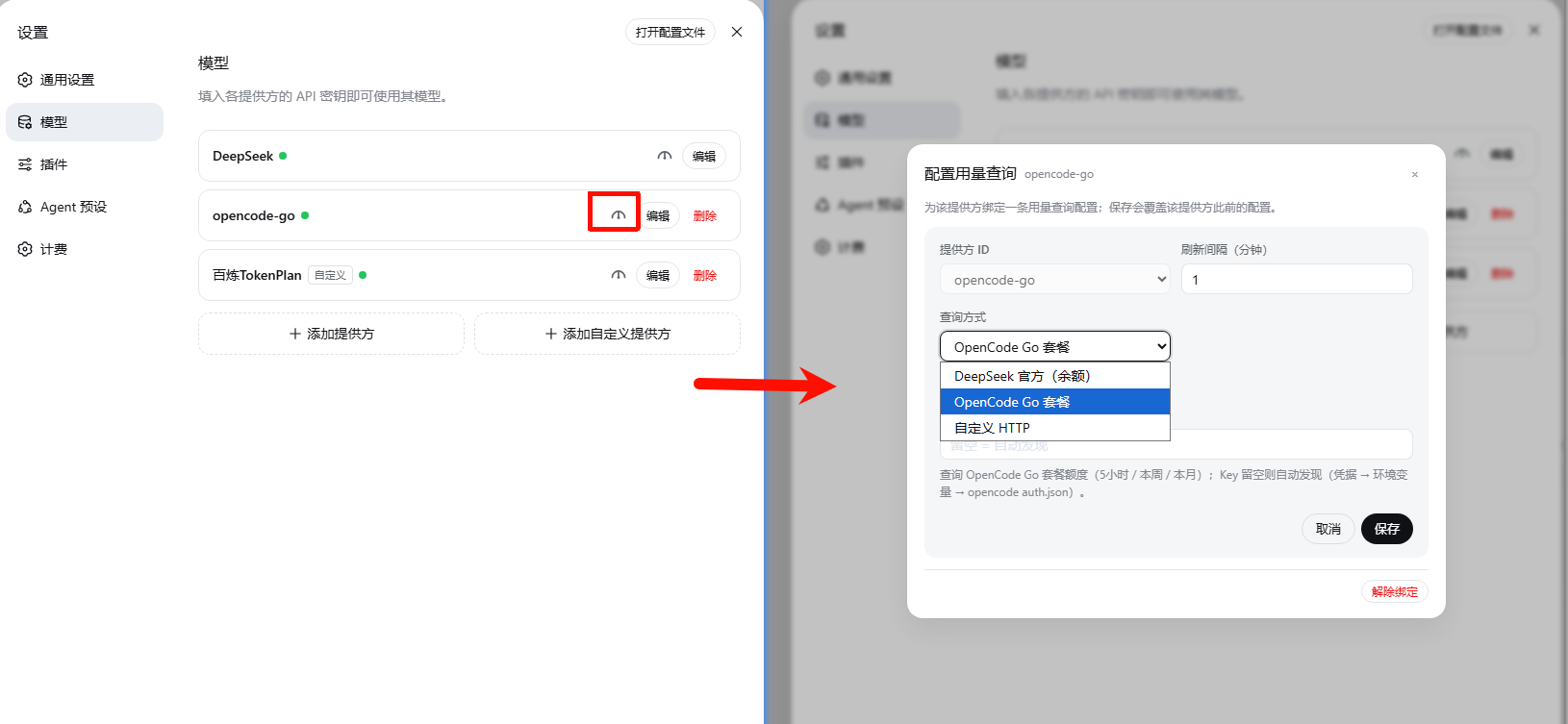
Chinese-UI screenshot — no English capture yet.
View usage: click the gauge icon left of the model switcher in the composer. The panel shows the current session provider's quota: provider name + preset badge in the header, refresh icon on the top right.
DeepSeek official balance (built-in, queries
api.deepseek.comdirectly):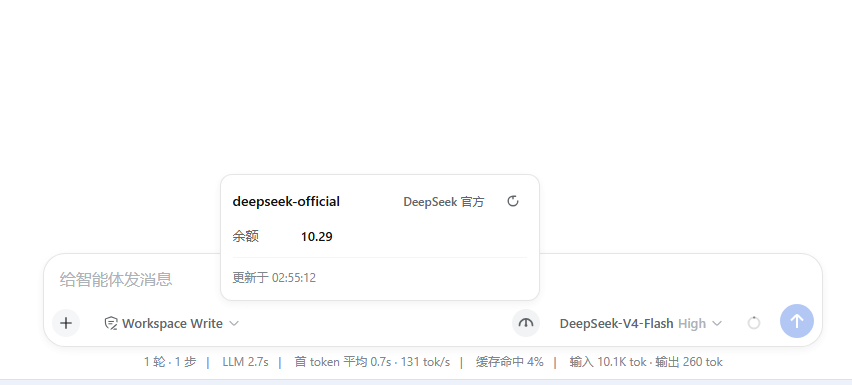
Chinese-UI screenshot — no English capture yet.
OpenCode Go plan (5-hour / weekly / monthly progress):
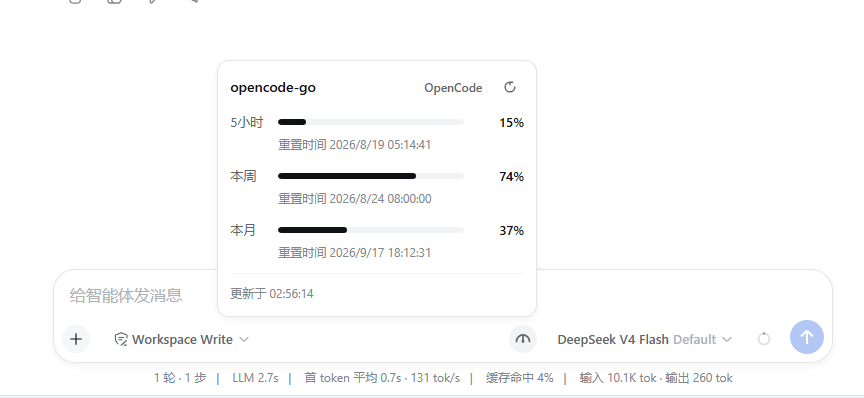
Chinese-UI screenshot — no English capture yet.
Session cost: the session header shows the session cost chip; hover for input/cache/output token details.

Chinese-UI screenshot — no English capture yet.
Prices: Settings → Usage → Billing prices — edit prices, add models via a provider-grouped dropdown of the models configured in Settings → Models, or sync from the official docs.
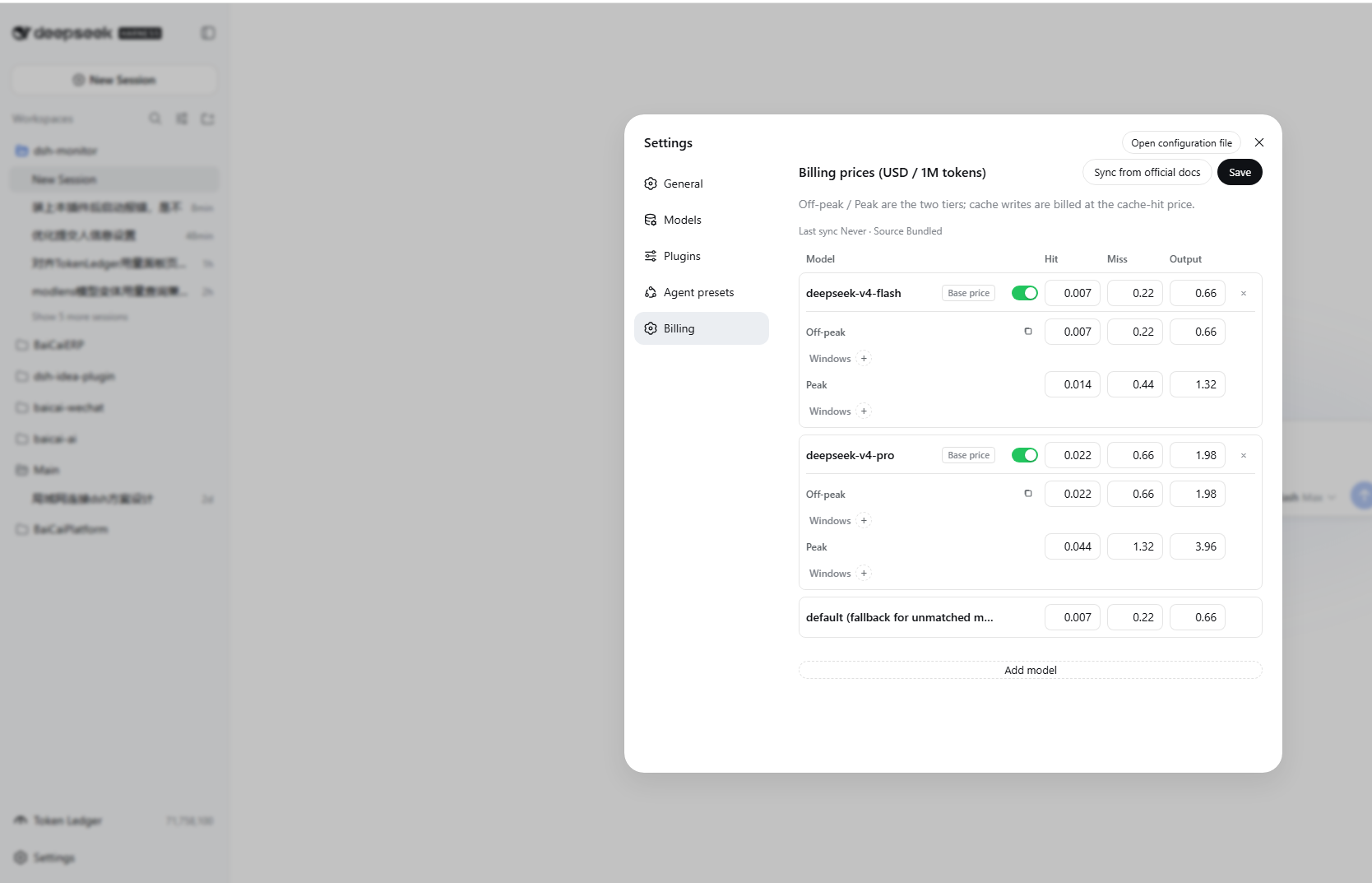
Token ledger: left-side entry
Token Ledger— shows today / week / month / cumulative token counts, provider distribution, project distribution, activity heatmap, and per-model breakdown.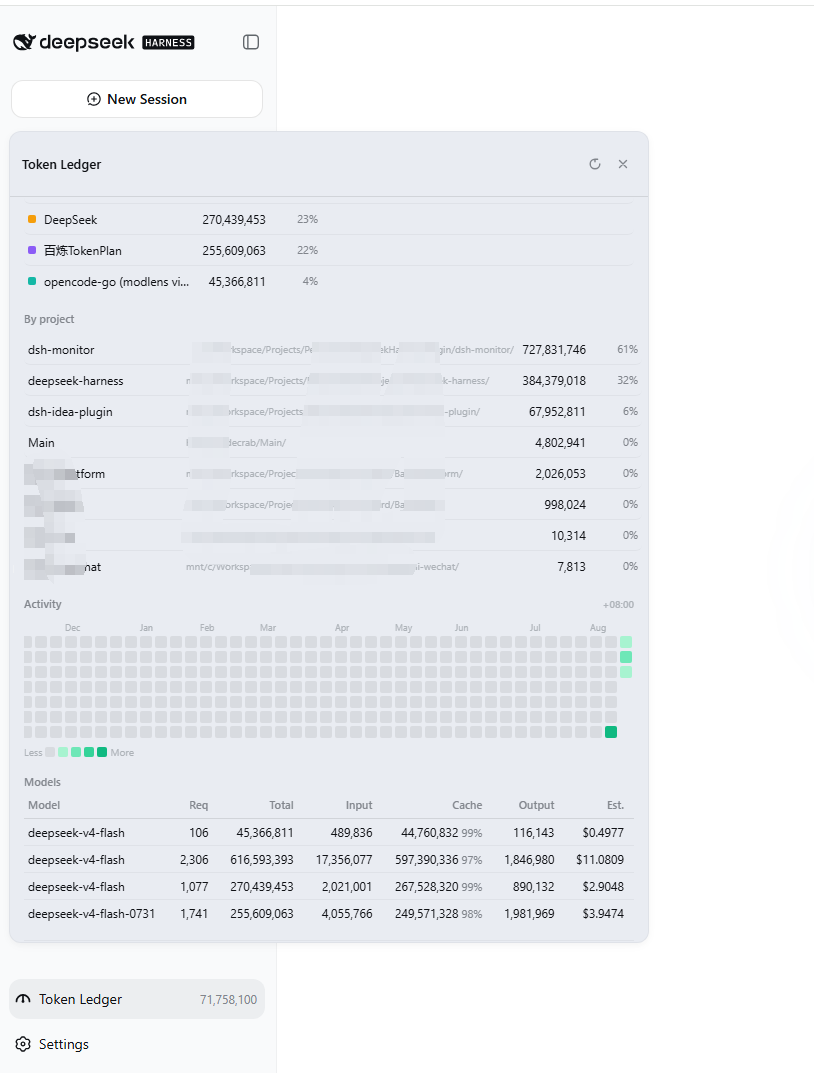
Configuration flow
End-to-end path from install to first run:
Install
  └─ dsh plugin --profile web add <repo-url>     ← joins the web profile's bundle layer
        │
        ▼
Settings → Models
  ├─ "DeepSeek" provider already exists
  │     └─ Reuses its API key, no extra setup (balance queries api.deepseek.com directly)
  ├─ "opencode-go" provider already exists
  │     └─ Click the usage icon left of its edit button → choose OpenCode preset → Save
  └─ Any third-party provider
        └─ Click the usage icon → choose "Custom HTTP" → fill URL / Headers / JSON paths → Save
        │
        ▼
Settings → Billing
  ├─ deepseek-v4-flash / deepseek-v4-pro are bundled by default (both USD and CNY)
  └─ Edit manually / sync from official docs / add new models from Settings → Models
        │
        ▼
New session → pick a model
  ├─ Session header shows a live cost chip
  ├─ Usage icon (left of model switcher) shows the session's provider quota
  └─ Left-side "Token Ledger" → full breakdown
Notes:
- DeepSeek official is built-in — works without any binding. Bindings are mainly for OpenCode, Custom, or overriding the DeepSeek refresh interval.
- Two independent price tables are persisted (USD / CNY); the active currency is determined by the UI language (zh → CNY, otherwise → USD). Official sync updates both.
- Each model can declare its own peak/off-peak windows in UTC. Models with their own windows use them; models with none fall back to the global official windows.
- Where the config lives:
$DSH_HOME/storages/dsh-monitor/ledger.json, under theconfigkey (see the next section).
Config model
Persisted at $DSH_HOME/storages/dsh-monitor/ledger.json (config):
{
  "locale": "auto",
  "currency": "CNY",
  "symbol": "¥",
  "decimals": 4,
  "exchangeRate": 7.2,
  "peakEnabled": true,
  "peakEffectiveAt": "2026-08-01T00:00:00Z",
  "peakWindows": [{ "start": 1, "end": 4 }, { "start": 6, "end": 10 }],
  "prices": {
    "models": { "deepseek-v4-flash": { "cacheHit": 0.007, "cacheMiss": 0.22, "output": 0.66, "offPeak": {}, "peak": {}, "legacyBase": {} }, "deepseek-v4-pro": {} },
    "default": { "cacheHit": 0.007, "cacheMiss": 0.22, "output": 0.66 }
  },
  "providers": {
    "deepseek": { "enabled": true, "preset": "deepseek", "refreshMinutes": 5, "apiKey": "" },
    "opencode": { "enabled": true, "preset": "opencode", "refreshMinutes": 15, "apiKey": "" },
    "custom1": {
      "enabled": true, "preset": "custom", "refreshMinutes": 10, "apiKey": "k",
      "custom": {
        "url": "https://example.com/usage",
        "headers": { "Authorization": "Bearer {apiKey}" },
        "items": [
          { "key": "weekly", "label": "This week", "kind": "percent", "path": "usage.weekly.percent", "maxPath": null, "resetsAtPath": "usage.weekly.resetsAt" },
          { "key": "tokens", "label": "Tokens", "kind": "number", "path": "usage.tokens", "maxPath": 1000000, "resetsAtPath": null }
        ]
      }
    }
  },
  "historyDays": 180,
  "fetchedAt": null,
  "priceSource": "bundled"
}
Custom item fields:
| Field | Meaning |
|---|---|
key |
Unique item id |
label |
Display name |
kind |
percent (value is already a percent) / number / money / text |
path |
Dotted JSON path, e.g. usage.weekly.percent |
maxPath |
Max: numeric constant or JSON path; when present, percent = value/max×100 |
resetsAtPath |
Reset-time JSON path (optional) |
Security notes
- DeepSeek balance: only the official host
api.deepseek.comis ever contacted; other endpoints are refused and the key is never sent. - OpenCode: only
opencode.ai; key resolution order: configapiKey→ DSH credentialOPENCODE_GO_API_KEY→ envOPENCODE_GO_API_KEY/OPENCODE_API_KEY→opencode auth.json. - Custom: the target URL and headers are user-configured; credentials are your own responsibility.
Development
npm install --cache ./.npm-cache   # sandboxed environments must keep the cache inside the workspace
npm test                           # node --test, 37 cases
npm run build:client               # bundle lib/client-src/ → lib/client.js (single-file bundle)
npm run dev:client                 # rebuild on change (--watch)
Layout:
- Host:
lib/index.js(plugin entry +llm/streambilling wrapper, re-exports the public API),lib/messages.js(server copy),lib/projection.js(costUsage session projection),lib/queries.js(DeepSeek balance / OpenCode plan / custom HTTP queries),lib/monitor.js(monitor service: cache / listCatalog / official price sync),lib/store.js(ledger + config validation),lib/pricing.js(prices/peak/official parse),lib/typert.host.js(Typert manifest). - Browser:
lib/client.jsis an esbuild artifact (DSH's module loader only resolves host-managed module names, so the shipped bundle must be one file; do not edit it by hand). Source lives inlib/client-src/:main.js(entry/wiring),styles.js,i18n.js,codecs.js,format.js,panel.js(usage icon/panel/cost badge),settings.js(Settings → Usage page);scripts/build-client.mjsbundles it, injects a content-derived BUILD_TAG, and smoke-checks the result. - Iterating: after changing client sources run
npm run build:client(ornpm run dev:clientwatch) and re-dsh plugin --profile web add <repo>; withpnpm run dev:webrunning in the DSH repo, client changes can hot-reload via client HMR.
Billing and pricing math are ported from dsh-cost-meter (MIT).
The usage ledger and per-provider usage panel are referenced from TokenLedger (MIT).
License
MIT
No comments yet. Be the first to write one.