Linen theme

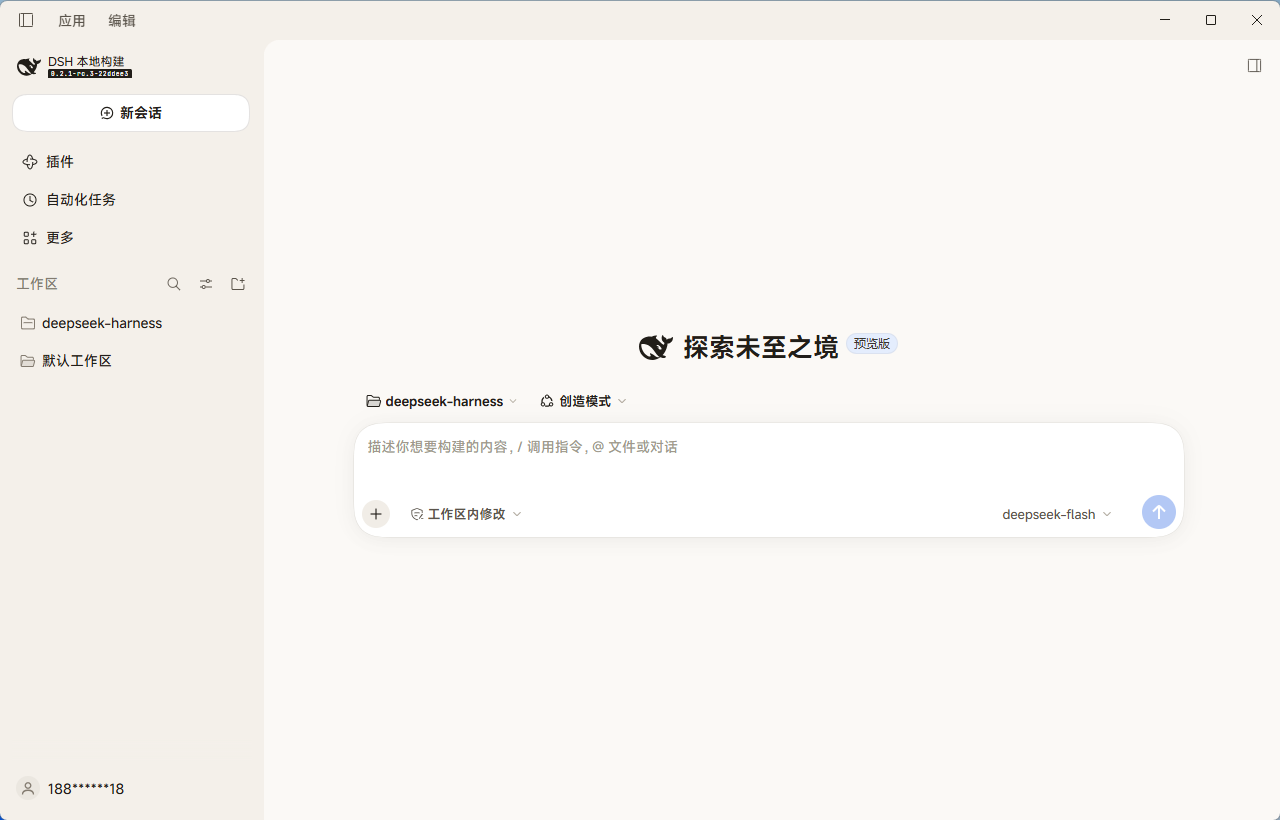
A warm neutral theme for the DeepSeek Harness Web GUI. It warms the surfaces, rounds the corners one step further, and prefers sharper default fonts — in both light and dark appearance.
DSH Web 界面的暖中性主题:表面更温暖、圆角再圆一档、默认字体更锐利,亮色与暗色外观同时生效。
完整中文说明见下方 中文.
Screenshots
Light appearance with the theme applied — the new-session screen, showing the warm surfaces and the softer corner scale:
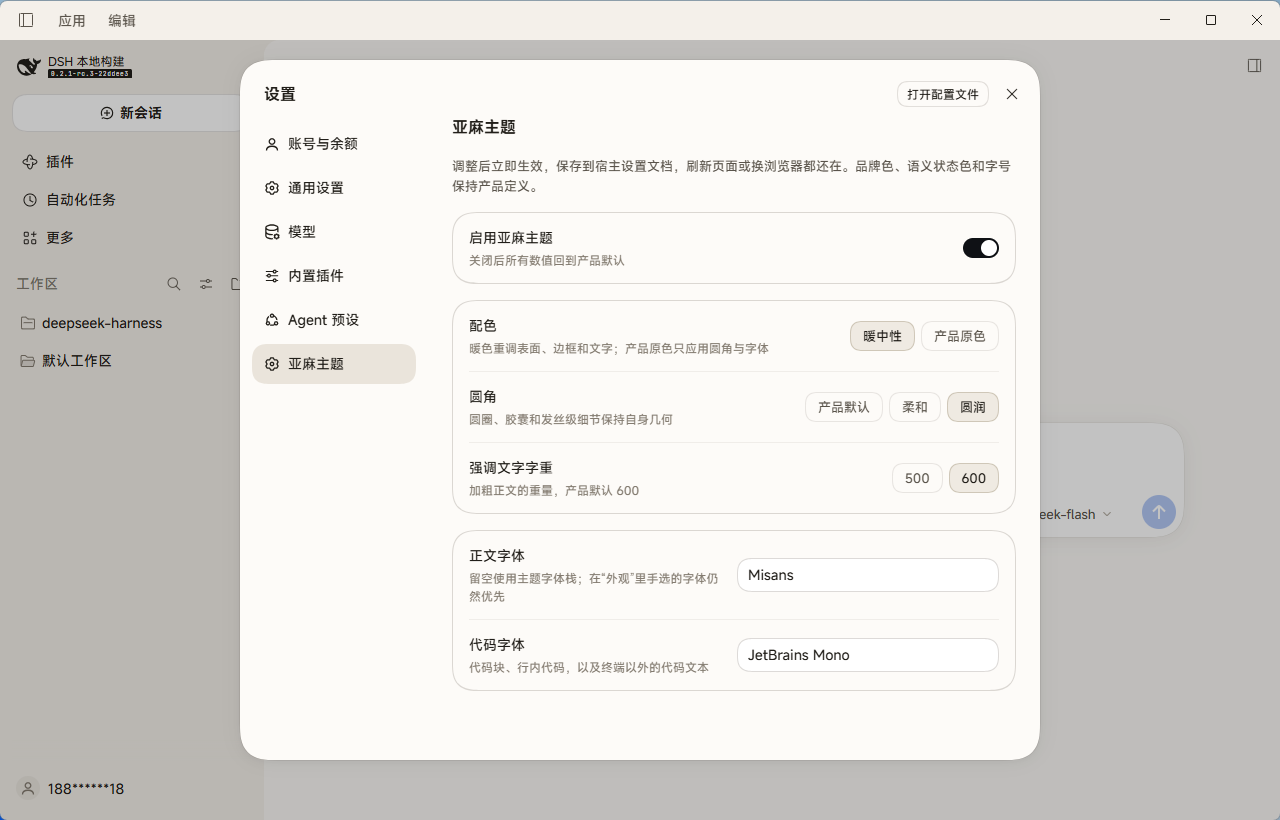
The theme's settings page, under Settings → Linen theme:
What it changes
| Area | Effect |
|---|---|
| Surfaces | Page, raised layers, overlay, sidebar, code blocks, and scrollbars move to a warm neutral palette |
| Borders and text | Four border steps and seven text steps retuned to the same warm ramp |
| Corner radius | One step softer than the product scale: 4/8/12/16/20/28 → 6/10/14/18/22/32 (a third "round" scale is also selectable) |
| Fonts | Default text and code stacks prefer system-ui / Cascadia Code; emphasis drops from 600 to 500 |
| Interactive fills | Hover, active, ghost-button, and floating-button fills follow the warm ramp |
What it deliberately does not change
Each of these is blocked by the Host mechanism, not by taste:
- Font sizes and line heights — the theme presenter rewrites them from Settings on every apply, so an override would leave the font-size stepper in Settings doing nothing. Use Appearance → font size instead.
- Elevation and shadow tokens — declared on
body, body *, so a body-level override never reaches the elements that consume them. - Menu material —
--dsw-menu-surface-filland--dsw-menu-backdrop-filterare theme-owned; overriding them breaks the shared menu blur contract. - Product icons —
ThemeDefinition.iconsexists only onctx.theme.register, which would replace your light/dark preference. - Brand, link, and state colors — a theme that recolors success, warning, error, or link stops communicating state.
Circles, capsules, and hairline details keep their own literal geometry; only the shared --dsw-radius-* scale follows the theme.
Install
The bundle is self-contained: no dependencies are installed at activation time (the schema library is vendored). Install it through the plugin manager with the absolute path to this directory:
plugin_manager { action: "install_bundle", target: "<absolute path to this directory>" }
Or from a packed tarball, extract it first and point install_bundle at the extracted directory.
Reload the window once after installing. The theme then applies immediately on every later load.
Update
install_bundle refuses an already-installed package. Remove and reinstall:
plugin_manager { action: "remove_bundle", target: "dsh-theme-linen" }
plugin_manager { action: "install_bundle", target: "<absolute path>" }
Replacing an installed package requires restarting dsh so the browser loads the new module generation.
Configure
Open Settings → Linen theme. Changes apply immediately and are stored in the Host settings document, so they survive a restart and follow you across browsers.
| Setting | Values | Meaning |
|---|---|---|
| Enable the Linen theme | on / off | Off restores every product default |
| Palette | Warm / Product | Product keeps the original colors and applies only corners and fonts |
| Corner radius | Product / Soft / Round | Three radius scales |
| Emphasis weight | 500 / 600 | Weight of emphasized body text; product default is 600 |
| Body font | font list | Empty uses the theme stack; a font chosen in Appearance still wins |
| Code font | font list | Code blocks, inline code, and code text outside the terminal |
Font fields take comma-separated family names and commit on blur or Enter.
Requirements
- A DeepSeek Harness profile with the Web client (
dsh webor the desktop app). - The
theme,slots,configForms, andlocaleclient services, which the standard Web composition provides.
Layout
index.js              Host half: the Config schema (all fields volatile)
client.js             Browser half: the token layer and the settings page
cordis.patch.yml      Bundle patch that inserts the plugin row
locale/*.json         Plugin manager title and description (8 languages)
icon.svg              Plugin artwork
vendor/               Vendored @deepseek-ai/schemastery and cosmokit builds (MIT)
scripts/verify.mjs    Package invariant checks, run by CI and locally
assets/               Screenshots used by this README (not packed)
Releasing
Publishing is tag-driven and needs no configuration: no secrets, no local build step.
git tag v1.0.1
git push origin v1.0.1
The Release workflow then validates the package, builds the tarball, and attaches it to the GitHub Release, using the GITHUB_TOKEN GitHub provides automatically. Pushing a tag that already has a release replaces the attached asset instead of failing.
Before tagging, the same checks run on every push and pull request, and locally:
npm pack --dry-run --json > /tmp/pack.json && node scripts/verify.mjs /tmp/pack.json
scripts/verify.mjs guards the invariants that would otherwise break silently: the browser module id must equal the package name, the settings namespace must equal the patch row id, every Config field must be .volatile(), the vendored schema library must resolve from the packed files, and every locale must carry a title and description.
Notes for theme authors
- Every token value is a
{ light, dark }pair. The theme service rejects a bare string on purpose: a single value goes illegible when the color scheme flips. - The layer is applied through
overrideTokens, so the Appearance preference keeps working and the theme never appears as a fourth choice. - Settings fields must be
.volatile(). The settings directory only exposes a namespace when at least one field is live, and a token change must apply without remounting the browser plugin.
License
MIT for this plugin. The vendored @deepseek-ai/schemastery and @deepseek-ai/cosmokit builds retain their own MIT licenses, shipped alongside in vendor/.
中文
一个暖中性主题。它让界面表面更温暖、圆角再圆一档、默认字体更锐利,亮色和暗色外观同时生效。
改了什么
页面与浮层底色、四级边框、七级文字色阶、侧栏、代码块与行内代码、滚动条、插画、悬停与激活填充,统一挪到暖中性色阶;圆角比产品尺度再柔一档;正文字体和代码字体优先使用 system-ui 与 Cascadia Code;加粗正文从 600 降到 500。
刻意不改什么
字号与行高(会被设置里的字号控件覆盖,改了那个控件就成了摆设)、elevation 与阴影(在 body, body * 上逐元素声明,body 级覆盖到不了)、菜单材质(主题所有权,覆盖会破坏共享毛玻璃)、产品图标(只在 register 上,会顶掉你的亮暗偏好)、品牌色与状态色(改了就不再传达状态)。
圆圈、胶囊和发丝级细节保持自己的字面量几何,只有共享的 --dsw-radius-* 尺度跟随主题。
安装
这个包是自包含的,激活时不装任何依赖(schema 库已随包携带)。用插件管理器指向本目录的绝对路径安装:
plugin_manager { action: "install_bundle", target: "<本目录绝对路径>" }
安装后刷新一次窗口。之后每次加载都会自动生效。
更新
install_bundle 不允许重复安装同一个包,先移除再装,然后重启 dsh 让浏览器加载新的模块。
发版
推标签即可,不需要任何额外配置(不用配 secret,也不用本地打包):
git tag v1.0.1
git push origin v1.0.1
Release 工作流会自动校验、打包并把 tgz 挂到对应 Release 上,用的是 GitHub 自带的 GITHUB_TOKEN。同一个标签重跑会替换附件而不是报错。
推之前同样的检查也会在每次 push 和 PR 上跑,本地也可以跑:
npm pack --dry-run --json > /tmp/pack.json && node scripts/verify.mjs /tmp/pack.json
配置
打开 设置 → 亚麻主题。改动立即生效,保存在宿主设置文档里,重启后仍在,换浏览器也跟随。可调:启用开关、配色(暖中性 / 产品原色)、圆角(产品默认 / 柔和 / 圆润)、强调字重(500 / 600)、正文字体、代码字体。
字体输入框接受逗号分隔的字体名,失焦或回车提交;留空则使用主题自带的字体栈,而你在「外观」里手选的字体始终优先。
No comments yet. Be the first to write one.