DSH Island
A small, always-visible macOS status island for every DeepSeek Harness session.


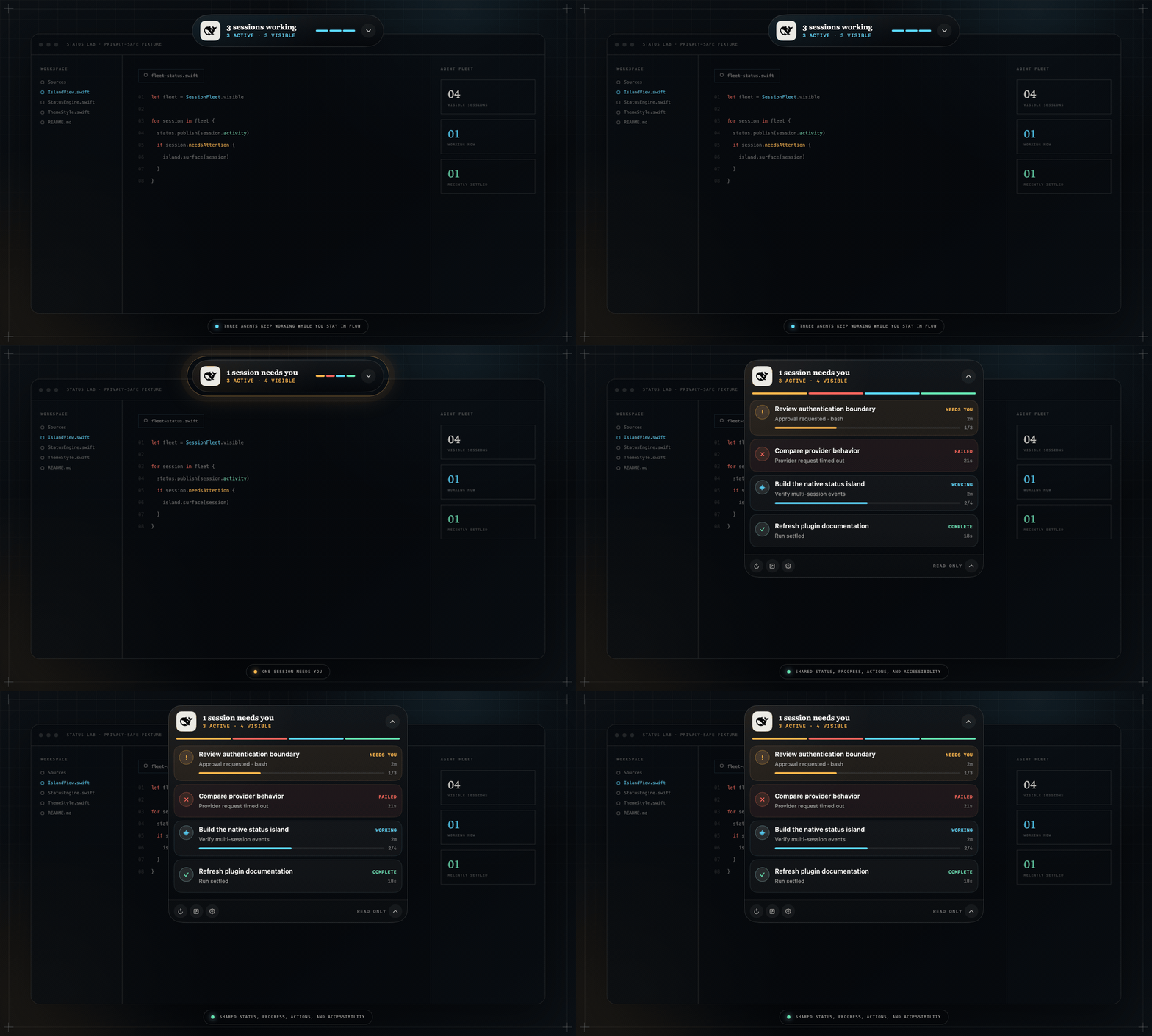
Every screenshot and recording uses deterministic synthetic sessions—never a personal desktop, path, account, or live conversation.
DSH Island lets you return to your editor while several DeepSeek Harness Agents keep working. Its collapsed capsule answers what matters immediately: whether a session needs you, how many signals are active, and whether DSH is reachable. One click reveals the complete session list.
It is an independent native companion that connects to the published DSH Web API. It does not run inside the Harness process, so there is no cordis.yml entry to add. Start DSH Web, open DSH Island, and the two work together. It is a community project, not an official DeepSeek product.
What it shows
- All non-blank sessions from the authoritative
session.listbaseline. - Live attention, failure, running, recently completed, idle, and offline states.
- Pending approvals and questions without exposing their contents in the collapsed capsule.
- Todo progress only when DSH publishes a non-empty Todo projection.
- Descriptive phases and coarse tool categories when no numeric progress exists.
- Parent/subagent families, background-job counts, elapsed time, and session deep links.
- A menu-bar recovery surface for show/hide, reconnect, privacy mode, settings, and quit.
The signal rail is a compact map of the visible fleet. Amber means human input, coral means failure, cyan means working, mint means recently completed, and gray means idle or offline.

Appearance
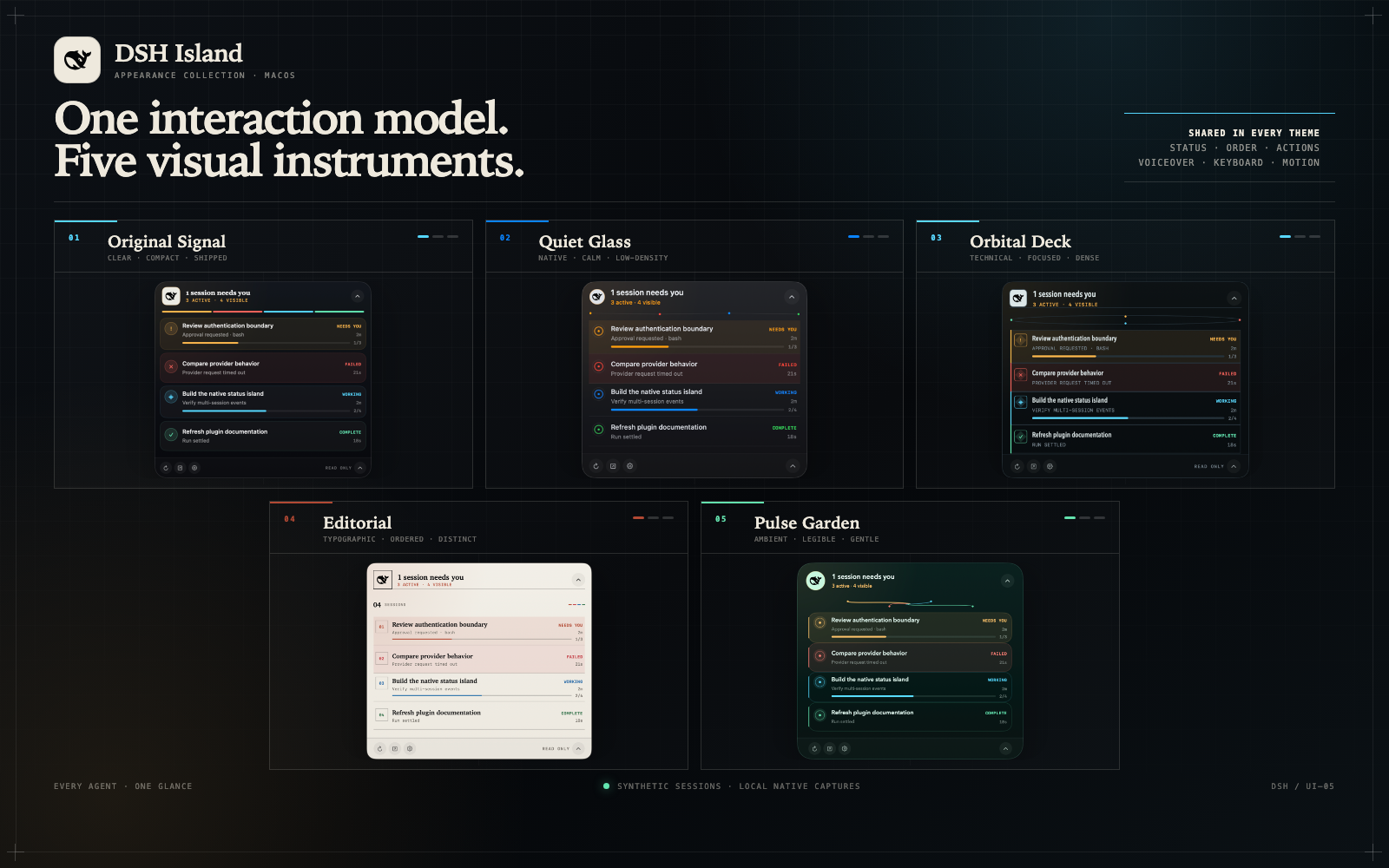
One status model, one set of actions, and one accessibility model power five selectable presentations. Changing a theme never changes session ordering, progress semantics, controls, VoiceOver labels, keyboard behavior, or Reduce Motion support.
| Theme | Character |
|---|---|
| Original Signal | The shipped obsidian instrument with cards and a segmented fleet rail |
| Quiet Glass | A calm native-glass treatment with rings and restrained dividers |
| Orbital Deck | A dense technical console with an orbit summary and grid rows |
| Editorial | A light typographic ledger with numbered sessions and print-like structure |
| Pulse Garden | A soft deep-green surface with organic status veins |
Every theme carries the official black DeepSeek Harness whale mark. Choose one in Settings → Appearance; the selection is applied immediately and persists across launches.
Truthful progress
DSH does not expose a universal percentage or ETA for an Agent run. DSH Island therefore keeps execution state and progress separate:
| Source | Presentation |
|---|---|
session.list / host/session-status |
Authoritative running state |
Non-empty todos projection |
Determinate completed/total rail |
| Session events | Descriptive activity such as reasoning or editing files |
| No Todo projection | Indeterminate working state; no invented percentage or ETA |
Connected priority is needs attention → failure → running → completed → idle. A failed baseline makes the whole island offline because its live state can no longer be trusted.
Install
Manual install
- Download
DSH-Island-0.2.0-macOS-universal.zipfrom the latest release. - Optionally download the adjacent
.sha256file and runshasum -a 256 -c DSH-Island-0.2.0-macOS-universal.zip.sha256. - Unzip it and move DSH Island.app to Applications.
- Start DSH Web, then open DSH Island. The default endpoint is
http://127.0.0.1:3080.
The 0.2 release is ad-hoc signed, not Apple-notarized. On first launch, macOS may require Control-clicking the app and choosing Open. The release runs natively on both Apple silicon and Intel Macs.
Typical DSH commands are:
npx @deepseek-ai/dsh web

# If dsh is already installed globally:
dsh web

# From a DeepSeek Harness source checkout:
pnpm dsh web
No configuration is required when DSH uses the default loopback endpoint. Open Settings from the island gear or menu bar when you need to change a preference:
| Setting | Purpose |
|---|---|
| DSH endpoint | Connect to a different local port or trusted Host |
| Allow a non-loopback endpoint | Required before any remote address is accepted |
| Privacy mode | Alias titles and hide Todo text, tool names, errors, and connection details |
| Appearance | Choose Original Signal, Quiet Glass, Orbital Deck, Editorial, or Pulse Garden |
| Launch at login | Register the app with macOS login items |
| Reset island position | Return the panel to its default display-relative position |
Non-loopback endpoints are refused until you explicitly enable them; only connect to a remote DSH Host you trust.
Clicking a row opens ?session=<id>. The Web UI opens safely without extra software; exact session selection is added by the optional community dsh-deeplink plugin.
Install with a coding agent
A coding agent can download, verify, install, launch, and configure the app. Paste this prompt into an agent running on the target Mac:
Install DSH Island v0.2.0 from https://github.com/ChuanTianML/dsh-island/releases/tag/v0.2.0 on this Mac.

1. Require macOS 13 or later. Download the universal ZIP and its .sha256 file, then verify them with shasum -a 256 -c.
2. Check whether /Applications/DSH Island.app already exists. Ask me before replacing an existing installation.
3. Move the verified app to /Applications. Do not bypass Gatekeeper or change macOS security settings; if first launch requires Control-click → Open, hand that step back to me.
4. Start DeepSeek Harness Web with npx @deepseek-ai/dsh web unless it is already running.
5. Open DSH Island and use its Settings UI to keep the default http://127.0.0.1:3080 endpoint. Ask before enabling a non-loopback endpoint or changing privacy-related settings.
6. Confirm that the island reports a connected DSH state and show me the final configuration. Do not collect or upload any real session title, path, account detail, or desktop screenshot.
Privacy and safety
- Read-only: the app cannot approve, answer, steer, cancel, queue, or edit a session.
- Loopback-only by default; remote endpoints require a deliberate settings change.
- Privacy mode aliases titles and removes Todo text, unknown tool names, errors, and connection details at the state-engine boundary.
- Tool arguments are never retained for presentation.
- No analytics, telemetry, cloud relay, credential storage, or model-context injection.
DSH itself can execute powerful Agent actions. Do not expose an unauthenticated DSH Host to an untrusted network.
Build and test
Requirements: macOS 13 or later and Xcode 16 or a compatible Swift 6 toolchain.
swift test
swift build -c release -Xswiftc -strict-concurrency=complete -Xswiftc -warnings-as-errors
./scripts/build-app.sh
The packaging script builds a universal application, generates the icon, applies an ad-hoc signature, and writes the app and ZIP to dist/.
Run the deterministic visual fixture without a DSH Host:
swift run dsh-island --demo-working
swift run dsh-island --demo-expanded
swift run dsh-island --demo-expanded --theme editorial
The committed community media is rendered from the same synthetic fixtures. Run ./scripts/render-marketing-assets.sh to regenerate the five-theme board, social preview, desktop scene, and GIF source frames. See docs/marketing/README.md for its privacy rules.
See product design, architecture, and the validation record for the state semantics and verification evidence.
Scope
Version 0.2 targets macOS. Windows/Linux surfaces, interactive approvals, transcripts, sounds, avatars, pet skins, fabricated ETA, and model steering are intentionally outside this release.
Contributions are welcome; start with CONTRIBUTING.md. DSH Island is available under the MIT License.
No comments yet. Be the first to write one.