dsh-skin-tomorrow-night-blue
Tomorrow Night Blue skin for the DeepSeek Harness (DSH) Web GUI.


English | 中文
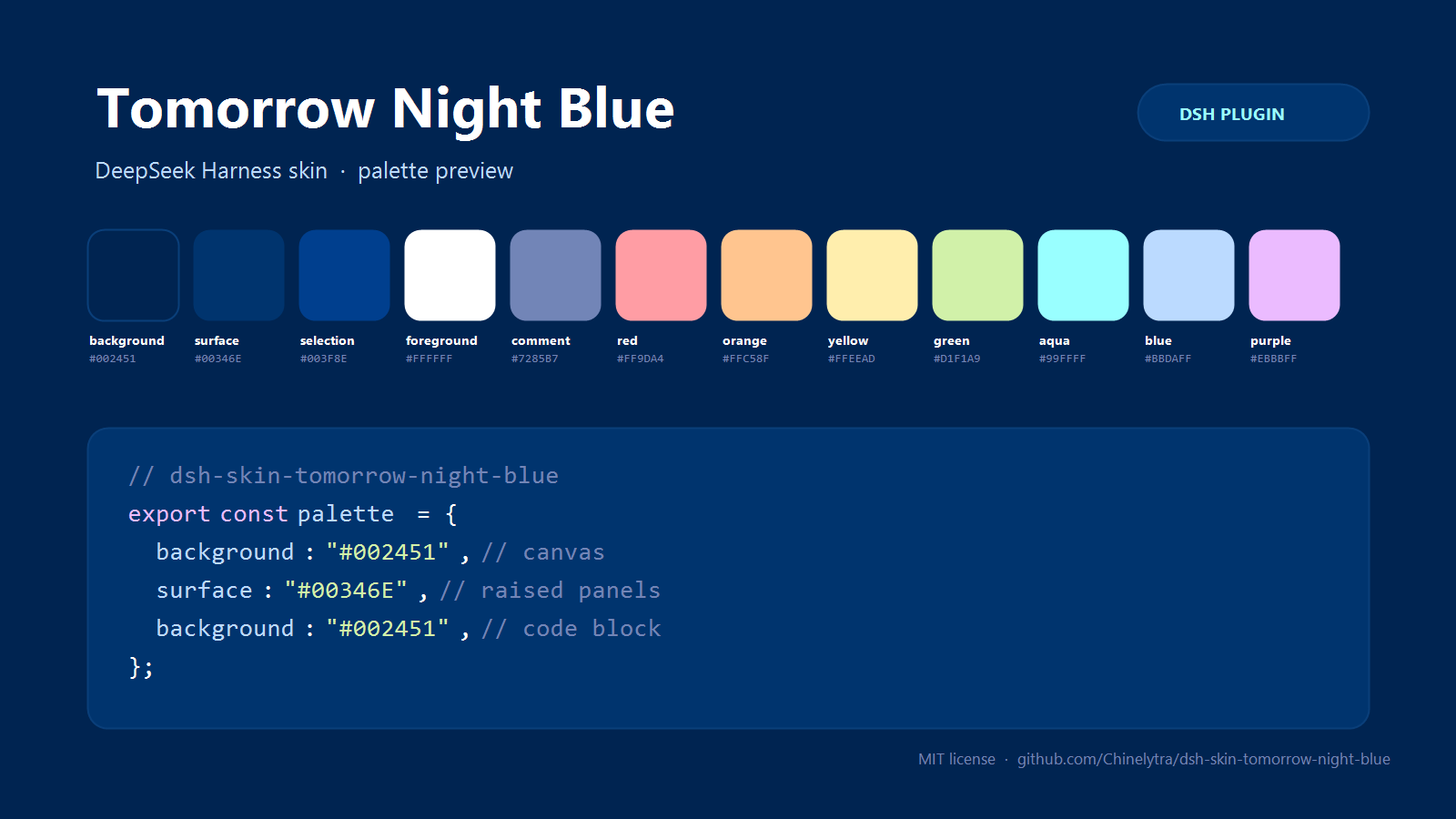
One skin, the whole interface: the classic deep-blue Tomorrow Night Blue palette (Chris Kempson's Tomorrow Theme) mapped onto DSH's design tokens and code-highlighting colors — canvas, sidebar, panels, menus, buttons, conversation bubbles, markdown, diffs, scrollbars, focus ring, and syntax highlighting in code blocks.
Unofficial community skin. Not affiliated with DeepSeek.
Install
Install into the profile that runs your GUI — web for dsh --profile web,
desktop for the DSH Desktop app.
From GitHub:
dsh plugin --profile web add github:Chinelytra/dsh-skin-tomorrow-night-blue
From the release tarball (prebuilt, no build step):
dsh plugin --profile web add https://github.com/Chinelytra/dsh-skin-tomorrow-night-blue/releases/latest/download/dsh-skin-tomorrow-night-blue.tgz
From a local checkout:
dsh plugin --profile web add link:/absolute/path/to/dsh-skin-tomorrow-night-blue
DSH applies profile changes live; if the palette does not appear immediately, restart DSH once (the browser half loads with the app shell).
What it does
- 113
--dsw-alias-*design tokens — application canvas, raised layers, overlays, borders, labels, brand/link/button colors, interactive and state colors, markdown, diff, file-diff, scrollbar, focus ring, toast, tooltip, menu and product-specific surfaces (sidebar, bubble, composer, selector, tips). - 11 Shiki syntax roles — comments, keywords, strings, numbers/constants, functions, parameters, punctuation and links in fenced code blocks match the theme instead of keeping the stock Shiki palette.
- First paint is already blue — the host half injects the same declarations
into every served
index.htmlthrough the webserver's structuredindex-injectrows, so a browser page does not flash the default palette while its scripts load. - No dependencies, no network, no settings namespace — one stylesheet and one token layer; disable or remove the bundle to get the stock look back.
Palette
| Role | Color | Role | Color | |
|---|---|---|---|---|
| Background | #002451 |
Red | #FF9DA4 |
|
| Current line / raised surface | #00346E |
Orange | #FFC58F |
|
| Selection / nested surface | #003F8E |
Yellow | #FFEEAD |
|
| Foreground | #FFFFFF |
Green | #D1F1A9 |
|
| Comment | #7285B7 |
Aqua | #99FFFF |
|
| Blue | #BBDAFF |
|||
| Purple | #EBBBFF |
Tomorrow Night Blue has no official light counterpart, so the skin keeps this palette in both appearance modes and aligns the appearance setting to dark on first use.
How it works
This is a two-half DSH plugin (all standard DSH plugin metadata, no custom wiring):
| Half | File | Role |
|---|---|---|
| Host | index.js |
Pushes one structured style row into webserver/index-inject so served pages paint the skin before scripts run. |
| Client | lib/client.js |
Appends one <style> element with the token + Shiki declarations and registers it with the app's __ModuleLoader__ bundle format. |
src/palette.mjs is the single source of truth: a 15-anchor palette expanded
into the --dsw-alias-* surface. build-client.mjs serializes that derivation
into the browser bundle; verify.mjs re-derives it offline and exercises both
halves against stubs.
The declarations are !important on purpose: DSH's layout presenter writes the
composed alias tokens as inline custom properties on <body>, and only an
important stylesheet declaration outranks inline style. A fixed skin must win
that cascade; a theme that wants to stay configurable should use the
ctx.theme.overrideTokens layer instead.
Compatibility
- DSH Web GUI 0.2.x (developed and tested against
0.2.2-rc.1, DSH Desktop profile; the same client bundle servesdsh --profile web). - Node.js
>=20for the build/verify scripts (runtime needs no build). - While enabled, the skin's
!importantlayer takes precedence over token layers from other skin plugins (for exampledsh-opencode-palette). Disable this bundle to hand the cascade back to them.
Known limitations
- The skin overrides alias tokens (plus the Shiki syntax roles). A few auxiliary surfaces in DSH are painted from design-system static tokens (for example some file-change/diff card headers keep a neutral dark fill) and therefore stay as the stock theme draws them — the same boundary every token-layer skin works within.
- Tomorrow Night Blue is a dark palette; the skin keeps it under both appearance modes by design.
Disable / uninstall
- Settings → Plugins → turn off or remove
dsh-skin-tomorrow-night-blue. - CLI:
dsh plugin --profile <profile> remove dsh-skin-tomorrow-night-blue
Development
node build-client.mjs   # regenerate lib/client.js from src/palette.mjs
node verify.mjs         # offline checks: palette, host injection, bundle load
verify.mjs requires no DSH runtime: it derives the token surface, calls the
host apply with a fake context and a captured injection table, then loads the
built bundle through the real window.__ModuleLoader__ factory shape against a
DOM stub.
License & attribution
MIT © Chinelytra. See LICENSE.
The palette is transcribed from Tomorrow Theme by Chris Kempson (chriskempson/tomorrow-theme, MIT). This repository is an independent DSH skin and is not affiliated with or endorsed by the Tomorrow Theme project or DeepSeek.
No comments yet. Be the first to write one.