dsh-book
English · 简体中文



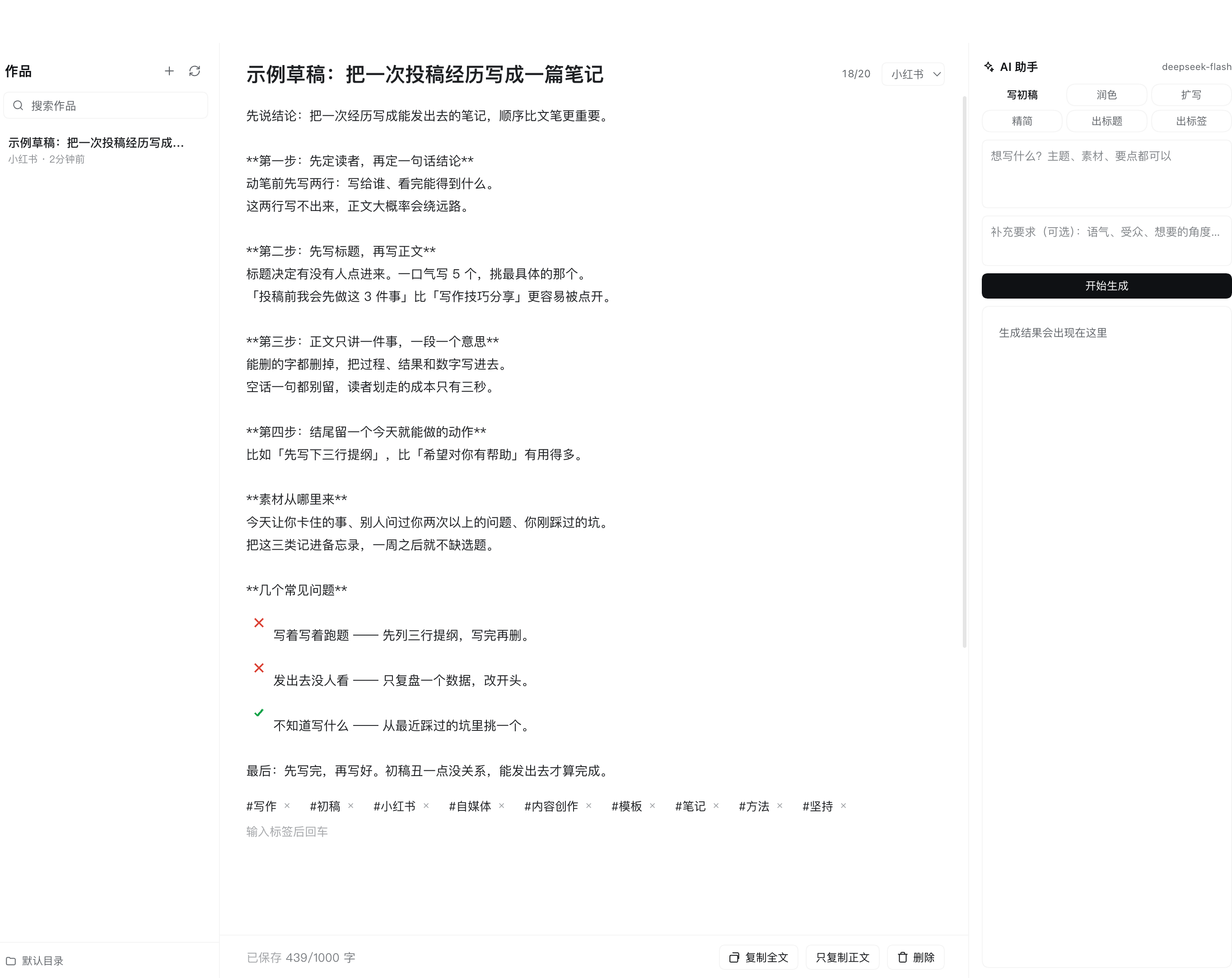
A writing workspace for DeepSeek Harness: a Markdown draft library, platform-aware editors for Xiaohongshu / WeChat official accounts / generic posts, and an AI copywriting assistant that streams from your profile's default model.
Features
- Draft library — one Markdown file per draft, in a folder you choose (default
~/Documents/DSH写作, created on first save); browse, search (title + body excerpt), create, refresh and delete; drafts are ordinary files, so Obsidian, Git andvimcan share the same folder. - Editor — Xiaohongshu / WeChat / generic platform profiles with live title and body counters
(soft limits: amber warnings, saving is never blocked); tag chips (
Enteror,adds,Backspacein an empty field removes the last one); ~0.9 s autosave with a live status; copy the whole post (title + body +#hashtags) or just the body; renaming the title renames the file (a collision gets a(2)suffix); delete takes two clicks. - AI copywriting assistant — six modes (Draft, Polish, Expand, Tighten, Titles, Tags) streaming
token by token with a Stop button, platform-aware prompts (Xiaohongshu hooks and hashtags, WeChat
subheads, neutral generic tone) and one-click apply back into the editor; runs on the current DSH
profile's default model through the host
llmservice, with no API key setup inside the panel. - Fit and finish — bilingual UI (Chinese / English) that follows the DSH locale, theme-aware styling on DSH design tokens so light and dark mode follow the app, no build step, no runtime dependencies and no background processes.
Install
Prerequisite: a working DeepSeek Harness install (dsh). The default profile is usually web.
From GitHub (recommended)
dsh plugin --profile <profile> add github:ChenYichener/dsh-book
From a local clone
git clone https://github.com/ChenYichener/dsh-book.git
dsh plugin --profile <profile> add /path/to/dsh-book
DSH desktop app
Open the Plugins page, install from a local directory, and point it at the cloned dsh-book
folder (or paste the GitHub repo path). After installing, restart dsh web or refresh the page: a
pen-icon Writing (写作) entry shows up in the sidebar panel list. To update, run the same add
command again; to remove the plugin, run dsh plugin --profile <profile> remove dsh-book.
Requirements
| Requirement | Notes |
|---|---|
| DSH | plugin-bundle support with the sidebar.panellist / main slots; tested on 0.2.2-rc.1 |
| Node.js | >= 20 |
| Default model | optional; required for the AI panel (uses the profile's default provider + model) |
| Runtime dependencies | none — plain ESM on the host, plain browser JS on the client |
Usage
Click the pen icon labeled Writing in the sidebar. The workspace has three columns: library, editor and AI assistant; the newest draft opens automatically once the library loads, and New work starts an empty one.
Edit a draft
- Pick a platform next to the title counter, then type the title and body (counters turn amber past the platform limit, but nothing is blocked).
- Add tags; they are stored in
frontmatterand copied by Copy all. Everything autosaves. - Use Copy all / Copy body to publish, or Delete → Confirm delete to remove a draft.
| Platform | Title limit | Body limit | Tag limit | Assistant style |
|---|---|---|---|---|
Xiaohongshu (xiaohongshu, default) |
20 chars | 1,000 chars | 10 | hook title, first-person short paragraphs, 8–10 hashtags |
WeChat official account (wechat) |
64 chars | 4,000 chars | 30 (assistant suggests none) | clear value title, subhead structure |
Generic (generic) |
none | none | 30 | clear title, natural paragraphs, 5–10 tags |
AI assistant
| Mode | What you need | What comes back | Apply action |
|---|---|---|---|
| Draft | a brief (topic / material / key points) | title + body + tags | Apply to editor |
| Polish | a non-empty body | rewritten body | Replace body |
| Expand | a non-empty body | longer body | Replace body |
| Tighten | a non-empty body | shorter body | Replace body |
| Titles | body or brief | 5 title candidates | click one |
| Tags | body or brief | 8–10 hashtags | click one, or Add all |
An optional Extra requirements box (tone, audience, angle) is sent with every mode. Stop aborts the stream, and errors are shown inline in the output area.
Keyboard and interactions
| Where | Key | Action |
|---|---|---|
| Title input | Enter |
jump to the body |
| Tag input | Enter, , or , |
add the tag |
| Tag input (empty) | Backspace |
remove the last tag |
| Folder input | Enter / Esc |
switch to that folder / cancel editing |
There are no global keyboard shortcuts; everything else uses the buttons.
Draft format
---
title: A month of writing in public
platform: xiaohongshu
tags: 自媒体, 副业, 小红书运营
createdAt: 2026-11-03T01:00:00.000Z
updatedAt: 2026-11-03T01:20:00.000Z
---

Body text. Everything after the closing `---` is preserved verbatim.
The five keys are parsed line by line (a small frontmatter subset, not a full YAML parser); unknown
keys are ignored and tags is a comma-separated list. Without frontmatter, the whole file is the body
and the file name (minus .md) is the title. Only .md files directly inside the folder are listed —
subfolders, dotfiles and files over 2 MiB are skipped.
How it works
- Host half (
index.js): exportsinject: ['webServer']and mounts one prefix route,/dsh-book/api, on the DSH host web server throughctx.effect+ctx.webServer.register. - Draft storage: plain
node:fs; saves are atomic (temp file + rename), file names are derived from the title and validated against path traversal, and every operation is bounded (1 MiB request body, 2 MiB draft file, 500 listed drafts). - Generation: reads
ctx.get('agentDefaultModel').currentSelection()for provider/model and streams throughctx.llm.stream(...), emitting Server-Sent Events (start→delta→done/error); closing the browser stream aborts the upstream request. - Prompts: a shared Chinese copywriting baseline (no fabricated facts or numbers, no medical or absolute claims, no ad tone) plus a per-platform style block; each author field is trimmed to 12,000 characters.
- Client half (
client.js): loaded by DSH's module loader, registers thesidebar.panellistentry (order 20, pen icon, localized label) and themainpanel keyedwriting; React comes from the shell module table. Draft CRUD goes throughfetch; the folder override lives inlocalStorageunderdsh-book.directory; styles are one<style data-plugin>element using DSW theme variables.
HTTP API
All endpoints are POST with a JSON body; /dsh-book/api/generate replies with text/event-stream.
| Endpoint | Request body | Response |
|---|---|---|
/dsh-book/api/info |
{} |
{ ok, defaultDirectory, aiAvailable, provider, model } |
/dsh-book/api/list |
{ directory } |
{ ok, directory, defaultDirectory, exists, docs: [...] } |
/dsh-book/api/read |
{ directory, name } |
{ ok, directory, doc: { ...frontmatter, body, chars } } |
/dsh-book/api/save |
{ directory, name?, title, platform, tags, body } |
{ ok, directory, doc, renamedFrom? } |
/dsh-book/api/delete |
{ directory, name } |
{ ok } |
/dsh-book/api/generate |
{ task, platform, brief?, extra?, title?, body?, tags? } |
SSE events start, delta, done, error |
name is always a bare .md basename. The route accepts only loopback Host headers and same-origin
browser requests (non-POST gets 405, anything else 403), and JSON bodies are capped at 1 MiB.
Data & privacy
- Your drafts stay local. Every draft is one
.mdfile in the folder shown at the bottom-left of the panel (default~/Documents/DSH写作; any absolute path,~accepted). No database, no sync. - The folder preference is browser-local (
localStoragekeydsh-book.directory), never written to disk by the plugin. - Only the AI call leaves the machine. A generation request sends the mode, platform, your brief /
extra requirements and the current title, body and tags to your configured model provider through
DSH's
llmservice; each text field is trimmed to 12,000 characters. Other drafts, file names, folder paths and any other local data are never sent. - No telemetry. The plugin makes no network calls of its own — no analytics, crash reporting or remote config. The route rejects non-loopback hosts and cross-site requests, so another site cannot read your drafts through the DSH web server.
Configuration
| Setting | Where | Default |
|---|---|---|
| Draft folder | bottom-left of the panel; absolute path, ~ accepted |
~/Documents/DSH写作 |
| Platform per draft | selector next to the title counter | Xiaohongshu |
| Model | DSH model settings (the profile's default model) | profile default |
| Autosave delay / prompt text cap | fixed internals | 900 ms / 12,000 chars per field |
There is no plugin config file; the folder and platform live with the draft data.
Development
There is no build step — both halves are hand-written and loaded as-is. Syntax-check them, install a
working copy into a throwaway profile, and restart dsh web after each edit:
node --check index.js && node --check client.js
dsh plugin --profile dev add /path/to/dsh-book
You can exercise the host route with curl while dsh web is running (use the port from its startup
log; loopback requests without an Origin header are accepted):
curl -s -X POST http://127.0.0.1:<port>/dsh-book/api/info -H 'content-type: application/json' -d '{}'
curl -s -X POST http://127.0.0.1:<port>/dsh-book/api/list -H 'content-type: application/json' \
  -d '{"directory":"~/Documents/DSH写作"}'
The client half is a single bundle-registered file: window.__ModuleLoader__.load({ id: 'dsh-book', factory(require) { ... } }), React from require('react'), returning { inject, apply }.
Project layout
dsh-book/
├── index.js             # host half: /dsh-book/api route, Markdown storage, SSE generation
├── client.js            # client half: sidebar entry + main.writing workspace
├── cordis.patch.yml     # bundle patch that inserts the dsh-book plugin row
├── package.json         # dsh.bundle / dsh.client manifests, exports, npm metadata
├── icon.svg             # plugin icon
├── locale/
│   ├── en.json          # plugin-manager title + description (English)
│   └── zh.json          # plugin-manager title + description (Chinese)
├── docs/screenshot.png  # screenshot used by this README
├── README.md            # English (default) + README.zh.md (简体中文)
├── LICENSE
└── .gitignore
FAQ / Troubleshooting
| Symptom | Fix |
|---|---|
| No Writing entry after install | Restart dsh web (or refresh the page), then confirm the plugin is in the profile you run: dsh plugin --profile <profile> list |
| AI panel says No model, Generate disabled | Set a default model for the profile in DSH model settings; the assistant needs the llm service and a default model |
| Draft list is empty although files exist | Check the folder at the bottom-left; only .md files directly in it are listed, and files over 2 MiB are skipped |
| Changes made in another editor do not appear | Click the refresh icon in the library header |
| A title change created a second file | Expected: the draft file name follows its title, and a collision gets (2) |
| The AI reply is cut off | Each mode has its own token budget; shorten the source text or use Expand / Tighten in a second pass |
| Does the AI write in English? | The built-in prompts are tuned for Chinese social platforms, so output is mainly Chinese; the UI language is independent |
| Windows / Linux support? | Yes — the default folder resolves under your home directory, and the folder field accepts any absolute path |
Compatibility
- DSH / OS: the Web UI served by
dsh weband the DSH desktop app (tested on0.2.2-rc.1) on macOS, Windows or Linux — the host half only uses Node core modules, the client half browser APIs. - Plugin API caveat: this is an external plugin bundle (
cordis.patch.yml+dsh.bundle/dsh.clientmanifests) that depends on thewebServer,slotsandlocaleservices, themainandsidebar.panellistslots, and — for AI — thellmandagentDefaultModelservices. If DSH renames those, the panel needs a matching update. Model providers work as long as they can be set as the profile's default model; the panel never talks to a provider directly.
Related DSH plugins
| Plugin | What it does |
|---|---|
| dsh-book | Markdown draft library + AI copywriting workspace for Xiaohongshu / WeChat / generic posts |
| dsh-notify | Native desktop notification when a session finishes while DSH is in the background |
| dsh-pomodoro | Distraction-free Pomodoro timer in the sidebar |
| dsh-translate | Chinese/English translation workbench with an always-on AI tutor and neural read-aloud |
| dsh-nce | New Concept English Book 1 study panel (lessons, SRS flashcards, mistake notebook) |
License
MIT © 2026 chenyichen
No comments yet. Be the first to write one.