DSH Search & Proxy
English | 中文
dsh-search-proxy brings self-hosted search and an optional process proxy together. Formerly dsh-web-search-searxng; existing users should follow the rename and migration guide before installing the new package.




Give DeepSeek Harness (dsh) web search through your own self-hosted SearXNG instance.
Keep official search and still use the optional DSH process proxy. Proxy settings work independently of search routing and connect to your existing HTTP/HTTPS proxy. They may improve connectivity and runtime download speed, depending on your network and proxy exit. The proxy is off by default and requires explicit risk acknowledgement. See setup.
- ✅ No API key required by default — optional authentication for protected instances
- ✅ No per-search API fee on the SearXNG path — paid fallback is off by default; host route overrides have separate cost notices
- ✅ Optional DSH process proxy — also useful with official search; remembered and restored per profile
- ✅ Self-hosted search relay — your instance forwards queries to the selected search engines
- ✅ Configure directly in DSH — sidebar → Plugins → DSH Search & Proxy
- ✅ Tested end-to-end against the official web search — no quality difference observed
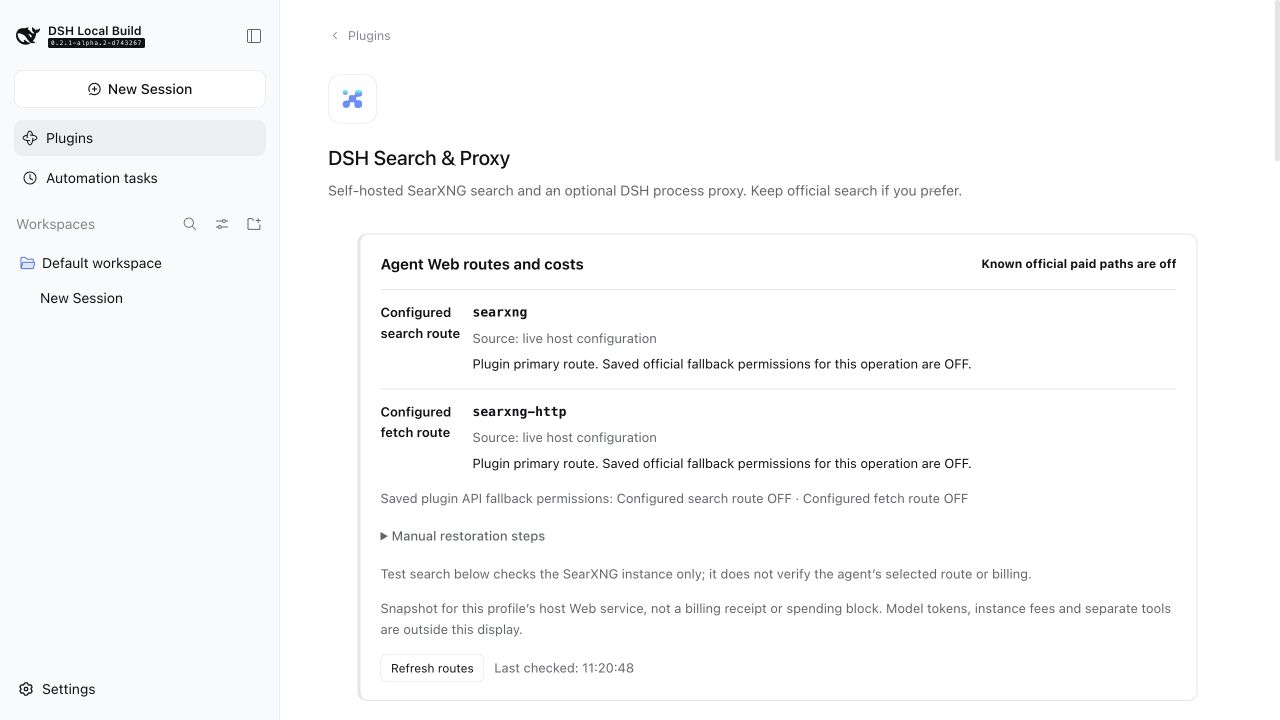
Version 0.5.0 on unpatched DSH 0.2.1-alpha.2, captured in a temporary profile on 2026-10-25. First-use downloads wait for Prepare and start; official fallback and the process proxy are off by default.
Quick Start
Version 0.5.0: renamed to DSH Search & Proxy with package and repository name dsh-search-proxy. Search preferences, instance credentials, proxy memory and host requirements retain their existing identifiers. Migrate from the old package.
Prerequisite: DeepSeek Harness 0.2.1-alpha.2 with the standard Web/base bundles. No host patch is required. See configuration and upgrade notes.
The default is a plugin-managed local SearXNG service, without user-installed Docker or Python. After first-use confirmation it downloads a setup tool, isolated Python and search dependencies, with progress in the card. Existing endpoints or SEARXNG_BASE_URL continue using an external service. See managed runtime notes.
1. Install the plugin:
In DSH's sidebar, open Plugins → Add plugin, enter https://github.com/Chaos-Paradox/dsh-search-proxy#v0.5.0, and choose Enable now after installation. The equivalent CLI command is:
dsh plugin --profile <name> add https://github.com/Chaos-Paradox/dsh-search-proxy#v0.5.0
2. Set your preferences: open sidebar → Plugins → DSH Search & Proxy. Review the first-use summary and click Prepare and start when no reusable cache exists. Wait for Ready, choose engines and result language, and save. Test search uses the saved preferences. A free port is selected automatically; advanced settings allow a specific port. To use your own existing service, select Existing instance and enter its endpoint.
Installing appends a bundle layer that selects SearXNG by default. Higher-priority user configuration still wins. Plugin-path failures report an error without official requests by default. Version 0.4.1's new Search/Fetch API retries need separate explicit opt-ins; legacy permission never enables them. Check the host route panel first: if official settings override routing, plugin fallback switches cannot block that official path's fees. Use Restore plugin routes to change it. Disabling/removing the bundle exposes remaining layers; user selections written by an explicit restore remain until separately changed. See routing notes.
Default lifecycle and ports
An already prepared local SearXNG starts with the enabled plugin and stops on normal DSH backend shutdown, plugin disablement or removal. First preparation or a missing/incomplete cache requires approval; switching mode, changing ports or querying never grants it. The service stays running between searches. Closing a browser tab does not stop the backend. The plugin installs no OS startup service; subsequent launches reuse the profile cache. Stop retains downloads; Clean runtime separately confirms removal of generated runtime files, while settings and credentials remain.
The default local port is 0, not 8080. The OS assigns a free loopback port and the plugin updates its effective endpoint automatically, including after a restart. You do not need to open a port manually or copy the address into settings. If you explicitly set 8080 and it is occupied, startup fails visibly rather than changing that choice. Set Local port back to 0 and save to restore automatic allocation, or choose another available fixed port.
| Service mode | Behavior |
|---|---|
Automatic (auto, default) |
Uses an existing saved endpoint or SEARXNG_BASE_URL; otherwise manages a local service. |
Managed local service (local) |
Forces local management, even if an external endpoint was saved before. |
Existing instance (external) |
Connects to your service; its startup, shutdown and port mapping remain under your control. |
If you previously used an instance at http://localhost:8080, automatic mode keeps using it. To switch to plugin management, select Managed local service and leave Local port at 0; no new endpoint entry is needed. The previous external service remains independently managed. See managed runtime notes for cache location, recovery and shutdown limits.
Optional DSH process proxy
You can use the proxy while keeping official search. Leave the plugin enabled, retain or select your official search/fetch routes in DSH's web settings, and check the host route status on the card. You do not need to prepare local SearXNG or enable the plugin's official fallback. Official routes retain their own credential and fee requirements.
- Open sidebar → Plugins → DSH Search & Proxy and scroll to the red DSH process proxy section at the bottom.
- Enter your existing proxy's host and HTTP / Mixed port; select HTTP for a normal Mixed listener. The plugin does not install a proxy server or discover ports. SOCKS and proxy endpoints with username/password authentication are unsupported.
- Turn on the switch, open the risk statement in the dialog, then acknowledge and confirm. Cancellation leaves it off.
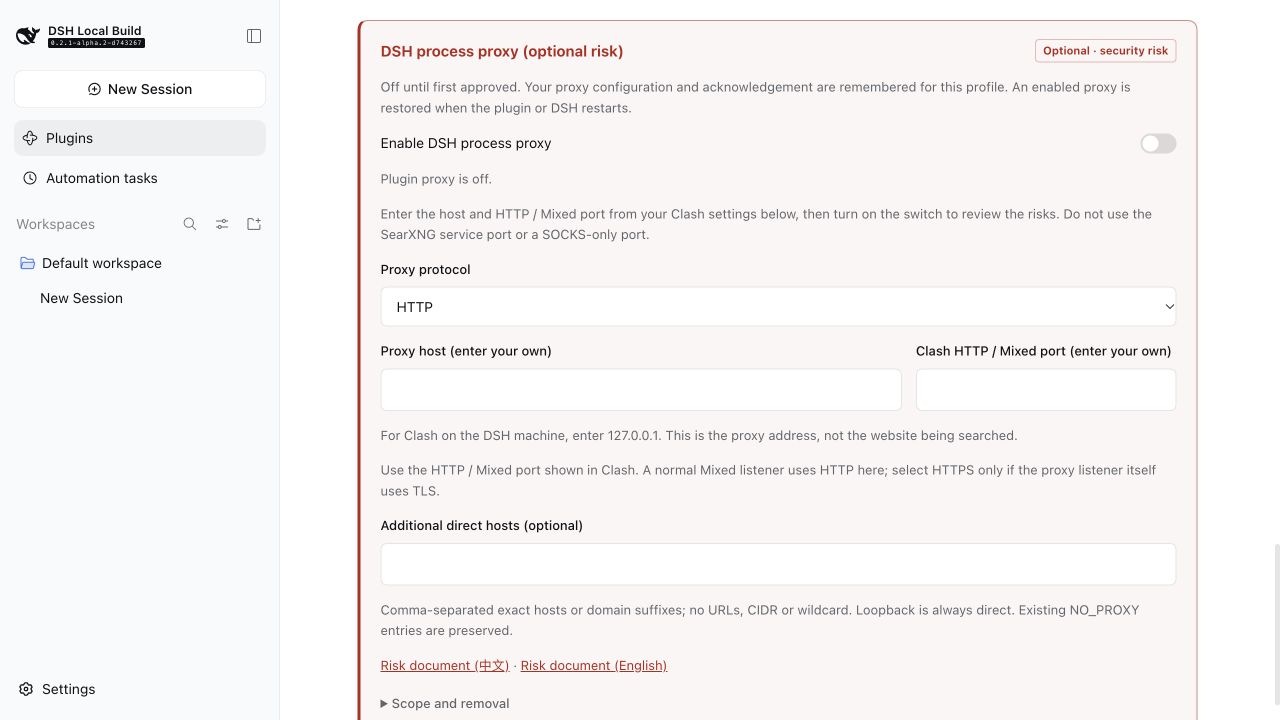
The proxy affects the current DSH backend process and may affect model calls, official search, page fetches, HTTP MCP and some child processes. Enabling it before first-use setup may improve GitHub, Python and PyPI dependency downloads; actual proxy use depends on the host and each tool. Existing child processes do not restart when the switch changes. Not every download or SearXNG upstream query is guaranteed to use it.
Configuration and acknowledgement are saved per profile in DSH credential storage. Restarting DSH or re-enabling the plugin restores an enabled proxy. Turning it off keeps it off and retains its configuration; Forget removes the configuration and consent. Disabling the plugin releases its current process policy. It changes neither the system proxy nor user .env; existing host proxies take priority. Fully restart the DSH backend and refresh after upgrading.
Read the full risk statement first: the proxy takes over DNS and destination selection for some connections, so the proxy must restrict private-network and metadata targets. The proxy switch does not change search routes or automatically enable paid fallback.
Why use it?
This plugin gives the agent a search relay (SearXNG) on your own machine. It queries the engines selected in settings, or the instance defaults when none are selected, then returns their combined results. Available engines depend on the instance and upstream availability.
| Hosted search APIs | This plugin | |
|---|---|---|
| Cost | Usually billed per query | No plugin search API fee; you provide hosting and network access |
| Search API key | Usually required | Not required by default; protected instances can use an authentication header |
| Query path | Hosted service, then its search sources | Your SearXNG, then the selected upstream engines |
| Rate limit | Provider limits | Instance and upstream engine limits |
| Private-network endpoint | Depends on the service | Loopback and private-network endpoints supported |
Public web search still needs internet access from SearXNG; a cached installation does not make searching offline. DSH model-provider credentials are configured separately from this search plugin.
Benchmark
Does answer quality drop? We benchmarked it end-to-end — a real dsh agent answering with real web_search calls, same model and prompts on both sides, blinded judging: no quality difference observed (two 10-question runs: 6-2-2 and 3-4-3 win/loss/tie; average scores ≈4.8 vs ≈4.4). Methodology, per-question data, and honest limitations: docs/quality-benchmark.md.
Architecture
The plugin registers the searxng provider into ctx.web. Each search starts with GET {baseURL}/search?format=json. The new direct Search/Fetch API retry options require independent explicit opt-ins. The default fetch route is searxng-http, using the target host's public HTTP provider. Legacy allowOfficialFallback still requires public web.searchWithProvider.
┌─────────────┐   web search   ┌──────────────┐   JSON API   ┌────────────────┐
│  dsh agent  │ ─────────────▶ │ ctx.web seam │ ───────────▶ │ your SearXNG   │
│  (LLM)      │ ◀───────────── │  (searxng    │ ◀─────────── │ instance       │
└─────────────┘  sources only  │  provider)   │   results[]  └───────┬────────┘
                               └──────────────┘                      │ aggregates
                                                          ┌──────────▼──────────┐
                                                          │ Google / Bing / DDG │
                                                          │ selected engines    │
                                                          └─────────────────────┘
SearXNG returns no generated answer, so results carry sources only — the agent reads the pages itself with fetch when it needs content. Each result maps to a citeable source:
| SearXNG field | dsh source field | Notes |
|---|---|---|
url |
url |
entries without one are dropped |
title |
title |
omitted when blank |
content |
snippet |
the engine's excerpt |
publishedDate |
publishedAt |
when the engine provides it |
The provider initially maps truncated to false; DSH's Web service applies maxResults and can set the final result's flag to true. No generated content answer is attached because SearXNG supplies sources rather than an answer.
Security
- 🔒 Credential-free by default — local search needs no key. Optional instance credentials use DSH's credential store and never appear in ordinary settings or card responses.
- ⛔ Redirects fail closed — HTTP redirects raise
WEB_PROVIDER_ERROR, so queries and optional credentials never follow a redirect target. - 🏠 Self-host friendly — loopback (
http://localhost:8080), private IPs, and subpath mounts (http://host/searxng) all work;/searchis appended correctly. - 💬 Actionable errors — 401 points to authentication; 403 can mean denied access or disabled JSON output. Neither status alone proves a key expired.
Credentials are bound to the instance endpoint (including its mount path) and header name. Managed local mode never sends saved external credentials, and official fallback receives no instance headers. Use HTTPS for remote instances.
Configuration
Requirements
- DeepSeek Harness 0.2.1-alpha.2 (the tested host), standard base/Web bundles, and the public
ctx.webservice. DSH peers declare>=0.2.1-alpha.2 <0.3.0; earlier releases are not supported. Client development dependencies are pinned to the same release train. - Local management needs GitHub and PyPI access from the DSH backend. Dependencies are cached in the profile's
searxng/directory for subsequent launches. Existing-instance mode needs a running service with JSON output enabled. - The host's Node.js runtime must satisfy
^22.19 || >=24; source development requires the same range.
Optional: deploy an external SearXNG instance
Install and start Docker first. The following is a macOS/Linux shell example; Windows users can run it in WSL with Docker integration configured, or adapt it to native PowerShell syntax. Alternatively, follow the official SearXNG container deployment guide or connect to an existing remote instance.
mkdir -p searxng && cd searxng
cat > settings.yml <<'EOF'
use_default_settings: true
server:
  secret_key: "change-me-to-a-long-random-string"
search:
  formats:
    - html
    - json   # ← required by this plugin
EOF
docker run -d --name searxng -p 8080:8080 \
  -v "$PWD/settings.yml:/etc/searxng/settings.yml" \
  searxng/searxng
This section is for Existing instance mode; default local management needs none of these commands. -d runs the container in the background without an automatic restart policy in this example. External containers remain operator-managed; the plugin never starts or stops them. Managed local services follow the plugin/DSH lifecycle.
If host port 8080 is occupied, use -p 8088:8080 and enter http://localhost:8088 in the card; the right-hand side remains the container port. A directly launched source instance instead needs a server.port change and a service restart; see configuration notes.
Verify JSON is enabled:
curl "http://localhost:8080/search?q=test&format=json"
Operating systems and validation coverage
Local setup selects macOS, Windows and Linux glibc x64/arm64 bootstrap tools and uses public DSH subprocess APIs. The three-system workflow checks setup and lifecycle; real upstream searches and the full Web card are checked locally on macOS arm64. See this release's validation record for exact commits, commands, CI results and uncovered cases. Historical CI runs do not certify this release. A complete CPU architecture and Linux distribution matrix is not covered.
| DSH host platform | SearXNG deployment options | Validation scope |
|---|---|---|
| macOS | Managed local service or existing local/remote instance | Local Web card and real search; CI status in release evidence |
| Windows | Managed local service or existing local/remote instance | CI setup and lifecycle; full Web card not locally verified |
| Linux | Managed local service (glibc) or existing local/remote instance | CI setup and lifecycle; full Web card not locally verified |
DSH version compatibility is separate: the minimum remains unpatched 0.2.1-alpha.2. Version 0.5.0 is verified against that exact baseline; the rc.2 candidate is not revalidated for this release. See the current release evidence. The peer range >=0.2.1-alpha.2 <0.3.0 is not a guarantee for every version.
Future updates follow the host compatibility and release testing policy: preserve the minimum host, validate recommended/candidate versions, and record packed-artifact, real-host and settings-page evidence. The current minimum and recommended host are both 0.2.1-alpha.2.
The endpoint must be reachable from the DSH backend. localhost means the backend's host or container; a browser on another computer does not make that computer the backend's localhost. A remote instance does not require every user to start SearXNG locally. For connection errors, check that the service is running and JSON is enabled, then check the card's endpoint.
Install options
From GitHub (tracks latest main):
dsh plugin --profile <name> add https://github.com/Chaos-Paradox/dsh-search-proxy
Pin the v0.5.0 release (recommended for reproducibility):
dsh plugin --profile <name> add https://github.com/Chaos-Paradox/dsh-search-proxy#v0.5.0
This README describes plugin 0.5.0, with credential-free managed local search by default. See release notes and the installable tarball, or all versions on the Releases page. Fully restart the DSH backend and refresh after upgrading. Existing external instances and usable older caches remain usable.
From a local clone or tarball: the same command takes an absolute path, e.g. dsh plugin --profile <name> add /path/to/dsh-search-proxy. No build step needed — lib/ is committed.
The bundle registers SearXNG and overlays the complete web.config with searchProvider: searxng and fetchProvider: searxng-http. DSH replaces config objects instead of merging fields. Profile/home/CLI overrides retain higher priority; custom fetch providers in earlier layers need a later complete Web config. Installation itself writes no user-layer route. Explicitly confirming Restore plugin routes saves a user selection that disable/removal will retain; see manual handling. Verify the import:
dsh plugin --profile <name> list        # dsh-search-proxy should appear

# disable the whole bundle — expose the remaining route, keep saved settings
dsh plugin --profile <name> disable dsh-search-proxy

# remove — expose the remaining route, keep saved settings
dsh plugin --profile <name> remove dsh-search-proxy
1. Point it at your instance
Option A — GUI (recommended): choose a service mode, engines and result language, then save. Local mode supplies its endpoint automatically. Port changes restart the local service; engine/language changes do not. Existing-instance mode accepts your own endpoint.
The engine list groups common candidates by purpose: web, news, research, and technology/reference. It is not a live inventory of your instance; chosen names must exist and be enabled there. No selection uses the instance defaults. Other engine names and language codes remain available through the custom options, and existing custom values are preserved when editing a list selection.
Option B — environment variable before launching dsh:
export SEARXNG_BASE_URL="http://localhost:8080"
| Field | GUI label | Env fallback | Description |
|---|---|---|---|
mode |
Service mode | — | auto preserves existing endpoints, otherwise manages locally; local forces local; external uses an existing service. |
managedPort |
Local port | — | Default 0 selects a free port; occupied explicit ports fail visibly. |
baseURL |
Instance endpoint | SEARXNG_BASE_URL |
External instance base; managed local mode uses its effective endpoint. |
engines |
Engines / 引擎限制 | — | Grouped multi-select list; stored as comma-separated names, e.g. bing,duckduckgo. Custom names are supported. |
language |
Language / 结果语言 | — | Dropdown for common languages plus a custom-code option, e.g. zh-CN, en, ja. |
authEnabled |
Send an authentication header | — | Default false. Only applies to an existing instance; managed local mode always omits credentials. |
authHeaderName |
Authentication header name | — | Default X-API-Key; custom authentication headers such as Authorization are supported. |
For a protected instance, open the card's Instance authentication (optional) section, enable it, and enter the header name and complete value supplied by the operator (for example Authorization with Bearer <token>). Save once, then use Test search. The value is write-only and stored through DSH credentials, not cordis.patch.yml. Leaving the value blank keeps the saved credential; changing the endpoint/mount or header name requires a credential for that target. Disabling authentication or resetting settings stops sending it while retaining the saved value. Remove saved credential deletes the value for the current target; save or discard pending edits first. Upstream engine API keys remain SearXNG settings.yml configuration. This plugin does not deploy authentication, billing or quota management on the server. See configuration notes.
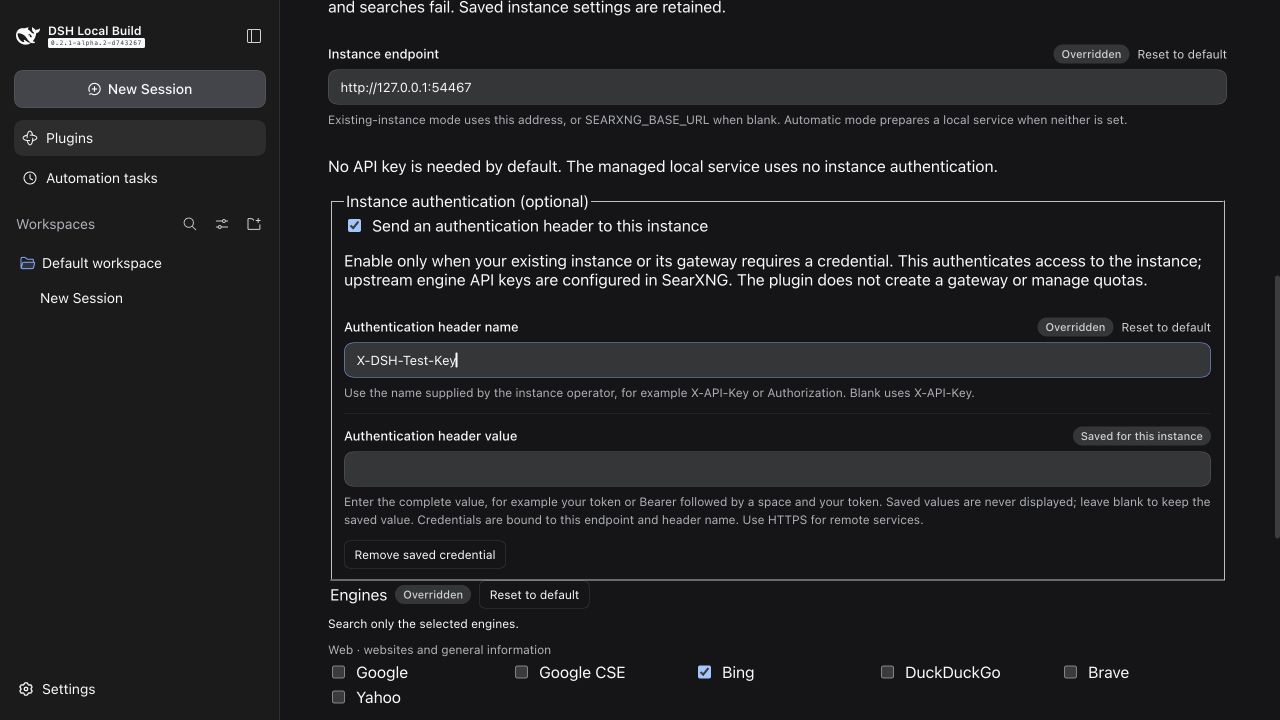
Actual 0.3.1 card in an isolated DSH test profile. The local fixture requires a custom header; the saved value is not displayed.
Search reports unavailable while preparing, stopped or failed, or when external mode has no endpoint. The card exposes status, retry and logs. Test search only calls SearXNG, never official fallback.
2. Optional official fallback
Version 0.4.1 has two independent, default-off paid switches: one Search API attempt after a failed SearXNG search, and one Fetch API attempt after an eligible local failure. Explicitly save each permission; legacy settings do not enable the new API paths. Cancellation and local safety refusals never trigger a paid retry. Successful fallback results disclose fees, and official fetch may still fail or return a verification page.
Public host credentials and the active rc.2 Web API configuration are reused. No host patch, private registry access or temporary route switching is required. For these retries keep searxng / searxng-http; the rc.2 built-in API switch overrides both routes. The top route/cost panel offers Restore plugin routes with a two-route review and manual steps. Saved fallback permissions stay unchanged; higher-priority refusals include instructions. See official API fallback.
3. Disable, uninstall and retained settings
Disable the entire dsh-search-proxy bundle, using its installed-bundle switch or dsh plugin --profile <name> disable dsh-search-proxy; enable uses the corresponding enable command. With HMR, route changes apply live; without HMR, restart. Removal uses dsh plugin --profile <name> remove dsh-search-proxy (stop a running profile first for CLI removal). The remaining bundle/profile/home/CLI layers determine the restored route, including a custom earlier provider or later manual override. Re-enabling appends the bundle and may change precedence relative to other bundles.
Disabling only the web-search-searxng provider row does not restore routing. Its bundle still selects searxng, so searches fail visibly with WEB_PROVIDER_CONFIGURED_MISSING; they do not silently use paid search. Enable that row again, or disable the whole bundle.
Version 0.3.0 retires configEffects, the activation journal gate and the companion host patch. Installation no longer writes route ownership to the profile; removal no longer rolls back card settings or arbitrary pre-install field values. Endpoint, engines, language and fallback choices saved by the user stay in the profile for reinstallation. Read upgrade notes if an earlier patched installation left a journal or explicit SearXNG route.
Troubleshooting
| Symptom | Cause | Fix |
|---|---|---|
SearXNG error (HTTP 401) |
Instance requires authentication or rejected the credential | Check the card's authentication header name/value and the instance operator's instructions |
SearXNG error (HTTP 403) |
Access denied, or search.formats lacks json |
Check permissions/authentication; enable JSON in the instance if needed |
instance authentication is not ready |
No saved credential for the current endpoint/header, invalid configuration, or unavailable credential service | Save a valid credential for this target, or disable authentication for an unprotected instance |
Search fails with provider unavailable (WEB_PROVIDER_CONFIGURED_UNAVAILABLE) |
Local service is preparing/stopped/failed, or external mode has no endpoint | Check card status and retry; configure an address for external mode |
| Local startup reports address/port in use | An explicitly configured local port is occupied | Set Local port to 0 and save, or choose a free fixed port; the plugin does not remap an explicit choice |
| First setup fails during download or dependency installation | The DSH backend cannot reach the download/package services, or setup timed out | Read the card's diagnostic log, restore GitHub/PyPI access and retry |
| Local service reports another owner for this profile | Another DSH process is using the same profile's managed runtime | Stop the other profile process, then retry; do not run two owners for one profile |
| Search went to another provider | A later bundle or higher-priority profile/home/CLI config | Check --dump-config and your overrides |
search request failed / ECONNREFUSED |
Instance down or wrong port | For managed mode, check card status and start/retry; for external mode, check its service and endpoint (e.g. docker ps for a container) |
| A search result opens with a ⚠️ fallback notice | An extended host supports official fallback and SearXNG just failed once | Check the instance; disable the fallback on the card to return to strict mode |
WEB_PROVIDER_ERROR mentioning a redirect |
A proxy in front of SearXNG redirects | Point baseURL at the final address; redirects fail closed by design |
Empty sources |
Engines returned nothing usable (or all entries lacked URLs) | Loosen engines, check the instance in a browser |
Development
pnpm install        # dependencies come from npm (@deepseek-ai/* 0.2.1-alpha.2 train)
pnpm run build      # tsdown (host + browser bundles) + tsc (browser declarations)
pnpm test           # vitest: provider behavior, redirect policy, proxy egress, card form
pnpm run typecheck  # tsc --noEmit
DSH_SOURCE_ROOT=/path/to/deepseek-harness pnpm run test:host  # after build; unpatched built host
SEARXNG_BASE_URL=http://localhost:8080 pnpm run test:e2e    # opt-in real instance
pnpm run test:managed  # first-use approval, clean setup, real search, cached remount and cleanup (network required)
src/
  index.ts      plugin entry: config schema, env fallback, provider registration
  provider.ts   SearxngSearchProvider: JSON API call, result mapping, error policy
  fallback.ts   opt-in official fallback: per-request degrade, bilingual notice, host log
  types.ts      SearXNG response types
  client/       browser bundle: the Plugins-page card (React)
tests/          vitest suites incl. redirect & egress policy
lib/ is committed on purpose: installing from a git URL gives the consumer the built artifacts without a build step. Rebuild and recommit lib/ whenever src/ changes.
Known gap: the card's apply-level registration test lives upstream for now — the published @deepseek-ai/dsh-client-test-runtime references source files its npm package does not ship, so this repo keeps local stand-ins (tests/helpers.ts) for the two helpers the remaining card specs use.
Known Limitations
- The minimum supported host remains unpatched DSH 0.2.1-alpha.2. Exact candidate host, packed-artifact and settings-page coverage is recorded separately for each build.
- The route is a bundle default, not an enforced activation condition. Later configuration may select another provider while SearXNG is still registered.
- Overlays replace the entire Web config. Include both
searchProviderand your desiredfetchProviderin a custom override; a partial override can remove the explicit search route and cause ambiguity. - Bundle disable/removal restores composition, not a historical snapshot. User settings remain. Individual provider-row disable fails search until the row or bundle configuration changes.
Contributing
Issues and pull requests are welcome. Keep authentication optional, credentials out of ordinary settings and read responses, and redirects fail-closed. Instance credentials must never reach managed local services, other endpoints, official fallback or diagnostics.
License
Links
- DeepSeek Harness — the host project
- SearXNG — the metasearch engine
- SearXNG JSON format docs — enabling
search.formats
No comments yet. Be the first to write one.