DSH 工具箱(dsh-toolbox)/ DSH Toolbox
本工具由 DeepSeek(DSH agent)编写 · 仓库由 CNyaotian 维护与发布。
English: Written by DeepSeek (the DSH agent) · maintained and published by CNyaotian.
2026-09-22 建。把「写完一次、以后还会反复用」的脚本从一次性任务目录里收出来,常驻工作区,随手可调。 目录:
<工作区>\projects\dsh-toolbox\· 全部 Node ESM(本机 Node v24)· 只依赖标准库 + 本机已有依赖。English: Created 2026-09-22. It takes scripts that are "written once, then reused over and over" out of throwaway task directories into a permanent workspace toolbox, ready to call at any time. Directory:
<workspace>\projects\dsh-toolbox\· all Node ESM (Node v24 on this machine) · depends only on the standard library plus dependencies already present on this machine.
为什么有这个东西 / Why This Exists
以前每遇到同类活(读 dsh 会话日志、体检记忆库、导出浏览页…)都要重写一遍,还容易重新踩同样的坑
(例如"zstdDecompressSync 只解第一帧"这件事被踩过 4 次)。收到这里之后:先来这儿找,没有再写。
English: Previously, every time the same kind of job came up (reading dsh session logs, health-checking the memory DB, exporting a browser page…), it had to be written all over again, and the same pitfalls got re-hit (for example "zstdDecompressSync only decodes the first frame" was hit 4 times). After collecting them here: look here first, only write something new if it isn't here.
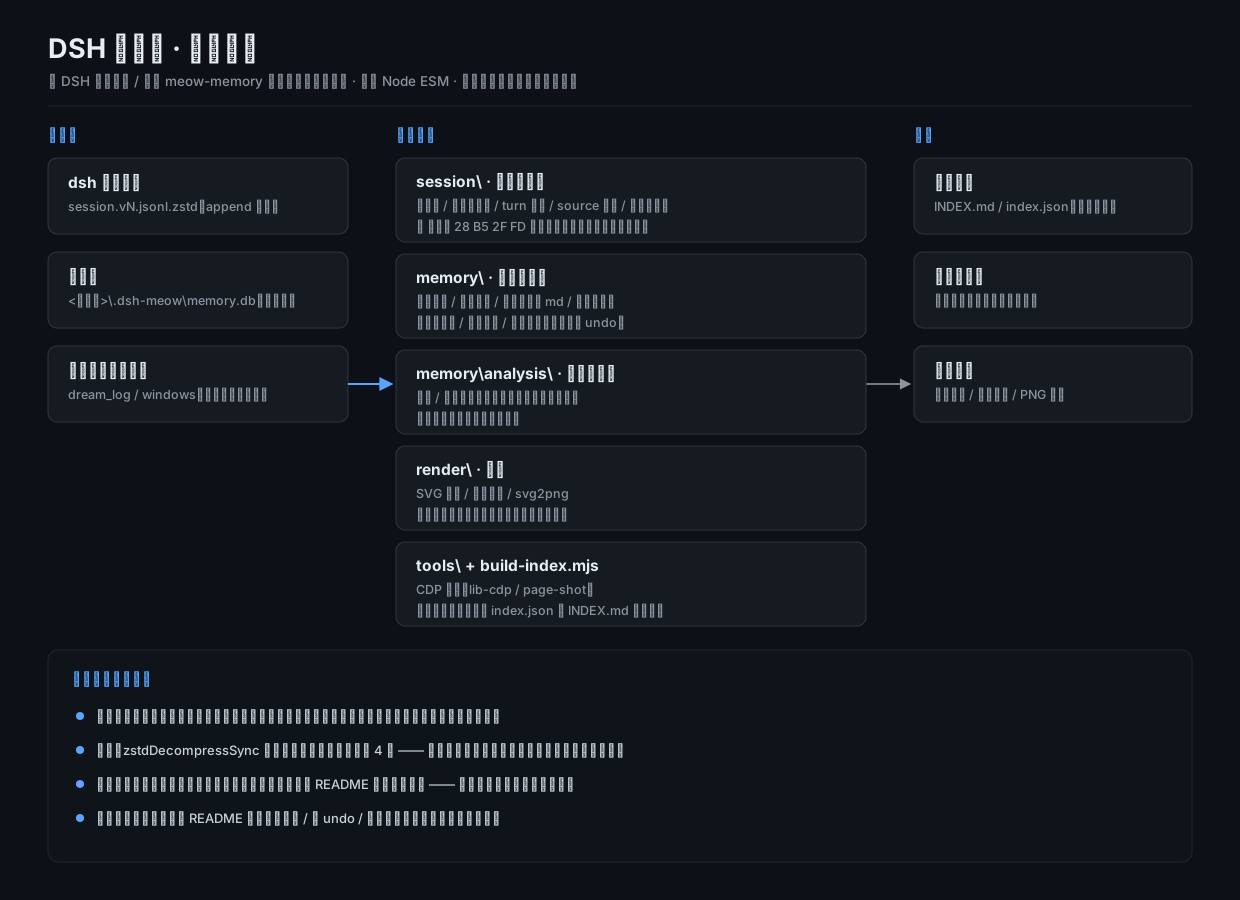
目录结构 / Directory Layout
目录一览:/ At a glance:
dsh-toolbox\
  README.md            本文件(总入口)
  build-index.mjs      扫全部脚本,生成 INDEX.md / index.json
  session\             读 / 分析 dsh 会话日志
  memory\              记忆库(meow-memory 的 memory.db)体检 · 导出 · 浏览 · 备份 · 批量改
  render\              SVG → PNG 渲染 / 多图拼版(依赖 sharp)
  tools\               其它工具(无头浏览器截图 · CDP 小客户端)
  out\                 生成物(浏览页、报告;已在 .gitignore 里)
English: What each directory is for:
session\— read / analyse dsh session logsmemory\— health-check · export · browse · back up · bulk-edit the memory DB (meow-memory'smemory.db)render\— SVG → PNG rendering and grid composition (needssharp)tools\— other tools (headless browser screenshots, a tiny CDP client)out\— generated artefacts (browser pages, reports; ignored by git)
① session\ —— 读 dsh 会话日志 / ① session\ — Reading dsh Session Logs
会话文件是 ~/.dsh/sessions/<workspace>/<id>/session.v<N>.jsonl.zstd(N 随版本递增,脚本按 session.v*.jsonl.zstd 通配匹配,不写死版本号)。
🩸 它是 append 的多帧 zstd:zstdDecompressSync 只解第一帧(只得到 ~192 字节的会话头或直接报
Unknown frame descriptor)—— 下面这些脚本都已经按魔数 28 B5 2F FD 切帧再逐帧解,直接用就行。
English: Session files live at ~/.dsh/sessions/<workspace>/<id>/session.v<N>.jsonl.zstd (N grows with the format version; the scripts match session.v*.jsonl.zstd rather than hard-coding a version).
🩸 They are append-only multi-frame zstd: zstdDecompressSync decodes only the first frame (yielding either the ~192-byte session header or a straight Unknown frame descriptor error) — the scripts below already split frames on the magic number 28 B5 2F FD and decode them one by one, so just use them as they are.
| 脚本 | 干什么 | 例子 |
|---|---|---|
list-sessions.mjs |
列全部会话:id / 标题 / 末条用户消息(可按关键词过滤) | node session\list-sessions.mjs a2a |
zstd-session.mjs |
解压一个会话,按关键词切片打印(前后若干行) | node session\zstd-session.mjs <文件> "关键词" 1 200 |
dump-session.mjs |
同上(按关键词切片打印),与 zstd-session.mjs 为同一实现的另一入口 |
node session\dump-session.mjs <文件> "关键词" 3 400 |
dump-turn.mjs |
打印某会话某个 turn 的节点序列(step / kind / 工具名) | node session\dump-turn.mjs 0c11dcbf 17 |
turn-summary.mjs |
某会话最后 N 个 turn 的结构摘要(步数/工具数/文本数/是否含 meow prompt) | node session\turn-summary.mjs 0c11dcbf 4 |
scan-sources.mjs |
全库统计 user/message.source.kind 分布 |
node session\scan-sources.mjs <会话根> |
sample-sources.mjs |
每种 source 抽一条样例文本(判断这类注入是什么) | node session\sample-sources.mjs <会话根> |
repro-inbound.mjs |
折叠范围反事实复现:事件流 → chat 快照 → 对比修复前后折叠组 | node session\repro-inbound.mjs --fold-src <目录> 0c11dcbf |
_repro-inbound.mjs |
与 repro-inbound.mjs 逐字节相同的历史副本(留给旧调用,内容随前者同步) |
node session\_repro-inbound.mjs --fold-src <目录> 0c11dcbf |
⚠️
repro-inbound.mjs需要一个本仓库之外的目录--fold-src:里面要有 dsh 客户端的client-fold-baseline.ts(修复前)与client-fold-fixed.ts(修复后)。缺了会直接报错退出。
English:
| Script | What it does | Example |
|---|---|---|
list-sessions.mjs |
list every session: id / title / last message from the user (keyword filter supported) | node session\list-sessions.mjs a2a |
zstd-session.mjs |
decompress one session and print slices around a keyword (a few lines either side) | node session\zstd-session.mjs <文件> "关键词" 1 200 |
dump-session.mjs |
same slicing printer as zstd-session.mjs, exposed under a second entry point |
node session\dump-session.mjs <文件> "关键词" 3 400 |
dump-turn.mjs |
print the node sequence of one turn of a session (step / kind / tool name) | node session\dump-turn.mjs 0c11dcbf 17 |
turn-summary.mjs |
structural summary of a session's last N turns (steps / tools / texts / whether a meow prompt is present) | node session\turn-summary.mjs 0c11dcbf 4 |
scan-sources.mjs |
tally the user/message.source.kind distribution across the whole store |
node session\scan-sources.mjs <sessions-root> |
sample-sources.mjs |
pull one sample text per source kind (to tell what that kind of injection is) | node session\sample-sources.mjs <sessions-root> |
repro-inbound.mjs |
folding-range counterfactual reproduction: event stream → chat snapshot → compare folding groups before/after the fix | node session\repro-inbound.mjs --fold-src <dir> 0c11dcbf |
_repro-inbound.mjs |
a byte-identical historical copy of repro-inbound.mjs (kept for old call sites; kept in sync with it) |
node session\_repro-inbound.mjs --fold-src <dir> 0c11dcbf |
⚠️
repro-inbound.mjsneeds a directory outside this repo via--fold-src: it must contain the dsh client'sclient-fold-baseline.ts(before the fix) andclient-fold-fixed.ts(after the fix). Without it the script exits with an error.
⚠️ 会话目录名不都有
session-前缀(子代理会话是裸 UUID)—— 按前缀过滤会漏掉大半(实测 123 → 24)。English: ⚠️ Session directory names do not all carry a
session-prefix (subagent sessions are bare UUIDs) — filtering by prefix misses most of them (measured: 123 → 24).
② memory\ —— 记忆库(<工作区>\.dsh-meow\memory.db)/ ② memory\ — The Memory DB (<workspace>\.dsh-meow\memory.db)
⚠️ 库路径有两种口径,别混:
- 支持
--db <路径>的脚本:apply-archive/apply-compress/apply-merge/archive-user-old/mem-archive/mem-cut/merge-keywords/restore-compress/restore-merge—— 解析顺序--db→ 环境变量DSH_MEMORY_DB→<DSH_WORKSPACE 或用户主目录>\.dsh-meow\memory.db。- 其余脚本:库路径要么走位置参数(
memory-stats/stats-buckets/analyze/gen-browser的argv[2];backup-db/export-from-backup/compare-before-after的库路径参数),要么只认环境变量DSH_MEMORY_DB(list-lite/list-user/mem-dist/export-layer/verify-merge-json/verify-compress-json/token-account)—— 给它们传--db会被静默忽略、落到默认库(filter-merge-json/normalize-members根本不读库)。生成物(报告 / undo)默认写本仓库的
out\,可用DSH_TOOLBOX_OUT覆盖。English: ⚠️ Two DB-path conventions — do not mix them up:
- Scripts that take
--db <path>:apply-archive/apply-compress/apply-merge/archive-user-old/mem-archive/mem-cut/merge-keywords/restore-compress/restore-merge— resolution order--db→DSH_MEMORY_DB→<DSH_WORKSPACE or home>\.dsh-meow\memory.db.- All other scripts: the DB path is either a positional argument (
argv[2]inmemory-stats/stats-buckets/analyze/gen-browser; the DB-path arguments ofbackup-db/export-from-backup/compare-before-after) or only theDSH_MEMORY_DBenvironment variable (list-lite/list-user/mem-dist/export-layer/verify-merge-json/verify-compress-json/token-account) — passing--dbto those is silently ignored and the default DB is used (filter-merge-json/normalize-membersdo not read the DB at all). Generated artefacts (reports / undo files) default to this repo'sout\, overridable viaDSH_TOOLBOX_OUT.
| 脚本 | 干什么 | 例子 |
|---|---|---|
memory-stats.mjs |
分层条数 / 状态分布 / project 子类 / 各层最近若干条 | node memory\memory-stats.mjs |
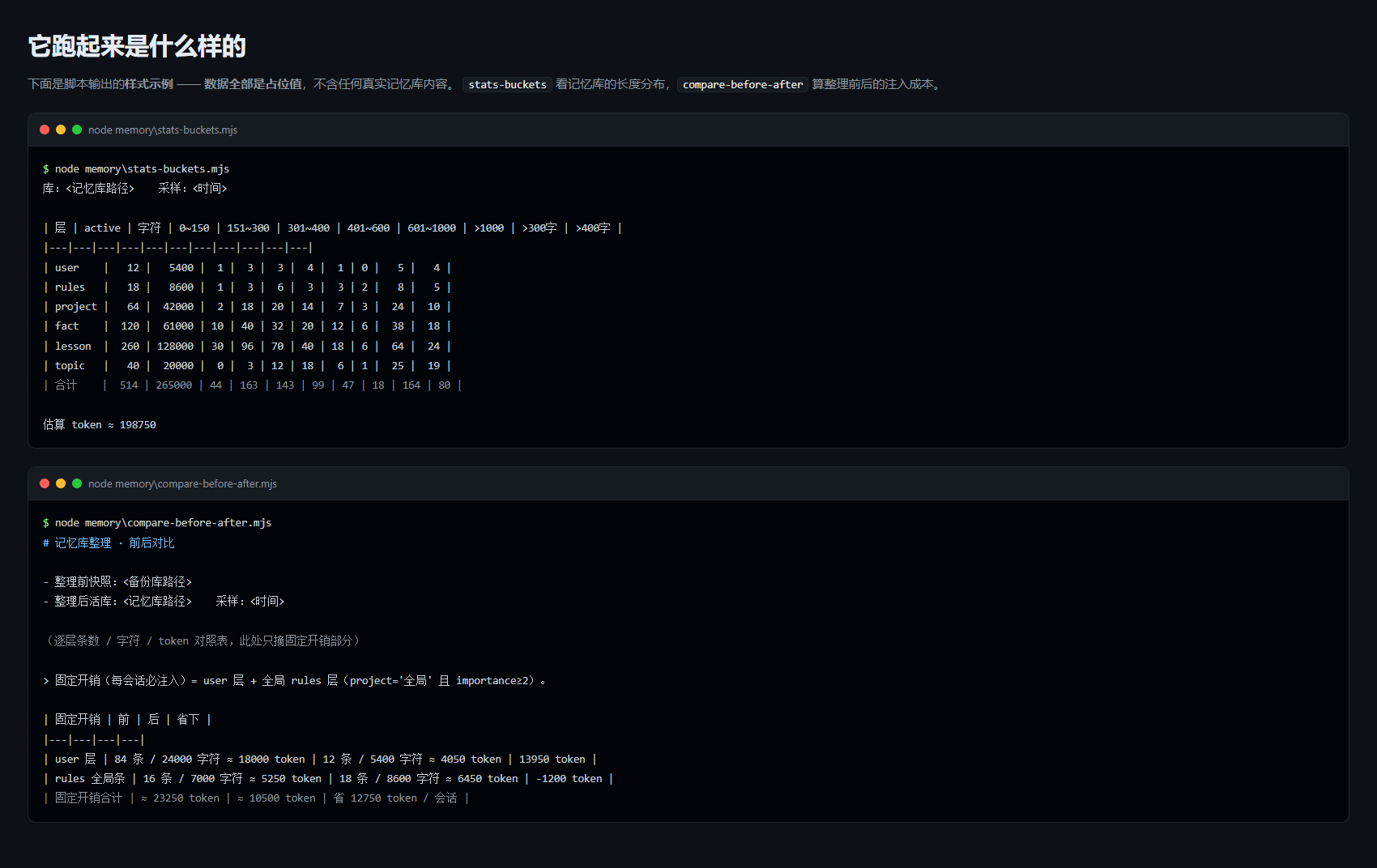
stats-buckets.mjs |
各层长度分布桶(>300 / >400 字有多少) | node memory\stats-buckets.mjs |
list-lite.mjs |
列某层 active 条目(id / project / 长度 / 首 64 字),按长度倒序 | node memory\list-lite.mjs lesson |
list-user.mjs |
专列 user 层(每会话固定注入的那层),带过滤 | node memory\list-user.mjs "极简" |
export-layer.mjs |
某层 active 全文导出成 md | node memory\export-layer.mjs lesson out\lesson.md |
export-from-backup.mjs |
从备份库导出某层(补"整理前"快照用) | node memory\export-from-backup.mjs <bak> rules out\rules-before.md |
backup-db.mjs |
一致性备份(VACUUM INTO,含 WAL 未落盘数据,源库不改) |
node memory\backup-db.mjs <源db> <目标> |
gen-browser.mjs |
全库导出单文件深色浏览页(搜索/筛选/展开) | node memory\gen-browser.mjs → out\memory-browser.html |
compare-before-after.mjs |
前后对比报告(逐层条数/字符/token + 固定开销) | node memory\compare-before-after.mjs |
apply-archive.mjs |
批量归档(早期专用版:只认 active) | node memory\apply-archive.mjs --cluster C1,C2 --apply |
mem-archive.mjs |
通用归档器(推荐):--table 任意层、--ids/--from-file/--cluster、--from <states>(可归档 stale)、undo 按原状态还原、id 抄错时给近似提示 |
node memory\mem-archive.mjs --table topic --from stale --ids <ids> --apply |
mem-cut.mjs |
判据裁剪:low-imp / never / never+low(+old) / never+verylow(+old);默认按长度从长到短砍,可 --limit |
node memory\mem-cut.mjs --table lesson --rule never+verylow+old --olderThanDays 3 |
apply-compress.mjs |
批量改写正文(任意层;逐条校验状态/长度/必须真变短;旧正文全量存 undo JSON,文件名带表名+时间戳不覆盖) | node memory\apply-compress.mjs out\x.json --table fact --apply |
apply-merge.mjs |
簇内合并落地:把成员并进主条(改写主条正文 + 归档其余成员,可同时改 keywords/project/importance);判据是「比簇内原总和短」 | node memory\apply-merge.mjs out\merge-fact-C1-C2.json --table fact --apply |
restore-merge.mjs |
上面那个的还原器(主条四字段 + 该批归档的成员一起还原回 active) | node memory\restore-merge.mjs out\undo-merge-fact-<戳>.json --table fact --apply |
verify-merge-json.mjs |
合并产物独立验真(不信子代理自检):从库重读原文算实体覆盖率 + 校验 id/状态/长度/膨胀;--dump 落盘正文 |
node memory\verify-merge-json.mjs out\merge-fact-C1-C2.json --table fact --dump C1 |
merge-keywords.mjs |
合并后补关键词并集(keywords 不进首轮注入、只作检索入口 ⇒ 丢词=丢命中);自动滤掉 ttl 900 类过时值与「已修」类过程词 |
node memory\merge-keywords.mjs out\merge-fact-C1-C2.json --table fact --max 16 |
filter-merge-json.mjs |
按 cluster 名过滤 merge JSON(剔除某些簇后另存) | node memory\filter-merge-json.mjs in.json out.json --exclude "C1,C2" |
restore-compress.mjs |
上面那个的还原器(支持 --table,能按 undo 文件名猜表) |
node memory\restore-compress.mjs out\undo-compress-fact-2026092300.json --apply |
archive-user-old.mjs |
user 层整批归档(保留 12 条主题条,其余全归档 + undo) | node memory\archive-user-old.mjs --apply |
analyze.mjs |
体检:层分布 / 注入成本 / 重复簇 / 超长 / 关键词 / 时间分布 | node memory\analyze.mjs |
verify-compress-json.mjs |
压缩产物独立验真:原文实体的覆盖率 + 反向核对「凭空新增的事实」;--dump 落盘正文 |
node memory\verify-compress-json.mjs out\x.json --table topic --dump C1 |
mem-dist.mjs |
只读看各层 importance / 长度 / 是否被检索命中过 / 项目的分布(砍之前先看清代价) | node memory\mem-dist.mjs lesson |
normalize-members.mjs |
把 merge JSON 的 members 从对象数组规范化成 id 字符串数组,并校验没有丢 id |
node memory\normalize-members.mjs in.json out.json |
token-account.mjs |
「每轮固定注入」总账:两份 AGENTS.md 与记忆库整理前后的 token 一起算 | node memory\token-account.mjs --agents-before <旧版> --db-before <旧备份库> |
English:
| Script | What it does | Example |
|---|---|---|
memory-stats.mjs |
per-level counts / status distribution / project subcategories / the latest few entries per level | node memory\memory-stats.mjs |
stats-buckets.mjs |
length-distribution buckets per level (how many are >300 / >400 chars) | node memory\stats-buckets.mjs |
list-lite.mjs |
list active entries of one level (id / project / length / first 64 chars), longest first | node memory\list-lite.mjs lesson |
list-user.mjs |
lists only the user level (the one injected into every session), with filtering | node memory\list-user.mjs "极简" |
export-layer.mjs |
export one level's active entries in full to md | node memory\export-layer.mjs lesson out\lesson.md |
export-from-backup.mjs |
export one level from a backup DB (to fill in a "before the tidy-up" snapshot) | node memory\export-from-backup.mjs <bak> rules out\rules-before.md |
backup-db.mjs |
consistent backup (VACUUM INTO, includes WAL data not yet flushed, source DB untouched) |
node memory\backup-db.mjs <源db> <目标> |
gen-browser.mjs |
export the whole DB as a single-file dark browser page (search / filter / expand) | node memory\gen-browser.mjs → out\memory-browser.html |
compare-before-after.mjs |
before/after comparison report (per-level counts / chars / tokens + fixed overhead) | node memory\compare-before-after.mjs |
apply-archive.mjs |
bulk archive (the early special-purpose version: only recognises active) | node memory\apply-archive.mjs --cluster C1,C2 --apply |
mem-archive.mjs |
general-purpose archiver (recommended): --table any level, --ids/--from-file/--cluster, --from <states> (can archive stale), undo that restores each entry's original state, and near-match hints when an id is mistyped |
node memory\mem-archive.mjs --table topic --from stale --ids <ids> --apply |
mem-cut.mjs |
rule-based trimming: low-imp / never / never+low(+old) / never+verylow(+old); by default it cuts from longest to shortest, with --limit |
node memory\mem-cut.mjs --table lesson --rule never+verylow+old --olderThanDays 3 |
apply-compress.mjs |
bulk body rewriting (any level; per-entry validation of state/length/must genuinely get shorter; all old bodies are stored in an undo JSON whose filename carries the table name + timestamp so nothing is overwritten) | node memory\apply-compress.mjs out\x.json --table fact --apply |
apply-merge.mjs |
landing an intra-cluster merge: folds members into the primary entry (rewrites its body + archives the remaining members, and can change keywords/project/importance at the same time); the criterion is "shorter than the original cluster total" | node memory\apply-merge.mjs out\merge-fact-C1-C2.json --table fact --apply |
restore-merge.mjs |
the restorer for the above (restores the primary entry's four fields plus that batch's archived members back to active together) | node memory\restore-merge.mjs out\undo-merge-fact-<戳>.json --table fact --apply |
verify-merge-json.mjs |
independent verification of merge output (it does not trust the subagent's self-check): re-reads the original text from the DB to compute entity coverage + validates ids/state/length/bloat; --dump writes the bodies to disk |
node memory\verify-merge-json.mjs out\merge-fact-C1-C2.json --table fact --dump C1 |
merge-keywords.mjs |
backfills the union of keywords after a merge (keywords are not injected in the first round, they are only search entry points ⇒ losing a word = losing a hit); automatically filters out stale values such as ttl 900 and process words such as "已修" |
node memory\merge-keywords.mjs out\merge-fact-C1-C2.json --table fact --max 16 |
filter-merge-json.mjs |
filter a merge JSON by cluster name (save the rest after dropping certain clusters) | node memory\filter-merge-json.mjs in.json out.json --exclude "C1,C2" |
restore-compress.mjs |
the restorer for the above (supports --table, and can infer the table from the undo filename) |
node memory\restore-compress.mjs out\undo-compress-fact-2026092300.json --apply |
archive-user-old.mjs |
bulk-archive the user level (keeps 12 topic entries, archives all the rest + undo) | node memory\archive-user-old.mjs --apply |
analyze.mjs |
health check: level distribution / injection cost / duplicate clusters / over-long entries / keywords / time distribution | node memory\analyze.mjs |
verify-compress-json.mjs |
independent verification of compression output: entity coverage of the original text plus a reverse check for "facts invented out of nowhere"; --dump writes the bodies to disk |
node memory\verify-compress-json.mjs out\x.json --table topic --dump C1 |
mem-dist.mjs |
read-only view of each level's importance / length / never-retrieved / project distribution (see the cost before you cut) | node memory\mem-dist.mjs lesson |
normalize-members.mjs |
normalises a merge JSON's members from an object array into an id string array, verifying no id was dropped |
node memory\normalize-members.mjs in.json out.json |
token-account.mjs |
the "fixed per-round injection" ledger: both AGENTS.md files and the memory DB before/after a tidy-up, added up together | node memory\token-account.mjs --agents-before <old> --db-before <old-backup> |
改库的三条硬规矩(这些脚本都遵守)/ Three Hard Rules for Mutating the DB (all these scripts follow them)
- 先备份:
backup-db.mjs(VACUUM INTO到<工作区>\backups\meow-memory\)。 **English:** **Back up first**:backup-db.mjs(VACUUM INTOinto<workspace>\backups\meow-memory\). - 先 dry-run:
apply-archive/apply-compress不加--apply就只打印清单。 English: Dry-run first:apply-archive/apply-compressonly print the list unless--applyis passed. - 留 undo:归档写
out\undo-archive-<表>.sql(按原状态还原);改正文写out\undo-compress-<表>-<时间戳>.json(配restore-compress.mjs,不再覆盖上一批);合并写out\undo-merge-<表>.json+ 同批 archive SQL。 English: Always leave an undo: archiving writesout\undo-archive-<table>.sql(restoring each entry's original state); body rewrites writeout\undo-compress-<table>-<timestamp>.json(paired withrestore-compress.mjs, and it no longer overwrites the previous batch); merges writeout\undo-merge-<table>.jsonplus the archive SQL for the same batch.
③ render\ —— SVG 渲染与拼版 / ③ render\ — SVG Rendering & Grid Composition
⚠️ 这一组依赖 sharp(不是标准库):在仓库根 npm i sharp 即可;
sharp 若装在别处,用环境变量 DSH_SHARP_DIR 指过去(脚本也会从自身目录向上逐级找 node_modules/sharp)。
English: ⚠️ This group depends on sharp (not the standard library): run npm i sharp in the repo root; if sharp lives elsewhere, point DSH_SHARP_DIR at it (the scripts also walk up from their own directory looking for node_modules/sharp).
| 脚本 | 干什么 | 例子 |
|---|---|---|
svg2png.mjs |
把静态 SVG 转 PNG(sharp/librsvg,不用浏览器);命中哪个 sharp 会打印出来 | node render\svg2png.mjs in.svg out.png 144 |
compose-grid.mjs |
多张 SVG / PNG 按网格拼成一张对比图,每格顶部加文件名标签 | node render\compose-grid.mjs out.png 2 900 a.png b.svg |
check-svg.mjs |
校验导出的静态 SVG:自包含性 / XML 良构 / UTF-8 / 中文标签 / 与线上产物一致性 | node render\check-svg.mjs map.html spider.svg force.svg |
English:
| Script | What it does | Example |
|---|---|---|
svg2png.mjs |
convert a static SVG to PNG (sharp/librsvg, no browser); prints which sharp it found | node render\svg2png.mjs in.svg out.png 144 |
compose-grid.mjs |
compose several SVG / PNG files into one grid image, with a filename label above each cell | node render\compose-grid.mjs out.png 2 900 a.png b.svg |
check-svg.mjs |
validate an exported static SVG: self-containment / XML well-formedness / UTF-8 / Chinese labels / agreement with the online artefact | node render\check-svg.mjs map.html spider.svg force.svg |
④ tools\ —— 其它工具 / ④ tools\ — Other Tools
| 脚本 | 干什么 | 例子 |
|---|---|---|
page-shot.mjs |
无头浏览器「截图 + 采集 console 错误 + 跑断言」;用独立的 user-data-dir 与端口 ⇒ 不弹窗、不抢焦点 | node tools\page-shot.mjs --url file:///…/x.html --out shot.png --full |
lib-cdp.mjs |
极简 CDP 客户端(Node ≥22 自带全局 WebSocket,无依赖),供 page-shot.mjs 复用 |
库,用法见文件头注释 |
English:
| Script | What it does | Example |
|---|---|---|
page-shot.mjs |
headless browser "screenshot + collect console errors + run assertions"; uses its own user-data-dir and port ⇒ no window, no focus stealing | node tools\page-shot.mjs --url file:///…/x.html --out shot.png --full |
lib-cdp.mjs |
a minimal CDP client (Node ≥22 ships a global WebSocket; no dependencies), reused by page-shot.mjs |
a library — see the file header |
⑤ 仓库根:索引生成器 / ⑤ Repo Root: Index Generator
| 脚本 | 干什么 | 例子 |
|---|---|---|
build-index.mjs |
扫本仓库所有脚本,抽出顶部注释里的「干什么 / 用法」,生成 INDEX.md(人看)与 index.json(机器读) |
node build-index.mjs |
加了新脚本重跑一次就行 —— 两份索引会自动更新,别手改它们。
English:
Script What it does Example build-index.mjsscans every script in the repo, pulls the "what it does / usage" out of the top comment, and writes INDEX.md(for humans) andindex.json(for machines)node build-index.mjsAfter adding a script, just re-run it — both index files update themselves; don't hand-edit them.
收录约定(以后往这儿加东西时照做)/ Inclusion Rules (follow these when adding things here later)
- 只收"会被反复调用"的:标准库依赖、参数化路径、幂等、
--apply与 dry-run 分开。 English: Only collect things that will be called repeatedly: standard-library-only dependencies, parameterised paths, idempotency, and--applykept separate from dry-run. - 改库/删文件的脚本必须自带 undo(写 undo 文件 + 提供还原脚本)。 English: Scripts that mutate the DB or delete files must ship their own undo (write an undo file + provide a restore script).
- 每个脚本顶部写清:它解决什么问题、怎么用、最容易踩的坑。 English: Write it clearly at the top of every script: what problem it solves, how to use it, and the easiest pitfall to fall into.
- 新加脚本后在本 README 的对应表里补一行(表就是索引,别让它烂掉)。 English: After adding a script, add a row to the matching table in this README (the tables are the index — don't let them rot).
- 原任务目录里的版本不要删(那是带上下文的存档),这里的是"正式可复用版"。 English: Do not delete the copy in the original task directory (that is an archive with its context); the one here is the "official reusable version".
运行环境 / Requirements
- Node.js ≥ 20(主体);其中用 CDP 的脚本(
tools\page-shot.mjs等,经lib-cdp.mjs)需要 Node ≥ 22,因为它依赖 Node 22 起自带的全局WebSocket。本机在 Node 24 上实测通过。 - Python 3(仅当你使用个别 Python 辅助脚本)。
- 运行依赖:无。所有
.mjs都是零第三方依赖的纯 Node 脚本;可选能力(sharp渲染、Edge/CDP 截图)按需探测,缺了就跳过并给出提示。 - 本仓不是 DSH 插件(没有
cordis.patch.yml),只是一组可直接node xxx.mjs运行的工具脚本。
English:
- Node.js ≥ 20 (the bulk); scripts that use CDP (
tools\page-shot.mjsand friends, vialib-cdp.mjs) need Node ≥ 22 because they rely on the globalWebSocketshipped since Node 22. Verified on Node 24 here. - Python 3 (only for a couple of optional helper scripts).
- Runtime dependencies: none. Every
.mjsis a plain Node script with zero third-party dependencies; optional capabilities (sharprendering, Edge/CDP screenshots) are probed at runtime and skipped with a message when absent. - This repo is not a DSH plugin (no
cordis.patch.yml) — it is a set of scripts you run directly withnode xxx.mjs.
权限与依赖 / Permissions & Dependencies
按「保守」口径声明本工具集对系统的接触面 —— 「未发现」不等于「不访问」。
English: The following declares, conservatively, what this toolbox touches on a system — "not observed" does not mean "does not access".
- 文件 / Files
- 读:记忆库
--db/DSH_MEMORY_DB/<DSH_WORKSPACE 或用户主目录>\.dsh-meow\memory.db;会话日志DSH_SESSIONS_DIR/<DSH_HOME 或 ~/.dsh>\sessions;--fold-src指定的目录。 - 写:默认只写本仓库的
out\(可用DSH_TOOLBOX_OUT覆盖);apply-*/mem-archive/mem-cut/merge-keywords/archive-user-old会**直接改 SQLite 记忆库**(都带--apply开关与 undo)。 - English: Reads the memory DB (
--db/DSH_MEMORY_DB/<DSH_WORKSPACE or home>\.dsh-meow\memory.db), session logs (DSH_SESSIONS_DIR/<DSH_HOME or ~/.dsh>\sessions) and the directory given by--fold-src. Writes by default only to this repo'sout\(DSH_TOOLBOX_OUToverrides); theapply-*/mem-archive/mem-cut/merge-keywords/archive-user-oldscripts **mutate the SQLite memory DB directly** (all gated behind--applyand all ship an undo).
- 读:记忆库
- 网络 / Network —— 默认不发起任何出网请求。唯一会联网的是
tools\page-shot.mjs:它连的是自己拉起的浏览器在本机http://127.0.0.1:<port>的 CDP 端点;--url若指向外部站点,则由浏览器去访问那个站点(取决于使用者的参数)。 English: No outbound requests by default. The only networked piece istools\page-shot.mjs, which talks to the CDP endpoint athttp://127.0.0.1:<port>of the browser it starts itself; if--urlpoints at an external site, the browser will visit it (that is the caller's choice). - 外部命令 / External commands ——
tools\page-shot.mjs会启动本机 Edge/Chrome(路径可用DSH_BROWSER指定),并用taskkill /PID <pid> /T /F收掉它拉起的进程树。不需要 root / 管理员权限;没有安装 / 卸载等生命周期脚本。 English:tools\page-shot.mjsstarts a local Edge/Chrome (path overridable viaDSH_BROWSER) and usestaskkill /PID <pid> /T /Fto reap the process tree it spawned. No root/admin rights are needed, and there are no install/uninstall lifecycle scripts. - 凭据 / Credentials —— 未发现读取任何凭据、token、密码或密钥文件;
render\需要的是可选的第三方依赖sharp。 **English:** **No** credential, token, password or key file was observed being read;render\needs the optional third-party dependencysharp. - 已知风险 / Known risks —— ① 上面那几个改库脚本没有二次确认,
--apply一给就写;虽然都写 undo,仍务必先备份(memory\backup-db.mjs)。②page-shot.mjs --keep会把临时浏览器 profile 留在系统临时目录。③node:sqlite需要 Node ≥ 22。 English: ① The DB-mutating scripts above have no second confirmation — passing--applywrites immediately; all of them write an undo file, but back up first (memory\backup-db.mjs). ②page-shot.mjs --keepleaves the temporary browser profile behind in the system temp directory. ③node:sqliterequires Node ≥ 22.
已知待办 / Known TODO
- 脚本的默认输出路径已统一到本仓库的
out\(可用DSH_TOOLBOX_OUT覆盖); 库 / 会话路径改为--db与环境变量(DSH_MEMORY_DB/DSH_SESSIONS_DIR/DSH_SHARP_DIR),不再写死任何绝对路径。 **English:** Default output paths are now unified to this repo'sout\(DSH_TOOLBOX_OUToverrides); DB / session paths go through--dband environment variables (DSH_MEMORY_DB/DSH_SESSIONS_DIR/DSH_SHARP_DIR) — no absolute paths are hard-coded any more. - 还没有一个统一入口(
node dsh-toolbox\<子命令>);目前按表直接调具体脚本。 English: There is no single entry point yet (node dsh-toolbox\<subcommand>); for now you call the specific script straight from the table.
No comments yet. Be the first to write one.