dsh-time-inject
⚠️ 非官方插件 —— 社区作品,与 DeepSeek 官方无关。官方同类包是
@deepseek-ai/dsh-time-context, 本插件是它的中文单行变体(差异见下)。⚠️ Unofficial plugin — a community project, unaffiliated with DeepSeek. The official package doing this job is
@deepseek-ai/dsh-time-context; this plugin is its single-line Chinese variant (differences below).
给 DSH(DeepSeek Harness) 的 host 插件: 每个 turn 的第一个 step 往模型上下文里追加一条单行中文时间读数, 让 agent 永远知道「现在几点、距上一条消息过了多久」。
English: A host plugin for DSH (DeepSeek Harness): on the first step of every turn it appends a single-line Chinese clock reading to the model context, so the agent always knows what time it is and how long ago the previous message arrived.
文案样例(就是模型实际看到的那一行,一字不多): Sample output (exactly the single line the model actually sees, nothing more):
[时钟] 2026-09-25 21:34:07 +08:00 周五 · 距上条消息 8 分 12 秒
[时钟] 2026-09-25 21:34:07 +08:00 周五 · 距上条消息 刚刚
[时钟] 2026-09-26 00:00:03 +08:00 周六 · 距上次读数 1 小时 3 分
[时钟] 2026-09-25 21:34:07 +08:00 周五 · 距上条消息 未知
刚刚:距上条消息不足 1 秒(时钟回退也钳到这里,elapsed 永不为负) English:刚刚("just now"): less than 1 second since the previous message (clock rollback is clamped here too, so elapsed is never negative).距上次读数:本会话内还没有「上一条模型可见消息」时,退化到本插件上一次注入 English:距上次读数("since the last reading"): when the session has no "previous model-visible message" yet, it degrades to this plugin's own last injection.未知:连上次读数都没有(会话刚开、或投影服务不可用) English:未知("unknown"): there is not even a previous reading (brand-new session, or the projection service is unavailable).- 时长最多保留两个单位:
8 分 12 秒/1 小时 3 分/1 天 2 小时/59 秒English: A duration keeps at most two units:8 分 12 秒/1 小时 3 分/1 天 2 小时/59 秒.
它怎么工作 / How It Works
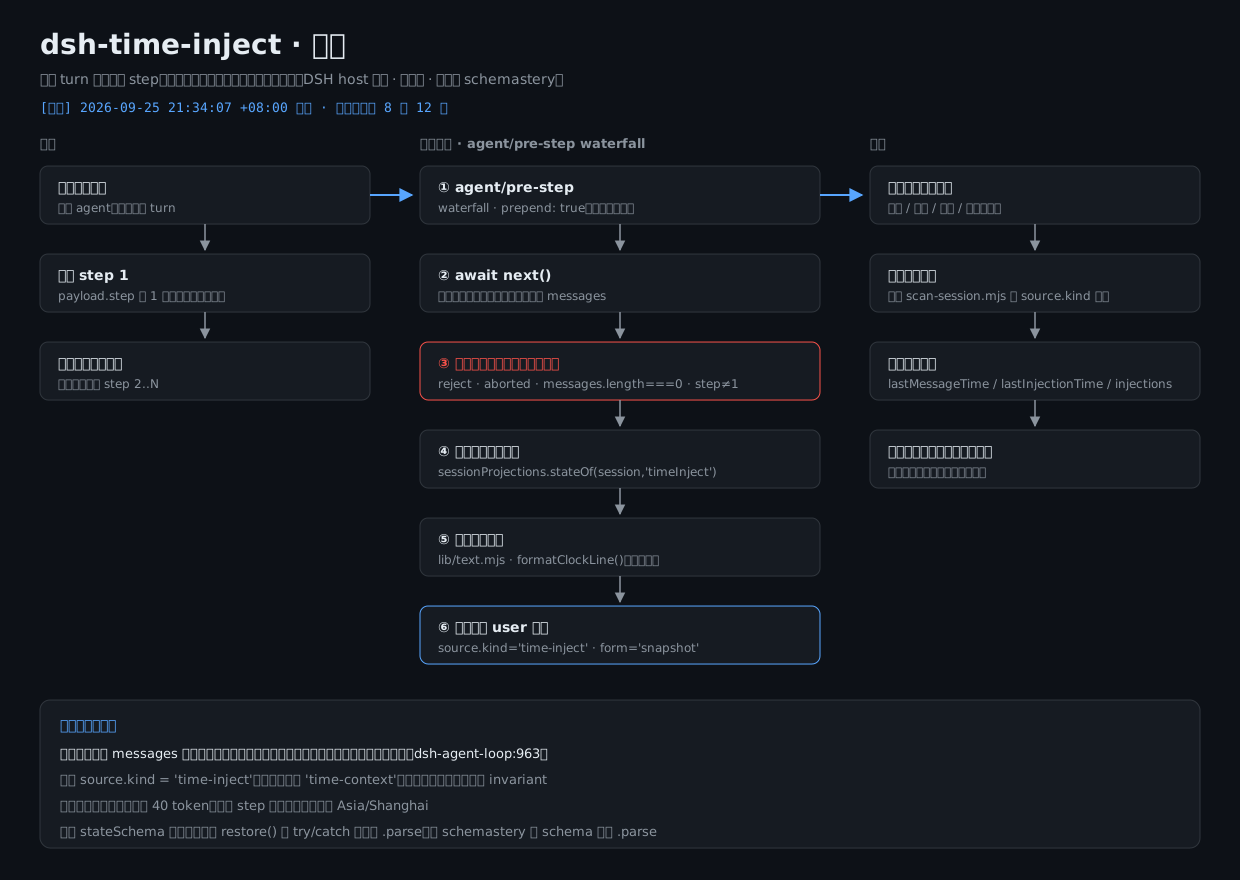
agent/pre-step (waterfall, prepend: true)
      │
      ├─ await next()                       ← 先让下游/宿主把所有决策做完
      ├─ decision.kind !== 'enter'      → 原样放行
      ├─ signal.aborted                 → 原样放行
      ├─ messages.length === 0          → 🩸 原样放行(空轮保护,见下)
      ├─ step !== 1                     → 原样放行(一个 turn 只注入一次)
      ├─ 读自己的 sessionProjections('timeInject') 折叠状态
      └─ 返回 { ...decision, messages: [...messages, 那条读数] }

sessionProjections 折叠(key = timeInject, stateVersion = 1)
      lastMessageTime    = 最近一条**模型可见且非本插件注入**的事件时间
      lastInjectionTime  = 本插件最近一次注入时间
      injections         = 本插件注入条数
English: What the diagram says, line by line — it hangs off agent/pre-step as a prepend: true waterfall hook; it first await next() so that downstream/host code has finished all its decisions; then it passes the decision through untouched when decision.kind !== 'enter', when signal.aborted, when messages.length === 0 (🩸 empty-turn guard, see below), or when step !== 1 (only one injection per turn); otherwise it reads its own sessionProjections('timeInject') folded state and returns { ...decision, messages: [...messages, that reading] }. The folded state (key = timeInject, stateVersion = 1) holds: lastMessageTime = the time of the most recent event that is model-visible and not injected by this plugin; lastInjectionTime = this plugin's latest injection time; injections = the number of injections this plugin has made.
🩸 空轮保护(本插件最重要的一条)/ 🩸 Empty-Turn Guard (the single most important rule in this plugin)
dsh-agent-loop 的 lib/index.js:963 用 decision.messages.length === 0 判「本轮没有内容 ⇒ 正常收尾」。
往 messages 里塞任何一条消息,都会把本该结束的轮次变成一个真步骤 ⇒ 白烧一次模型请求。
所以 decision.messages.length === 0 时本插件原样返回 decision(lib/index.mjs:241)。
English: dsh-agent-loop's lib/index.js:963 uses decision.messages.length === 0 to decide "this turn has no content ⇒ wrap up normally". Pushing any message into messages turns a turn that should have ended into a real step ⇒ one model request burned for nothing. So when decision.messages.length === 0, this plugin returns the decision untouched (lib/index.mjs:241).
与官方 @deepseek-ai/dsh-time-context 的差异 / Differences from the Official @deepseek-ai/dsh-time-context
| 维度 | 官方 | 本插件 |
|---|---|---|
| 文案 | 英文三行 | 中文单行紧凑 |
| 触发 | 每步 + refreshIntervalMs 节流(默认 10 min) |
只在 step === 1(官方那套节流逻辑整体不要) |
| 时区 | 从 user-rpc.clientTimeZone 派生三态 |
固定 Asia/Shanghai(可配) |
source.kind |
'time-context' |
'time-inject'(绝不复用官方标识) |
| invariant companion | 可选提供 | 不提供 |
| 折叠里的自己 | 注入消息也算进 lastMessageTime |
排除自己,距上条消息 量的确实是别人的消息 |
English:
| Dimension | Official | This plugin |
|---|---|---|
| Text | three lines of English | one compact line of Chinese |
| Trigger | every step + refreshIntervalMs throttling (default 10 min) |
only when step === 1 (the whole throttling scheme is deliberately dropped) |
| Time zone | three states derived from user-rpc.clientTimeZone |
fixed Asia/Shanghai (configurable) |
source.kind |
'time-context' |
'time-inject' (never reuses the official identifier) |
| invariant companion | optionally provided | not provided |
| Self in the fold | injected messages also count towards lastMessageTime |
self is excluded, so 距上条消息 really does measure someone else's message |
装法 / Installation
路线 A(推荐·改动面最小)——profile 的 cordis.patch.yml 里加一条 insert
Route A (recommended · smallest footprint) — add one insert entry to the profile's cordis.patch.yml
把本仓源码拷进 profile 的
vendor/,并link:进 profile: English: Copy this repo's source into the profile'svendor/andlink:it into the profile:// ~/.dsh/profiles/web/package.json "dependencies": { "dsh-time-inject": "link:vendor/dsh-time-inject-src" }在
~/.dsh/profiles/web/cordis.patch.yml追加: English: Append to~/.dsh/profiles/web/cordis.patch.yml:- insert: - id: time-inject name: 'dsh-time-inject'在 profile 目录跑一次
pnpm install(link:依赖需要它建 junction),然后重启dsh web。 English: Runpnpm installonce in the profile directory (link:dependencies need it to create the junction), then restartdsh web.💡 如果你想跳过
pnpm install(例如你的 profile 里也有file:vendor/*.tgz型依赖, 而 install 会重新解包它们),可以手动建 Junction:mklink /J ~/.dsh/profiles/web/node_modules/dsh-time-inject <源码目录>(Windows), 效果与link:相同,且不改动任何锁文件。本仓的tools/install.mjs就是这条路线。💡 English: If you want to skip
pnpm install(for example your profile also hasfile:vendor/*.tgzdependencies and install would re-unpack them), you can create the Junction by hand:mklink /J ~/.dsh/profiles/web/node_modules/dsh-time-inject <source dir>(Windows). The effect is identical tolink:, and no lockfile is touched. This repo'stools/install.mjstakes exactly this route.
路线 B(当 bundle 包挂)——进 bundles 列表
Route B (mount it as a bundle) — add it to the bundles list
- 同 A 的
link:依赖; English: Samelink:dependency as route A; ~/.dsh/profiles/web/package.json的dsh.profile.bundles里加"dsh-time-inject"(本包的dsh.bundle.patch会让它自己的cordis.patch.yml被当成一层 patch); English: add"dsh-time-inject"todsh.profile.bundlesin~/.dsh/profiles/web/package.json(this package'sdsh.bundle.patchmakes its owncordis.patch.ymlcount as one patch layer);pnpm install+ 重启dsh web。 English:pnpm install+ restartdsh web.
⚠️ 别想用 patch 的
name字段「把官方那行换成我们」:name是断言不是改名, 不匹配就整条warn + skip(静默失效)。官方那行id: time-context本来就disabled: true,保持关闭、另起一条insert即可。⚠️ English: Don't try to swap the official line for ours via the patch
namefield:nameis an assertion, not a rename — on a mismatch the whole entry doeswarn + skip(a silent no-op). The official lineid: time-contextis alreadydisabled: true, so leave it off and add a separateinsert.
自带的安装 / 回滚脚本(默认干跑)/ Bundled Install & Rollback Scripts (dry-run by default)
tools/install.mjs 自动做上面的路线 A,四步全部可回滚:
① 先备份 profile 的 cordis.patch.yml → ② 把源码铺到 vendor/ → ③ 在 profile 的 node_modules/ 建 Junction → ④ 在 patch 末尾追加一行 insert。
tools/uninstall.mjs 负责回滚:只删 Junction(源码与备份保留);加 --backup <备份目录> 才额外从备份还原 cordis.patch.yml。
两个脚本默认都是干跑,只有加 --apply 才真的动手。
node tools/install.mjs                                 # 干跑:只打印将要做的事 + 现状检查
node tools/install.mjs --apply                         # 真装(第 ① 步先备份 cordis.patch.yml)
node tools/install.mjs --apply --backups <备份根目录>    # 真装 + 自定义备份根目录(默认 ~/.dsh-plugin-backups)
node tools/uninstall.mjs                               # 干跑:只打印将要做的事
node tools/uninstall.mjs --apply                       # 回滚:删 Junction(源码、备份都保留)
node tools/uninstall.mjs --apply --backup <备份目录>     # 回滚:删 Junction + 从该备份目录还原 cordis.patch.yml
English: tools/install.mjs automates route A above; all four steps are reversible: ① back up the profile's cordis.patch.yml first → ② lay the source down into vendor/ → ③ create the Junction under the profile's node_modules/ → ④ append the insert line to the patch. tools/uninstall.mjs rolls it back: it removes only the Junction (source and backups are kept); add --backup <backup dir> to also restore cordis.patch.yml from a backup. Both scripts are dry-run by default — they only act when --apply is passed.
node tools/install.mjs                                 # dry run: print what it would do + current-state checks
node tools/install.mjs --apply                         # actually install (step ① backs up cordis.patch.yml first)
node tools/install.mjs --apply --backups <backup root>  # actually install with a custom backup root (default ~/.dsh-plugin-backups)
node tools/uninstall.mjs                               # dry run: print what it would do
node tools/uninstall.mjs --apply                       # roll back: remove the Junction (source and backups kept)
node tools/uninstall.mjs --apply --backup <backup dir>  # roll back: remove the Junction + restore the patch from that backup
配置项 / Configuration
| 字段 | 类型 | 默认 | 说明 |
|---|---|---|---|
enabled |
boolean | true |
总开关 |
timeZone |
string | 'Asia/Shanghai' |
显示时区(IANA 名)。填非法名不会炸,会降级回默认时区 |
includeSubagents |
boolean | true |
子代理的轮次是否也注入 |
English:
| Field | Type | Default | Description |
|---|---|---|---|
enabled |
boolean | true |
master switch |
timeZone |
string | 'Asia/Shanghai' |
display time zone (IANA name). An invalid name will not crash it, it degrades to the default zone |
includeSubagents |
boolean | true |
whether subagent turns are injected as well |
改配置 = 改 profile patch 里那一行的 config(整字段替换,不是深合并),或由 cordis 重载插件触发重新 apply。
例:
English: Changing the configuration means editing config on that one line in the profile patch (whole-field replacement, not a deep merge), or letting cordis reload the plugin to trigger a fresh apply.
Example:
- id: time-inject
  config:
    timeZone: 'Asia/Shanghai'
    includeSubagents: false
回滚(三步,任选其一即可停掉注入)/ Rollback (any one of three steps stops the injection)
- 最快:把 patch 里那条
insert改成disabled: true(或直接删掉那条 insert),重载/重启; English: Fastest: change thatinsertentry in the patch todisabled: true(or just delete the insert), then reload/restart; - 从
dsh.profile.bundles/dependencies里移除dsh-time-inject,pnpm install,重启; English: removedsh-time-injectfromdsh.profile.bundles/dependencies, runpnpm install, restart; - 想在不碰配置的前提下临时关:把
config.enabled设为false。 English: to switch it off temporarily without touching the mount configuration: setconfig.enabledtofalse.
用本仓脚本回滚(默认干跑): English: Rolling back with this repo's script (dry-run by default):
node tools/uninstall.mjs --apply --backup <备份目录> # 删 Junction + 从该备份目录还原 cordis.patch.yml
(不加 --backup 只删 Junction、patch 里的 insert 行保留;脚本说明见「装法 / Installation」一节。)
English: (without --backup it only removes the Junction and leaves the patch's insert line in place; the script is described under Installation.)
回滚不需要清任何数据:投影只是
sessionProjections的一格折叠状态, 键消失后宿主读作「能力缺失」,不会留下垃圾;已注入的历史消息本来就在会话日志里, 那是只读事实、也不影响后续(本插件关掉后不再产生新的source.kind === 'time-inject'消息)。English: Rollback does not require cleaning up any data: the projection is just one cell of folded state in
sessionProjections; once the key is gone the host reads it as "capability missing" and no garbage is left behind. Messages that were already injected sit in the session log anyway — that is a read-only fact and it does not affect anything later (with the plugin off, no newsource.kind === 'time-inject'messages are produced).
自测 / Self-Test
node test/selftest.mjs     # 纯函数 + 源码断言,零依赖(npm test)
node test/harness.mjs      # 宿主桩:真跑 apply() 与 handler
test/selftest.mjs:118 项,覆盖文案格式 / 中文星期 / 时长边界(0 秒·59 秒·59 分·跨天·跨月·跨年·闰日)/ 时钟回退钳 0 / UTC 偏移 / 非法输入不抛错,外加lib/index.mjs的 🩸 硬要求静态断言。 English:test/selftest.mjs: 118 cases, covering text format / Chinese weekday names / duration boundaries (0 s · 59 s · 59 min · across days · across months · across years · leap day) / clock rollback clamped to 0 / UTC offset / invalid input not throwing, plus static assertions for the 🩸 hard requirements inlib/index.mjs.test/harness.mjs:81 项,用module.registerHooks把schemastery/@deepseek-ai/dsh-llm换成内存桩,真的 import 并调用apply(),用假 ctx / 假 payload 验空轮保护、 注入消息形状(source恰好 3 个 key、section.text === content[0].text)、step触发时机、异常语义、投影折叠与配置兜底。 English:test/harness.mjs: 81 cases. It usesmodule.registerHooksto replaceschemastery/@deepseek-ai/dsh-llmwith in-memory stubs, really imports and callsapply(), and with a fake ctx / fake payload it verifies the empty-turn guard, the injected message shape (sourcehas exactly 3 keys,section.text === content[0].text), thesteptrigger timing, exception semantics, projection folding and configuration fallbacks.
文件 / Files
| 文件 | 职责 |
|---|---|
lib/text.mjs |
中文文案纯函数(时间戳 / 星期 / 时长 / 偏移),零宿主依赖 |
lib/index.mjs |
插件入口:name / inject / Config / apply,注册投影 + agent/pre-step |
cordis.patch.yml |
bundle patch:一条 insert 把插件行挂进 loader 树 |
test/selftest.mjs |
纯函数自测(进 npm test) |
test/harness.mjs |
宿主桩 harness(不进 npm test,它依赖 module.registerHooks) |
tools/install.mjs |
装机辅助:先备份 profile patch + 铺源码 + 建 Junction + 追加 patch 行(默认干跑、幂等、只增不删) |
tools/uninstall.mjs |
回滚辅助(默认干跑;只删 Junction,源码与备份保留;加 --backup <备份目录> 才还原 patch) |
tools/scan-session.mjs |
诊断:读多帧 zstd 会话日志,统计事件类型与注入来源(source.kind 分布) |
English:
| File | Responsibility |
|---|---|
lib/text.mjs |
pure functions for the Chinese text (timestamp / weekday / duration / offset), zero host dependencies |
lib/index.mjs |
plugin entry: name / inject / Config / apply; registers the projection + agent/pre-step |
cordis.patch.yml |
bundle patch: a single insert hooks the plugin line into the loader tree |
test/selftest.mjs |
pure-function self-test (part of npm test) |
test/harness.mjs |
host-stub harness (not part of npm test; it depends on module.registerHooks) |
tools/install.mjs |
install helper: back up the profile patch first + lay down the source + create the Junction + append the patch line (dry-run by default, idempotent, add-only) |
tools/uninstall.mjs |
rollback helper (dry-run by default; removes only the Junction, source and backups are kept; add --backup <backup dir> to also restore the patch) |
tools/scan-session.mjs |
diagnostics: read multi-frame zstd session logs and tally event types and injection sources (source.kind distribution) |
运行环境 / Requirements
- DSH(DeepSeek Harness)≥
0.1.7-rc.2——package.json里dsh.compatibility.dshReleases声明为compatible;本仓在该版本上实测通过。 - Node.js ≥ 20 ——
package.json的engines.node;本机在 Node 24 上实测通过。 - 运行依赖:无。代码用到
schemastery,但它由 DSH 宿主提供(见peerDependencies),本仓不随包安装任何第三方运行依赖。
English:
- DSH (DeepSeek Harness) ≥
0.1.7-rc.2— declaredcompatibleinpackage.json'sdsh.compatibility.dshReleases; verified on that release. - Node.js ≥ 20 — see
engines.nodeinpackage.json; verified on Node 24 here. - Runtime dependencies: none. The code uses
schemastery, but it is provided by the DSH host (seepeerDependencies); this package installs no third-party runtime dependency.
权限与依赖 / Permissions & Dependencies
- 文件 / Files:插件运行时只读宿主给的会话事件与投影状态,自己不直接读写文件。
tools/install.mjs --apply会写 profile 的vendor/dsh-time-inject-src/、在 profile 的node_modules/建一个 Junction、并追加 profile 的cordis.patch.yml(第 ① 步先把该文件备份到~/.dsh-plugin-backups/<时间戳>/);tools/uninstall.mjs --apply只删那个 Junction,加--backup <目录>才还原cordis.patch.yml(还原前把当前文件另存.before-restore)。两个脚本不带--apply时不写任何文件。 - 网络 / Network:未发现任何网络访问 —— 插件与脚本都不发起请求(无 HTTP 客户端、无遥测)。
- 命令 / Commands:不调用外部命令,不需要管理员 / root(Windows 上建 Junction 也无需提权)。
- 凭据 / Credentials:未发现读取或写入任何凭据(无 token、无密钥、无账号配置)。
- 生命周期脚本 / Lifecycle scripts:无 ——
package.json里没有preinstall/install/postinstall等钩子。 - 运行时依赖 / Runtime dependencies:
schemastery声明为peerDependencies(由 DSH profile 提供,本包不自带);宿主侧@deepseek-ai/dsh-llm由 DSH 提供。自测不依赖任何外部包。 - 已知风险 / Known risks:
tools/uninstall.mjs --apply会删除 profile 里指向本插件源码目录的 Junction(删除前已在代码里就地断言目标必须落在 profile 的node_modules/之下、且不等于根自身);tools/install.mjs --apply会覆盖vendor/dsh-time-inject-src/里的旧源码(原 patch 已先备份)。
English:
- Files: at runtime the plugin only reads the session events and projection state the host hands it; it does not read or write files itself.
tools/install.mjs --applywrites the profile'svendor/dsh-time-inject-src/, creates one Junction under the profile'snode_modules/, and appends to the profile'scordis.patch.yml(step ① backs that file up to~/.dsh-plugin-backups/<timestamp>/first);tools/uninstall.mjs --applyremoves only that Junction, and only with--backup <dir>restorescordis.patch.yml(saving the current file as.before-restorefirst). Without--applyneither script writes anything at all. - Network: no network access found — neither the plugin nor the scripts issue requests (no HTTP client, no telemetry).
- Commands: no external commands are invoked and no administrator/root is needed (creating a Junction on Windows needs no elevation either).
- Credentials: none found being read or written (no tokens, keys or account configuration).
- Lifecycle scripts: none —
package.jsondefines nopreinstall/install/postinstallhooks. - Runtime dependencies:
schemasteryis declared underpeerDependencies(provided by the DSH profile, not bundled here); the host-side@deepseek-ai/dsh-llmis provided by DSH. The self-tests need no external packages. - Known risks:
tools/uninstall.mjs --applydeletes the Junction in the profile that points at this plugin's source directory (before deleting, the code asserts in place that the target lies under the profile'snode_modules/and is not the root itself);tools/install.mjs --applyoverwrites old sources invendor/dsh-time-inject-src/(the original patch has already been backed up).
许可 / License
MIT © 2026 CNyaotian
No comments yet. Be the first to write one.