dsh-git-conventions
简体中文 | English


为 DeepSeek Harness 提供可配置的 Git 提交 / 推送 / 拉取请求规范(静态插件,Host + Client 双端)。规则文本由用户在设置页配置,经宿主 settings 持久化到 settings.yaml;拦截逻辑不硬编码任何规则。
功能特性
- 提交规范校验:对
git commit -m的内联消息做 Conventional Commits 结构检查,不合规即拒绝,并回显不合规点与当前规则 - 推送安全:
git push使用裸--force/-f时,提示改用--force-with-lease - PR 完整性:
gh pr create缺少--title/--body时拒绝,并给出补齐提示 - 规则零硬编码:规则文本只来自设置页配置,保存后即时生效,无需重启
- 一键放行:关闭「强制拦截」后守卫不再介入,全部命令放行
- 多语言:设置页与拦截消息支持简体中文 / 英文,跟随宿主语言偏好
截图
设置页中的「Git 规范」面板(深色 / 浅色模式;图中为默认中文规则示例,可在设置页改为任意语言):
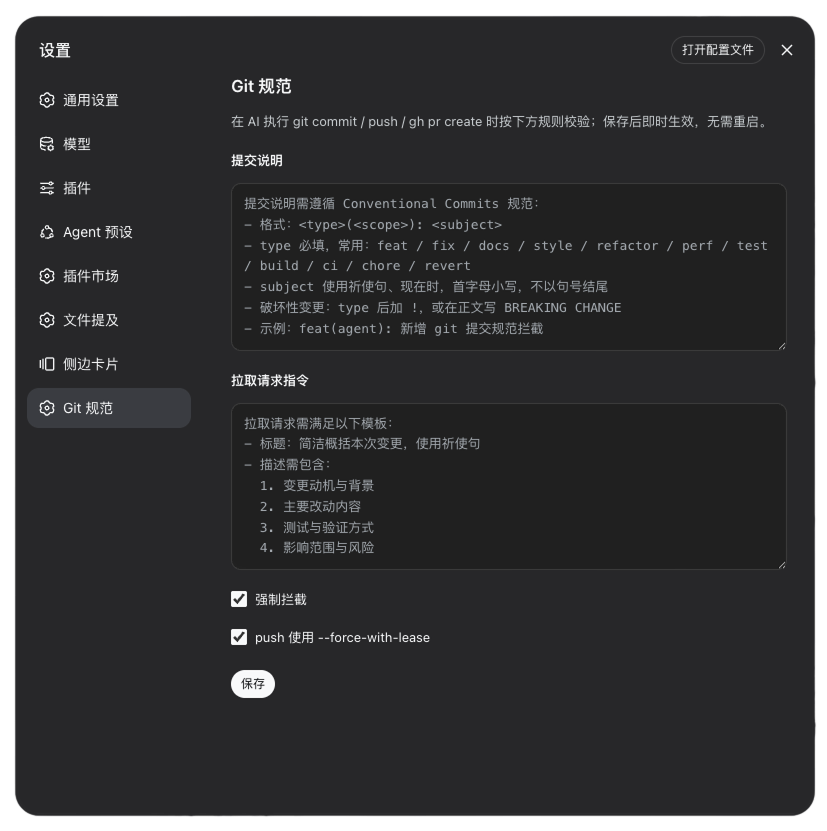
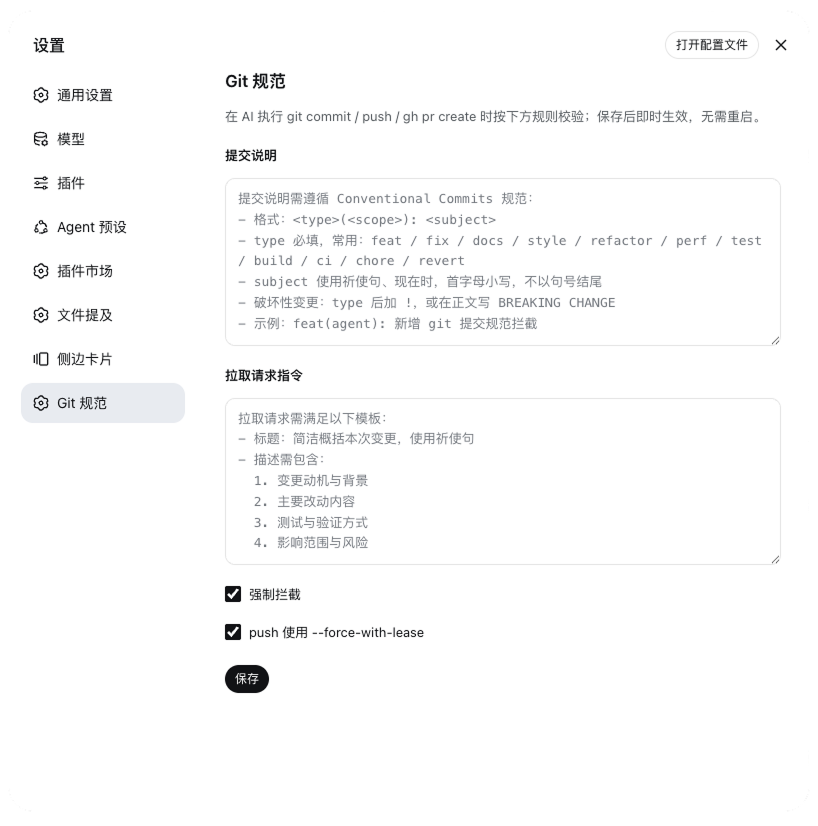
安装
本包已发布到 npm,在目标 profile 按包名安装即可。dsh plugin add 会读取 package.json 中 dsh.bundle.patch 指向的 cordis.patch.yml,并把包名追加进 dsh.profile.bundles:
dsh plugin --profile web add dsh-git-conventions
dsh web
重启后设置页出现独立的「Git 规范」页。更新 / 卸载:
dsh plugin --profile web update dsh-git-conventions   # 更新
dsh plugin --profile web remove dsh-git-conventions  # 卸载
本地开发
以工作区路径安装会建立 link: 依赖(改源码后重启即生效)。此时宿主解析 import z from 'schemastery' 走模块真实路径,需在工作区补一个可解析的依赖:
dsh plugin --profile web add <本包路径>
mkdir -p node_modules
ln -s ~/.dsh/profiles/web/node_modules/schemastery node_modules/schemastery
按 npm 包名安装则无需该链接(包被复制进 profile 的 node_modules,依赖沿 profile 正常解析)。
配置项
命名空间 git-conventions:
| 字段 | 类型 | 默认 | 含义 |
|---|---|---|---|
commitInstructions |
string | Conventional Commits(zh/en 随语言) | 提交说明规则;违规时作为重写提示回显 |
prInstructions |
string | PR 模板(zh/en 随语言) | 拉取请求标题 / 描述规则 |
enforce |
boolean | true | 是否强制拦截;关闭后全部放行 |
useForceWithLease |
boolean | true | git push 出现裸 --force 时提醒改用 --force-with-lease |
任何修改即时生效,无需重启。
国际化
界面文案、默认规则文本与拦截消息均支持 zh / en,跟随宿主语言偏好(dsh 设置 → 通用 → 语言,持久化为 settings.yaml 的 locale.preference)。未显式选择时,客户端回退浏览器语言,服务端回退中文。自定义规则文本与语言无关,一旦保存始终优先于默认规则。
使用示例
合规:正常放行
git commit -m "feat(agent): 新增 git 提交规范拦截"
git commit -m "fix(commit): 修正 subject 校验的空消息边界"
git push --force-with-lease
gh pr create --title "feat: 支持 scope 校验" \
  --body "动机与背景 / 主要改动 / 测试与验证 / 影响范围"
违规:被拦截
# 缺少 <type>(<scope>): <subject> 前缀 → 拒绝
git commit -m "新增提交规范拦截"

# subject 以句号结尾 → 拒绝
git commit -m "feat: 新增提交规范拦截。"

# 裸 --force(useForceWithLease=true 时)→ 提醒改用 --force-with-lease
git push --force
git push -f

# 缺少 PR 标题或描述 → 拒绝
gh pr create --title "feat: 新增校验"          # 缺 --body
gh pr create --body "缺少标题"                  # 缺 --title
拦截时 reason 列出具体不合规点、当前配置的完整规则文本,并提示「请重写后重新提交」。以 git commit 为例,agent 收到的拒绝消息形如:
提交信息不符合配置的提交说明规则:
  - 提交首行需符合 "<type>(<scope>): <subject>" 格式,例如 "feat(agent): 说明"

当前提交说明规则:
提交说明需遵循 Conventional Commits 规范:
- 格式:<type>(<scope>): <subject>
- type 必填,常用:feat / fix / docs / style / refactor / perf / test / build / ci / chore / revert
- subject 使用祈使句、现在时,首字母小写,不以句号结尾
- 破坏性变更:type 后加 !,或在正文写 BREAKING CHANGE
- 示例:feat(agent): 新增 git 提交规范拦截

请重写后重新提交。
不被拦截的情况
git commit -F commit-msg.txt:守卫同步执行,无法读取文件内容- 关闭「强制拦截」(
enforce=false)后的所有命令 - 规则文本留空(或清空)时回退到当前语言默认规则,校验仍生效
工作原理
Host 端通过 ctx.tools.guard() 守卫 bash 工具:
git commit带-m/--message时提取消息并做 Conventional Commits 结构校验;不合规则 deny,reason 含不合规点、完整规则与「请重写后重新提交」。git push含裸--force/-f且useForceWithLease=true时,提醒改用--force-with-lease。gh pr create缺少--title或--body时按prInstructions回显并拒绝。
已知限制
tools/execute管道不提供参数改写,因此 PR 的“校验 / 注入”实现为校验:缺失标题 / 描述时拒绝并给出补齐提示。- 守卫同步执行,无法读取
-F/--file指向的文件,文件消息不拦截(仅处理-m/--message内联消息)。 - 结构校验为通用 Conventional Commits 形状检查;具体规则以设置页配置为准,并在拒绝原因中原样回显。
许可证
MIT License © 2026 雨果,详见 LICENSE。
还没有评论,来写第一条。