Project Mode for DeepSeek Harness
Give a project a persistent Coordinator that manages Workers, maintains project knowledge and decides how to move the work forward.
English | 简体中文
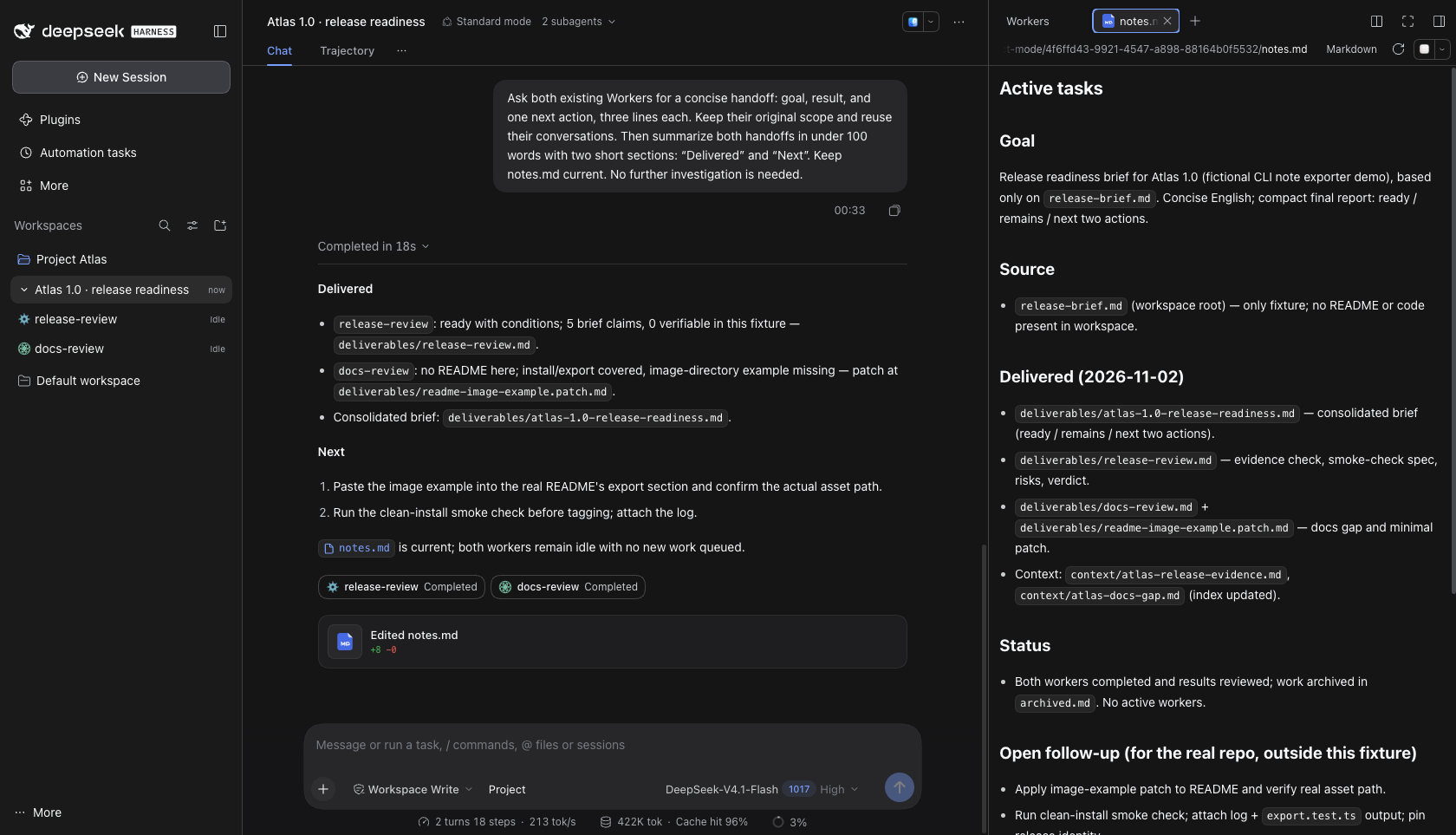
One project, a persistent team. Delegate work, open any Worker, and keep the next steps in view.
Watch the 22-second walkthrough · Explore the screenshots · Install
Unofficial developer preview: v0.1.22. Requires DSH 0.2.1-rc.3 with the three compatibility extensions documented in this repository. Stock rc.3 cannot enable the plugin. Read Compatibility before installing.
Contents
- Core capabilities
- See it in action
- Quick start
- User guide
- Project memory
- Features in DSH
- Project structure
- Development
- API and documentation
- Current limits
- License
Core capabilities
Project Mode gives the coordination work of a multi-Agent project to a persistent Coordinator in the main conversation. You set the goal; it chooses Workers, follows their progress, reviews results and keeps project knowledge useful across tasks.
| Capability | What it gives you |
|---|---|
| Persistent coordination | One Coordinator conversation owns the project's work records and next steps. |
| Full Worker control | Create or reuse Workers, steer current work, queue later instructions, inspect status and history, interrupt or delete. |
| Shared project knowledge | Coordinator and Workers maintain an index and load relevant context progressively. |
| Automatic result return | Each ended Worker turn returns its full final AI message for Coordinator review. |
| Direct human participation | Open a Worker, guide it yourself, then return to the Coordinator. |
| Native DSH execution | Sessions, Agent Loop, tools, permissions, message delivery and Stop stay with DSH. |
See it in action
A release review is a useful place to start: one Worker checks release evidence, another reviews documentation, and the Coordinator brings the results together. In this demo it then reuses both Workers for a follow-up and updates notes.md.
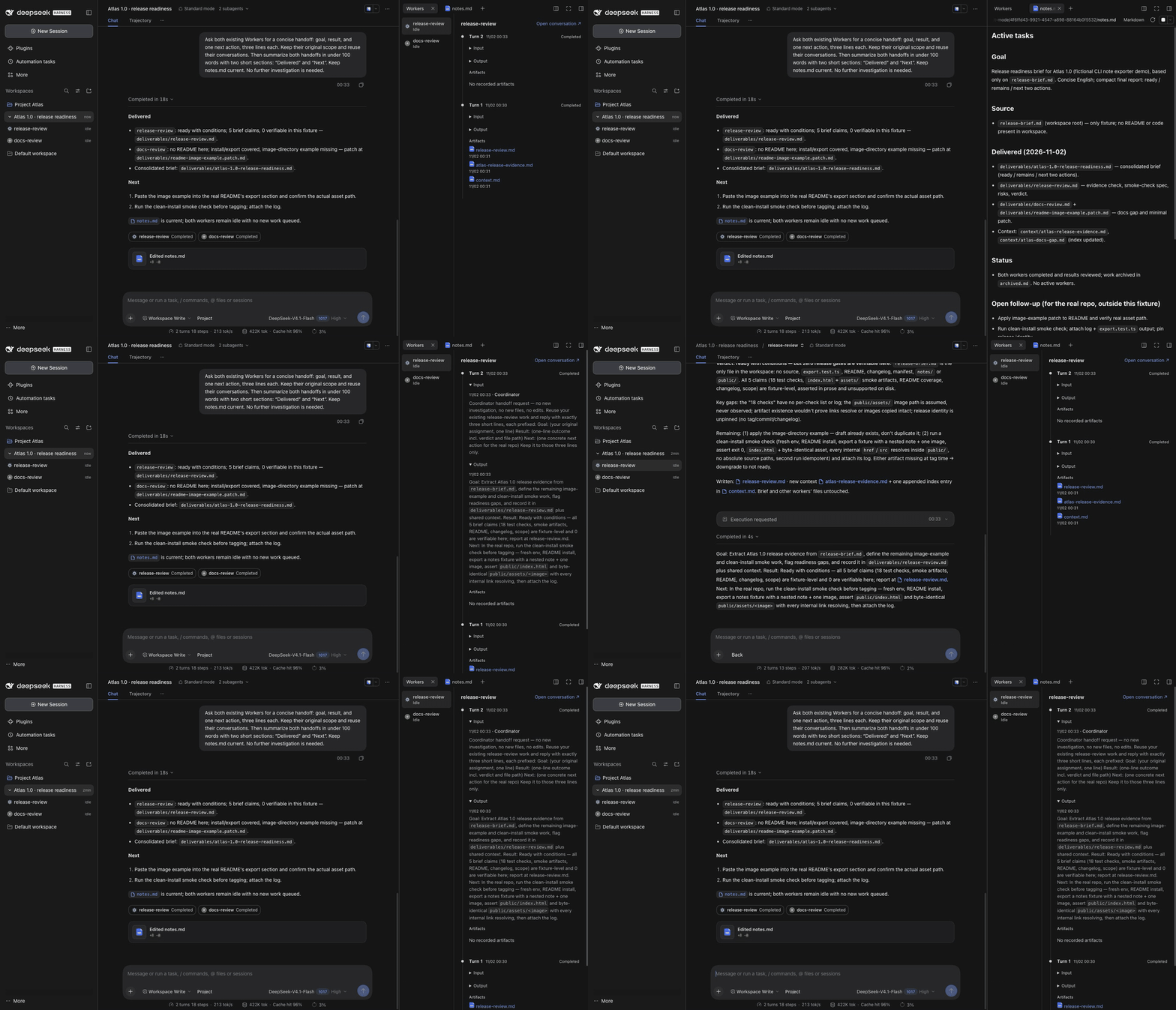
The walkthrough shows navigation after the work has finished: Workers → notes.md → turn input/output → Worker conversation → Back. Open the MP4 for playback controls, or view the workspace screenshot at full size.

Follow each Worker's work
Choose a Worker to see its turns from newest to oldest. Expand the original instruction and final AI response when you need the detail; open recorded artifacts or jump into the conversation to guide it yourself.

Keep the project ready for the next task
notes.md stays beside the conversation: goal, delivered work, current status and next steps. The Coordinator maintains it while reusable knowledge accumulates under the shared context index.

These are real DSH captures of Project Atlas, a fictional demo workspace, using plugin v0.1.22 and the compatible rc.3 runtime. They illustrate the workflow rather than a release-quality or speed benchmark. Capture details and reuse.
Quick start
- Prepare DSH 0.2.1-rc.3 with all three explicit extensions in Compatibility:
- Agent-local
tools.suppress({ deny })with reversible disposal. - Per-session
conversation.submission.register(sessionId, "steer"). sidebar.workspaces.session.branchfor native parent/child rows.
- Agent-local
- Install the tagged bundle through that runtime's CLI:
dsh plugin --profile desktop add "git+https://github.com/Burns1028/dsh-plugin-project-mode.git#v0.1.22"
Tagged bundles are listed on Releases.
Enable the plugin in DSH's Plugins page, open a workspace, create a conversation and select Project before sending the first message.
The repository includes built artifacts for Git installation. There is no automatic application patching or npm publication. Patching this checkout's development dependencies does not patch your installed DSH application; a packaged Desktop needs a separately prepared compatible runtime. The compatibility guide documents the explicit helper, exact-version checks and backup/restore requirements.
User guide
| Role | Responsibility |
|---|---|
| You | Set goals, make decisions and talk to the Coordinator. You can also open a Worker and guide it directly. |
| Coordinator | Choose and guide Workers, supply context, review results, maintain work records, organize shared knowledge and report progress. It can handle clarification, synthesis and small self-contained actions itself. |
| Worker | Carry an assigned investigation or execution through to a result, contribute reusable findings and return a self-contained final AI message. |
A usual workflow:
- You bring a goal to the Coordinator. It checks Workers and relevant project memory, including direct user activity in child conversations.
- It chooses an existing Worker or creates one, supplies the goal and context, then updates
notes.md. - As work changes, it uses steer to guide the current work or queue to leave an instruction for after the current turn. Interrupt and delete remain separate actions.
- Each Worker turn automatically returns its complete last committed AI message. A turn without an AI message still reports its identity and outcome with an empty AI result.
- The Coordinator reviews the result, follows up or concludes, and updates work records and reusable context. Normal closure waits for relevant work and result consumption within the same native Coordinator turn.
When you operate a Worker directly, the Coordinator can inspect its current state and read the conversation as needed when you return.
Project memory
.dsh/project-mode/<project-id>/
├── notes.md                 Todos, assignments, progress, blockers, next steps
├── archived.md              Concluded work and its results
└── context/
    ├── context.md           Shared index: file paths and short descriptions
    ├── decisions.md         Reusable decisions and their reasons, created as needed
    └── ...                  Other reusable project knowledge
The Coordinator maintains notes.md and archived.md so it knows where the project stands and what needs attention.
Both the Coordinator and Workers maintain context. They read context/context.md first, then open the files needed for the current task. Workers contribute valuable reusable findings and update the index. The Coordinator primarily organizes, consolidates and prunes that knowledge. Routine progress stays in the work records.
These documents persist with the project; they are loaded progressively rather than copied into every request. The MOA model describes these responsibilities in more detail.
Features in DSH
- Select Project for a new conversation before its first message. Its Project identity stays fixed after the first turn starts.
- Expand the Coordinator in the original workspace sidebar to open its Workers. Each has a stable identity icon and current status.
- Click a Worker capsule in the main conversation to open that child. Capsules stay with the conversation segment where work was dispatched, updated or received; later passive replies do not move them.
- Use the default Workers and notes.md tabs on the right. Workers shows a newest-first timeline of original input, final AI output and recorded artifacts. Input/output are collapsed until opened. Both tabs are closable.
- Worker composers provide Back to the Coordinator and use native delegated permissions without an independent permission picker. Archiving the Project brings its managed Workers along.
Coordinator delegation/control tools are replaced only in that Agent's scope. Workers and ordinary conversations retain native composition. Native Stop remains available and does not automatically stop every Worker.
Project structure
packages/project-mode/
├── src/host/       Project lifecycle, Worker operations and result delivery
├── src/client/     Sidebar, capsules and project tabs
├── src/shared/     Shared types and contracts
└── lib/            Built plugin artifacts
compat/rc3/         Audited runtime compatibility patches
scripts/            Build, compatibility and verification helpers
tests/              Regression and native contract checks
docs/               Model, architecture, API and verification guides
Development
Requires Node 24.9+, npm and Git.
git clone https://github.com/Burns1028/dsh-plugin-project-mode.git
cd dsh-plugin-project-mode
npm ci
node scripts/apply-native-compat.mjs --dry-run
node scripts/apply-native-compat.mjs --backup "$PWD/.superpowers/native-backup"
npm test -- --maxWorkers=1
npm test builds the plugin first. Edit packages/project-mode/src; regenerate the committed lib artifacts through the build. See Contributing for typechecks, native contracts, package consumer verification and the test map.
API and documentation
The Coordinator uses control_workers with spawn, list, get, send, history, interrupt and delete. send distinguishes current-work steer from next-turn queue. See the tool API for arguments, examples and result semantics.
| Read this | To understand |
|---|---|
| MOA model | Role responsibilities and progressive shared context |
| Code architecture | Modules, functions, data structures and execution paths |
| Tool API | Worker control, message delivery and history windows |
| Compatibility | The explicit rc.3 runtime extensions |
| Verification / Manual checks | What was tested and how to check a real application |
Current limits
Delegation remains a model judgment. This preview does not guarantee ideal task ownership on every request, and does not use task keywords or command/time thresholds to force it.
Try Project Mode on a small project and share your workflow or installation feedback in Issues. If you would like to follow its development, a star helps others discover it.
License
MIT. See LICENSE and third-party notices.
No comments yet. Be the first to write one.