dsh-desktop-shell-plus
给 DeepSeek Harness 的桌面外壳补上它缺的那层皮。
深色品牌启动页 · 真 DPI 感知 · 深色无边框标题栏 · 窗口位置记忆 · F12 开发者工具 · 右栏 20%
这是什么
DeepSeek Harness(下称 dsh)官方只提供 web / tui / headless 三种 profile,没有桌面客户端。社区的
dsh-desktop-shell 用 .NET Framework + WebView2 把 Web UI
包成一个原生窗口,思路很对,但它交出来的默认版有三个明显问题:
- 糊:进程没有 DPI 声明,125% 缩放的屏幕上整个窗口被 Windows 位图拉伸;
- 丑:启动等待期是一个白底黑字的裸 WinForms 面板,标题栏也是系统浅色,深色界面旁边挂着一条白条;
- 碎:后端还没起完就反复重导航,会看到「127.0.0.1 拒绝连接」、闪回、以及看门狗把正在启动的后端误杀。
本仓库是这套外壳的补丁版源码 + 可重复执行的脚本:不重新发明外壳,只把上面这些按下去,并且让改动在 插件升级之后还能一键重放。
这不是 fork 的 npm 包,也不分发任何二进制。仓库里只有一份改过的
DSHLauncher.cs和几个 PowerShell 脚本,作用在你自己已经装好的dsh-desktop-shell上。
效果
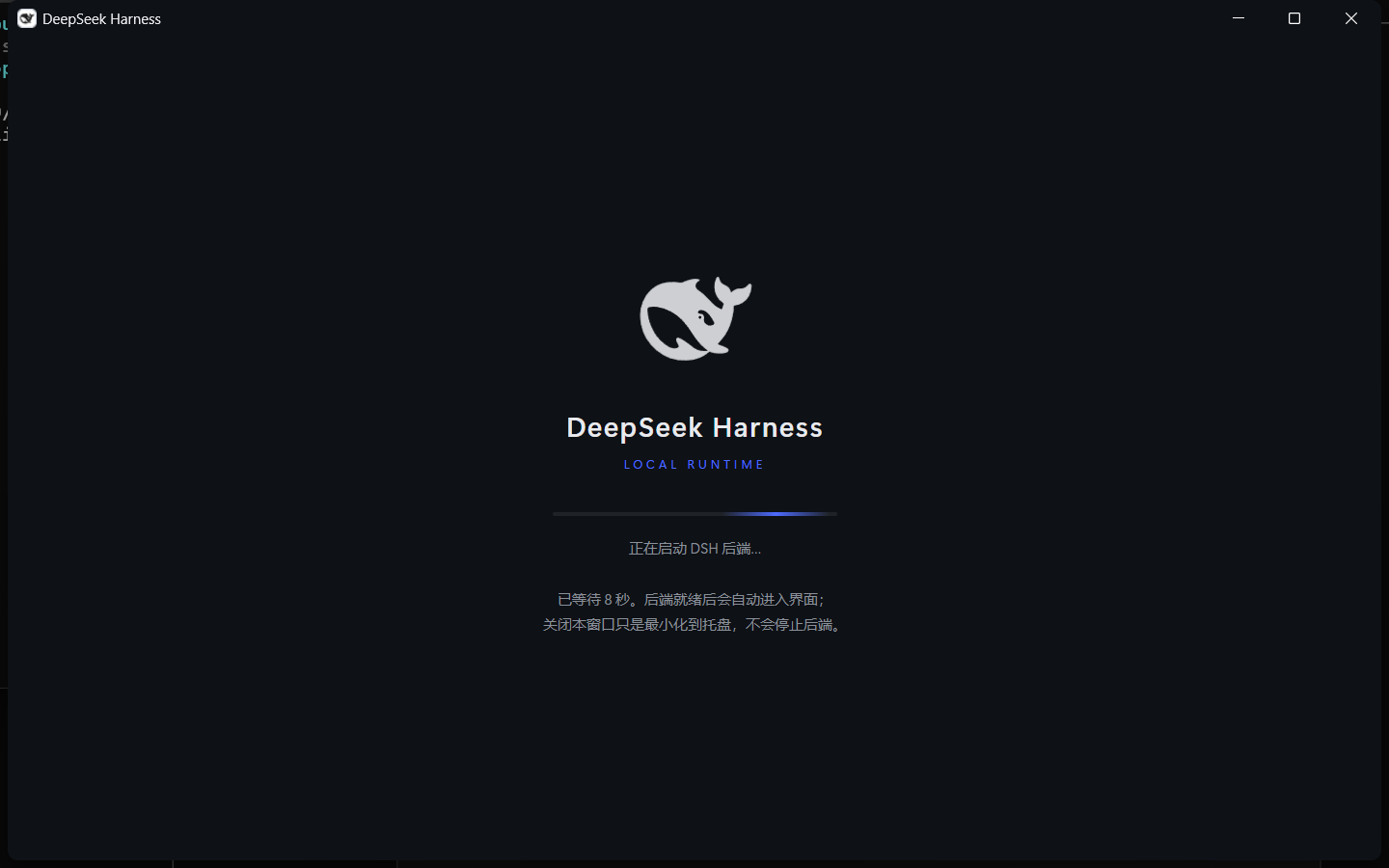
| 启动页 | 进界面 |
|---|---|
 |
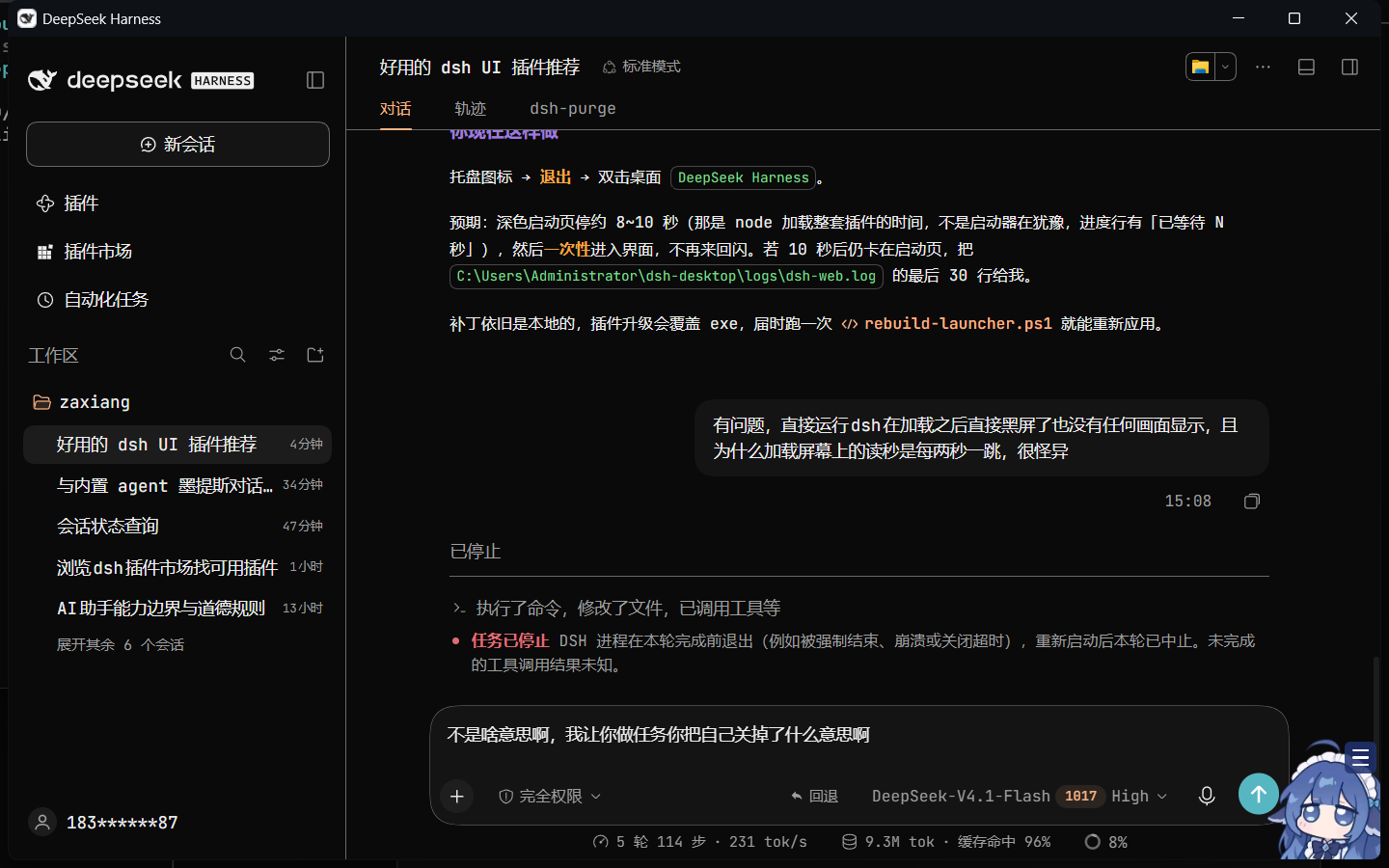 |
标题栏深色、与内容无缝;启动页是鲸鱼 logo + wordmark + LOCAL RUNTIME + 进度条 + 一行状态,没有白闪。
改了什么
1. 启动器(src/DSHLauncher.patched.cs)
| 项 | 默认版 | 本仓库 |
|---|---|---|
| DPI | 无声明,被系统拉伸 | SetProcessDpiAwarenessContext(-2) → shcore 1 → SetProcessDPIAware() 三级回退 |
| 窗口尺寸 | 固定,可能超出工作区 | 按 WorkingArea 计算,上限 1440×900,下限 880×560 |
| 标题栏 | 系统浅色 | DWM 属性 20/19/34/35/36:沉浸深色 + 深色边框 + 标题文字色 #E8EAED |
| 等待界面 | 白底黑字 Label | 深色 HTML 启动页(读 <home>\logo.svg),236×3 进度条,状态行随启动阶段更新 |
| 错误界面 | 裸文字面板 | 同一个品牌启动页承载错误文案 |
| 窗口记忆 | 每次默认居中 | <home>\window.json 记录 x/y/w/h/max,恢复前校验与显示器工作区相交 |
| 开发者工具 | 无入口 | 注入 keydown 桥:F12 打开 DevTools,Ctrl+R 重载 |
| 导航节奏 | 每 2s 重导航一次 | 单次在飞闸门 + 端口未监听不导航 + 端口监听前 60s 启动宽限 |
| 读秒 | 「已等待 N 秒」跳变 | 已移除,只留静态说明 |
2. 右栏宽度(scripts/patch-rightbar-width.ps1)
DSH 框架把右侧面板(Git、文件、终端都挂在右栏)的首开宽度写死成视口的 45%。脚本改的是
@deepseek-ai/dsh-client-ui-layout/lib/client.js:
const RIGHTBAR_DEFAULT_RATIO = .45;   // → .2
const rightbarPreference = layoutInfo.rightbar ?? viewport * .45;   // → * .2
clampWidth(rightbar, 300, viewport * RIGHTBAR_MAX_RATIO)            // → 280
改完右栏首开约 20%,拖拽下限也一起降到 280px。
3. 快捷方式不再被抢(scripts/patch-shortcuts.ps1)
dsh-desktop-shell 在后端每次启动后都会重跑 installDesktop():把原版 DSHLauncher.exe 复制回去,
并按硬编码的文件名重建快捷方式——你重命名过的链接会被当成「缺失」再建一个。脚本做三件事:
- 让插件生成的快捷方式脚本优先指向最新的
DSHLauncher-custom*.exe,没有才回退到原版; - 让启动期修复在
.shortcuts-frozen标记存在时不再创建/改名/改目标; - 落下这个标记文件。
要求
- Windows 10/11 x64
- .NET Framework 4.8(Win10 22H2 起自带)
- WebView2 Runtime(Edge 自带;
C:\Program Files (x86)\Microsoft\EdgeWebView\Application\*存在即可) - dsh
>= 0.1.5-rc.1(本仓库在0.2.1-rc.2上验证) - 已安装
dsh-desktop-shell:dsh plugin --profile web add dsh-desktop-shell - 编译用 legacy csc,不需要装 SDK:
C:\Windows\Microsoft.NET\Framework64\v4.0.30319\csc.exe
安装
前置:先装外壳本体,否则本插件没有东西可补。
dsh plugin --profile web add dsh-desktop-shell
然后二选一:
# A. 直接从仓库装(pnpm 走 git)
dsh plugin --profile web add https://github.com/Broknsun/dsh-desktop-shell-plus

# B. 用发布包里的预构建 tarball(免构建授权)
dsh plugin --profile web add https://github.com/Broknsun/dsh-desktop-shell-plus/releases/download/v1.0.0/dsh-desktop-shell-plus-1.0.0.tgz
装完重启后端。之后每次启动,插件会用 scripts/ 里的脚本把两件事重新对齐一遍(幂等,已经是对的
就什么都不做):
- 启动器:
src/DSHLauncher.patched.cs比现有构建新、或者还没有构建时,才重新编译并重指快捷方式; - 右栏:
dsh-client-ui-layout回到 45% 就再压回 20%。
接口
插件在宿主进程里注册两个 loopback-only 路由:
GET  /api/desktop-plus/status   -> 安装位置、当前构建、右栏补丁状态、编译器/冻结标记
POST /api/desktop-plus/apply    -> 立刻重放补丁(body: {"launcher":true,"rightbar":true,"shortcuts":true})
curl http://127.0.0.1:3080/api/desktop-plus/status
curl -X POST http://127.0.0.1:3080/api/desktop-plus/apply -H "content-type: application/json" -d "{}"
插件不下载任何东西:改过的启动器源码和三个脚本都在包里,编译用系统自带的
C:\Windows\Microsoft.NET\Framework64\v4.0.30319\csc.exe。
手动脚本(不想装插件时)
三个脚本都幂等,重复执行输出 already patched 之类的提示,不会重复改。
# 0) 先让插件把 home 目录铺好(装完后端跑一次,或直接调 install 接口)
1) 编译补丁启动器 + 把已有快捷方式指过去
powershell -ExecutionPolicy Bypass -File .\scripts\rebuild-launcher.ps1
2) 右栏首开 20%
powershell -ExecutionPolicy Bypass -File .\scripts\patch-rightbar-width.ps1
3) 冻结快捷方式 + 让插件指向 custom 构建
powershell -ExecutionPolicy Bypass -File .\scripts\patch-shortcuts.ps1
然后**重启后端**(托盘 → 退出,再双击快捷方式),浏览器侧改动按 `Ctrl+F5` 强刷。

### 脚本参数

| 脚本 | 说明 |
|---|---|
| `rebuild-launcher.ps1` | `-LauncherHome <路径>` 指定 launcher home(默认 `%USERPROFILE%\dsh-desktop`);`-NoBuild` 只重指快捷方式不编译;`-Quiet` 静默 |
| `patch-rightbar-width.ps1` | `-DshRoot <路径>` 指定 dsh 安装根,默认在 `%LOCALAPPDATA%\npm-cache\_npx\*\` 里找最新一份 |
| `patch-shortcuts.ps1` | `-ProfileRoot`、`-LauncherHome`,默认 `%USERPROFILE%\.dsh\profiles` 与 `%USERPROFILE%\dsh-desktop` |

三个脚本都**幂等**,重复执行输出 `already patched` 之类的提示,不会重复改。

## 为什么构建文件名带版本号

Windows 不允许覆盖一个正在映射中的 exe 映像,而改外壳的时候启动器通常正开着。所以每次构建产出
`DSHLauncher-custom-v<N>.exe`(`<home>\custom\build-name.txt` 记当前序号),再把快捷方式原地重指到新文件;
没人指向、也没在运行的旧构建会被自动清掉,只留当前和一个前身。

## 已知限制

- **插件升级会覆盖**:`dsh-desktop-shell` 升级会重写 `lib/install.js`、`lib/index.js` 并覆盖
  `DSHLauncher.exe`/`DSHLauncher.cs`。升级后重跑三个脚本即可(源码在 `src/`,不依赖插件里的那份)。
- **dsh 升级会覆盖右栏补丁**:`@deepseek-ai/dsh-client-ui-layout` 在 npx 缓存里,换版本就是新目录,重跑
  `patch-rightbar-width.ps1`。脚本会先做 `RIGHTBAR_DEFAULT_RATIO` 存在性检查,版本变了会明确报错而不是
  乱改。
- 改的是上游文件的本地副本,**升级/重装即失效**,这是这套方案的本质代价;不接受的话应该去上游提 PR。
- 单实例互斥、托盘、就绪门控、令牌捕获这些骨架来自 `dsh-desktop-shell`,本仓库没有重写它们。

## 许可与来源

MIT,见 [LICENSE](LICENSE)。

- `src/DSHLauncher.patched.cs` 与 `src/DSHLauncher.ico` 源自 [RINGOLINK/dsh-desktop-shell](https://github.com/RINGOLINK/dsh-desktop-shell)(MIT),
  在其上做修改;原版权声明保留在 LICENSE 中。
- `scripts/patch-rightbar-width.ps1` 只对 `@deepseek-ai/dsh-client-ui-layout` 的本地安装副本做字符串替换,
  不复制、不分发该包的任何代码;该包版权归 DeepSeek 所有。
- 本仓库不包含 dsh 本体、不包含 WebView2 运行时、不分发任何 exe。

## English

`dsh-desktop-shell-plus` is a patch set for the community WebView2 shell of DeepSeek Harness. dsh ships only
`web` / `tui` / `headless` profiles — there is no official desktop app. This repo fixes what the stock shell gets
wrong on high-DPI Windows: it declares per-monitor DPI awareness, replaces the blank white wait panel with a
dark branded splash, paints the title bar dark via DWM, remembers window bounds, wires `F12` to DevTools, and stops
the launcher from re-navigating while the backend is still booting. Two extra scripts narrow the right-side panel
from 45% to 20% of the viewport and stop the plugin from recreating your renamed shortcuts.

Everything is source + idempotent PowerShell on top of an existing install. No binaries. MIT.
No comments yet. Be the first to write one.