dsh-visible-action-row
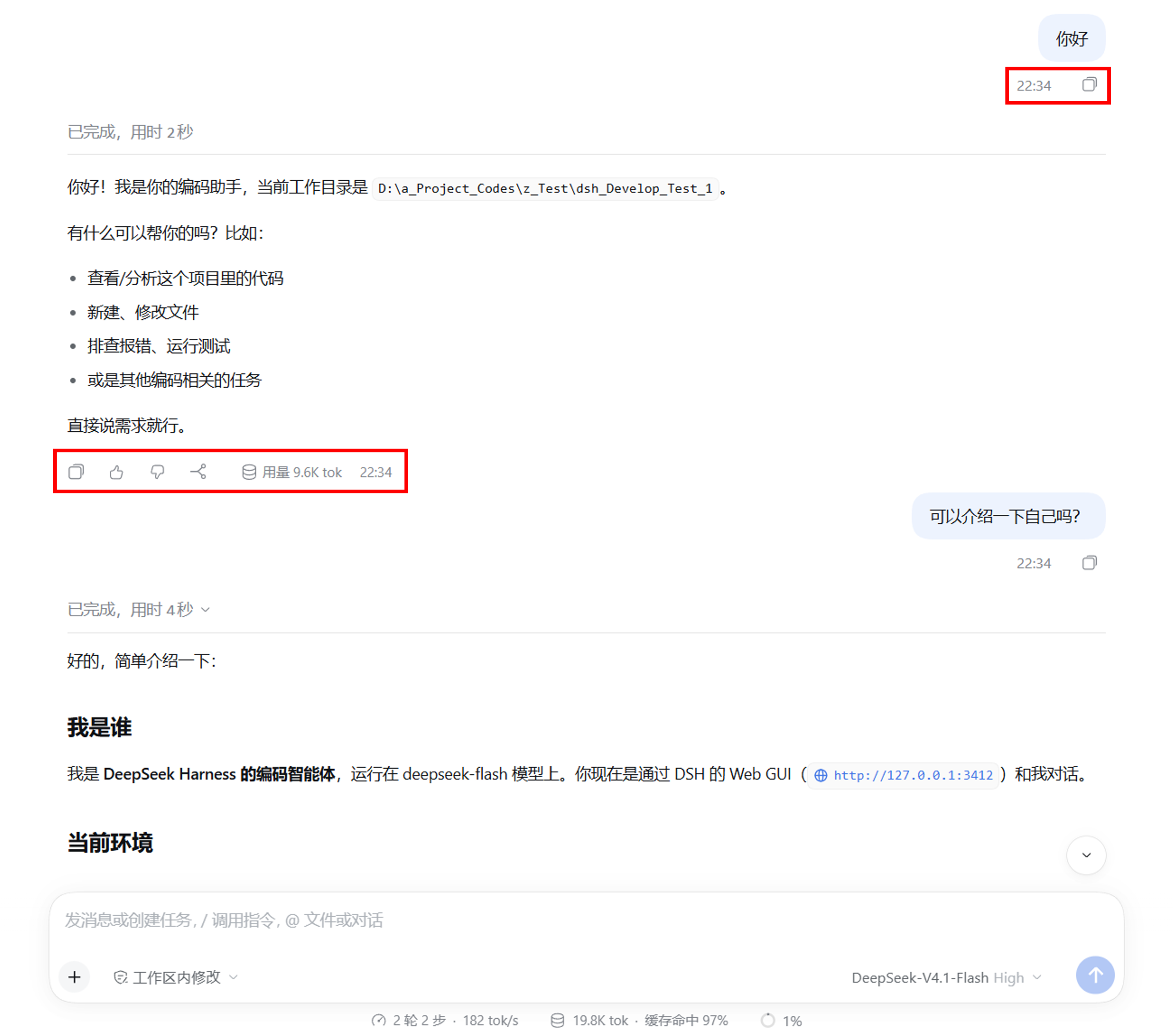
DeepSeek Harness(桌面版 / Web 版)插件:让每条消息——用户消息与 DSH 消息——气泡下方的整条操作栏无需悬停即可始终显示。
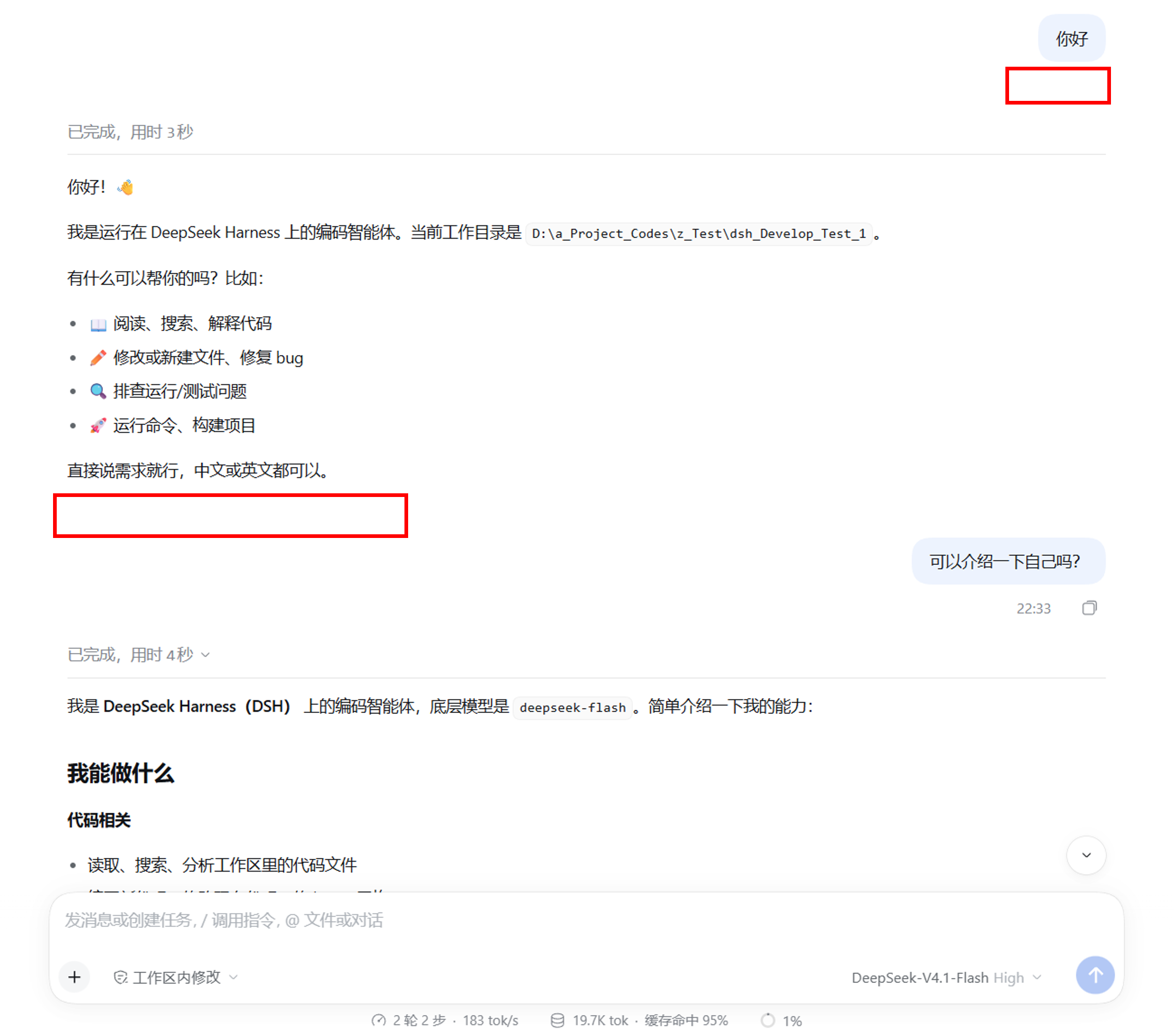
DSH 原生只在最新一轮消息上常显这条操作栏(复制 / 点赞 / 点踩 / 分支等按钮、时间,以及其他插件向该区域添加的按钮与信息),历史消息需要悬停才出现。本插件以一条 scoped CSS 可见性覆盖,让每条消息的操作栏都保持最新一轮那样的常显状态:复用原生渲染、原生位置与原生内容,不新增任何可见 UI。
- Always visible:用户与 DSH 消息的操作栏全部常显,含历史消息;悬停前后一致
- Native content:按钮、时间与第三方插件塞进该行的内容原样显示——不重新生成、不改格式
- Zero config:无设置项、无开关、无存储、无后端、无网络请求,安装即生效
- Clean uninstall:卸载后恢复原生「仅最新一轮常显」行为,不残留 DOM / CSS / 配置
- Minimal & safe:不扫描 DOM、无 MutationObserver、无轮询;仅调整
opacity,按钮行为与悬停效果不变
维护:Bobnemimimmi · 问题与反馈:GitHub Issues
Preview
安装前(Before Installation)
安装后(After Installation)
Usage
安装(Installation)
通过 DSH Desktop 安装(Install through DSH Desktop)
- 打开侧栏 插件(Plugins)页;
- 点击 添加插件(Add plugin)旁的箭头,选择 安装第三方插件(Install a third-party plugin);
- 输入
dsh-visible-action-row安装,安装完毕后点击 立即启用。
通过 npm 安装(Install through npm)
dsh plugin --profile web add dsh-visible-action-rownpm 安装拿到的是发布时构建好的成品,无需任何构建授权。
从 GitHub 安装(Install through GitHub)
会运行本包的
prepare自构建;pnpm ≥10 首次add会拒绝并要求授权,按提示把打印的allowBuilds键加入 profile 的pnpm-workspace.yaml后重跑:dsh plugin --profile web add github:Bobnemimimmi/dsh-visible-action-row本地目录 / tarball 安装(Local directory / tarball installation)
dsh plugin --profile web add ./dsh-visible-action-row或通过 Awesome DeepSeek Harness (DSH) Plugin 搜索安装(Search and install from the awesome list)
用命令行安装后,重启 DSH 即生效(桌面版重启应用;Web 版重启 dsh web)。
桌面版使用的 profile 名为
desktop:把上面命令里的--profile web换成--profile desktop。
卸载(Uninstallation)
dsh plugin --profile web remove dsh-visible-action-row
重启后恢复原生「仅最新一轮常显」行为(restart DSH to restore the native behaviour)。
从 0.1.x 迁移(Migrating from 0.1.x)
旧包 dsh-always-status-bar 只覆盖时间戳,且其锚点在 DSH 0.2.x 中已变更(因此在新版里实际为空转)。建议先移除再安装新包:
dsh plugin --profile web remove dsh-always-status-bar
dsh plugin --profile web add dsh-visible-action-row
Requirements
- DeepSeek Harness:桌面版,或
dsh web(二进制安装 / 源码启动均可) - 已验证:
- 桌面版
0.2.1-rc.5(Windows 11) - 源码启动的 Web
0.2.2-alpha.2(Windows 11) - 两者加载同一套前端产物;macOS / Linux 未单独实测,但同一份 client bundle 不含平台分支
- 桌面版
dshCLI(或按 DSH 文档以源码方式运行pnpm dsh)
若升级 DSH 后操作栏不再常显,请核对以下稳定锚点是否仍存在于 packages/client/ui-chat/src/client/chat/:
MessageIconActions.tsx→ 操作栏根节点的data-clockTurnTailNodeView.tsx→data-actions-revealChatNodeSeat.tsx→data-chat-flow-kind
License
MIT
No comments yet. Be the first to write one.