Site & showcase · npm · English | 中文
npm:
codsh-cli· command:codsh
A terminal coding agent built around one command: /ship takes a one-sentence idea to landed, verified code — on the DeepSeek Harness (dsh).
Install
npm install -g @deepseek-ai/dsh codsh-cli   # already have dsh? just: npm install -g codsh-cli
codsh
codsh-cli is a zero-dependency launcher, a few kilobytes — it never bundles the dsh runtime, so a machine carries exactly one dsh however many tools sit on it. The launcher finds your dsh (DSH_BIN, a resolvable @deepseek-ai/dsh, or dsh on PATH), registers the codsh-bundle runtime into a dsh code profile under $DSH_HOME (default ~/.dsh) on first run — the packaged code-cli agent preset installs itself on first boot — and every later run boots straight into the prompt. Profiles install through your pnpm store, so the runtime's packages are shared with everything else dsh on the machine. The model key is read from DEEPSEEK_API_KEY (environment or .env).
codsh is exactly dsh --profile code — the launcher only performs the one-time registration (and upgrades the bundle when you upgrade the launcher). Flags after codsh reach the app: codsh --resume <session-id>, codsh --continue, codsh -p "one-shot task".
Prefer no launcher at all? The two lines it wraps work directly, with any profile name:
dsh plugin --profile code add codsh-bundle
dsh --profile code
/ship — from one sentence to shipped
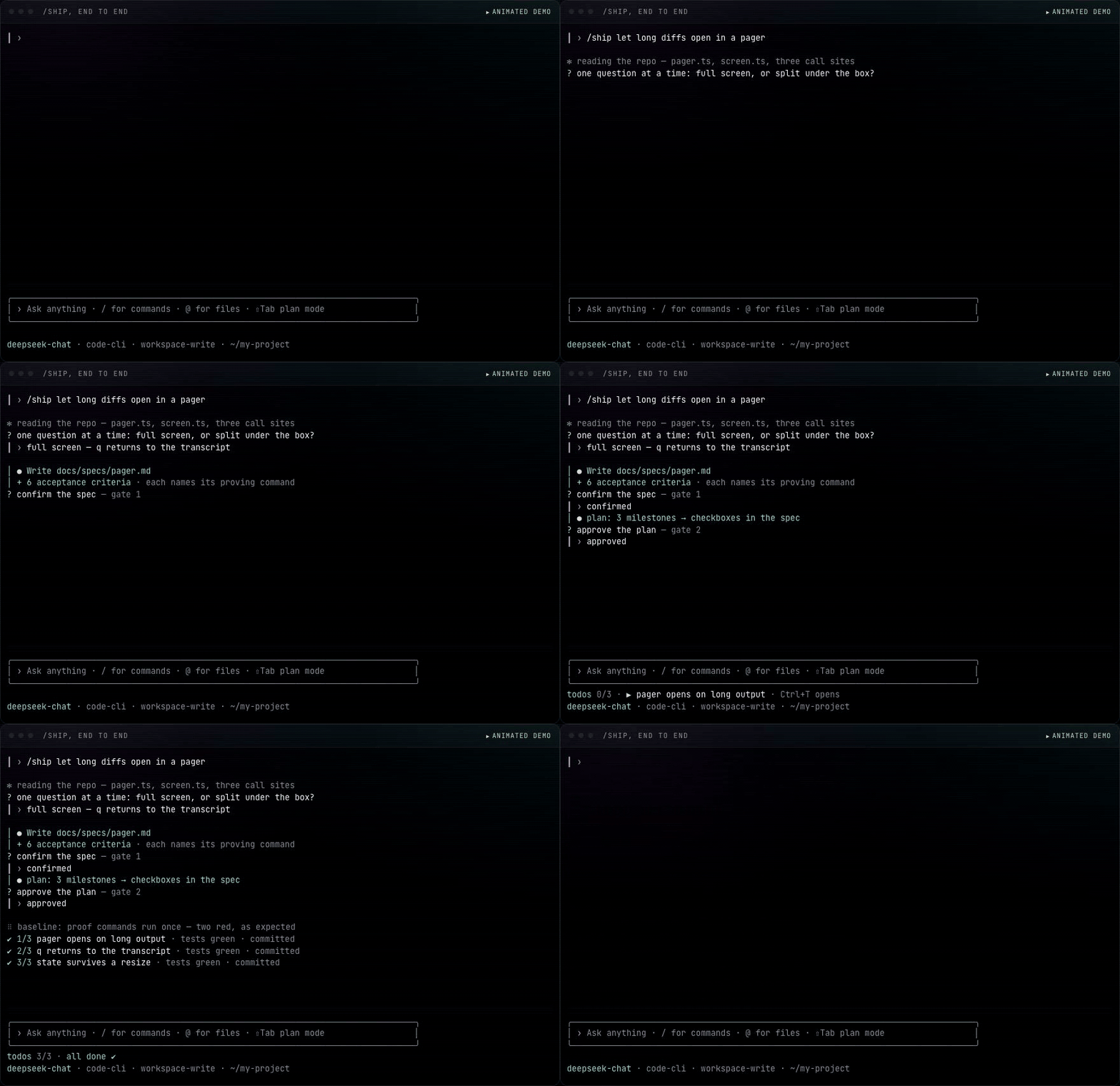
The core of codsh. Type /ship <one-sentence idea> and the agent drives it from 0 to 1 with exactly two approvals and nothing else to babysit:
- Interview — the agent reads your repo first, then asks one focused question at a time (users, success criteria, scope, non-goals, constraints, edge cases) until answers stop changing the design. A pasted mockup or screenshot is requirements material.
- Spec (gate 1) — the agreed design lands as a file in your repo (
docs/specs/<slug>.mdunless your repo has its own convention). Every acceptance criterion names the exact command that proves it, and aStatus:line makes the file resumable; you confirm it. - Plan (gate 2) — milestones, tests, and the commands that prove them; you approve it. The approved plan is then written into the spec as checkboxes, and the proof commands run once before any code — a baseline that is already red surfaces here, not under the diff.
- Landing — from here it is autonomous, with the spec file as the working memory: re-read before each milestone, checkbox ticked and a commit made when it turns green. Small plans run implement→test→fix→commit in-session under the todo list; large ones run a fresh-agent Ralph loop — bounded, and told to stop and report rather than spin past two rounds of no progress.
- Done — every criterion verified by running its own command and reading the output (after a Ralph loop, the session re-runs them all itself), then a report listing criterion → command → what it printed.
/ship let long diffs open in a pager instead of scrolling past
Run it bare and it first offers to resume any unfinished spec it finds — interruptions lose nothing — then asks for the sentence. Mid-flight decision changes go back into the spec file, so the file always states what is being built.
The surface
Around /ship, a session surface that borrows the best interaction design in the category — in brief (the site shows each one live):
- A session that is its own space — codsh takes the alternate screen: the transcript scrolls in a buffer the session owns, the input box never leaves the bottom, and quitting restores your shell untouched plus a two-line summary (session id, spend, the
--resumecommand). - Folds you can click — long finished blocks (thinking, tool output, answers past a screenful) collapse to their head lines; a click opens the one under the pointer, hovering names it first, and Ctrl-O swaps them all.
- Todos that stay in view — a pinned row holds the agent's list over the status row; Ctrl+T expands it,
/todosprints it,--resumereopens on it. - Select to copy — drag, release, and it is on your clipboard — OSC 52 and the platform clipboard both (
CODSH_CLIPBOARDnarrows it). - Streaming rendering — Markdown with code highlighting and real table columns, thinking dim under
✻ thinking, tool calls as cards with diffs. - Paste an image, even into a text-only model — Ctrl+V attaches it; image-capable routes send it as a first-class attachment, text-only routes get a file the agent can open with tools — and with
CODSH_VISION_*pointing at any OpenAI-compatible vision endpoint, a verbatim description rides the same message. - An input box that owns the keyboard — multi-line editing (Shift-Enter on kitty-protocol terminals, Alt-Enter everywhere), history across sessions, fuzzy completion for commands, arguments, and
@-mentioned files. - Decisions as selections — approvals, questions,
/model, and/resumeare arrow-key widgets; Shift-Tab toggles plan mode and tints the box frame. - Session flow —
/clearstarts fresh in place,/resumepicks from recorded sessions, Escape twice recalls your last message, and!cmdruns in your shell with the outcome injected as context. - Canned prompts and status —
/initdrafts anAGENTS.md; Markdown files under$DSH_HOME/commands/or.dsh/commands/become slash commands; a status line, terminal-title updates, a bell when a decision waits, and--printfor scripts.
Off a TTY (pipes, scripts) the same surface degrades to a line reader: selections become typed answers, lists replace widgets, and nothing draws.
Development
pnpm install
pnpm run dev          # build → sync into .dev-home → boot; seconds per iteration
MOCK=markdown pnpm run dev    # keyless, against the e2e mock model
pnpm run build        # tsdown runtime bundles + tsc declarations into lib/
pnpm run typecheck
pnpm test             # unit suites (pure modules: editor, markdown, transcript, …)
pnpm run test:e2e     # packs this repo, registers it into a dsh profile, and
                      # drives the INSTALLED dsh binary through pipes and a real PTY
pnpm run dev keeps a repo-local dsh home in .dev-home: the first run does a real profile install of the packed tree, and every later run just copies the fresh lib/ over the profile's unpacked package — so edits reach the running surface in seconds. MOCK=<write|bash|slow|markdown|reasoning|echo|tall> swaps in the keyless e2e model for UI work without a key, arguments pass through (pnpm run dev -- --resume <id>), and INSPECT=1 opens the Node inspector on the app process (chrome://inspect or a VS Code attach). Off-TTY logic is easiest to step through piped — printf 'task\n/exit\n' | MOCK=echo pnpm run dev — where raw mode and the repaint region are out of the picture; keep console.* out of debug prints on a TTY (they tear the managed region) and log to a file instead.
The e2e suites test the release artifact: npm pack output installed into a real profile, booted by the dsh launcher from npm, with a keyless mock model. What passes there is what a user installs.
Debugging against dsh sources
Day to day, dsh is an ordinary npm dependency. To step into harness code, clone deepseek-harness beside this repo, build it (pnpm install && pnpm run build), then point the packages you are debugging at the checkout:
// package.json — remove again when done; keep npm as the default
"pnpm": {
  "overrides": {
    "@deepseek-ai/dsh-agent-loop": "link:../deepseek-harness/packages/core/agent-loop"
  }
}
and re-run pnpm install. Changes you want upstream go to the harness repo as ordinary PRs; this repository never forks it.
Keeping up with dsh releases
codsh consumes the harness as published @deepseek-ai/dsh-* packages, so "syncing with dsh" means tracking harness releases, not merging source. Three layers keep it automatic:
- Detect — Renovate watches
@deepseek-ai/dsh-*(plus co-released cordis packages) and opens dependency PRs; a nightly sync workflow does the same without third-party services. - Bump —
pnpm run sync:dshrewrites every@deepseek-ai/dsh-*range to the latest published release, refreshes the lockfile, writes a changeset, and exits1from--checkwhen newer versions exist (that is what the nightly job keys on). - Prove — the same command re-verifies
cordis.patch.yml: every plugin id it disables or configures must still be declared by an installed dsh bundle, and every package it inserts must resolve. Then it runs typecheck/build/unit (add--e2eto boot the real patched bundle), and CI repeats all of that on the resulting PR.
Every dsh package is a prerelease (0.1.0-rc.N), and a caret on one does float: ^0.1.0-rc.7 admits 0.1.0-rc.8. The lockfile is what holds this repo still, so an install that has no lockfile — the profile install a user gets, and the one the e2e builds — resolves the newest rc instead. Keep the ranges synced rather than trusting them to pin: a runtime and a plugin set from different rcs load fine and then fail at the first call whose shape changed. The harness also publishes rcs without moving its latest tag, so pnpm run sync:dsh reads the highest published version, and pnpm update is never the source of truth.
License
MIT
No comments yet. Be the first to write one.