dsh-chat-avatars
给 DeepSeek Harness(dsh)Web GUI 的聊天消息加头像:用户消息右侧、AI 消息左侧。 支持全局默认 + 按工作区覆盖、上传前裁剪、会话内点击更换、动图头像、大图预览与拍一拍。 零运行时依赖,数据只保存在本机浏览器。


English summary — Chat avatars for the DeepSeek Harness (dsh) Web GUI: per-workspace avatar
overrides, interactive cropping, click-to-change, animated GIF/APNG/WebP avatars (client-side
sprite sheet + CSS steps()), a large preview, and a purely local "poke" effect. Zero runtime
dependencies; data stays in localStorage. Install the GitHub Release tarball with
dsh plugin --profile <profile> add /path/to/dsh-chat-avatars-0.1.1.tgz.
Requires dsh >=0.2.1-rc.2 <0.3.0. MIT licensed.
界面
| 设置页 | 大图预览 |
|---|---|
 |
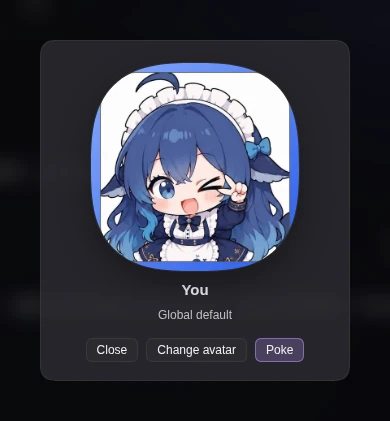 |
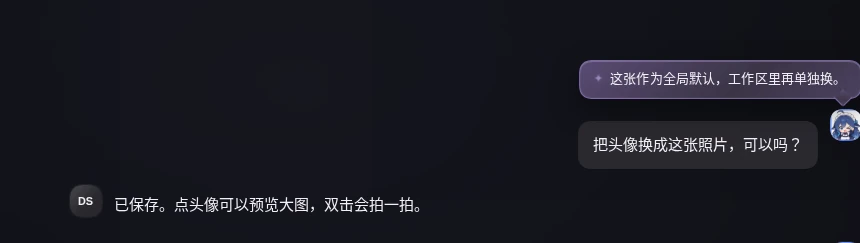
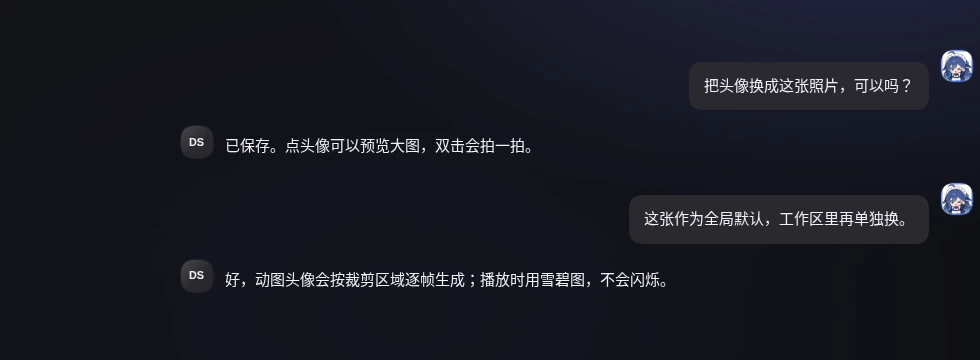
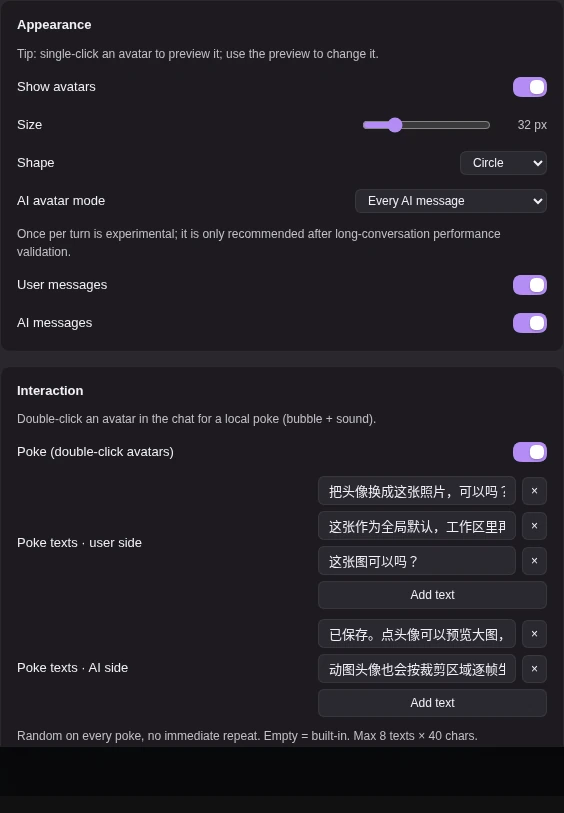
截图为脱敏示例(示例头像 + 合成消息),不代表真实会话内容。
功能
- 用户/AI 头像:默认显示在用户右侧、AI 左侧;可调尺寸 24–60px、圆形/圆角、分别显示或隐藏两侧。
- 全局默认 + 按工作区覆盖:每个工作区可以单独设置头像,未设置时继承全局默认。
- 上传前裁剪:PNG/JPEG/WebP(≤2 MB),拖拽/缩放/键盘操作,预览即最终效果;静态输出 256×256。
- 动图头像:GIF/APNG/动图 WebP(≤6 MB)在本地解码、自适应采样 8–96 帧并烘焙为雪碧图,用 CSS
steps()播放。 - 大图预览:单击聊天中的头像打开居中预览,预览内可直接「更换头像」。
- 拍一拍:双击头像触发纯本地效果(行抖动 + 气泡 + WebAudio 合成音效),不写会话事件、不联网、不通知对方。
- 随机文案组:用户侧/AI 侧各可配置最多 8 条拍一拍文案,每次双击随机一条且避免连续重复;留空使用内置默认文案。
- 数据工具:导出/导入 JSON、清除全部数据、清理未使用的工作区头像;多标签页自动同步。
- 安全降级:dsh 版本或宿主契约不匹配时自动暂停并回退原生界面,不阻断 GUI 启动。
安装
方式 1:GitHub Release tarball(当前推荐)
打开 Releases,下载最新
.tgz(当前为dsh-chat-avatars-0.1.1.tgz)。在终端执行(把路径和 profile 换成你的实际值):
dsh plugin --profile <profile> add /path/to/dsh-chat-avatars-0.1.1.tgz例如 dsh 的 Web profile 常用
--profile web。刷新 dsh Web GUI;若未立即生效,重启 dsh 后再打开。
安装/启用会写入你的 dsh profile,属于本机配置变更;请确认路径与来源可信后再执行。
方式 2:npm(发布准备中)
包名 dsh-chat-avatars。npm 发布完成后可直接:
dsh plugin --profile <profile> add dsh-chat-avatars
当前请先使用上面的 tarball 方式。
使用
- 打开 设置 → 聊天头像(Account menu → Settings → Chat avatars)。
- 在 Appearance 中启用头像、调整尺寸/形状/显示范围。
- 在 Global defaults 中上传全局默认头像;需要时在 Workspace overrides 里为单个工作区覆盖。
- 在聊天中:
- 单击头像 → 大图预览(可在预览内更换头像);
- 双击头像 → 拍一拍(气泡 + 音效);
- 连续双击会重新弹出气泡(视觉冷却 300ms);音效 900ms 内只响一次。
- 动图头像支持 GIF/APNG/动图 WebP;上传后会按裁剪区域逐帧生成。开启
prefers-reduced-motion时冻结首帧。
拍一拍的文案组(可添加多条,每次随机)、音效开关与音量在设置页 Interaction 卡片中配置。
兼容性
- dsh:
>=0.2.1-rc.2 <0.3.0(在 0.2.1-rc.2 上完成真机验收);超出范围时插件自动暂停并回退原生界面。 - 零运行时依赖,不需要
npm install;不修改 dsh 源码,不写document.body、不写会话事件、不联网。 - 动图播放依赖浏览器
ImageDecoder(需要http://127.0.0.1或 https 等安全上下文);不可用时只拒绝动图,静态头像仍可用。
隐私与数据
- 头像与设置只保存在当前浏览器的
localStorage(key:dsh.chat-avatars.v1),不上传、不联网、不读取消息正文。 - 导出/导入文件由你主动触发;文件只在本机生成或读取。
- 卸载插件不会自动删除 localStorage;如需彻底清理,请在设置页使用「清除全部数据」,或在浏览器 DevTools 删除对应 key。
- 数据损坏/版本迁移会保留一次备份 key(
dsh.chat-avatars.v1.broken)。
常见问题
看不到头像? 检查设置页总开关、当前 dsh 版本是否在支持区间,以及诊断区是否显示暂停原因。窄屏(<520px)下头像会按设计隐藏。
动图不播放?
动图需要安全上下文与 ImageDecoder;请通过 http://127.0.0.1 或 https 打开 GUI。非安全上下文会提示 E_ANIM_UNSUPPORTED。
双击没反应? 确认设置页「Interaction」中的拍一拍已开启;两次点击需在同一头像区域且间隔 ≤260ms;视觉冷却 300ms、音效冷却 900ms。
卸载重装后设置还在?
这是预期行为:数据在 localStorage,不属于插件安装目录。可在设置页手动清除。
升级 dsh 后需要做什么? 插件会自动检测版本/契约;不匹配时暂停并显示横幅,匹配后「重新检测」即可恢复。继续使用前建议先在真实页面检查头像与设置页。
升级与卸载
# 升级:下载新的 release tarball 后再次 add 即可;设置与头像保留
dsh plugin --profile <profile> add /path/to/dsh-chat-avatars-<new>.tgz

# 卸载
dsh plugin --profile <profile> remove dsh-chat-avatars
链接
License
MIT © 2026 dsh-chat-avatars contributors
插件图标由项目作者提供(icon.webp,512×512 WebP),随本项目以 MIT 许可发布。
No comments yet. Be the first to write one.