description: "Review Markdown manuscripts with durable annotations, agent-accessible manuscript tools, and changes measured against the last marked review." kind: "package-bundle"
@deepseek-ai/dsh-experimental-paper-review
English | 中文
Summary
Read a Markdown manuscript beside the native conversation, collect annotations, and request localized revisions. A floating progress rail jumps to sections and paragraphs without narrowing the page. Bind .bib files as the citation-key authority and inspect their index outside the reading body. The agent can open manuscripts, manage bibliography entries, and create or revise pending manuscript proposals. Paper mode retains ordinary tools; a file-write-enabled agent can still edit outside the review workflow. Install a pinned, prebuilt Git tag into a Web profile.
Table of Contents
- Use this package
- Understand the implementation
- Further Exploration
- Model Experience
- Known Limitations and Deferred Work
- Dev Note
Use this package
Install the prebuilt version tag with DSH's profile command:
dsh plugin --profile web add 'github:Biogod2020/dsh-article-review#v0.1.7-alpha.8'
dsh web
The installer adds this package's bundle patch after the Web layer. Restart an already running Web profile after installation; no separate launcher or model configuration is needed. This independent add-on was smoke-tested with DSH 0.1.6-alpha.2 on macOS. The main branch contains development source with workspace:^ dependencies and is not a direct Git install target; pin a release tag. For local development, build a compatible DeepSeek Harness checkout containing this package, then run dsh plugin --profile web add /absolute/path/to/deepseek-harness/packages/experimental/paper-review and keep that checkout in place.
Screenshots
These captures show the running Web plugin with a fictional manuscript and scripted agent output. The text, counts, notes and edits are synthetic; no personal manuscript or private workspace path is shown.
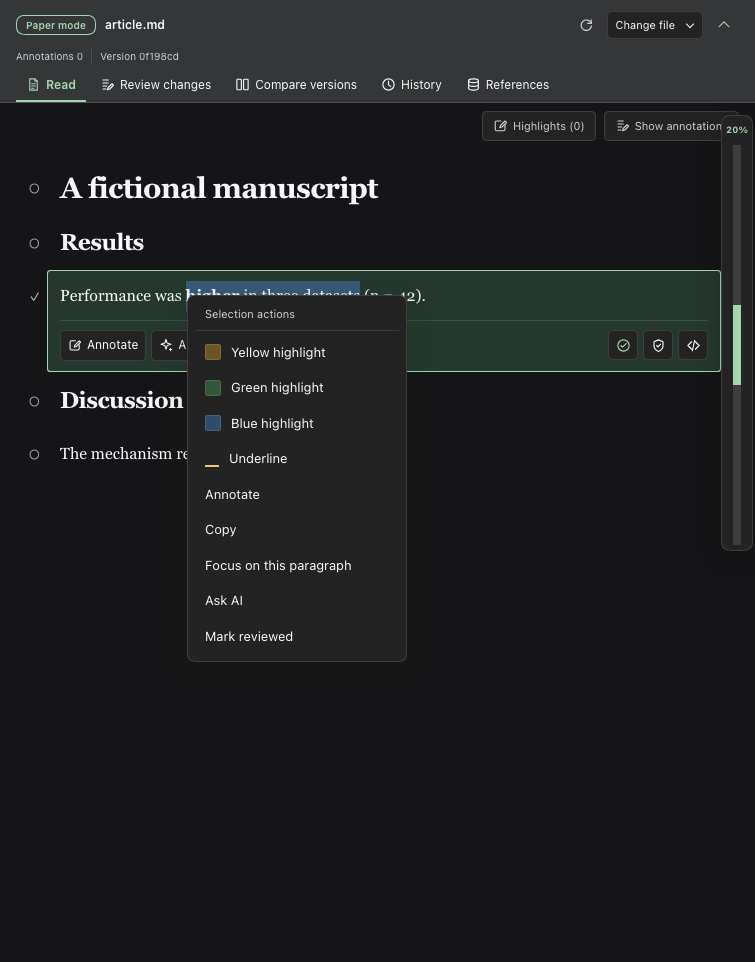
Select words and right-click to open highlight, annotation and reading actions.
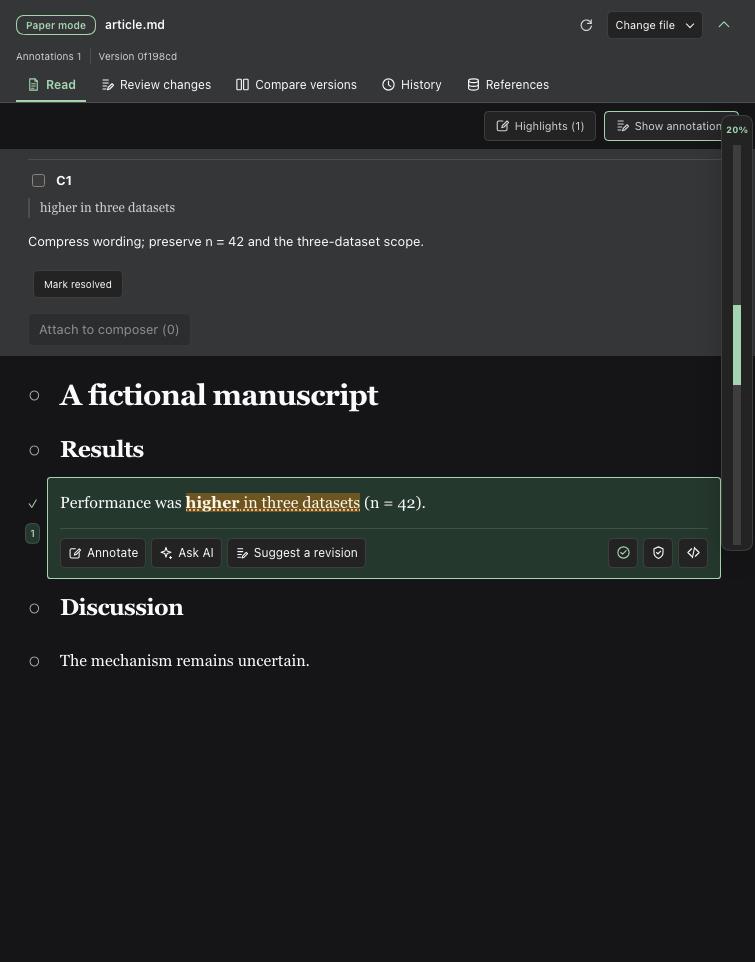
Save an annotation on the selected phrase without editing the Markdown source.
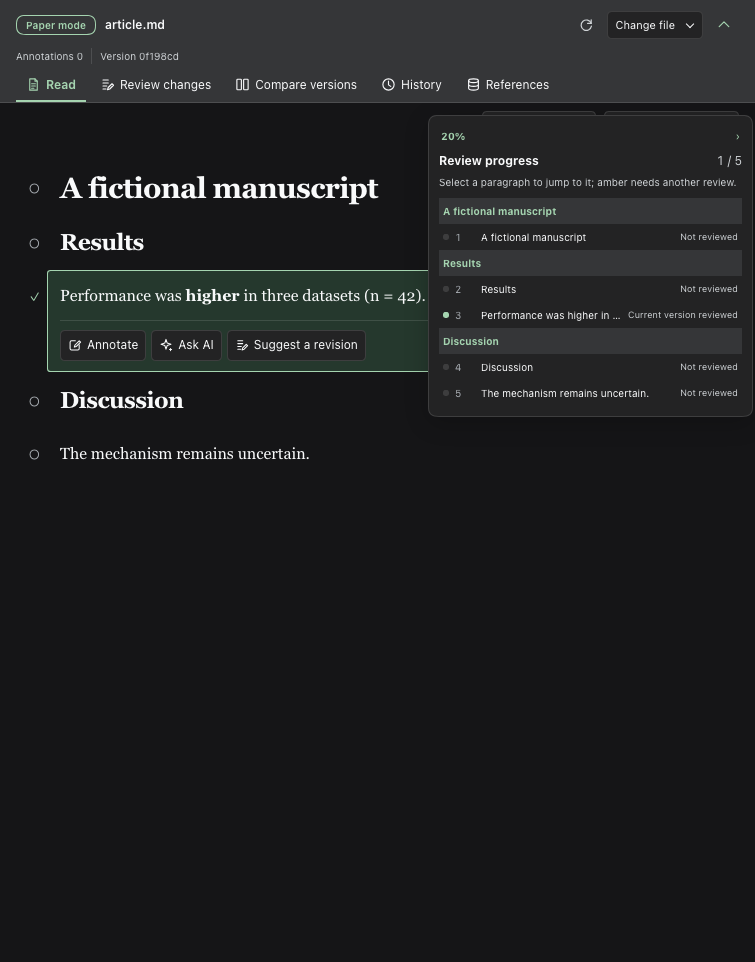
Expand the floating review progress rail to see paragraph status and jump to a section.
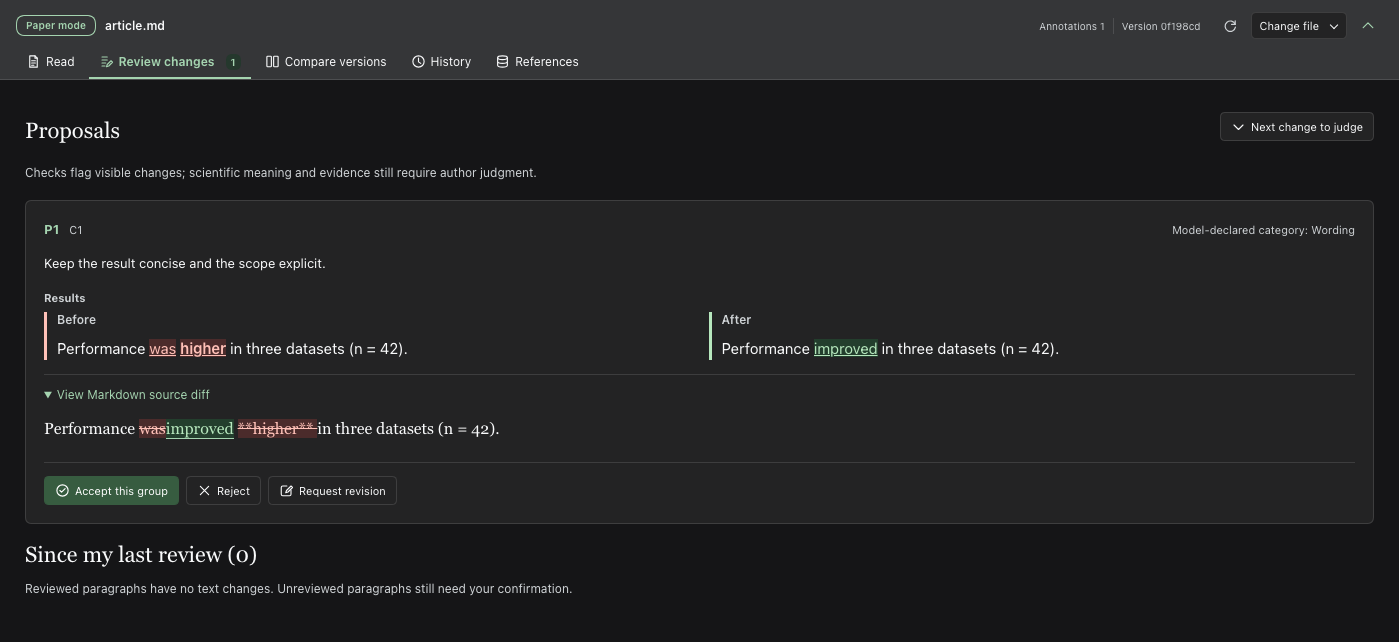
Inspect a proposal's changed words and Markdown source diff before accepting or requesting another revision.
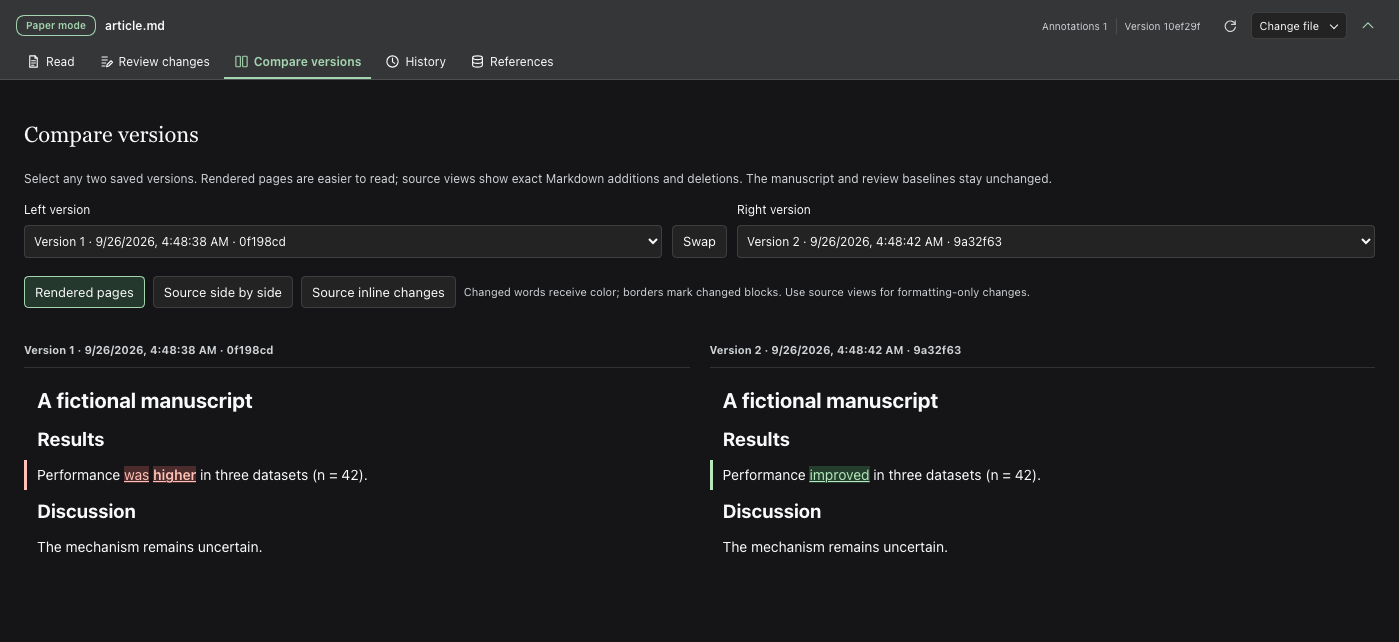
Compare saved versions as rendered pages with changes colored at the word level.
Configuration
The default manuscript directory is the current conversation's local workspace. Stored conversations can reopen manuscripts after a server restart without sending a model message. Optional profile overrides target the paper-review row. The review overlay remains available for isolated development with an explicit DSH_PAPER_REVIEW_ROOT; it is not needed for native installation.
| Field | Default | Meaning |
|---|---|---|
workspaceRoot |
Conversation workspace | Optional fixed local directory containing the manuscripts |
maxBytes |
1000000 |
Maximum manuscript UTF-8 bytes; at most 2000000 |
maxFigureBytes |
67108864 |
Maximum bytes retained for one replacement figure; 64 MiB by default |
Choose a local workspace and open the conversation's right sidebar. Choose Read, annotate and revise, then select Choose Markdown file to open the macOS Finder file chooser on the DSH host, or enter a relative .md path such as article.md. The host validates the selected file inside the workspace and refuses symlink escapes. On a non-macOS host, the button opens the in-app workspace browser, which lists up to 500 visible folders and Markdown files per directory. The agent can use paper_list and paper_open to select a known workspace path; its choice appears in the sidebar after its turn. The selection survives restarts. Exit Paper mode hides the active manuscript tools without deleting review records; it is unavailable while the agent is running. Manuscripts must remain inside the workspace or explicitly configured review directory.
After opening a manuscript, the header keeps the review tabs visible while hiding file controls. Select Change file to reopen the path, picker and exit action; use the toolbar chevron to leave only a narrow manuscript bar while reading. The toolbar choice survives a reload. Each view's position, comparison versions and layout survive view changes and reloads in this browser; returning to Read restores the visible paragraph and its offset after lazy rendering. Explicit proposal, outline and search jumps take priority. Navigation and major review decisions pair icons with text; compact controls such as refresh, mark reviewed, lock and source use icons with tooltips and accessible names. Narrow panes show icon-only tabs. An opening Markdown provenance comment appears as a collapsed Manuscript source note in the reader; expand it to inspect its exact text. These display controls do not edit the manuscript or its review records.
With focus in the review pane, press Cmd+F on macOS or Ctrl+F elsewhere to search the current view: Read, Review changes, Compare versions, History or References. Search reveals lazy or paginated results, highlights mounted matches, and scrolls to the selected occurrence. Find in full manuscript switches to Read. Enter, Shift+Enter and the arrow buttons move between matches. Escape closes search and removes temporary highlights without changing the manuscript or saved highlights. Search does not take the shortcut from a text input or another pane. Broad searches stop after 2,000 matches.
Review workflow
- Select text within a paragraph and right-click for yellow, green or blue highlights, underlining, annotations, copying, focused reading or AI context. Inline formatting and repeated phrases retain the selected occurrence. Highlights and annotations never change the manuscript. The highlight list offers removal and restoration. Clicking a paragraph still exposes its existing actions.
- Mark a paragraph reviewed, or review and lock it. This saves the human-review baseline. A lock prevents proposals and acceptance for that block inside this plugin. Marking it reviewed again preserves the lock; only Unlock removes it. The narrow floating review rail shows the percentage and color-coded status of reviewable blocks without changing reading width. Click anywhere on the rail to open a hierarchical manuscript outline. Expand headings one level at a time to reveal subsections and paragraphs; select a heading or paragraph to jump there. Expand all and Collapse all are available. Green means the current text was reviewed, gray means unread, and amber means the text changed after review. Bibliography and source comments do not count; accepting a revision can lower the percentage until you review it again.
- Open Review changes to read each proposal's before and after Markdown with changed visible words colored, alongside the model's declared category and independent lexical warnings. Each edit shows its section path, approximate position in the reviewable manuscript, and an excerpt of its source anchor. View in manuscript switches to the reader, scrolls to that exact block, and marks whether new content goes before or after it; replacements mark the affected block. The reader corrects the position after lazy Markdown renders. Back to proposal returns to the same proposal card. If the anchor no longer matches the displayed revision, the jump is unavailable rather than guessed. Comparisons load as they approach the viewport; scroll to a proposal to inspect it. Expand View Markdown source diff to inspect exact word and formatting-syntax changes. You or the agent can accept or reject each group;
paper_decideaccepts only after your request. Acceptance changes the file but never marks the result reviewed. To improve a pending proposal, use Request revision or ask the agent to callpaper_revise: it updates the same proposal ID, reruns checks and leaves the manuscript untouched. Accepted and rejected proposals cannot be revised. - Inspect Since my last review, then mark the revised paragraph reviewed only after checking it. Multiple accepted rounds remain compared with that earlier human baseline.
- Check updates refreshes proposal metadata. A completed conversation turn also checks it. External file changes leave the reader fixed until you select Load new version.
- Open Compare versions and select any two saved revisions. Rendered pages colors changed visible words without filling entire blocks; thin borders identify changed blocks. Externally rewritten blocks may receive new IDs, so this view matches sufficiently similar blocks between stable neighbors for word coloring only; it never moves saved annotations. Source side by side and Source inline changes show exact additions and deletions in complete Markdown source, including formatting-only changes. If a rendered block cannot be matched or its text cannot be mapped reliably, it keeps its border without inline color. Swap the sides to reverse the comparison. This view neither restores files nor advances human-review baselines. Narrow panes stack the two sides vertically.
- In Read, each figure caption has a collapsible small preview that loads near the viewport, not a full-sized image in the reading body. Click it to view full screen, zoom, fit to the window or inspect at 100%; drag a zoomed image to pan. Arrow keys and previous/next buttons switch figures. The right-edge floating figure window still expands into a thumbnail grid on hover. PDF previews show the first page; Open in DSH tab handles additional pages. The pinned Markdown reference chooses the file: paths resolve beside the manuscript unless its opening provenance comment explicitly says
Figure PDFs stay in path/;. There is no version picker or fallback to a same-named file; missing files show a failure instead of another figure. Retry reloads that same file. - Select Replace figure, choose an existing workspace PDF or image with Finder on macOS (the workspace browser on other hosts), and give a reason. This creates a pending proposal, not a source write. Review changes shows old/new thumbnails, each opening full screen, and reminds you to check captions and panel labels. The agent can use
paper_figure_listandpaper_figure_replace;proposalIdupdates a pending proposal while preserving its caption edits. Both files are retained by SHA-256 underfigures/review-assets/; acceptance changes the Markdown destination without overwriting the original file. Historical comparisons use snapshots when available. Captions and callouts need separate review. Back up these assets with the manuscript; rejection keeps retained assets.
To propose deleting a complete paragraph, list or table without retyping Markdown, call paper_read with its blockId, then paper_delete with the returned revision as baseRevision, beforeHash, blockId and a reason. An optional proposalId appends deletion to that pending group without replacing its other edits; the group must use the current revision and must not already edit that block. The host copies exact source, checks its hash and author locks, and keeps the result pending. It does not delete manuscript text until author-requested acceptance. To remove only part of a paragraph, use the ordinary proposal tools with exact whole-block before and the remaining after text.
References and BibTeX
Open References to bind existing workspace .bib files by path or, on a macOS DSH host, with Finder. The tab shows indexed entries and flags missing [@key] citations or possible legacy bare keys. The reader hides a top-level Markdown References or Bibliography section without deleting it from source or version history; the bound .bib files, not that display section, are the authority. Cite in Markdown as [@key] or [@first; @second]; in Read, resolved citations display as author-year labels without rewriting the saved Markdown, while unknown or incomplete entries remain visible as keys. New citations in manuscript proposals must resolve in the bound files; newly introduced bare year-style keys and [cite: key] notation are refused. Existing legacy text is left intact and surfaced for migration. The agent can find, bind, list, read, add and replace BibTeX entries through paper_bib_* tools; adding or replacing an entry writes the bound .bib file directly and creates no manuscript proposal. Syntax and key uniqueness are checked, but the tool does not independently verify publication metadata or whether it supports a claim. Manuscript prose changes still require the normal proposal and acceptance flow.
Filter entries by title, author, year or citation key. The list displays 40 entries per page and retains its filter and page when switching views. An entry's citation navigation jumps to its occurrences in the manuscript. Pane search can reveal an entry outside the current filter or page.
Annotations can attach the selected paragraph and its neighbors to the ordinary composer. Attaching context does not send it; inspect the draft before submitting it to your configured model provider. The selection menu supports arrow keys, Enter and Escape; outside clicks or reader scrolling dismiss it.
The reader, annotations, selection menu and version differences follow DSH's Light, Dark or System appearance setting immediately. Highlights and added/deleted text use scheme-specific colors. The plugin does not save a separate theme preference.
Unsent annotation drafts survive paragraph selection, view changes and reloads in this browser, separately for each session and manuscript. Close and keep draft retains the comment; Discard draft removes it. Local drafts lists retained comments, including those whose original block disappeared. A draft based on changed source cannot be saved until you explicitly attach it to the current paragraph; this clears its outdated quotation, not its comment. Storage failures display a warning so you can copy the text before leaving. Opening another manuscript clears selected annotation checkboxes, not its retained drafts.
After a lost network response, Check operation status reads current server state before offering a retry. A proposal already accepted or rejected is not sent again. For a review baseline with no matching current block, Recover review record can archive the record or link it to an explicitly selected current paragraph. Both actions retain the original text; linking does not mark changed text reviewed. Archived records remain available for restoration. These recovery actions do not edit the manuscript.
On DSH 0.1.6, attached context appends to existing plain-text drafts. If the draft contains file or session reference chips, the plugin leaves it unchanged and asks you to send or clear it first. Newer composers preserve those references during insertion. Busy composers reject attachment without changing the draft.
Highlights, annotations, original quotations, revisions, decisions, baselines, locks, and the last clicked paragraph per session live under <workspaceRoot>/.paper-review/. Preserve this private directory with the manuscript backup; exclude it from public Git history because it contains complete draft text and comments. Browser storage retains paths, per-view reading positions, version choices, reference filters and unsent annotation drafts by session and manuscript; it is not a cross-device backup. Do not edit the same manuscript concurrently in another application while accepting a proposal.
Understand the implementation
Implementation internals — click to expandThe host adds manuscript discovery, review and BibTeX tools to the ordinary agent tools. Authenticated operator requests use Connection's /api carrier; model tools derive the session from the executing agent. Enabled sessions and their selected manuscript paths persist in the workspace's private review directory and restore before a resumed agent runs. Exit hides active manuscript tools while retaining review records and ordinary tools. Inactive sessions can still use paper_list and paper_open. The plugin does not override DSH's configured permissions, and its paragraph locks do not prevent direct file writes through other tools.
The store serializes actions and holds an exclusive kernel-backed workspace lock. The kernel releases it when the server exits, including after a crash. An existing owner.lock from an older plugin process blocks startup while its recorded PID is alive; a dead PID is admitted under the kernel lock, and the old file is removed on a clean close. An invalid or unverifiable owner record still requires manual inspection. Do not remove owner.kernel.lock while a server may be using the workspace. In-place proposal revision checks the displayed revision, disk source, annotations, exact block text and locks before updating only private review state; omitted fields stay unchanged, while a supplied edits array replaces the full edit group. A stale pending proposal can be rebased in place by supplying the new base revision and complete edits against exact current blocks; its ID and pending status remain unchanged. Insertions remain applicable after unrelated revisions when their exact anchor id and source survive. Acceptance inserts beside that current anchor; changed, missing or locked anchors still block it. Acceptance repeats source and lock checks before writing. It saves a recovery journal, atomically replaces the source, commits state, and removes the journal. On restart, a matching before/after source hash resolves an interrupted acceptance; a third hash refuses further work and preserves the journal for manual reconciliation.
The Markdown parser retains source offsets and assigns durable block ids. Unique unchanged blocks survive insertions; accepted replacements explicitly preserve identity. Ambiguous external rewrites detach annotations instead of guessing. The panel uses the native sidebar and composer without changing core DSH packages. No runtime invariant companion is published: the store validates persisted state and owns every state transition; there is no separately cached runtime observation to reconcile.
The selection reader mounts Markdown near the visible scroll area and paints DOM ranges through the CSS Custom Highlight API; it does not insert markup into React-owned text. It displays pipe tables with em-dash divider rows as tables in reading and rendered comparisons without changing the saved Markdown or block identities. Changed tables retain block borders instead of word-level coloring. Saved rendered anchors include the selected offset, quote, surrounding text and exact block source. Any source change to that block detaches its rendered anchors rather than guessing how formatting changed. Existing private schema-version-1 records remain readable with an empty highlight list; older raw-source annotations retain their original matching rules. Highlight removal is reversible. Paint registrations and menu listeners are disposed with their components.
The review panel keeps proposal summaries, risk flags and decisions mounted while it defers offscreen comparisons. Each comparison parses both sides once; its exact Markdown source diff is computed only while expanded. Browsers without IntersectionObserver render every comparison immediately.
Figure references come from explicit captions and ordinary Markdown images. The host confines paths and snapshot folders to the workspace, limits retained bytes, and checks snapshot hashes again before acceptance. Retained old images survive later changes to the original file; historical versions without snapshots cannot recover previously overwritten bytes. Small previews load near the viewport and release blob URLs when collapsed or unmounted. PDF first pages become bounded PNGs with macOS sips or Poppler pdftoppm; without either converter, the native DSH tab remains available. Preview failures never select a different figure.
Further Exploration
- Experimental packages — opt-in publication and dependency policy.
- Web bundle — the profile hosting this plugin.
- Focused store tests — source conflicts, anchors, locks and human baselines.
- Real composition test — scripted agent-loop calls, authentication and disposal.
- Browser tests live in the DSH checkout, outside this source repository.
Model Experience
Manuscript tools
What the model sees
The model receives paper_list and paper_open before a manuscript opens. An enabled review session also receives native paper_read, paper_annotations, paper_propose, paper_revise, paper_delete, paper_check, paper_decide and six paper_bib_* schemas; the exact schemas are recorded in the composition snapshot. Reads return exact block ids, source, revision and locks. In an edit, use insert-before or insert-after with the anchor block's exact before text and a complete Markdown fragment in after; lists, tables, quotes, code and multiple blocks are permitted. Omit operation to replace a block with any complete Markdown fragment, or set after to an empty string to propose deletion. For compatibility, an omitted operation also inserts when after contains the exact unchanged anchor beside blank-separated new blocks. Proposals return their id, status, lexical flags and manuscriptWritten: false. Checks report whether pending edits still match unlocked source; passing a proposal ID also returns that proposal's full content. paper_revise keeps the proposal ID and manuscript untouched. paper_decide can reject or accept a pending proposal after conflict checks. BibTeX add/replace writes only a bound .bib file and reports metadataVerified: false. The model retains ordinary tools allowed by its DSH permission mode. paper_figure_list reads exact references and retained hashes. paper_figure_replace retains both files and returns originalFilesWritten: false; it never rewrites caption prose. Supplying a pending proposalId preserves other edits while changing its image destination. Acceptance still checks source, locks, and snapshot hashes through paper_decide.
Token effect
Two discovery schemas remain available before opening a manuscript; fifteen active schemas join the ordinary model tool list afterward. Exiting hides those fifteen schemas for the next turn without removing earlier results. A full read may include the manuscript up to its byte cap; a block read includes neighbors. Proposal inspection and revision return the full edit group. Figure tools return paths and hashes, not image bytes, so the model must inspect the artwork separately. BibTeX indexes return all bound metadata. Large libraries, proposals and histories increase tool-result size; local histories have no pruning limit.
KV Cache effect
Stable tool schemas may preserve an existing reusable prefix; toggling this plugin or changing tool definitions can invalidate it. New tool results append history. This plugin neither promises provider caching nor issues an independent reviewer request.
Explicitly attached local context
What the model sees
The editable user-message draft contains the path, reader revision, selected blocks, adjacent source and selected annotations. The active interface language selects the localized instructions; the English rule is quoted below. Nothing is submitted until the user sends the native composer draft.
English editing instruction
Only change the selected blocks; insert complete Markdown before or after an exact anchor when the author requests new material. Read with paper_read, then submit each independent change with paper_propose. For an existing pending proposal, inspect it with paper_check and revise it in place with paper_revise; do not create another proposal. Group dependent edits. Preserve numbers, citations and scientific claims unless explicitly instructed. Do not strengthen causality, generalizability, novelty, significance or superiority. If evidence is missing, report it. Never treat a mechanical check as scientific validation.
Token effect
Attached blocks and annotations add a user message only when submitted. Neighbor context is explicit; this operation does not silently attach the entire manuscript. Multiple selected annotations can produce a large draft, which the user can inspect before sending.
KV Cache effect
Submitted context appends to the conversation. Changed quotations, revisions, annotations or interface language change the new message, not earlier retained messages. Provider cache reuse remains outside this plugin's control.
Known Limitations and Deferred Work
This local single-author Markdown prototype has the following limits.
- PDF, Word and LaTeX sources, tracked document export, block movement and cross-block Markdown reference resolution are not implemented. Proposals can replace or delete exact blocks, or insert complete Markdown fragments beside exact anchors; dependent edits can be grouped.
- Mechanical numeric, citation, figure, Methods and claim-word checks are incomplete lexical signals, not a scientific audit. Real-provider quality and an independent reviewing model remain unverified; the automated model responses are scripted.
- Selections stay within one Markdown block. Cross-block selections receive an explicit message; add separate notes and submit them together. Highlights require a browser with the CSS Custom Highlight API. A changed source block marks its rendered selections Needs location, even if the quoted words survive elsewhere. Automatic fuzzy matching and manual reanchoring are not implemented; preserve the old record and create a new one at the intended passage.
- Locks apply to this plugin, not external editors. A noncooperating writer can race the final check and rename. Atomic replacement and the journal address process interruption, not guaranteed power-loss durability or hostile local filesystem mutation.
- The Finder chooser opens on the macOS DSH host, not on a remote browser's computer. Remote and unattended host deployments should select a known workspace path with
paper_open. Ordinary write tools can bypass proposal review, so use DSH's permission mode and explicit instructions when author approval is required. - The Git release does not install
koffiautomatically because this native dependency is used only for Windows workspace locking. Windows installation and operation are not yet verified; Windows requireskoffiin the same profile before the plugin can open a manuscript. - Full revisions and annotations are retained without pruning or a manuscript restore button. Large histories can consume disk and slow state loading; the reader, review comparisons and rendered version blocks mount near the viewport. The references list shows at most forty entries per page. The workspace lock permits one server process, with multiple browser windows; it is not multi-author synchronization.
- BibTeX indexing accepts ordinary complete entries but does not expand macros or validate bibliographic truth. New in-text citations are checked in proposed replacements and insertions, not in unrelated direct file writes. The references tab flags possible bare keys conservatively; a scientific term can resemble a key and needs human judgment.
Dev Note
Working context for maintainers — click to expandThe deterministic composition and browser tests cover integration without contacting a model provider. They do not establish scientific review quality.
No comments yet. Be the first to write one.