dsh-done-check
English | 中文

Executable acceptance checklists for DeepSeek Harness coding tasks: every "done" is backed by a check that actually ran, and old results are flagged for re-check when the code changes.
What it can and cannot tell you
- A summary such as "3 checks: 2 passed, 1 awaiting manual confirmation" covers only the agreed checks. It does not mean the requirement is fully implemented. The plugin never shows a percentage or a "completion" score.
- It guards against an agent casually rewriting the verdict: claiming tests passed, quietly changing a check command, deleting a failing check, or forging a confirmation. It does not stop a malicious agent with an unrestricted shell, which can edit the tests themselves or the files under DSH home.
- Confirming a checklist does not authorize running its commands. Checks run on the shell executor of the current DSH composition;
bash-local/pwsh-localprovide no isolation, so compose the matching sandbox executor if you need it.watchis a scope you declare, not a dependency graph inferred for you.
Demo
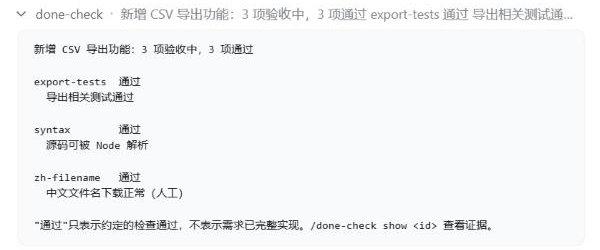
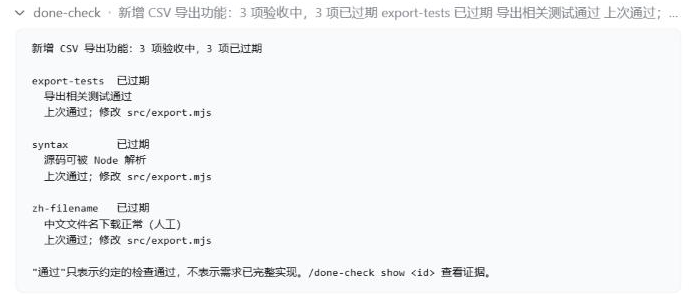
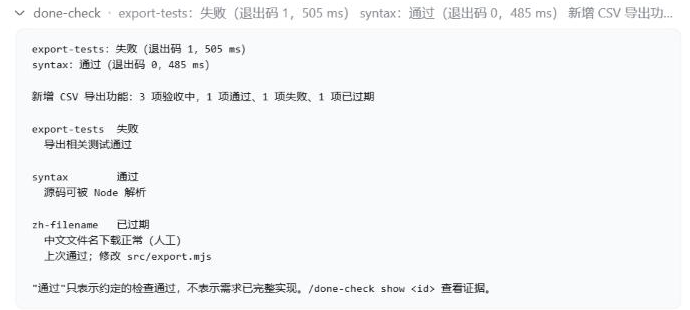
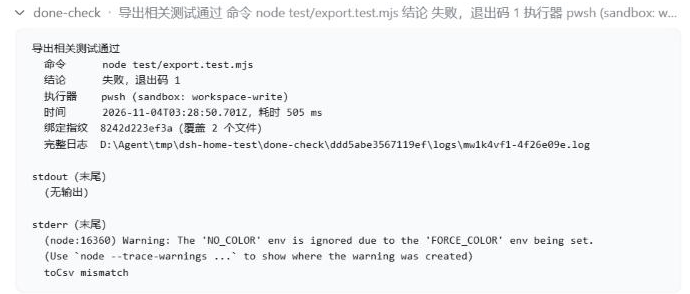
Screenshots from a real DSH web session (DSH 0.1.5, demo repo with a CSV export function). Status text is Chinese for now.
1. All agreed checks pass — /done-check
2. The code changes, so the old results go stale — the changed file is named
3. Re-running catches the regression — /done-check run; the manual check stays stale until you re-confirm it
4. The evidence behind a result — /done-check show export-tests
Status
v0.1.0, an early release. The full flow has been run on real DSH web hosts (0.1.5-rc.1 and 0.2.1-rc.5), with checks executed by the real pwsh tool inside its sandbox. Supported DSH: >=0.1.5-rc.1 <0.3.0. Design: docs/DESIGN.md (in Chinese). Status messages are currently in Chinese only.
Install
dsh plugin --profile <your-profile> add dsh-done-check
From a checkout: pnpm install && pnpm build, then dsh plugin --profile <your-profile> add /path/to/dsh-done-check.
Commands and tools
| Who | What | |
|---|---|---|
/done-check |
you | Status table |
/done-check confirm |
you only | Confirm the current done-check.yaml |
/done-check run [id…] |
you | Run confirmed automatic checks |
/done-check pass|fail <id> [note] |
you only | Record a manual verdict |
/done-check show <id> |
you | Latest evidence: command, exit code, executor, fingerprint, output tail |
done_check_draft |
agent | Validate a drafted checklist (the agent saves it with its own file tool) |
done_check_run |
agent | Run confirmed automatic checks |
done_check_status |
agent | Read the status |
Every check command, from either entry point, is dispatched to the shell tool your DSH composition already registered (pwsh / bash), so your permission rules and approval prompts apply to it. A command that is denied or cannot run is reported as "not executed" and records no evidence.
How it works
Write
done-check.yamlat the project root (or let the agent draft it):version: 1 task: Add CSV export checks: - id: export-tests name: Export tests pass run: pnpm test -- export watch: ["src/**", "test/**"] - id: typecheck name: TypeScript type check passes run: pnpm tsc --noEmit - id: zh-filename name: Downloads with Chinese file names work manual: trueYou confirm the checklist with
/done-check confirm. Confirmations and manual verdicts can only come from you through commands; the agent cannot make them.Checks really run through the DSH shell executor. The exit code, output, duration, and the workspace fingerprint at that moment are recorded.
When the workspace content changes (uncommitted edits included), results bound to the old content show as stale, with the changed files listed. If one check is edited, that check shows as "definition changed". If checks are added or removed, or the task description changes, the whole checklist shows as "structure changed, needs confirmation".
A result whose workspace or definition changed while it was running is marked "unstable, re-run required". Restoring the files does not bring it back.
Development
pnpm install
pnpm test
Requires Node.js ≥ 22.19 and git.
License
MIT
No comments yet. Be the first to write one.