dsh-download-progress
Live download progress for DeepSeek Harness — no more staring at a silent chat while the agent downloads a 1 GB installer.
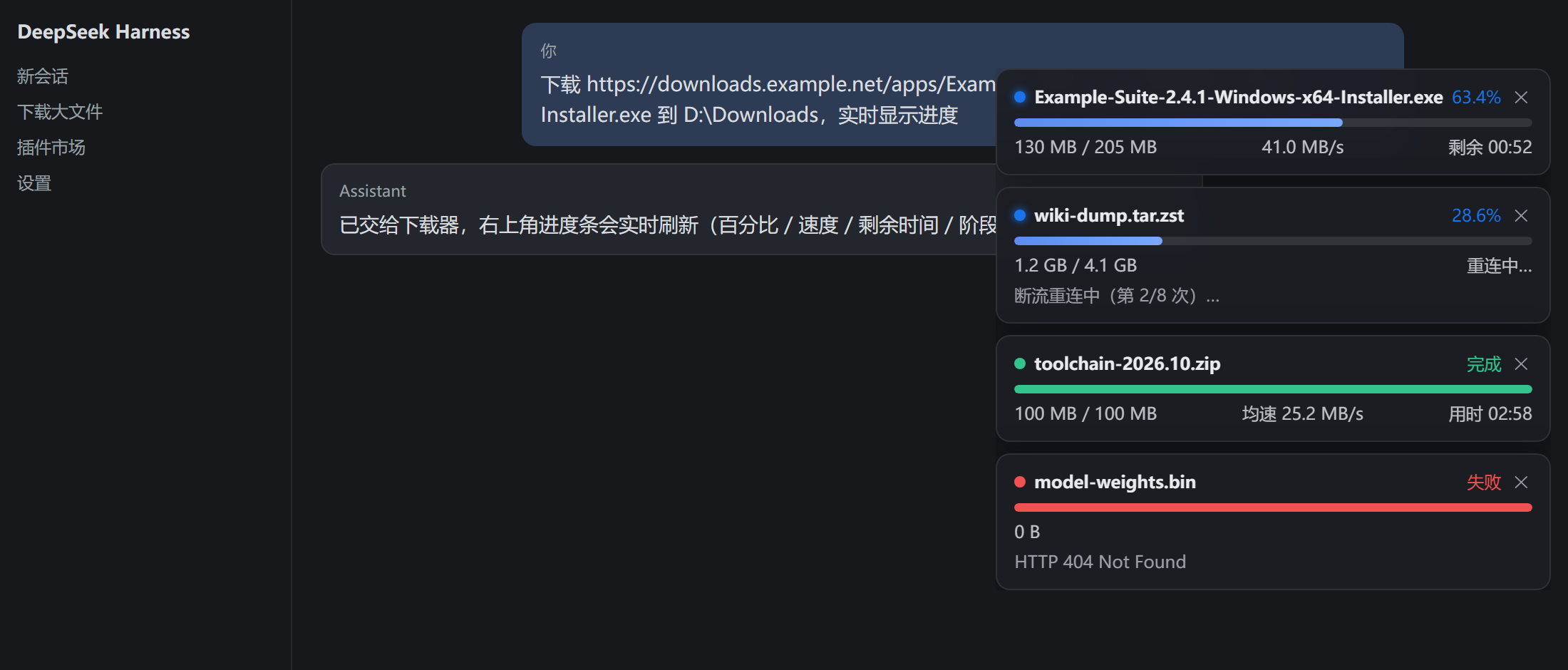
Same UI in light theme:
docs/screenshot-light.png

The cards in the top-right corner are rendered by this plugin's client half (lib/client.js); the numbers come from the real download worker (skills/download-progress/scripts/dl.mjs).
Features
- 💬 Live progress card in the top-right of the chat window — percentage, bar, downloaded / total, instantaneous speed, ETA, and current phase (probe → connect → download → reconnect → done). Cancel with one click; finished cards auto-collapse.
- 📏 Pre-flight probe —
dl startresolves total size first, then estimates duration from the per-host speed history. - 🔁 Resumable — automatic reconnect-and-resume after a 20 s stall (up to 8 attempts); after cancel/failure,
dl resumecontinues from the.partfile. - 🩹 Self-healing cards — if the worker dies (crash, killed shell), the card greys out as interrupted within 6 s and the status is healed to
failedin 20 s, so nothing hangs on screen forever. - 📦 Zero dependencies, zero host patching — plain cordis plugin (
cordis.patch.yml), client half auto-injected through the./clientexport, Node ≥ 18 standard library only. All data stays on your machine.
Install
From the DSH plugin market (once listed): search dsh-download-progress → install → restart DSH.
Manual install from this repo:
git clone https://github.com/Beership/dsh-download-progress.git
cd dsh-download-progress && npm pack          # -> dsh-download-progress-0.3.2.tgz
Then in ~/.dsh/profiles/desktop/package.json add the package to dependencies and to dsh.profile.bundles, extract the tarball into that profile's node_modules/dsh-download-progress, and restart DSH.
Prefer the prebuilt tarball: https://github.com/Beership/dsh-download-progress/releases/download/v0.3.2/dsh-download-progress-0.3.2.tgz
Usage
After install + restart, just ask in a session:
Download https://example.com/electron-v33.2.0-win32-x64.zip to
D:\Downloadsand show live progress
The agent calls the bundled skill, a worker starts in the background, and every dl.mjs download (from any agent/session) shows up on the progress cards.
CLI, if you want to drive it yourself:
node dl.mjs start <URL> --dir D:\Downloads   # background, returns a job id immediately
node dl.mjs status [--json]                  # progress of all jobs
node dl.mjs wait <id>                        # block until finished
node dl.mjs cancel <id>                      # keep the .part for later
node dl.mjs resume <id>                      # continue from the .part
node dl.mjs clean [--force]                  # drop job records (files are kept)
How it works
agent session
  └─ dl.mjs (bundled skill script, Node stdlib)
       ├─ probe: HEAD/Range → size + ETA estimate from per-host history
       ├─ worker: writes ~/.agent-downloads/jobs/<id>/status.json every 250 ms
       └─ stall → reconnect + range resume; cancel/fail → `dl resume`
DSH runtime (lib/index.mjs, cordis plugin)
  └─ webServer: GET /api/dsh-download-progress/list, POST .../cancel (host-authenticated)
DSH web client (lib/client.js)
  └─ adaptive polling (450 ms while cards are visible, 1.5 s otherwise, paused in background tabs)
Why the worker is launched through WMI on Windows
A one-shot command executor (DSH's ops_bash and friends) kills the whole process tree it spawned as soon as the command returns — a detached child included, via a Windows job object. On Windows the worker is therefore spawned by Win32_Process.Create through WmiPrvSE, whose parent is outside that job object; on POSIX detached: true (setsid) is enough. Because WMI children do not inherit the caller's environment, the job home is passed explicitly as --home.
Development
npm test                    # node --test: local HTTP fixture, no network
npm run screenshot          # regenerate docs/screenshot-*.png with the real client.js
npm run pack:check          # what goes into the tarball
Layout:
| Path | Purpose |
|---|---|
lib/index.mjs |
cordis plugin: HTTP API + stale-job self-healing + skill installation |
lib/client.js |
web client: polling, card rendering, cancel, auto-collapse |
skills/download-progress/ |
the agent skill (SKILL.md + scripts/dl.mjs) |
cordis.patch.yml |
bundle patch that inserts the plugin into the runtime |
test/, scripts/ |
smoke tests and the screenshot generator |
Changelog
0.3.2
- Job home is passed to the worker as
--home— fixes downloads that stayed atqueued/probewhenAGENT_DL_HOMEwas customized (WMI children inherit the provider's environment, not the caller's). status --jsonalways prints valid JSON ([]when there is no job).- Filename falls back to the URL path when the server sends no
Content-Disposition. - Card: reconnect shows
重连中…instead of测速中…;✕is keyboard accessible (role=button, Enter/Space); fewer needless re-renders;dismissedset is capped. - Skill installation is skipped when the version is unchanged, so local edits survive restarts.
- Added smoke tests, a screenshot generator and CI.
0.3.1
- Root cause of “stuck at 3 % / cards never disappear”: the executor reclaimed the worker's process tree right after
dl startreturned, sostatus.jsonstopped updating. Fixed by launching the worker through WMI on Windows (Win32_Process.Create) andsetsidon POSIX. - Status writes retry and fall back to a plain overwrite on
EPERM/EBUSY(Windows rename contention). - Adaptive polling, client-side 6 s staleness detection, terminal cards auto-collapse (4 s done / 12 s failed or cancelled, paused while hovering).
License
MIT
No comments yet. Be the first to write one.