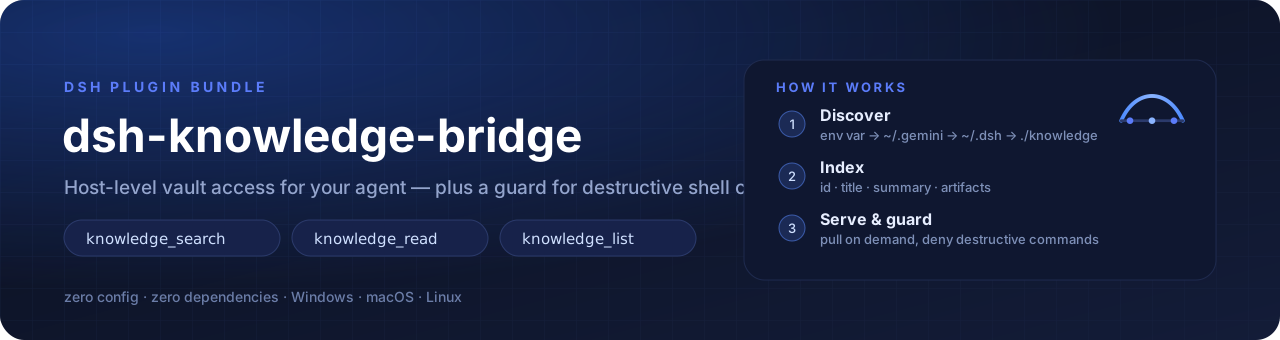
Give your DeepSeek Harness agent a brain — host-level knowledge access, zero-config vault discovery, and a safety guard for destructive shell commands.
ต่อสมองให้เอเจนต์ DeepSeek Harness — เข้าถึงคลังความรู้ระดับ host, ค้นหา vault อัตโนมัติแบบไม่ต้องตั้งค่า, และกันคำสั่ง shell ที่ทำลายข้อมูล






English · ภาษาไทย
Architecture at a glance · ภาพรวมสถาปัตยกรรม
flowchart LR
    V[("Knowledge vault<br/>50 items · 229 files")]
    D["Discovery<br/>env var → ~ → ./"]
    I["Index<br/>id · title · summary · artifacts"]
    T["Tools<br/>search · read · list"]
    A["Agent context"]
    Q["One-line directive<br/>~140 chars"]
    G{"Safety guard<br/>exec.name + exec.arguments"}

    V --> D --> I --> T --> A
    Q --> A
    A --> G
    G -->|"banned pattern"| X["Denied ❌"]
    G -->|"clean"| R["Executed ✅"]
Try it in 10 seconds · ลองใช้ใน 10 วินาที
git clone https://github.com/Babydunx1/dsh-knowledge-bridge && cd dsh-knowledge-bridge
npm test          # 28 tests — unit + bundle contract, no install needed
npm run validate  # 21 static checks on the bundle contract
npm run demo      # index a sample vault and print what the agent would see
  2 · index
      2 item(s) · 3 artifact(s)
      ├─ deploy-guide  ·  1 artifact(s)
      └─ posttracker_engine  ·  2 artifact(s)

  4 · guard (patterns are matched against the command string)
      ⛔ BLOCKED  git reset --hard HEAD~1
      ⛔ BLOCKED  rm -rf /
      ✅ allowed  git status
No install, no configuration, no DeepSeek Harness required. ไม่ต้องติดตั้ง ไม่ต้องตั้งค่า ไม่ต้องเปิด DeepSeek Harness ก็ลองได้
🇬🇧 English
Why this exists
An agent's quality is bounded by what it can reach, not by how smart it is. Three concrete failure modes motivated this plugin:
- Sandbox false negatives. Under
workspace-write, an agent cannot read knowledge vaults or repositories outside the active workspace. On Windows the shell turns that denial into a misleadingFile Not Found, so the agent concludes the knowledge does not exist — and starts guessing. - Context amnesia. Teams keep 50+ architecture docs, SOPs and API contracts in a vault (Antigravity's
~/.gemini/antigravity-ide/knowledge, shared drives,docs/). DeepSeek Harness has no native way to discover or index them. - Irreversible commands. Autonomous agents happily run
git reset --hard,git clean -fdorgit restore .and destroy uncommitted work.
dsh-knowledge-bridge runs as a host-level cordis plugin: it reads the host filesystem with the host process's own permissions, exposes three fast retrieval tools, injects a one-line directive so the model knows a vault exists, and denies destructive shell calls before they execute.
Goals
| Goal | How it is met |
|---|---|
| Scoped, on-demand knowledge | Nothing is dumped into the prompt. One ~140-character directive is injected; content is pulled per topic — knowledge_search → knowledge_read. |
| Zero configuration | The vault is auto-discovered from an environment variable or well-known locations. No hardcoded paths anywhere in the code. |
| Zero dependencies | Node.js built-ins only (node:fs, node:path, node:os). Nothing to install. |
| Never destroy user work | A monotonic guard: any matching rule denies the call, and no other plugin can force-allow it. |
| Portable | ~-relative discovery, DSH_KNOWLEDGE_PATHS override, works with any markdown vault layout. |
What this plugin is not
- It is not a memory system that loads your whole vault into every prompt. A 2 MB vault is ~1M tokens: slow and expensive.
- It is not a vector database. Ranking is deterministic keyword scoring — predictable, debuggable, no embedding service to run.
Features
| Feature | Detail | |
|---|---|---|
| 🧠 | knowledge_search |
Keyword search with explicit weights: title 10 · id 8 · aliases 8 · tags 6 · references 4 · summary 3 · artifact name 2 · document body 1 (lazy, cached by mtime). Returns id, title, score, a clipped summary and the artifact list — never file content. |
| 📖 | knowledge_read |
Reads a full document, or one specific artifact (master_guide.md, 07_migration.md, …) on demand. |
| 🗂️ | knowledge_list |
The vault outline: ids, titles, artifact counts, one-line previews. |
| 🔎 | Zero-config discovery | DSH_KNOWLEDGE_PATHS → ~/.gemini/antigravity-ide/knowledge → ~/.antigravity-ide/knowledge → ~/.dsh/knowledge → ~/.codex/knowledge → ./knowledge → ./docs/knowledge → ./.knowledge. |
| 📜 | Rules injection | Discovers AGENTS.md / GEMINI.md / CLAUDE.md from the workspace and adds them to the system prompt. |
| 🛑 | Safety guard | Denies bash / pwsh / cmd / terminal calls whose command matches a banned pattern. |
| 🪶 | Token-aware | Tool summaries are clipped, because tool output is replayed in every later model call. |
Installation
Option A — as a DSH profile bundle (recommended)The package declares dsh.bundle.patch, so DSH can install it like any other bundle.
# 1. Clone / copy the package somewhere permanent
git clone <your-repo-url> dsh-knowledge-bridge

# 2. Register it in your profile
#    ~/.dsh/profiles/<profile>/package.json
{
  "dsh": { "profile": { "bundles": ["@deepseek-ai/dsh-base", "@deepseek-ai/dsh-web-app", "dsh-knowledge-bridge"] } },
  "dependencies": { "dsh-knowledge-bridge": "link:/absolute/path/to/dsh-knowledge-bridge" }
}

# 3. Install the link
cd ~/.dsh/profiles/<profile>
pnpm install
Restart DeepSeek Harness. The plugin is applied from cordis.patch.yml.
Copy the insert row from cordis.patch.yml into ~/.dsh/profiles/<profile>/cordis.patch.yml and restart DSH.
Nothing to configure when your vault is in a standard location. Otherwise:
# Windows (PowerShell) — semicolon or comma separated
$env:DSH_KNOWLEDGE_PATHS = "D:/team-docs/knowledge;~/my-vault"
# macOS / Linux
export DSH_KNOWLEDGE_PATHS="$HOME/my-vault:$HOME/team-docs"
…or set it explicitly in the patch: knowledgePaths: ["~/my-vault"].
Configuration reference
Every key is optional; the defaults below are what a zero-config install uses.
| Key | Type | Default | Meaning |
|---|---|---|---|
knowledgePaths |
string[] |
[] → auto-discovery |
Vault roots. ~ is expanded; relative paths resolve against the workspace cwd. Explicit paths win, and still combine with DSH_KNOWLEDGE_PATHS. |
rulesPaths |
string[] |
["AGENTS.md","GEMINI.md","CLAUDE.md"] |
Files probed at the workspace root and injected as a prompt section. |
autoInjectRules |
boolean |
true |
Inject the rules section plus the one-line knowledge directive. Set false for a completely untouched prompt. |
enableSafetyGuard |
boolean |
true |
Enable the destructive-command guard. |
bannedPatterns |
string[] |
see below | Case-insensitive regular expressions matched against the command string. |
bannedPatterns: [
  'git\\s+reset\\s+--hard',
  'git\\s+clean\\s+-fd',
  'git\\s+restore\\s+\\.',
  'rm\\s+-rf\\s+/(?!tmp)',
]
If the vault cannot be found the plugin logs Initialized with 0 path(s) — check that line first when nothing is indexed.
Supported vault layouts
A. Structured items (Antigravity and similar multi-file vaults):
knowledge/
└── posttracker_engine/
    ├── metadata.json          # title, summary + optional tags / aliases / references
    ├── timestamps.json        # optional
    └── artifacts/
        ├── master_guide.md    # read first: table of contents + current status
        ├── 01_watchdog.md
        └── 02_reconciliation.md
metadata.json fields, in search-weight order:
| Field | Weight | Use it for |
|---|---|---|
title |
10 | the human name of the item |
tags |
6 | topic words (reconciliation, pos, payroll) |
aliases |
8 | the words you actually type, especially Thai/English pairs (ระบบลา, leave, ลาพักร้อน) |
references |
4 | real file paths or symbols (src/pages/LeaveRequestPage.tsx, migration 024) |
summary |
3 | one paragraph of context, clipped to 400 chars in results |
The document bodies are searched too (+1) as a last resort, so a symbol that only appears inside a file is still findable — but a body hit always ranks below a metadata hit.
B. Plain markdown — any directory tree of .md / .txt files:
knowledge/
├── architecture.md
├── deploy-guide.md
└── deployment/
    └── README.md
Recommended read order, which keeps context small: item outline → master_guide.md → the one numbered artifact that matches the task → source code.
How the safety guard behaves
- The guard inspects the execution object DSH passes to
tools.guard():exec.name(tool name) andexec.arguments(parsed arguments). Notexec.tool/exec.args— reading those yieldsundefinedand the guard silently never fires. - It only inspects
bash,pwsh,cmd,terminal; every other tool returnsundefinedand runs normally. - A denial returns a reason beginning with
[BLOCKED BY DSH-KNOWLEDGE-BRIDGE SAFETY POLICY], surfaced by the runtime asError: .... - The guard is monotonic: a denial cannot be overridden by another plugin.
Development
npm test           # 28 tests: engine, host plugin, bundle contract
npm run validate   # 21 static checks on the bundle contract
npm run demo       # index examples/vault and print the agent's view
npm run demo -- ~/my-vault --query deployment   # or any other vault
Narrower runs while iterating:
node --test lib/knowledge.test.js          # discovery, index, search, read
node --test lib/index.test.js              # tools, guard contract, prompt sections
node --test scripts/validate-bundle.test.js # the validator refuses broken bundles
No network, no writes outside a temp directory, and no install step — the CI matrix runs the
same commands on Linux and Windows across Node 20/22/24. In a sandboxed DSH session the OS temp
directory may be read-only; point TEMP/TMP at a writable directory first.
index.js                       cordis host plugin: inject, tools, guard, prompt sections
lib/knowledge.js               pure engine: discovery, index, search, read, rules loading
cordis.patch.yml               bundle patch row applied by DSH
locale/{en,th}.json            Plugin Manager display title and description
assets/{banner,logo}.svg       repo artwork
scripts/demo.mjs               zero-install demo (npm run demo)
scripts/validate-bundle.js     21 static bundle-contract checks (npm run validate)
scripts/validate-bundle.test.js  proves the validator refuses broken bundles
examples/vault/                sample vault in both supported layouts
lib/*.test.js                  node:test suites
.github/workflows/ci.yml       test matrix (no install step)
CHANGELOG.md                   release history
CONTRIBUTING.md                invariants a pull request must keep
SECURITY.md                    what counts as a vulnerability here
CODE_OF_CONDUCT.md             Contributor Covenant 2.1
Quality gates a change must pass:
| Gate | Command | What it protects |
|---|---|---|
| Unit tests | npm test |
engine behaviour, tool payload clipping, the guard's real exec contract |
| Bundle contract | npm run validate |
inject completeness, ports/ESM shape, no absolute user paths, patch wiring |
| Demo | npm run demo |
a fresh clone still discovers and indexes a vault |
Troubleshooting
| Symptom | Cause / fix |
|---|---|
Error: cannot get property "X" without inject, entry fails to activate |
Every cordis service you read must be listed in export const inject. Reading ctx.systemPrompt inside an if (...) condition (or behind ?.) still throws — the read itself is the failure. Keep service reads inside try, and never drop 'systemPrompt' from inject. |
| Entry stays pending instead of failing | A declared service does not exist yet. Nothing throws; DSH reports pending (waiting for service: …). Check the service name and that its provider plugin is enabled. |
| Edited the plugin but behaviour is unchanged | cordis caches the plugin function and ESM caches the module. Toggling off/on does not re-import. Restart the DSH host. |
Initialized with 0 path(s) |
Vault not found. Set DSH_KNOWLEDGE_PATHS or knowledgePaths, and confirm the path exists as a directory. |
| Guard never blocks anything | The guard must read exec.name / exec.arguments. Snippets using exec.tool / exec.args never match. |
🇹🇭 ภาษาไทย
ทำไมต้องมีปลั๊กอินนี้
คุณภาพของเอเจนต์ไม่ได้ขึ้นกับความฉลาดอย่างเดียว แต่ขึ้นกับว่า มันเอื้อมถึงอะไรได้ ปัญหาจริง 3 ข้อที่ทำให้เกิดปลั๊กอินนี้:
- Sandbox หลอกว่า "ไม่พบไฟล์" — โหมด
workspace-writeอ่าน vault หรือ repo นอก workspace ไม่ได้ และบน Windows shell จะแปลง error เป็นFile Not Foundทำให้เอเจนต์สรุปว่า "ความรู้ไม่มีอยู่" แล้วเริ่มเดาสุ่ม - ความจำขาดตอน — ทีมเก็บเอกสารสถาปัตยกรรม SOP และ API contract ไว้ 50+ ฉบับใน vault (เช่น
~/.gemini/antigravity-ide/knowledge, ไดรฟ์แชร์,docs/) แต่ DeepSeek Harness ไม่มีวิธีค้นหา/index ไฟล์พวกนี้ - คำสั่งที่ย้อนกลับไม่ได้ — เอเจนต์อัตโนมัติเผลอรัน
git reset --hard,git clean -fd,git restore .แล้วงานที่ยังไม่ commit หายหมด
dsh-knowledge-bridge ทำงานเป็น cordis plugin ระดับ host: อ่านไฟล์ด้วยสิทธิ์ของ process หลักของแอป เปิด tool ค้นหา 3 ตัว ฉีด directive บรรทัดเดียวให้โมเดลรู้ว่ามีคลังอยู่ และสกัดคำสั่ง shell ที่อันตรายก่อนจะถึงดิสก์
เป้าหมาย
| เป้าหมาย | วิธีที่ทำได้จริง |
|---|---|
| ความรู้แบบเจาะจง ดึงเมื่อต้องใช้ | ไม่ยัดอะไรลง prompt เลย นอกจาก directive ~140 ตัวอักษร แล้วดึงเนื้อหาตามหัวข้อผ่าน knowledge_search → knowledge_read |
| ไม่ต้องตั้งค่า | ค้นหา vault เองจาก env var หรือตำแหน่งมาตรฐาน ไม่มี path ฝังในโค้ดแม้แต่บรรทัดเดียว |
| ไม่มี dependency | ใช้ built-in ของ Node.js เท่านั้น (node:fs, node:path, node:os) ไม่ต้องติดตั้งอะไรเพิ่ม |
| ไม่ทำลายงานของผู้ใช้ | guard แบบ monotonic: แมตช์กฎแล้วปฏิเสธทันที และปลั๊กอินอื่นบังคับให้ผ่านไม่ได้ |
| ย้ายเครื่องได้ | discovery อ้างอิง ~, override ด้วย DSH_KNOWLEDGE_PATHS, ใช้ได้กับ vault รูปแบบ markdown ใดก็ได้ |
สิ่งที่ปลั๊กอินนี้ ไม่ใช่
- ไม่ใช่ ระบบที่โหลด vault ทั้งก้อนเข้า prompt ทุกครั้ง — vault 2 MB ≈ 1 ล้านโทเคน ช้าและแพง
- ไม่ใช่ vector database — การจัดอันดับใช้ keyword scoring แบบ deterministic ทำนายผลได้ debug ง่าย ไม่ต้องรัน embedding service
ฟีเจอร์
| ฟีเจอร์ | รายละเอียด | |
|---|---|---|
| 🧠 | knowledge_search |
ค้น keyword พร้อมน้ำหนักชัดเจน: title 10 · id 8 · aliases 8 · tags 6 · references 4 · summary 3 · ชื่อ artifact 2 · เนื้อในไฟล์ 1 (อ่านแบบ lazy + cache ตาม mtime) — คืน id, title, score, summary ที่ตัดแล้ว และรายชื่อ artifact ไม่คืนเนื้อไฟล์ |
| 📖 | knowledge_read |
อ่านเอกสารเต็ม หรืออ่าน artifact ทีละไฟล์ (master_guide.md, 07_migration.md, …) ตามต้องการ |
| 🗂️ | knowledge_list |
สารบัญทั้งคลัง: id, title, จำนวน artifact และคำโปรยบรรทัดเดียว |
| 🔎 | ค้นหา vault อัตโนมัติ | DSH_KNOWLEDGE_PATHS → ~/.gemini/antigravity-ide/knowledge → ~/.antigravity-ide/knowledge → ~/.dsh/knowledge → ~/.codex/knowledge → ./knowledge → ./docs/knowledge → ./.knowledge |
| 📜 | ฉีดกฎโปรเจกต์ | ค้น AGENTS.md / GEMINI.md / CLAUDE.md จาก workspace แล้วใส่เข้า system prompt |
| 🛑 | Safety guard | ปฏิเสธคำสั่งของ bash / pwsh / cmd / terminal ที่เข้าเกณฑ์ regex ต้องห้าม |
| 🪶 | ประหยัดโทเคน | summary ที่ tool คืนถูกตัดความยาว เพราะผลลัพธ์ tool จะถูกส่งซ้ำในทุกเทิร์นถัดไป |
การติดตั้ง
วิธี A — ติดตั้งเป็น DSH profile bundle (แนะนำ)แพ็กเกจประกาศ dsh.bundle.patch ไว้แล้ว จึงติดตั้งเหมือน bundle อื่นของ DSH
# 1. โคลน / คัดลอกแพ็กเกจไปเก็บถาวร
git clone <your-repo-url> dsh-knowledge-bridge

# 2. ลงทะเบียนใน profile ของคุณ
#    ~/.dsh/profiles/<profile>/package.json
{
  "dsh": { "profile": { "bundles": ["@deepseek-ai/dsh-base", "@deepseek-ai/dsh-web-app", "dsh-knowledge-bridge"] } },
  "dependencies": { "dsh-knowledge-bridge": "link:/absolute/path/to/dsh-knowledge-bridge" }
}

# 3. ติดตั้ง link
cd ~/.dsh/profiles/<profile>
pnpm install
รีสตาร์ท DeepSeek Harness — ปลั๊กอินจะถูก apply จาก cordis.patch.yml
คัดลอกแถว insert จาก cordis.patch.yml ไปวางใน ~/.dsh/profiles/<profile>/cordis.patch.yml แล้วรีสตาร์ท DSH
ถ้า vault อยู่ในตำแหน่งมาตรฐาน ไม่ต้องตั้งค่าอะไรเลย มิฉะนั้น:
# Windows (PowerShell) — คั่นด้วย ; หรือ ,
$env:DSH_KNOWLEDGE_PATHS = "D:/team-docs/knowledge;~/my-vault"
# macOS / Linux
export DSH_KNOWLEDGE_PATHS="$HOME/my-vault:$HOME/team-docs"
…หรือระบุตรง ๆ ใน patch: knowledgePaths: ["~/my-vault"]
ตารางตั้งค่า (config)
ทุกคีย์เป็น optional ค่า default ด้านล่างคือสิ่งที่ใช้เมื่อติดตั้งแบบไม่ตั้งค่าอะไร
| คีย์ | ชนิด | ค่าเริ่มต้น | ความหมาย |
|---|---|---|---|
knowledgePaths |
string[] |
[] → ค้นหาอัตโนมัติ |
root ของ vault, ~ ถูก expand, path สัมพัทธ์อ้างอิง cwd ของ workspace, path ที่ตั้งเองมีความสำคัญสูงสุดและยังรวมกับ DSH_KNOWLEDGE_PATHS |
rulesPaths |
string[] |
["AGENTS.md","GEMINI.md","CLAUDE.md"] |
ไฟล์ที่จะค้นจาก root ของ workspace แล้วฉีดเป็น section ใน prompt |
autoInjectRules |
boolean |
true |
ฉีดทั้งกฎโปรเจกต์และ directive บรรทัดเดียว ถ้าตั้ง false prompt จะไม่ถูกแตะเลย |
enableSafetyGuard |
boolean |
true |
เปิด guard กันคำสั่งทำลายข้อมูล |
bannedPatterns |
string[] |
ดูด้านล่าง | regex (ไม่แคร์ตัวพิมพ์ใหญ่เล็ก) ใช้เทียบกับ command string |
bannedPatterns: [
  'git\\s+reset\\s+--hard',
  'git\\s+clean\\s+-fd',
  'git\\s+restore\\s+\\.',
  'rm\\s+-rf\\s+/(?!tmp)',
]
ถ้าหา vault ไม่เจอ ปลั๊กอินจะ log ว่า Initialized with 0 path(s) — ให้ดูบรรทัดนี้ก่อนเป็นอันดับแรกเมื่อไม่มีอะไรถูก index
รูปแบบ vault ที่รองรับ
A. แบบมีโครงสร้าง (vault หลายไฟล์สไตล์ Antigravity):
knowledge/
└── posttracker_engine/
    ├── metadata.json          # title, summary + tags / aliases / references (ไม่บังคับ)
    ├── timestamps.json        # ไม่บังคับ
    └── artifacts/
        ├── master_guide.md    # อ่านตัวนี้ก่อน: สารบัญ + สถานะล่าสุด
        ├── 01_watchdog.md
        └── 02_reconciliation.md
ฟิลด์ใน metadata.json เรียงตามน้ำหนักการค้น:
| ฟิลด์ | น้ำหนัก | ใช้กับอะไร |
|---|---|---|
title |
10 | ชื่อที่คนอ่านเข้าใจ |
aliases |
8 | คำที่คุณพิมพ์จริง โดยเฉพาะคู่ไทย/อังกฤษ (ระบบลา, leave, ลาพักร้อน) |
tags |
6 | คำหมวดหมู่ (reconciliation, pos, payroll) |
references |
4 | path ไฟล์หรือชื่อ symbol จริง (src/pages/LeaveRequestPage.tsx, migration 024) |
summary |
3 | ย่อหน้าอธิบายบริบท ถูกตัดเหลือ 400 ตัวอักษรในผลค้น |
เนื้อในไฟล์ก็ถูกค้นด้วย (+1) เป็นทางเลือกสุดท้าย symbol ที่ปรากฏแค่ในไฟล์จึงหาเจอ แต่จะถูกจัดอันดับต่ำกว่าเสมอถ้า metadata match
B. markdown ธรรมดา — โฟลเดอร์อะไรก็ได้ที่มีไฟล์ .md / .txt:
knowledge/
├── architecture.md
├── deploy-guide.md
└── deployment/
    └── README.md
ลำดับการอ่านที่แนะนำ (ประหยัด context): ดูสารบัญ item → master_guide.md → ไฟล์ NN_*.md ที่ตรงกับงานนั้น → แล้วค่อยไปดูซอร์สโค้ด
พฤติกรรมของ safety guard
- guard ตรวจ execution object ที่ DSH ส่งให้
tools.guard():exec.name(ชื่อ tool) และexec.arguments(อาร์กิวเมนต์ที่ parse แล้ว) — ไม่ใช่exec.tool/exec.argsเพราะสองตัวนั้นอ่านได้undefinedแล้ว guard จะไม่ทำงานแบบเงียบ ๆ - ตรวจเฉพาะ
bash,pwsh,cmd,terminal; tool อื่นคืนundefinedและทำงานปกติ - เมื่อถูกปฏิเสธจะคืนข้อความขึ้นต้นด้วย
[BLOCKED BY DSH-KNOWLEDGE-BRIDGE SAFETY POLICY]และ runtime จะแสดงเป็นError: ... - guard เป็น monotonic: คำสั่งที่ถูกปฏิเสธแล้ว ปลั๊กอินอื่นบังคับให้ผ่านไม่ได้
การพัฒนาและทดสอบ
npm test           # 28 เทสต์: engine, host plugin, bundle contract
npm run validate   # 21 checks แบบ static บนสัญญาของ bundle
npm run demo       # index examples/vault แล้วแสดงสิ่งที่เอเจนต์จะเห็น
npm run demo -- ~/my-vault --query deployment   # หรือชี้ vault อื่นก็ได้
รันเฉพาะชุดที่ต้องการระหว่างพัฒนา:
node --test lib/knowledge.test.js           # discovery, index, search, read
node --test lib/index.test.js               # tools, guard contract, prompt sections
node --test scripts/validate-bundle.test.js # ตัว validator ต้องปฏิเสธ bundle ที่พัง
ไม่ต่อเน็ต ไม่เขียนไฟล์นอกโฟลเดอร์ temp และ ไม่ต้องติดตั้งอะไรเลย — CI รันคำสั่งเดียวกันบน Linux
และ Windows กับ Node 20/22/24 ถ้ารันในเซสชัน DSH ที่มี sandbox โฟลเดอร์ temp ของระบบอาจเขียนไม่ได้
ให้ตั้ง TEMP/TMP ไปที่ที่เขียนได้ก่อน
index.js                       cordis host plugin: inject, tools, guard, prompt sections
lib/knowledge.js               engine ล้วน: discovery, index, search, read, โหลดไฟล์กฎ
cordis.patch.yml               แถว patch ของ bundle ที่ DSH นำไปใช้
locale/{en,th}.json            ชื่อและคำอธิบายที่แสดงใน Plugin Manager
assets/{banner,logo}.svg       ภาพประกอบของรีโป
scripts/demo.mjs               เดโมไม่ต้องติดตั้ง (npm run demo)
scripts/validate-bundle.js     21 checks ของสัญญา bundle (npm run validate)
scripts/validate-bundle.test.js พิสูจน์ว่า validator ปฏิเสธ bundle ที่พังจริง
examples/vault/                vault ตัวอย่างทั้ง 2 รูปแบบที่รองรับ
lib/*.test.js                  ชุดเทสต์ node:test
.github/workflows/ci.yml       test matrix (ไม่มีขั้นตอนติดตั้ง)
CHANGELOG.md                   ประวัติเวอร์ชัน
CONTRIBUTING.md                ข้อกำหนดที่ PR ต้องรักษา
SECURITY.md                    อะไรถือเป็นช่องโหว่ของปลั๊กอินนี้
CODE_OF_CONDUCT.md             Contributor Covenant 2.1
ประตูคุณภาพที่ทุกการแก้ต้องผ่าน:
| ประตู | คำสั่ง | ป้องกันอะไร |
|---|---|---|
| Unit tests | npm test |
พฤติกรรม engine, การตัด payload ของ tool, สัญญา exec จริงของ guard |
| Bundle contract | npm run validate |
ความครบของ inject, รูปแบบ ESM/พอร์ต, ห้ามมี absolute path ของผู้ใช้, การต่อ patch |
| Demo | npm run demo |
โคลนใหม่แล้วยังค้นเจอและ index vault ได้จริง |
แก้ปัญหาที่พบบ่อย
| อาการ | สาเหตุ / วิธีแก้ |
|---|---|
Error: cannot get property "X" without inject แล้ว entry ไม่ activate |
ทุก service ของ cordis ที่อ่านต้องอยู่ใน export const inject — การอ่าน ctx.systemPrompt ในเงื่อนไข if (...) หรือหลัง ?. ก็ยัง throw เพราะตัวการคือ "การอ่าน" เอง ให้อ่านใน try และห้ามลบ 'systemPrompt' ออกจาก inject |
| entry ค้างเป็น pending แทนที่จะ fail | service ที่ประกาศไว้ยังไม่มีผู้ provide — ไม่มี exception ใด ๆ DSH จะรายงาน pending (waiting for service: …) ให้เช็คชื่อ service และดูว่าปลั๊กอินที่ให้ service นั้นถูกเปิดอยู่ไหม |
| แก้โค้ดปลั๊กอินแล้วพฤติกรรมไม่เปลี่ยน | cordis แคชตัว ฟังก์ชัน ของ plugin และ ESM แคชโมดูล การ toggle ปิด/เปิดไม่ทำให้ import ใหม่ → ต้องรีสตาร์ท host |
Initialized with 0 path(s) |
หา vault ไม่เจอ ตั้ง DSH_KNOWLEDGE_PATHS หรือ knowledgePaths และเช็คว่า path นั้นเป็นโฟลเดอร์จริง |
| guard ไม่บล็อกอะไรเลย | guard ต้องอ่าน exec.name / exec.arguments โค้ดที่ใช้ exec.tool / exec.args จะไม่แมตช์เลย |
📄 License · สัญญาอนุญาต
MIT License — see LICENSE. Use it, fork it, ship it. สัญญาอนุญาต MIT — ดูไฟล์ LICENSE ใช้ แก้ไข และเผยแพร่ได้เลย
No comments yet. Be the first to write one.