dsh-ask-first
A button in the DeepSeek Harness composer that asks first, then writes. You do not need to know how to describe what you want — pick from options and the plugin does the phrasing.
Most "improve my prompt" plugins assume you can already explain yourself, and only make the wording tidier. This one assumes the opposite: the draft is vague because the person could not say it yet. So it asks two or three questions with clickable answers first, and only then rewrites.
What it does
Put something short in the composer — even "make me a page" — then click 说清楚点 (Say it clearer) at the bottom-left of the input box, before sending.
- The model restates what it understood, in one sentence, in its own words: "What I understand you want is …". This is the only thing that tells you whether it got it, so it gets its own block.
- It asks two or three questions that would actually change the result. Every question comes with clickable options, and every question's last option is "I don't know, you decide" — so a user who cannot answer still has a way to answer. Typing is optional at every step.
- It rewrites your draft plus your choices into one request that an agent can start on directly:
goal first, then the constraints, then what counts as done. Anything genuinely unknown stays as a
visible
[待补充:…]placeholder instead of being invented. - You read the result, edit it if you want, and click to put it back in the composer. It never sends. You still press send yourself.
If the model decides your draft is already clear, it says so and offers the rewrite directly.
Screenshots
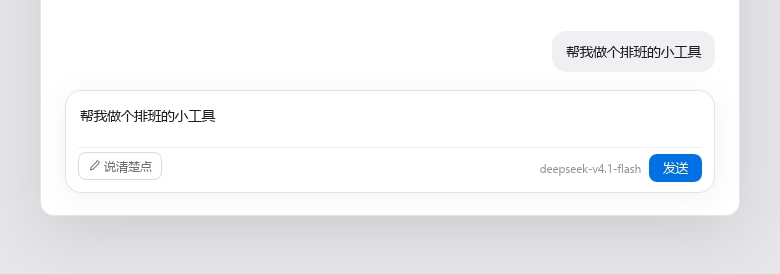
A short draft, and one button. Nothing is sent until you press send yourself.
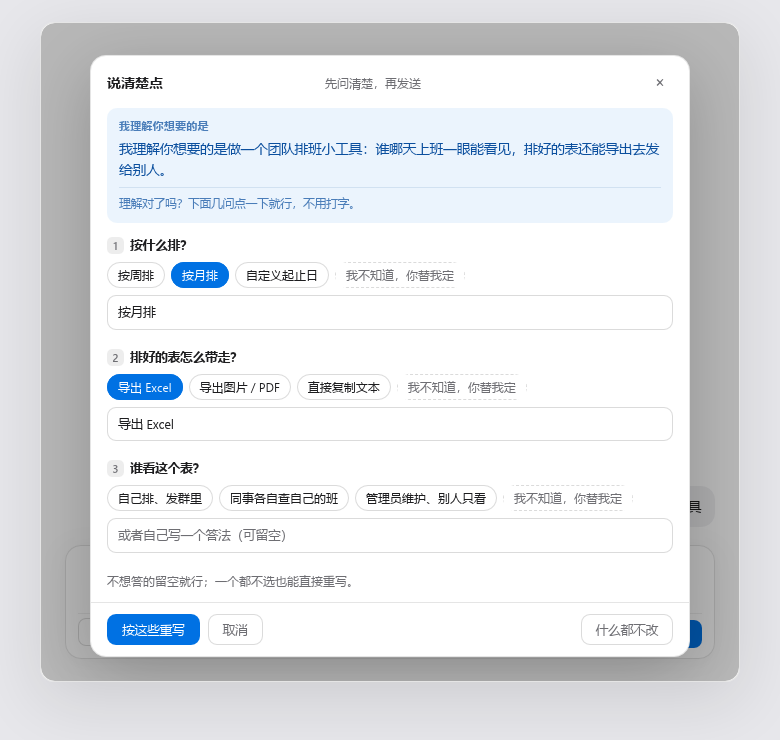
It restates what it understood, then asks. Every question can be answered by clicking, and the last option of every question is "I don't know, you decide" — so you can get through the whole panel without typing a word. The text field under each question is optional.
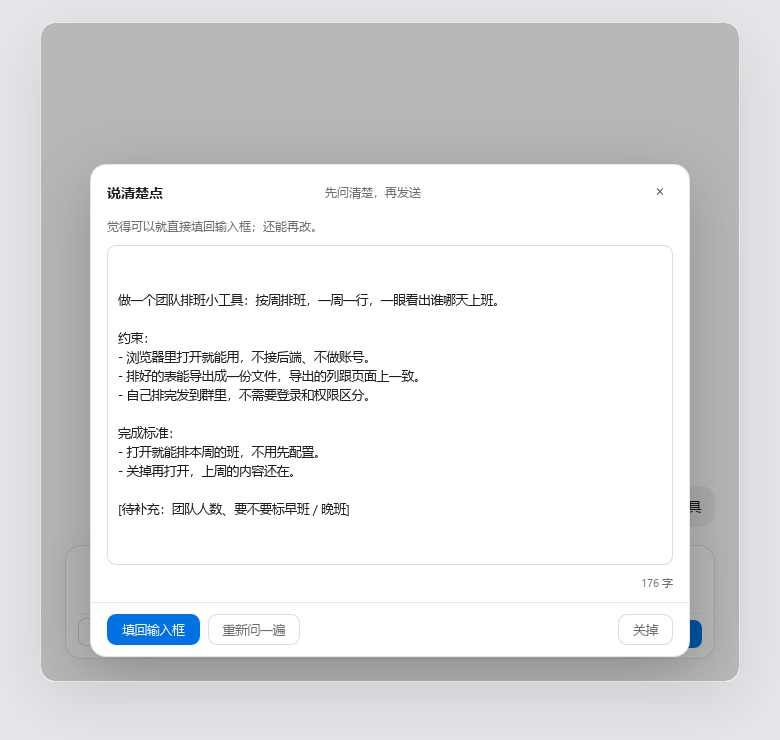
The result is a request an agent can start on: goal, constraints, then what counts as done. Anything it
does not actually know is marked [待补充:…] rather than invented. You put it back into the composer and
edit it further if you want.
Why clickable options matter
A question is only useful to someone who can answer it. "What tone do you want?" is useless to a person whose problem is that they cannot articulate the request — they will just type something vague again, or give up. Fixed options turn an open-ended question into a recognition task, which is much easier, and the "I don't know, you decide" option removes the last case where a user is forced to type.
Install
dsh plugin --profile desktop add dsh-ask-first
Or in the GUI: Plugins → Add plugin, and enter the package name.
The plugin has a browser half, so restart the host after installing. The button appears at the bottom-left of the composer, next to the send row.
How it works
Two halves, one package.
| Path | Role |
|---|---|
lib/index.js |
Host half. Registers three loopback-only POST routes and makes every model call (ctx.llm.stream). |
lib/client.js |
Browser half. Registers the button and the panel in the conversation.input.left slot, and writes the result back with inputActions.setDraft(). |
cordis.patch.yml |
Lets the host insert this package into the plugin tree. |
test-offline.mjs |
Offline self-check. No network, no host: node test-offline.mjs. |
Routes
| Method | Path | Body | Response |
|---|---|---|---|
| POST | /api/dsh-ask-first/health |
{} |
{ ok, value: { llm, provider?, model? } } |
| POST | /api/dsh-ask-first/ask |
{ draft } |
{ ok, value: { guess, questions: [{ id, question, hint, options[] }] } } |
| POST | /api/dsh-ask-first/rewrite |
{ draft, answers: [{ question, answer }] } |
{ ok, value: { text } } |
All three accept loopback requests only: the socket address must be 127.0.0.1, ::1 or
::ffff:127.0.0.1, the Host header must be loopback, and a request whose Origin points at another
host — or which carries sec-fetch-site: cross-site — is refused with 403.
Model selection
No API key, no provider config, no settings page. The plugin calls ctx.llm.stream with the provider and
model that agentDefaultModel.currentSelection() reports — the same one shown in the corner of the
composer. If that service is unavailable it omits both and lets the host fall back to the last target used.
So it costs whatever your current session costs, and nothing new needs filling in.
Degradation
The model is asked for strict JSON and does not always comply. If the reply cannot be parsed as JSON, it is not an error: the raw text becomes the "what I understand you want" sentence and the panel goes straight to rewriting. If the model offers no options for a question, or forgets the "I don't know, you decide" option, the host half adds it — the zero-typing path is enforced in code, not left to the prompt.
Self-check
node test-offline.mjs
39 checks, no network and no host process: route registration, request validation, JSON extraction from fenced replies, option normalisation, cross-site rejection, and the request body sent to the model.
Notes for reviewers
lib/client.jsis a singlewindow.__ModuleLoader__.load({ id, factory })wrapper. That is the standard shape for a DeepSeek Harness client plugin, not a bundler artefact: the module body is plain readable source, unminified, and the onlyrequirecalls arereactandreact-dom, which the host provides.- No credentials, no telemetry, no outbound requests. The only network calls are the loopback routes above,
and the only model calls go through the host's own
ctx.llmservice. - No install-time scripts.
preview/shot.htmlis the page the README screenshots were taken from. It loads the reallib/client.jsagainst a stub host and a stub backend, so the shots show the actual panel. It is not part of the published package (seefilesinpackage.json), and it needs a React UMD build inpreview/vendor/to run — which is git-ignored, fetch it from jsDelivr if you want to regenerate shots.
License
MIT
No comments yet. Be the first to write one.