Workspace Atlas

A workspace map, AGENTS editor, and multi-source skill catalog for DeepSeek Harness / DSH NEXT.
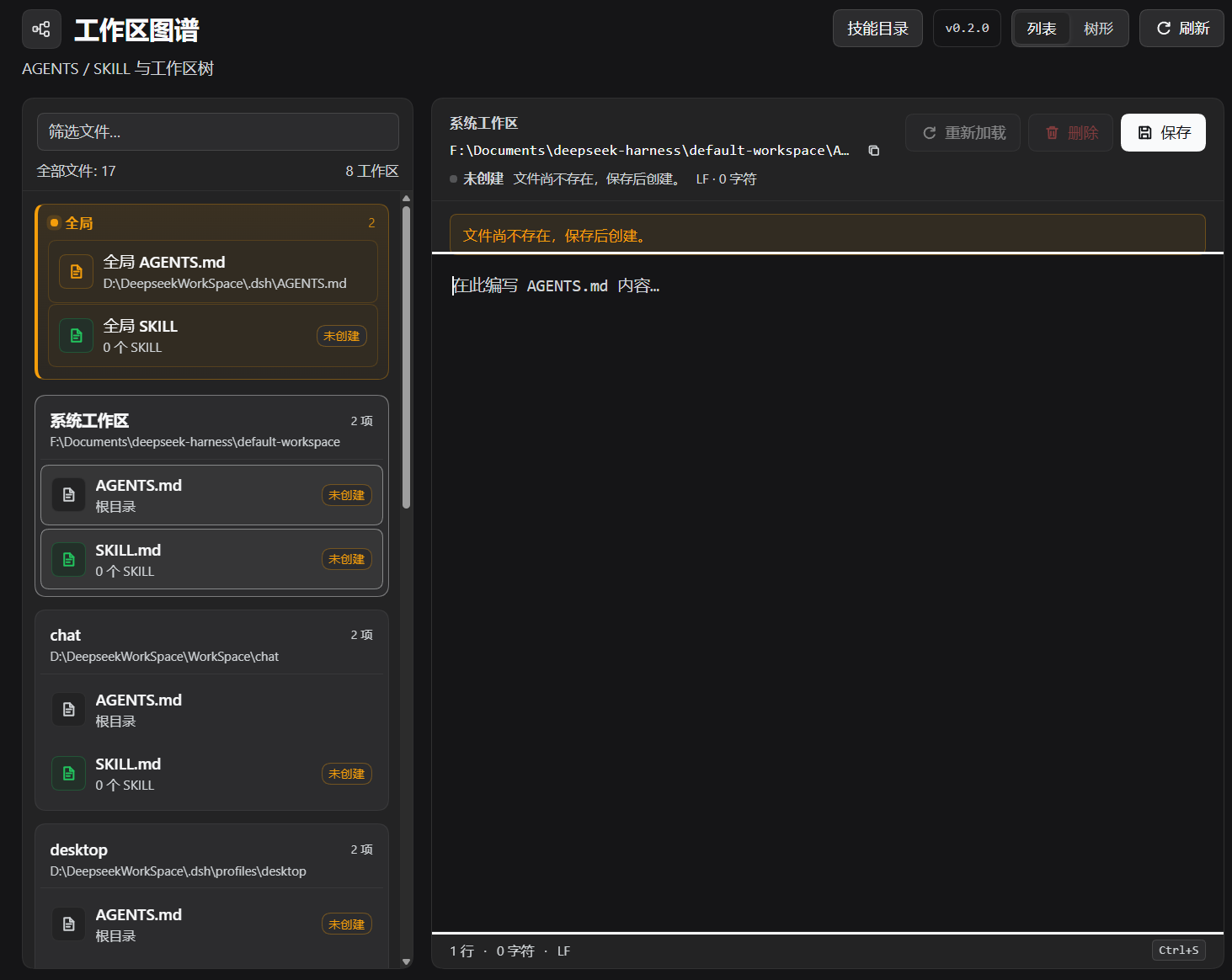
Workspace Atlas adds a full-page panel to the DSH Web UI for browsing registered workspaces and editing the global and workspace-level instruction files they contain.
This is a community plugin. It is not an official DeepSeek product.
中文简介:工作区图谱是 DSH 的工作区关系图与根文件编辑器。列表视图按名称平铺工作区,只显示根
AGENTS.md和 SKILL 汇总;树形视图按路径生成从左向右的森林。每个节点的SKILL按钮显示技能数量,点击进入技能管理器,支持.dsh/skills/<name>/SKILL.md的增删改、URL 导入和本地技能仓库。支持搜索定位、展开动画、备份、冲突检测和路径逃逸防护。
Features
- Two views, switchable at any time:
- List — flat, alphabetically sorted workspaces; each workspace shows its root
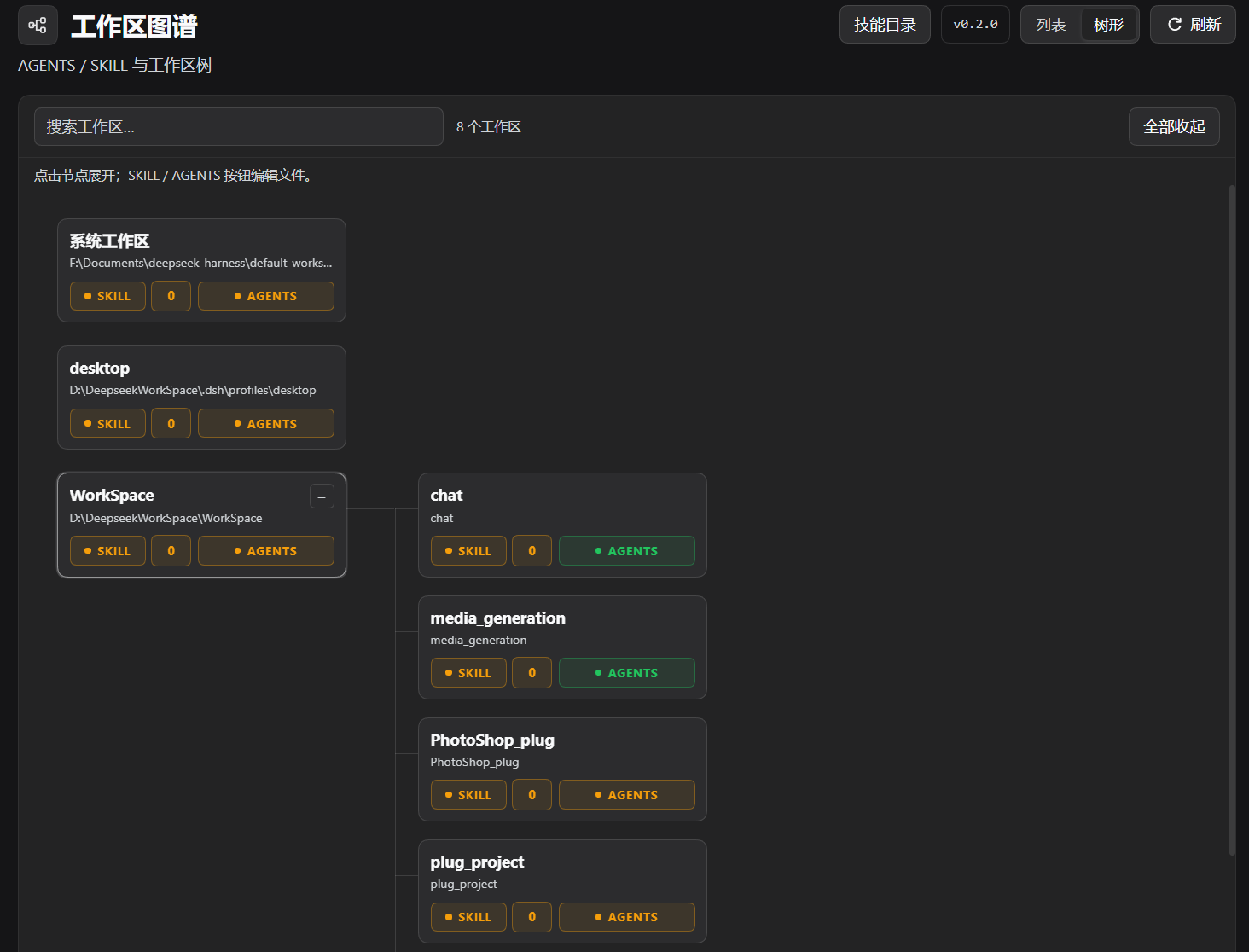
AGENTS.mdand a SKILL summary with count. - Tree — a left-to-right forest derived from workspace paths.
- List — flat, alphabetically sorted workspaces; each workspace shows its root
- Tree nodes start collapsed. Click a node to expand its children. Expand and collapse use a smooth 220 ms animation.
- Tree search initially lists matching nodes only. Selecting a result expands its ancestors and its complete subtree, then scrolls it into view.
- Every tree node has
SKILLandAGENTSbuttons:- green when content exists
- orange when it does not
SKILLalso shows a count box
SKILLopens a manager for multiple project skills:- native skills at
<workspace>/.dsh/skills/<name>/SKILL.md - legacy root
SKILL.mdkept as a separate row - create, edit, delete, import from a raw URL, save to the local library, install from the library
- native skills at
- Local skill library at
$DSH_HOME/workspace-atlas/skills. AGENTSopens the workspace rootAGENTS.mdeditor.- Global
AGENTS.mdeditor:$DSH_HOME/AGENTS.md. - Markdown text editing with LF/CRLF and UTF-8 BOM preservation.
Ctrl+S/Cmd+Ssave,Tabinserts two spaces.- Unsaved-change tracking, external-change conflict detection, reload, and delete.
- Header version button with GitHub Release checking and one-click update through DSH Plugin Manager.
- Atomic writes and automatic backups under
$DSH_HOME/agents-manager-backups/. - Global skill management at
$DSH_HOME/skills. - Chinese and English locale, DSH theme tokens, no private Harness UI imports.
Screenshots
Skill catalog
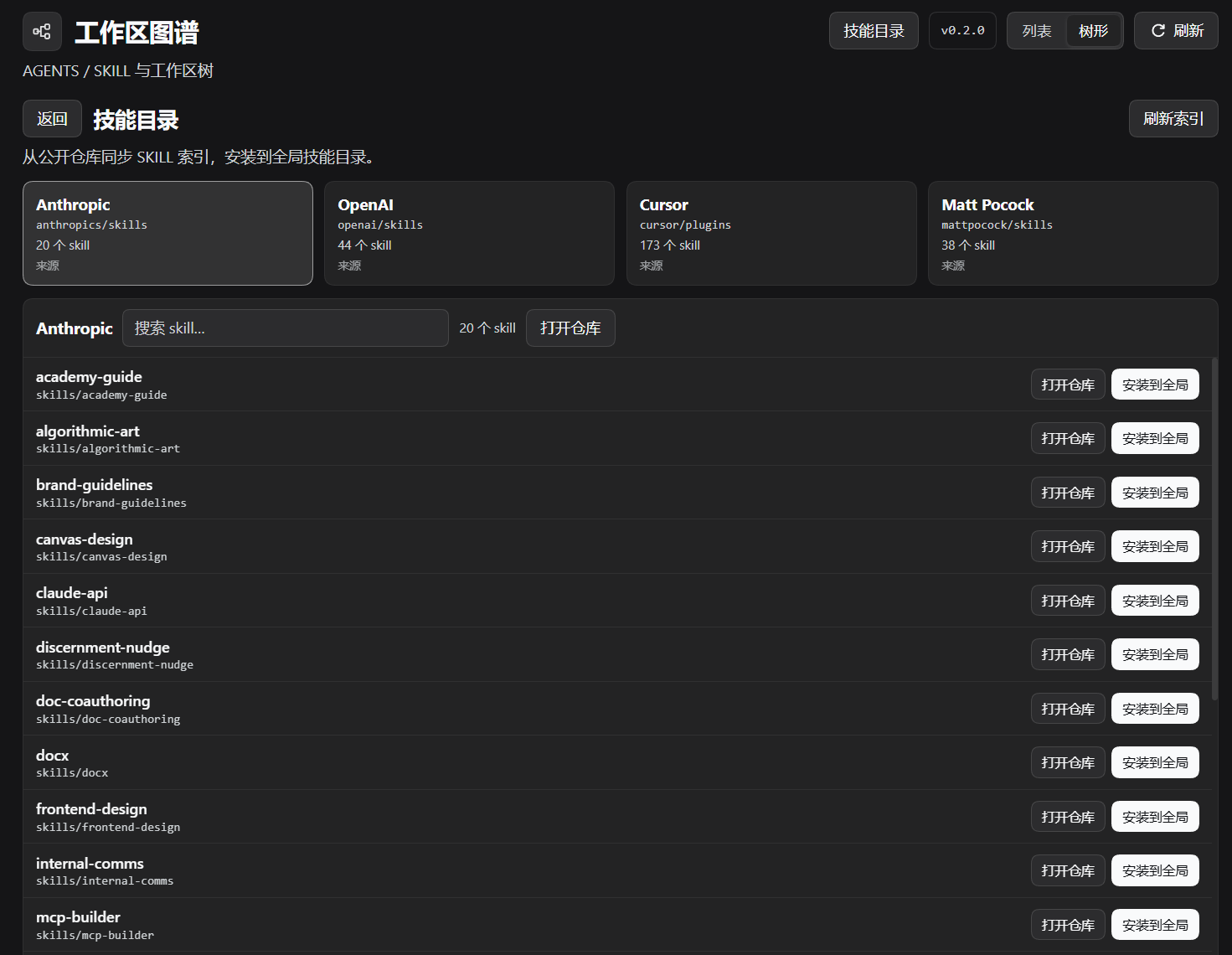
The header's Skill catalog / 技能目录 button opens a separate catalog view:
- four source cards: Anthropic, OpenAI, Cursor, Matt Pocock
- the catalog syncs on open and can be refreshed manually
- selecting a card shows that repository's skills
- each row can install into the global skill directory or open the source directory on GitHub
- indexes are cached under
$DSH_HOME/workspace-atlas/catalog.json
Sources:
| Card | Repository |
|---|---|
| Anthropic | anthropics/skills |
| OpenAI | openai/skills |
| Cursor | cursor/plugins |
| Matt Pocock | mattpocock/skills |
Catalog installation downloads every file in the selected skill directory, not only SKILL.md. It installs into $DSH_HOME/skills/<name> and refuses to overwrite an existing skill.
Install
Requirements:
- DeepSeek Harness / DSH NEXT with the Web UI and Plugin Manager
- Node.js
>=22.19.0
Clone this repository and install the directory as a bundle in the profile used by the desktop app:
git clone https://github.com/Asteroid-Code-Channel/dsh-workspace-atlas.git
In DSH, open Plugin Manager and install the cloned directory, or ask the agent:
请把 <absolute-path-to>\dsh-workspace-atlas 作为 bundle 安装到当前 profile。
Equivalent plugin_manager call:
plugin_manager
action: install_bundle
target: <absolute-path-to>\dsh-workspace-atlas
Refresh the Web UI after installation. Restart the desktop app after updating Host-side JavaScript.
For a different desktop UI, repeat the installation in that profile.
Usage
- Open the sidebar entry named Workspace Atlas / 工作区图谱.
- Choose List / 列表 for a flat alphabetical overview.
- Choose Tree / 树形 for the workspace forest.
- Click a node card to expand it.
- Use
SKILLto manage that workspace's native skills and legacy rootSKILL.md. - Use
AGENTSto edit the workspace rootAGENTS.md. - Use the global card in List view to edit
$DSH_HOME/AGENTS.mdor manage$DSH_HOME/skills. - Use the header's Skill catalog to sync and install public skills globally.
File rules
- Tree parent/child relationships are derived from registered workspace paths. The DSH workspace registry is never modified.
- A workspace with no registered ancestor becomes a root tree.
- Native project skills:
<workspace>/.dsh/skills/<name>/SKILL.md. SKILLalso shows a legacy root<workspace>/SKILL.mdwhen present.AGENTSedits workspace-rootAGENTS.md.- Skill deletion moves the skill directory to
$DSH_HOME/workspace-atlas/trash/. - The local skill library is
$DSH_HOME/workspace-atlas/skills/<name>/SKILL.md. - URL import downloads one
SKILL.md; it does not fetch a skill's auxiliary files. - The list shows root
AGENTS.mdand the SKILL summary only; nestedAGENTS.mdfiles are not listed.
Version updates
The header shows the installed version. Click it to check the latest GitHub Release.
The update source is resolved from, in order:
updateRepositoryin the bundle'scordis.patch.ymlrow configrepositoryinpackage.json
Use an owner/repo value. After creating the GitHub repository, add:
"repository": {
  "type": "git",
  "url": "https://github.com/Asteroid-Code-Channel/dsh-workspace-atlas.git"
}
When a newer Release exists, the dialog can call DSH Plugin Manager's installBundle with github:<owner>/<repo>#<tag>. A restart is required after a Host update. If Plugin Manager does not expose installBundle, the dialog still links to the Release page for a manual update.
Host API
The Host half registers these same-origin endpoints:
| Method | Path | Purpose |
|---|---|---|
GET |
/api/dsh-agents-manager/state |
Global file, workspaces, AGENTS/SKILL metadata, version |
POST |
/api/dsh-agents-manager/read |
Read a target |
POST |
/api/dsh-agents-manager/save |
Atomic save + backup |
POST |
/api/dsh-agents-manager/delete |
Delete + backup |
POST |
/api/dsh-agents-manager/skills/list |
List native + legacy skills |
POST |
/api/dsh-agents-manager/skills/create |
Create a native skill |
POST |
/api/dsh-agents-manager/skills/import |
Import a SKILL.md from URL |
POST |
/api/dsh-agents-manager/skills/delete |
Move a native skill to trash |
GET |
/api/dsh-agents-manager/skills/library |
List local skill library |
POST |
/api/dsh-agents-manager/skills/library/save |
Copy workspace skill to library |
POST |
/api/dsh-agents-manager/skills/library/install |
Install library skill into workspace |
GET |
/api/dsh-agents-manager/catalog |
Sync GitHub skill catalog |
POST |
/api/dsh-agents-manager/catalog/install |
Install a catalog skill globally |
GET |
/api/dsh-agents-manager/update |
Check GitHub Releases |
POST |
/api/dsh-agents-manager/update/apply |
Install a validated release tag |
Targets:
{ "scope": "global" }
{ "scope": "global", "skillName": "my-skill" }
{ "scope": "workspace", "workspaceId": "…", "file": "agents" }
{ "scope": "workspace", "workspaceId": "…", "file": "skill" }
{ "scope": "workspace", "workspaceId": "…", "skillName": "my-skill" }
Mutations require a loopback Host, matching Origin, x-dsh-agents-manager: 1, and Content-Type: application/json. Workspace targets pass through realpath; .., absolute paths, symlink escapes, and filenames outside the managed set are rejected. The per-file limit is 2 MiB.
Development
node --check .\index.js
node --check .\lib\store.js
node --check .\client.js
node .\test\store.test.mjs
node .\test\http.test.mjs
node .\test\client.test.mjs
node .\test\update.test.mjs
node .\test\catalog.test.mjs
The tests use temporary directories inside the workspace and do not write to the real $DSH_HOME.
Known limitations
- The global/workspace
AGENTS.mdfiles affect the model only when@deepseek-ai/dsh-agent-instructions(or the active profile's equivalent loader) is enabled. In the tested desktop profile that row was disabled. - Editing files does not rewrite history already injected into an open Session.
- Workspace Atlas manages
.dsh/skillsdirectories directly but is not a full skill marketplace: no GitHub repository tree browsing, dependency resolution, enable/disable policy, or instruction budgets. - URL import downloads a single
SKILL.mdonly; auxiliary files must be added manually. - Legacy root
SKILL.mdremains supported for backward compatibility but is not a DSH-native project skill.
License
MIT. See LICENSE.
No comments yet. Be the first to write one.