Fairy Ⅲ · 绝区零 H.D.D 皮肤
中文 · English
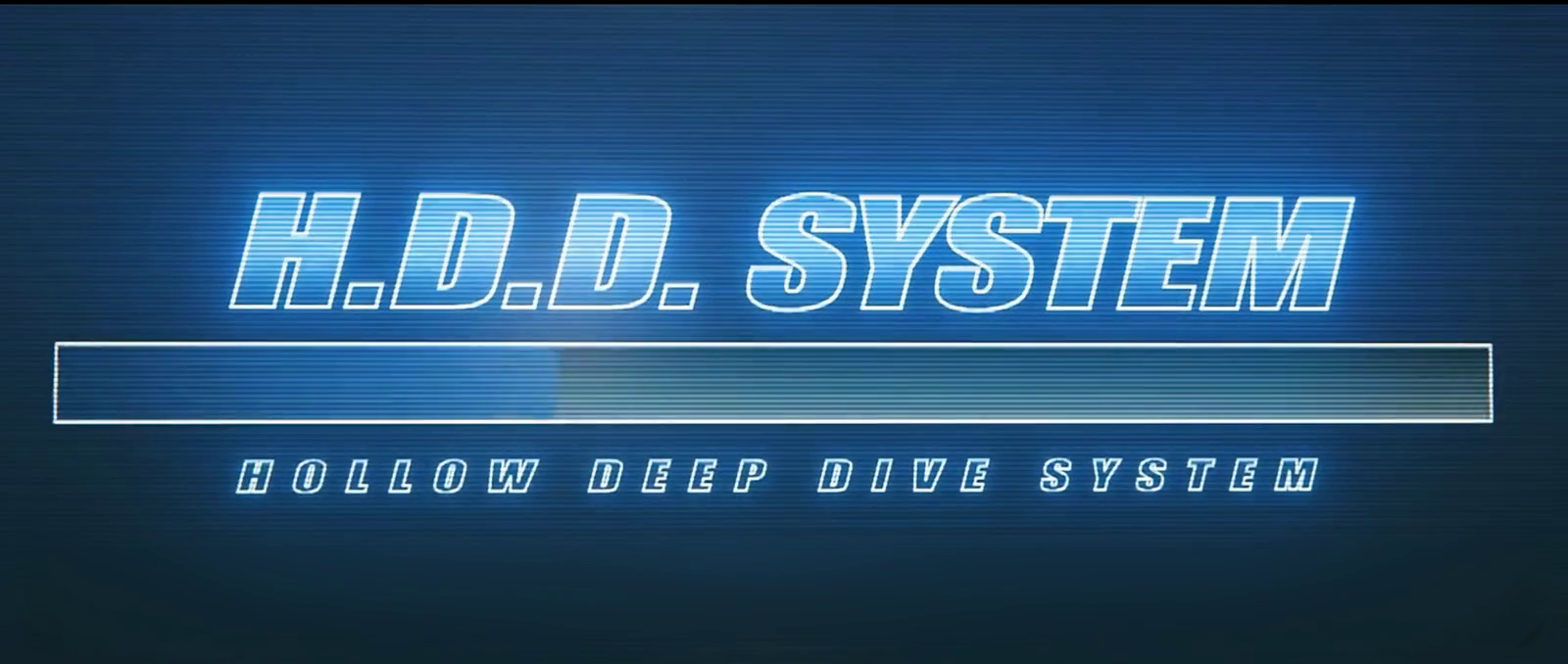
把 DeepSeek Harness 的 Web 界面换成《绝区零》Fairy 的 H.D.D 终端:满屏开机动画 → 居中问好 → 收成会话区左侧的常驻眼徽,并可用本地 GPT-SoVITS 的 Fairy 音色把回复念出来。

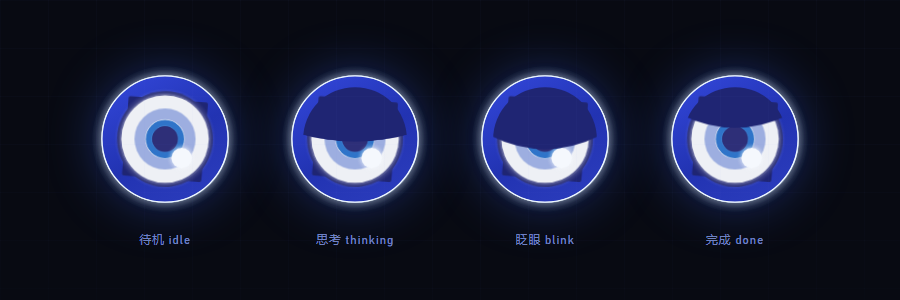
| 眼徽状态 | 设置面板 |
|---|---|
 |
 |
特性
- 开机动画:整屏播放 H.D.D 启动片,视频按
object-fit: contain完整显示,多余区域由同帧的模糊铺底填充,任何窗口比例都不会出现硬黑边。 - 居中问好:动画结束后淡入 H.D.D 眼徽(深蓝环 / 白盘 / 蓝瞳 / 高光点),背后是蓝光晕图,
HOLLOW DEEP DIVE SYSTEM标题带镜面倒影,下方按当前时段(凌晨/上午/中午/下午/傍晚/深夜)播一句问候并同步播放预录音频。 - 收成眼徽:问候结束约 1.9s 后眼徽飞到会话区左缘的中线(侧栏右侧的蓝色圈内)常驻,光晕图淡出;眼徽本身只是状态指示,点击不再弹面板。
- 状态动效(复刻参考实现 Fairy-DSH 的几何与时长):
idle呼吸 + 缓慢自转 + 扫描光带;thinking/working上眼睑压到半闭并轻微呼吸;- 待机随机眨眼(3.4–8.6s 一次,约 24% 概率连眨,眨眼后可能瞟一眼);
- 待机随机「花屏」:把整只眼切成 2–4 条横带横向错位;
done眼睑轻扫一下。
- 品牌位替换:隐藏官方 SVG 字标,在原位置叠上 Fairy 眼徽 + 斜体
Fairy字标,位置由量测官方元素得到,随窗口自适应。 - 主题:深蓝玻璃 + 青蓝霓虹 token、网格与扫描线壁纸、H.D.D 风滚动条与焦点光。
- 语音:开场问候是预录 wav(不依赖引擎);后续回复可自动朗读或点按钮朗读,走本地 GPT-SoVITS(CPU 推理)。
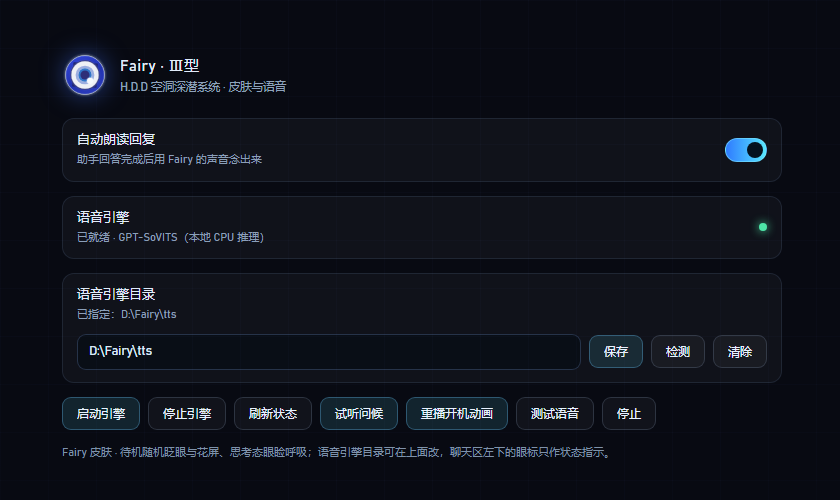
- 设置面板:DSH 的「设置 → Fairy」里集中管理朗读开关、引擎状态、引擎目录、试听/重播/测试。
安装
需要 DeepSeek Harness(插件只在运行时调用宿主提供的槽位与 webServer,不直接 import @deepseek-ai/*)。
方式一:让 agent 装(推荐)
git clone https://github.com/AssassinVIX/fairy-zzz-plugin.git
然后在 DSH 会话里:
plugin_manager install_bundle target=<克隆下来的目录>
方式二:手动合并 patch
把本仓库根目录 cordis.patch.yml 里的 insert 段合并进你的 profile patch(Windows 一般是 %USERPROFILE%\.dsh\profiles\<profile>\cordis.patch.yml):
- insert:
    - id: fairy-zzz-skin
      name: 'dsh-fairy-zzz'
装好后整页刷新一次。皮肤只做「插入一行 + 宿主注册两条 HTTP 路由」,不修改宿主的任何文件。
方式三:Windows 一键脚本
powershell -ExecutionPolicy Bypass -File .\install-windows.ps1            # 装
powershell -ExecutionPolicy Bypass -File .\install-windows.ps1 -Uninstall  # 卸
脚本会自己找 profile、把插件放进 node_modules\dsh-fairy-zzz、补 patch、把浅色主题改成深色。不放心脚本改文件的话用方式一/二。
从旧版升级:1.0.0 起包名从
@local/dsh-fairy-zzz改成dsh-fairy-zzz(为了能被收录与 npm 安装)。 老安装请把 profile patch 里的name: '@local/dsh-fairy-zzz'改成name: 'dsh-fairy-zzz', 并把插件目录从node_modules\@local\dsh-fairy-zzz换到node_modules\dsh-fairy-zzz。
presets/fairy-mode.patch.yml是可选的「Fairy 模式」agent 预设(毒舌 AI 腔、称你为「主人」)。 它依赖较多@deepseek-ai/dsh-*插件,不同 DSH 版本的工具集不一样,所以默认不在 patch 里启用; 想用就按文件开头的说明把它追加到 profile patch,并确认列出的插件在你的版本里都存在。
设置(设置 → Fairy)
| 控件 | 说明 |
|---|---|
| 自动朗读回复 | 助手回答完成后自动念出来;关掉也可以单独点消息旁的朗读按钮 |
| 语音引擎 | 引擎状态灯:绿=就绪,黄=启动中,灰=未运行 |
| 语音引擎目录 | 输入引擎目录 → 保存(写入 <插件目录>/voice-home.txt)、检测(只校验不保存)、清除(回到自动探测) |
| 启动引擎 / 停止引擎 | 由宿主进程托管引擎的启停 |
| 刷新状态 | 立即重新探测一次 |
| 试听问候 / 重播开机动画 | 重放最新问候音频 / 重新走一遍开机 → 问好 → 收成眼徽 |
| 测试语音 / 停止 | 合成一句测试语音 / 停止当前播放 |
语音引擎(可选)
皮肤、开机动画、预录问候都不需要引擎;只有「把回复念出来」需要。
引擎目录里需要有:
<引擎目录>/
  fairy_server.py        # 引擎入口(--port 指定端口)
  GPT-SoVITS/            # 引擎本体
  models/                # Fairy 的 .pth / .ckpt 与参考音频
  py311/                 # 可选:便携 Python
目录的查找顺序(用户指定的永远优先):
<插件目录>/voice-home.txt—— 在设置面板里保存的那个目录;FAIRY_VOICE_HOME环境变量;- 插件同级
voice/(免安装便携包); - 旧版
FAIRY_TTS_DIR环境变量(兼容)。
都没找到时皮肤照常工作,设置面板会提示去指定目录。
其它环境变量:
| 变量 | 默认 | 说明 |
|---|---|---|
FAIRY_TTS_PORT |
9800 |
引擎监听端口 |
FAIRY_CACHE_DIR |
<插件目录>/cache |
合成语音与磁盘缓存位置 |
引擎日志写在引擎目录下的 server.log。CPU 加载约 20s,加载完成前设置面板显示「启动中」。
路由
宿主半边只注册这些只读/本地路由(前缀 /fairy-zzz):
| 方法 | 路径 | 说明 |
|---|---|---|
| GET | /fairy-zzz/assets/<file> |
boot.mp4 / poster.jpg / hero.png / voice/greet-*.wav(支持 Range) |
| GET | /fairy-zzz/audio/<hash>.wav |
合成语音缓存(支持 Range) |
| POST | /fairy-zzz/tts |
{ text } → { url, cached, seconds },清 markdown/代码块后截 500 字 |
| GET | /fairy-zzz/health |
{ ok, engine, voice, speed, home } |
| GET | /fairy-zzz/mood |
idle / thinking / working / done(驱动眼徽状态) |
| GET | /fairy-zzz/voice-home |
当前引擎目录与来源 |
| POST | /fairy-zzz/voice-home |
保存 / 校验引擎目录 |
| GET | /fairy-zzz/engine |
引擎进程状态 |
| POST | /fairy-zzz/engine |
{ action: "start" | "stop" } |
截图是怎么来的
screenshots/ 里的图不是外链:开机帧取自 assets/boot.mp4,其余是离线渲染(把 client.js 里的 CSS 与眼徽 SVG 抽出来,用同一套样式渲染)。仓库里没有运行期依赖,也没有构建产物。
已知限制
- 官方字标是内联 SVG,没有可替换的文本节点;
sidebar.brand.mark/name又是single槽位、宿主先注册者常驻,所以皮肤用「隐藏官方字标 + 在同一位置叠自己的字标」来实现,不是真正的槽位替换。官方的 DOM 结构一改就可能要跟着调选择器。 - 桌面壳的窗口标题、菜单、侧栏条目文案属于应用本身,插件改不了。
- 与其它抢占左下/右下角落的插件(鲸鱼挂件、桌宠)同时开时观感会打架。
- 语音引擎是可选外部依赖,仓库不含权重与引擎本体。
排错
| 现象 | 处理 |
|---|---|
| 设置里引擎一直「未运行」 | 检查引擎目录是否含 fairy_server.py、GPT-SoVITS/、models/;看 <引擎目录>/server.log |
| 保存目录后仍显示旧路径 | 旧的宿主进程没有 voice-home 路由,重启一次 DSH |
| 回复不朗读但问候能播 | 问候是预录 wav,不走引擎;引擎没起来时只有朗读会静默失败 |
| 眼徽/字标没出现 | 确认 profile patch 里有 fairy-zzz-skin 这一行,并整页刷新 |
目录结构
cordis.patch.yml     # 一行 insert(皮肤本体)
client.js            # 客户端:主题、开机/问好/眼徽、设置面板、语音动作
index.js             # 宿主:静态资源、TTS 队列与缓存、心情、引擎托管
assets/              # boot.mp4 / poster.jpg / hero.png / voice/greet-*.wav
presets/             # 可选的「Fairy 模式」agent 预设
screenshots/         # 列表用截图
install-windows.ps1  # Windows 安装/卸载脚本
致谢与许可
- 本仓库代码以 MIT 发布(见
LICENSE)。 - 眼徽 SVG、动画几何与时长、眼睑/眨眼实现参考了 Chengzhibense/Fairy-DSH(Apache-2.0,commit 见
NOTICE-fairy-dsh.md);对照视频为 BV1SD4C63EZz「可能是全网最还原的Fairy」。 - 开机视频素材与角色形象版权归 miHoYo / HoYoverse 所有,这里只做个人桌面的视觉改造,请勿用于商业用途。
English
中文 · English
A Fairy Ⅲ · Zenless Zone Zero H.D.D skin for DeepSeek Harness.
It turns the DSH web interface into Fairy's H.D.D terminal: a full-screen boot animation, then a centered greeting, then the emblem tucks itself into a permanent eye badge at the left edge of the conversation area — and replies can be read aloud in a local GPT-SoVITS Fairy voice.
| Eye badge states | Settings panel |
|---|---|
|
|
Features
- Boot animation — the H.D.D startup clip fills the screen with
object-fit: contain, and the leftover area is filled with a blurred copy of the same frame, so no hard black bars appear at any window ratio. - Centered greeting — when the clip ends, the H.D.D eye badge (deep-blue ring / white disc / blue iris / highlight dot) fades in over a blue glow, with a mirrored
HOLLOW DEEP DIVE SYSTEMtitle and a time-of-day greeting (small hours / morning / noon / afternoon / evening / late night) played together with a matching pre-recorded audio clip. - Badge hand-off — about 1.9 s after the greeting the badge flies to the middle of the left edge of the conversation area (inside the blue ring next to the sidebar) and stays there while the glow fades out. The badge is a status indicator only; clicking it no longer opens a panel.
- State animations (geometry and timings replicate the reference implementation, Fairy-DSH):
idle— breathing, slow rotation, a sweeping scan light;thinking/working— the upper eyelid drops to half-closed and breathes slightly;- random blinks while idle (every 3.4–8.6 s, ~24% chance of a double blink, sometimes followed by a glance);
- random idle "glitch" — the whole eye is sliced into 2–4 horizontal bands and shifted sideways;
done— a quick eyelid sweep.
- Brand slot replacement — the official SVG wordmark is hidden and the Fairy eye badge plus an italic
Fairywordmark are overlaid in the same spot, positioned from measurements of the official element so it stays responsive. - Theme — deep-blue glass with cyan neon tokens, grid and scanline wallpaper, an H.D.D-style scrollbar and focus glow.
- Voice — the opening greeting is a pre-recorded wav and needs no engine; later replies can be read aloud automatically or with a per-message button through a local GPT-SoVITS (CPU inference).
- Settings panel — DSH's Settings → Fairy manages the read-aloud switch, engine status, engine directory, sampling, replay and tests.
Install
Requires DeepSeek Harness. The plugin only uses the host slots and webServer passed at runtime; it never imports @deepseek-ai/*.
Option 1 — let an agent install it (recommended)
git clone https://github.com/AssassinVIX/fairy-zzz-plugin.git
then, in a DSH session:
plugin_manager install_bundle target=<path to the cloned folder>
Option 2 — merge the patch by hand
Merge the insert block from cordis.patch.yml into your profile patch (on Windows usually %USERPROFILE%\.dsh\profiles\<profile>\cordis.patch.yml):
- insert:
    - id: fairy-zzz-skin
      name: 'dsh-fairy-zzz'
Reload the whole page once installed. The skin only inserts one line and registers two HTTP routes on the host; it does not modify any file that ships with DSH.
Option 3 — Windows one-click script
powershell -ExecutionPolicy Bypass -File .\install-windows.ps1            # install
powershell -ExecutionPolicy Bypass -File .\install-windows.ps1 -Uninstall  # uninstall
The script finds your profile, copies the plugin into node_modules\dsh-fairy-zzz, adds the patch and switches a light theme to dark. If you would rather not let a script edit files, use option 1 or 2.
Upgrading from older versions: from 1.0.0 the package name changed from
@local/dsh-fairy-zzztodsh-fairy-zzz(so it can be listed and installed from npm). Changename: '@local/dsh-fairy-zzz'toname: 'dsh-fairy-zzz'in your profile patch, and move the plugin directory fromnode_modules\@local\dsh-fairy-zzztonode_modules\dsh-fairy-zzz.
presets/fairy-mode.patch.ymlis an optional "Fairy mode" agent preset (snarky AI tone, addresses you as "Master"). It depends on a lot of@deepseek-ai/dsh-*plugins whose tool sets differ between DSH versions, so it is not enabled by default; to use it, append it to your profile patch as described at the top of the file and make sure every plugin it lists exists in your version.
Settings (Settings → Fairy)
| Control | What it does |
|---|---|
| Read replies aloud | Speaks each assistant answer when it finishes; with it off you can still use the speaker button next to a message |
| Voice engine | Engine status light: green = ready, yellow = starting, grey = not running |
| Engine directory | Type a directory → Save (writes <plugin dir>/voice-home.txt), Detect (validate without saving), Clear (back to auto-detection) |
| Start / Stop engine | Host-managed engine start and stop |
| Refresh status | Re-probe immediately |
| Play greeting / Replay boot | Replay the latest greeting audio / run the boot → greeting → badge sequence again |
| Test voice / Stop | Synthesize a test line / stop current playback |
Voice engine (optional)
The skin, the boot animation and the pre-recorded greeting need no engine — only "read replies aloud" does.
The engine directory must contain:
<engine dir>/
  fairy_server.py        # entry point (--port)
  GPT-SoVITS/            # the engine itself
  models/                # Fairy's .pth / .ckpt and reference audio
  py311/                 # optional: portable Python
Lookup order (a user-specified directory always wins):
<plugin dir>/voice-home.txt— the directory saved in the settings panel;- the
FAIRY_VOICE_HOMEenvironment variable; voice/next to the plugin (portable bundle);- the legacy
FAIRY_TTS_DIRenvironment variable (compatibility).
If none of them is found the skin still works, and the settings panel points you to the directory field.
Other environment variables:
| Variable | Default | Description |
|---|---|---|
FAIRY_TTS_PORT |
9800 |
Port the engine listens on |
FAIRY_CACHE_DIR |
<plugin dir>/cache |
Where synthesized audio and the disk cache go |
Engine logs are written to server.log in the engine directory. Loading on CPU takes about 20 s; until it finishes the settings panel shows "starting".
HTTP routes
The host side only registers these read-only/local routes (prefix /fairy-zzz):
| Method | Path | Description |
|---|---|---|
| GET | /fairy-zzz/assets/<file> |
boot.mp4 / poster.jpg / hero.png / voice/greet-*.wav (Range supported) |
| GET | /fairy-zzz/audio/<hash>.wav |
Synthesized-audio cache (Range supported) |
| POST | /fairy-zzz/tts |
{ text } → { url, cached, seconds }; strips markdown/code blocks and truncates to 500 characters |
| GET | /fairy-zzz/health |
{ ok, engine, voice, speed, home } |
| GET | /fairy-zzz/mood |
idle / thinking / working / done (drives the badge) |
| GET | /fairy-zzz/voice-home |
Current engine directory and where it came from |
| POST | /fairy-zzz/voice-home |
Save / validate the engine directory |
| GET | /fairy-zzz/engine |
Engine process state |
| POST | /fairy-zzz/engine |
{ action: "start" | "stop" } |
How the screenshots were made
The images in screenshots/ are not remote links: the boot frame is taken from assets/boot.mp4, and the rest are rendered offline by extracting the CSS and the eye-badge SVG from client.js and rendering them with the same styles. The repository has no runtime dependencies and no build output.
Known limitations
- The official wordmark is inline SVG with no replaceable text node, and
sidebar.brand.mark/namearesingleslots that the first registrant keeps, so the skin hides the official wordmark and overlays its own at the same position instead of doing a real slot replacement. If the official DOM changes, the selectors may need updating. - The desktop shell's window title, menus and sidebar labels belong to the app itself; a plugin cannot change them.
- Other plugins that claim the bottom-left/right corners (whale widget, desktop pet) may look cluttered when enabled together.
- The voice engine is an optional external dependency; the repository ships neither weights nor the engine itself.
Troubleshooting
| Symptom | Fix |
|---|---|
| The engine stays "not running" in Settings | Check that the engine directory has fairy_server.py, GPT-SoVITS/ and models/; read <engine dir>/server.log |
| The old path is still shown after saving | The old host process has no voice-home route; restart DSH once |
| Replies are not spoken but the greeting plays | The greeting is a pre-recorded wav and does not use the engine; with no engine running only read-aloud fails silently |
| No badge or wordmark appears | Check that fairy-zzz-skin is in your profile patch and reload the whole page |
Repository layout
cordis.patch.yml     # one insert line (the skin itself)
client.js            # client: theme, boot/greeting/badge, settings panel, voice actions
index.js             # host: static assets, TTS queue and cache, mood, engine supervision
assets/              # boot.mp4 / poster.jpg / hero.png / voice/greet-*.wav
presets/             # optional "Fairy mode" agent preset
screenshots/         # screenshots used above
install-windows.ps1  # Windows install/uninstall script
Credits & license
- The code in this repository is released under the MIT license (see
LICENSE). - The eye-badge SVG, the animation geometry and timings, and the eyelid/blink implementation reference Chengzhibense/Fairy-DSH (Apache-2.0; commit in
NOTICE-fairy-dsh.md); the comparison video is BV1SD4C63EZz「可能是全网最还原的Fairy」. - The boot video assets and the character likeness belong to miHoYo / HoYoverse. This is a personal desktop visual reskin only — do not use it commercially.
No comments yet. Be the first to write one.