READMESource: main@a52760e6
DeepSeekHarness Session Delete / DSH 删除会话




English | 简体中文
English
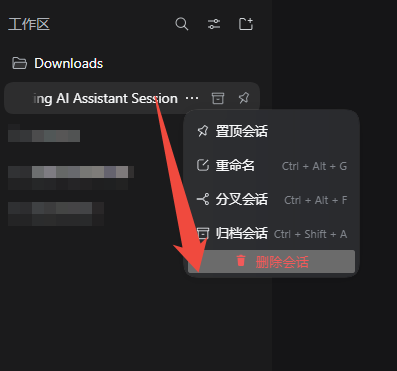
Adds the officially missing “Delete session” action to the DeepSeek Harness sidebar — one red menu row, a confirmation dialog, and a true removal of the session's registry entries and on-disk data.

Install
Requires the DeepSeek Harness desktop app.
# From npm (recommended)
dsh plugin --profile desktop add dsh-session-clean

# From GitHub
dsh plugin --profile desktop add github:Ansellwan/DeepSeekHarness-Session-Delete
Restart DSH after installing (the software build has no hot reload).
Upgrade (add does not upgrade by itself):
dsh plugin --profile desktop add dsh-session-clean@<version>
Uninstall:
dsh plugin --profile desktop remove dsh-session-clean
Features
- A red Delete session row in every session's
⋯menu, after the built-in pin / rename / fork / archive rows. - Greys out automatically while the session owns live work (running turn, pending approval or answer), with a tooltip explaining why.
- Archived sessions are deletable too — clearing out archived backlog is this plugin's main use case.
- A confirmation dialog warns that deletion is permanent.
- The Host re-checks liveness before deleting; a stale UI can never race a just-started task (HTTP 409 if work is still active).
- True deletion: the session is removed from the workspace registry (archive set, pin set, workspace session list), its durable directory under
~/.dsh/sessions/<workspace>/<sessionId>/is erased, and its projection cache entry is cleaned. - The sidebar refreshes itself through DSH's storage-domain change events — no restart needed.
Permissions & privacy
- Registers one local-only HTTP route (
/_dsh-session-clean) inside your own DSH process, protected by DSH's connection trust check (same as the shipped/apibridge); untrusted connections get 401/403. - Deletes data only under your own DSH home (
~/.dsh/sessions/…,~/.dsh/storages/session_projcache/…). - No network calls, no telemetry, no external services.
Compatibility
| DeepSeek Harness | verified on desktop 0.2.0-rc.2 |
| Profile | desktop (any single profile should work) |
| Node | ≥ 18 (ships with the DSH runtime) |
| Capability class | 界面与体验 (UI & experience) |
Notes & limits
- Deletion is irreversible — unlike archive, there is no undo.
- Deleting the session you are currently viewing works, but switching to another session first avoids a transient blank conversation view.
- If the optional
@deepseek-ai/dsh-session-query-sqlitesearch backend is enabled, deleted sessions may linger in the FTS index until it rebuilds; the default install does not enable it.
How it works
- Client half (
client.js): registers anorder: 500row in the officialsidebar.workspaces.session.menu.itemslot list — the same extension point the built-in rows use; running state comes from the host-injecteduseSessionStatussnapshot; the confirm dialog lives in the frame-wideshell.overlayslot so closing the menu cannot kill it. - Host half (
index.js): serves a private/_dsh-session-cleanroute, re-probes the session, mutates the registry through the same open storage domain handle the registry holds (storageDomain.get('workspace')), and deletes the session's files.
No app.asar patching, no overriding of official loader rows; safe across DSH upgrades.
简体中文
为 DeepSeek Harness 侧栏会话补充官方缺失的**「删除会话」**能力:红色菜单项 + 二次确认 + 真删除(注册表与磁盘一并清理)。
安装
前提:已安装 DeepSeek Harness 桌面版。
# 从 npm 安装(推荐)
dsh plugin --profile desktop add dsh-session-clean

# 从 GitHub 安装
dsh plugin --profile desktop add github:Ansellwan/DeepSeekHarness-Session-Delete
安装后重启 DSH(软件形态没有热刷新)。
升级(add 不会自动升版,须显式版本号):
dsh plugin --profile desktop add dsh-session-clean@<新版本号>
卸载:
dsh plugin --profile desktop remove dsh-session-clean
功能
- 在每个会话的
⋯菜单(置顶 / 重命名 / 分叉 / 归档之后)加入**红色「删除会话」**项 - 会话运行中自动置灰(含等待审批 / 等待回答),悬停提示「会话运行中,无法删除」
- 已归档会话同样可删除——清理存量归档正是本插件的常用场景
- 点击后弹二次确认,明确警示「永久删除、不可撤销」
- 宿主侧二次校验:即使界面状态过期,只要会话仍有进行中的工作,删除会被拒绝(HTTP 409)
- 删除是真删除:从工作区注册表(归档集 / 置顶集 / 工作区会话列表)移除 + 删除
~/.dsh/sessions/<工作区>/<sessionId>/全部落盘数据 + 清理会话投影缓存 - 走 DSH 存储域的变更事件通道,删除后侧栏自动刷新,无需重启
权限与隐私
- 只在你自己的 DSH 进程内注册一个仅本机的 HTTP 路由(
/_dsh-session-clean),受 DSH 连接信任检查保护(与官方/api桥同一道门),非信任连接返回 401/403 - 只删除你自己 DSH 主目录下的数据(
~/.dsh/sessions/…、~/.dsh/storages/session_projcache/…) - 无任何网络请求、无遥测、无外部服务
兼容性
| DeepSeek Harness | 桌面版 0.2.0-rc.2 实测 |
| Profile | desktop(其他单一 profile 理论通用) |
| Node | ≥ 18(DSH 运行时自带) |
| 能力分类 | 界面与体验 |
边界与说明
- 删除不可撤销(这是它与「归档」的本质区别)。确认框会再次警示。
- 删除当前正在查看的会话在技术上可行,但建议先切换到别的会话再删,避免对话视图短暂失焦。
- 若启用了
@deepseek-ai/dsh-session-query-sqlite(SQLite 全文搜索索引),被删会话的索引条目可能残留至该索引下次重建;默认安装未启用该后端,不受影响。
工作原理
- 客户端半
client.js:向官方 slot 列表sidebar.workspaces.session.menu.item注册order: 500的菜单行(与内置 pin=100 / rename=200 / fork=300 / archive=400 同一列表,官方支持的扩展点);运行状态来自宿主注入的useSessionStatus快照;确认弹窗挂在框架级shell.overlay槽位,菜单关闭不会连带销毁。 - 宿主半
index.js:注册私有路由/_dsh-session-clean,删除前重探会话活动;通过storageDomain.get('workspace')拿到工作区注册表已打开的同一个域句柄写入,写即持久化并发domain/changed事件驱动侧栏刷新;最后删除会话目录与投影缓存。
不修改 app.asar,不 patch 任何官方装载行,升级 DSH 不受影响。
License / 许可证
MIT
No comments yet. Be the first to write one.