dsh-computer-use-ng
让 DeepSeek Harness 像人一样操作桌面。 观察屏幕、定位界面元素、移动独立虚拟光标、点击、输入、滚动和拖拽。
Give DeepSeek Harness a safe, observable Computer Use layer. Observe desktop applications, locate UI elements, and act through an isolated virtual cursor.







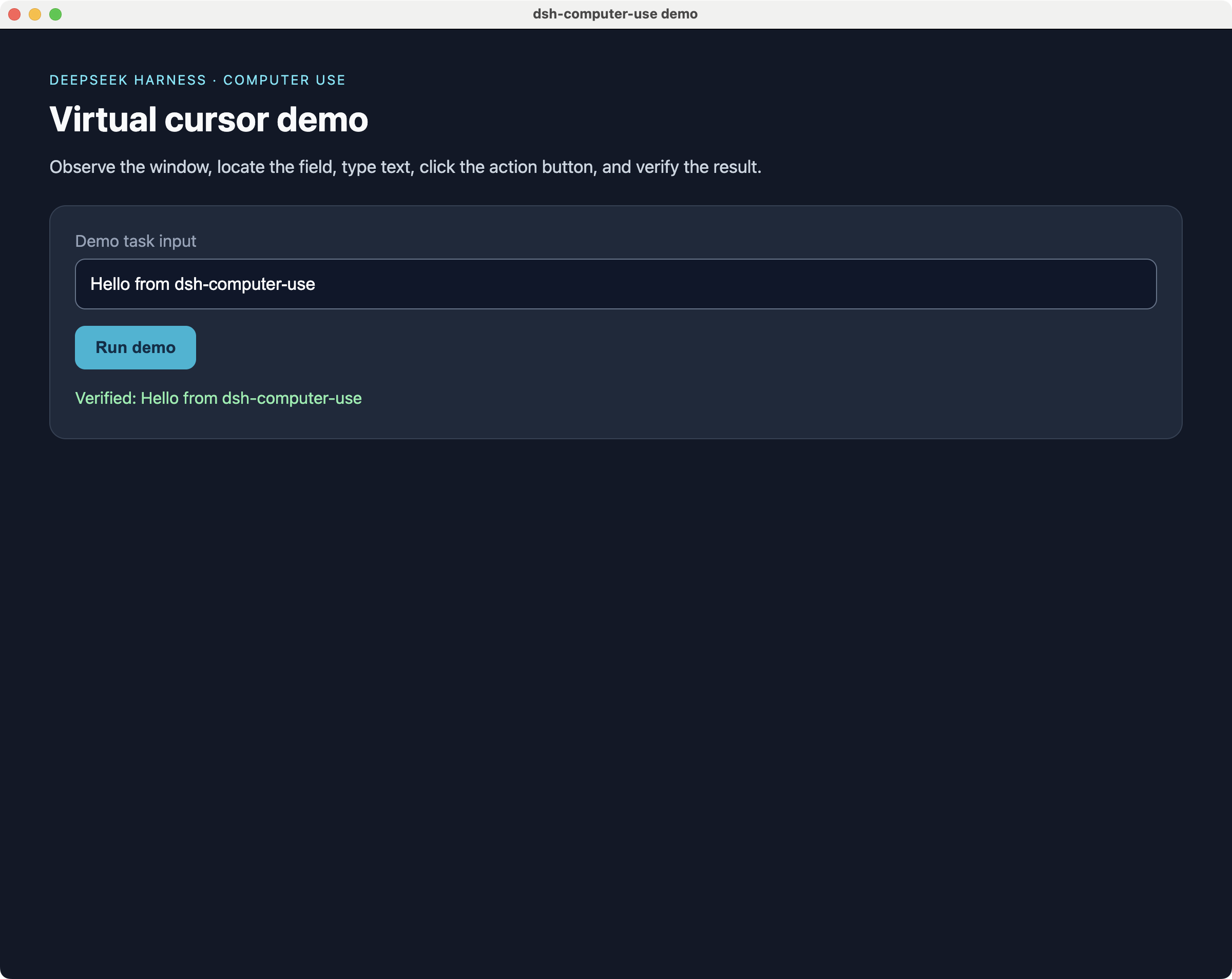
真实演示 · Real demo: a local, non-sensitive page was observed, filled, clicked, and verified through the Computer Use action loop.
社区维护分支 · Community-maintained continuation. 本项目基于 Wei Jerry 的 dsh-computer-use(MIT)独立维护,自 0.4.0 起重点跟进 DSH 0.2+。与原作者无隶属关系;原作者与贡献者的署名保留在 NOTICE 中。
中文文档 · English documentation
生态入口 · Ecosystem
| 入口 | 作用 | Link |
|---|---|---|
| harness-desktop | 开箱即用的 DeepSeek Harness 桌面客户端 · Ready-to-use desktop client | 下载 / Download |
| AI House | 发现 AI 工具、模型和 Agent · Discover AI tools and agents | 工具中心 / Tools |
| npm | 安装和查看包信息 · Install and inspect the package | dsh-computer-use-ng |
| awesome-dsh-plugin | 发现更多 DeepSeek Harness 插件 · Discover more plugins | Plugin list |
| 上游项目 | 原始项目与历史版本 · Original project and historical releases | dsh-computer-use |
维护说明 · Maintenance
- 本仓库是独立维护分支,版本线从
0.4.0开始;首个版本重点修复 DSH 0.2.1-rc.2 兼容性。 - 工具名(
screen_observe、computer_click等)保持不变,已有提示词和工作流无需改写。 - 本仓库从新的 Git 历史开始,不包含上游的提交历史或内部项目文档;MIT 署名见 NOTICE。
- 问题反馈、功能请求和 PR 请提到本仓库,而不是上游仓库。
- npm 包名
dsh-computer-use-ng,发布账号androidsup;也可以用固定版本dsh-computer-use-ng@0.4.0。
中文文档
这是什么?
dsh-computer-use-ng 是 DeepSeek Harness 的跨平台 Computer Use 插件,为 AI Agent 增加一套可观察、可约束、可验证的桌面操作能力。
它不是传统的鼠标宏:Agent 必须先观察目标窗口,再基于新鲜快照执行动作。点击、双击和右键操作通过 cua-driver 的独立虚拟光标完成,用户可以看到操作过程,而不是让程序悄悄发送一串不可见事件。
适合用于:
- 让 DeepSeek Harness 操作原生 macOS、Windows 和 Linux 桌面应用;
- 操作 Electron、Canvas 或游戏等 Accessibility/AX 信息不完整的界面;
- 构建“打开应用 → 观察 → 点击 → 输入 → 再观察验证”的 Agent 闭环;
- 为桌面自动化、内部工具和个人工作流增加可审计的 Computer Use 执行层;
- 研究 Computer Use、视觉定位和安全护栏。
本项目是开源社区插件,不是 DeepSeek 官方产品,也不代表 DeepSeek 的官方立场。
为什么需要它?
普通文本 Agent 可以生成答案,但无法直接完成很多桌面任务。dsh-computer-use-ng 把桌面交互拆成三个阶段:
观察 Observation → 决策 Decision → 受约束执行 Guarded Action
flowchart LR
    A[DeepSeek Harness Agent] --> B[dsh-computer-use-ng]
    B --> C[安全护栏 Guard]
    C --> D[AX / UIA 界面树]
    C --> E[虚拟光标与键盘]
    D --> F[cua-driver]
    E --> F
    F --> G[桌面应用 Desktop Apps]
核心原则:
- 先观察,再操作:没有新鲜观察快照时,动作会被拒绝;
- 模型所见即所点:元素编号和坐标来自同一窗口截图空间;
- 语义优先:优先使用
element编号,坐标模式保留视觉操作自由度; - 失败关闭:目标不明确、快照过期、应用不在白名单时不继续执行。
能力一览
| 能力 | 说明 |
|---|---|
| 屏幕观察 | 读取目标窗口元数据、Accessibility/AX/UIA 元素和坐标 |
| 三种观察模式 | ax 零视觉 Token、native 主模型直读图片、vision 视觉观察者 |
| 独立虚拟光标 | 点击、双击、右键会显示虚拟光标移动和操作过程,不抢用户真实鼠标 |
| 文本与快捷键 | 输入文本、发送 return、cmd+c、ctrl+shift+p 等按键 |
| 滚动与拖拽 | 支持上下左右滚动和窗口本地截图坐标拖拽 |
| 应用管理 | 列出运行中的应用,后台启动应用,按需前置窗口 |
| 安全护栏 | 快照 TTL、应用白名单、危险操作审批、密码框保护 |
| 跨平台 | macOS 已验证;Windows/Linux 需按真实环境完成平台验收 |
12 个模型工具
| 工具 | 作用 | 主要参数 |
|---|---|---|
screen_observe |
获取窗口、AX/UIA 元素、坐标或截图 | window, mode, query, maxElements |
screen_zoom |
截取并放大窗口局部区域 | window_id, pid, x1, y1, x2, y2 |
computer_click |
点击元素或截图坐标 | element 或 x,y,可选 count |
computer_double_click |
双击元素或坐标 | element 或 x,y |
computer_right_click |
右键点击元素或坐标 | element 或 x,y |
computer_type |
向焦点或指定元素输入文本 | text, 可选 element |
computer_key |
发送按键或快捷键 | key,例如 return、cmd+c |
computer_scroll |
在目标窗口滚动 | direction, amount, 可选 element |
computer_drag |
拖拽窗口中的区域 | from_x, from_y, to_x, to_y |
computer_wait |
等待界面加载或动画完成 | ms,最大 60000 |
app_list |
列出正在运行的应用 | 无 |
app_launch |
启动应用 | name 或 bundle_id,可选 bring_to_front |
版本兼容
- 当前插件版本:0.4.0
- DSH 运行时:
>=0.1.2-rc.1 <0.2.0-0 || >=0.2.0-rc.1 <0.3.0-0(已在 0.2.1-rc.2 实测通过) - Node.js:
>=22.18.0 @deepseek-ai/dsh-tools/@deepseek-ai/schemastery只声明为宿主peerDependencies,不随插件打包,避免同进程出现第二份 DSH 模块
0.2 的 DSH 版本号是预发布版本(例如
0.2.1-rc.2)。普通范围<0.2.0在 node-semver 下不包含它,因此这里使用显式的 0.2 预发布区间;旧版 0.1.x 运行时仍受支持。
快速开始
方式一:DSH 插件管理器(推荐)
# 如果装过旧版 dsh-computer-use,先卸载,避免同名工具重复注册
dsh plugin --profile desktop remove dsh-computer-use

# 从 npm 安装(推荐,desktop profile)
dsh plugin --profile desktop add dsh-computer-use-ng

# Web profile 同样一条命令
dsh plugin --profile web add dsh-computer-use-ng

# 或固定版本
dsh plugin --profile desktop add dsh-computer-use-ng@0.4.0

# 或直接从 GitHub 固定 tag 安装
dsh plugin --profile desktop add github:AndroidSix/dsh-computer-use-ng#v0.4.0
也可以直接在 DSH 的 插件页 → 添加插件 里输入包名 dsh-computer-use-ng。
安装完成后重启 DSH,或在插件页确认 dsh-computer-use-ng 已启用。
方式二:使用 harness-desktop
普通桌面用户建议先下载 harness-desktop。它是一个开箱即用的 DeepSeek Harness 桌面客户端,支持 macOS、Windows 和 Linux。
1. 下载并启动 harness-desktop
2. 完成首启配置
3. 安装本插件
4. 重启 harness-desktop
5. 在对话中让 Agent 操作桌面
方式三:从 GitHub 源码安装
git clone https://github.com/AndroidSix/dsh-computer-use-ng.git
cd dsh-computer-use-ng

# 先预演,不写入配置
./install.sh --dry-run

# 安装到用户级 patch 层
./install.sh

# 安装后重启 harness-desktop
安装脚本只做两件事:
- 将插件链接到
$DSH_HOME/profiles/desktop/node_modules/dsh-computer-use-ng(找不到desktop时回退到web); - 在
$DSH_HOME/cordis.patch.yml注册插件。
脚本使用用户级 patch 层,不修改项目代码,也不修改其他 profile 的配置。
Windows / Linux
install.sh 默认使用 $HOME/.dsh。Windows 或 Linux 用户请先指定自己的 DSH home:
export DSH_HOME="/path/to/your/dsh-home"
./install.sh --dry-run
./install.sh
如果系统不支持符号链接,请使用宿主 DSH 的插件管理方式,或按照 docs/store-evidence.md 中的手动安装说明操作。
方式四:npm 包
npm install -g dsh-computer-use-ng
安装后仍需要让 DSH profile 加载该 bundle,并确认 cua-driver 已经安装且在 PATH 中,或设置:
export CUA_DRIVER_BIN=/path/to/cua-driver
在 Windows 官方安装器布局中,插件还会自动探测
%USERPROFILE%\\.cua-driver\\packages\\current\\cua-driver.exe;GUI 宿主的 PATH 不完整时无需手工把目录加入 PATH。
安装完成后重启宿主,再通过 app_list 或 screen_observe 验证工具是否出现。
第一个完整任务
安装并授权后,可以让 Agent 执行下面的任务:
请完成以下桌面任务:

1. 使用 app_list 列出正在运行的应用;
2. 使用 app_launch 打开一个普通桌面应用;
3. 使用 screen_observe 观察目标窗口;
4. 找到目标按钮,优先使用 element 编号点击;
5. 使用 computer_type 输入一段非敏感测试文本;
6. 再次使用 screen_observe 验证文本已经出现;
7. 如果界面发生变化,请重新观察,不要使用旧元素编号继续操作;
8. 如果动作被安全护栏拒绝,请报告拒绝原因,不要绕过护栏。
推荐的操作循环
app_list / app_launch
        ↓
screen_observe
        ↓
computer_click / computer_type / computer_key
        ↓
computer_wait(如需等待)
        ↓
screen_observe 验证结果
每一次界面明显变化后,都应重新调用 screen_observe。元素编号属于某一次观察快照,不应跨页面、弹窗或长时间等待复用。
观察模式
screen_observe 的 mode 有三种选择:
| 模式 | 原理 | 成本 | 适用场景 |
|---|---|---|---|
ax(默认) |
读取 AX/UIA 界面树并返回编号和坐标 | 不消耗视觉 Token | 原生应用、元素树完整的界面 |
native |
将截图作为图片块交给当前对话模型 | 图片 Token;不额外调用视觉观察者 | Canvas、游戏、Electron 或 AX 树为空的界面 |
vision |
通过 Harness 的 ctx.llm 调用视觉模型,返回结构化元素列表 |
额外一次视觉模型调用 | 当前主模型不支持图片输入时 |
native 模式
当前对话模型必须声明支持 image 输入,例如视觉模型。插件通过 Harness attachments 传递图片,不额外发起独立视觉 API 请求。
screen_observe(mode="native")
vision 模式
默认观察模型为:
provider: deepseek-official
model: deepseek-v4-flash-vision-exp
老版本 Harness 需要在模型配置中声明:
models:
  - id: deepseek-v4-flash-vision-exp
    input: [text, image]
当 DeepSeek 视觉观察者不可用时,插件可以尝试 GLM 视觉兜底。GLM 兜底需要 ZHIPU_API_KEY,并可能受到免费模型访问量限制。
自动降级
当 AX/UIA 树为空时,插件会尝试:
native(当前路由支持图片时)
  → vision(宿主存在可用视觉模型时)
  → ax(返回可用的界面树信息或明确错误)
坐标语义
从 v0.2.0 起,所有坐标均为:
窗口本地截图像素(window-local screenshot pixels)
这意味着:
- 坐标原点在目标窗口左上角;
screen_observe输出的@(x,y)与computer_click(x=,y=)使用同一坐标系;- 不需要乘以 2;
- 不需要加屏幕坐标或窗口偏移;
- 使用
screen_zoom时,返回图片是局部区域,但点击仍应使用整窗截图坐标。
优先使用:
computer_click(element=5)
只有在元素无法通过 AX/UIA 识别,或视觉模式给出坐标时,才使用:
computer_click(x=640, y=420)
安全模型
已内置的安全机制
- 无快照拒绝:没有先调用
screen_observe,动作不会执行; - 观察快照 TTL:快照过期后动作被拒绝,必须重新观察;
- 应用白名单:配置
allowedApps后,只允许指定应用接受操作; - 危险操作审批:元素标签命中删除、支付、购买、转账、退出登录等词时请求用户确认;
- 密码框保护:检测到
AXSecureTextField/AXPasswordField时拒绝自动输入; - 键盘前台重试审批:键盘/文本优先后台投递;只有驱动明确拒绝后台投递并建议前台模式、且当前工具/平台支持时,才请求用户对本次前台重试授权;未获
allowed-once不切换焦点、不重试; - 固定 argv 调用:通过宿主以非 shell 方式启动
cua-driver; - 权限边界声明:核心桌面路径不读取业务文件或额外凭据;仅当用户配置视觉 GLM fallback 时,才读取指定 key 来源并向 GLM API 发起请求;没有 npm lifecycle 安装脚本。
重要限制
语义安全检测依赖观察到的元素标签,主要对 element 编号模式有效:
x/y坐标模式无法提前知道目标语义,主要依赖快照 TTL 和可见操作;computer_type和computer_key作用于当前焦点时,无法预判最终目标内容;- 驱动拒绝后台键盘/文本投递时,前台重试会先请求本次用户批准;授权后可能切换目标窗口焦点;
computer_key不会阻止cmd+q、ctrl+alt+delete等系统快捷键;- 不要把本插件的操作权限授予不可信 Agent;
- 密码、API Key 和其他敏感信息必须由用户本人输入。
配置
插件配置位于 DSH 的用户级 patch 层:
- id: dsh-computer-use-ng
  config:
    ttlMs: 30000
    maxElements: 500
    allowedApps: []
    cursorTheme: com.dsh.computeruse.rainbow
    nativeImage: auto
    visionProvider: deepseek-official
    visionModel: deepseek-v4-flash-vision-exp
| 配置项 | 默认值 | 说明 |
|---|---|---|
ttlMs |
30000 |
观察快照有效期,单位毫秒;多步任务建议显式设置 30000-60000 |
maxElements |
500 |
单次观察最多返回的编号元素数量 |
allowedApps |
[] |
空数组表示不限制;非空时只允许列表中的应用 |
cursorTheme |
com.dsh.computeruse.rainbow |
虚拟光标主题;空字符串使用引擎默认主题 |
nativeImage |
auto |
auto 自动降级;full 原图;compact 始终使用小图 |
visionProvider |
deepseek-official |
vision 模式使用的 provider |
visionModel |
deepseek-v4-flash-vision-exp |
vision 模式使用的视觉模型 |
安装脚本或 bundle patch 可能覆盖代码层默认值。请以实际生成的
$DSH_HOME/cordis.patch.yml为准;多步任务建议显式写入ttlMs,不要依赖隐式默认值。
平台支持 · Platform Support
| 平台 | 状态 | 说明 |
|---|---|---|
| macOS | ✅ 已验证 | 可能需要 Accessibility 和 Screen Recording 权限 |
| Windows | ⛔ BLOCKED | 当前无 Windows 10/11 真机;路径和按键逻辑已测试,真实 GUI 未验收 |
| Linux | ⛔ 未验证 | 桌面环境、Accessibility 栈和窗口管理器可能影响元素识别 |
测试通过不代表所有应用的界面树都完全一致。AX/UIA 不完整时,请使用 native 或 vision 模式,并在提交问题时附上操作系统、目标应用和 screen_observe 输出。
故障排查
| 现象 | 常见原因 | 处理方式 |
|---|---|---|
cua-driver not found |
引擎不在 PATH 或官方安装器路径不可用 | 安装 cua-driver,确认 ~/.cua-driver/packages/current/cua-driver.exe 存在,或设置 CUA_DRIVER_BIN |
| 没有可见窗口 | 图形会话或窗口权限不可用 | 确认目标应用正在运行并重新观察 |
| 快照已过期 | 超过 ttlMs |
重新调用 screen_observe |
| 元素编号点击失败 | 界面已经变化 | 重新观察后再使用新编号 |
| AX/UIA 树为空 | Canvas、游戏、Electron 或特殊窗口 | 使用 native 或 vision |
| native 被拒绝 | 当前主模型没有 image 输入能力 | 切换视觉模型或使用 vision |
| vision 模型不可用 | provider/model 未注册 image 输入 | 配置 visionProvider / visionModel |
| GLM fallback 不可用 | 没有 ZHIPU_API_KEY 或遇到限流 |
配置 Key,或使用 Harness 视觉模型 |
| 危险操作被拒绝 | 需要用户审批 | 检查审批提示,不要绕过安全护栏 |
| Windows 管理员窗口无法操作 | 目标窗口权限级别更高 | 使用普通用户窗口 |
开发与验证
项目使用隔离 profile 开发,避免污染真实 GUI 配置:
npm install
npm run check

# 运行时验证需要已安装 harness-desktop 和 cua-driver
node verify-runtime.mjs
macOS headless 验证示例:
DSH_HOME=$PWD/.dsh-p0 ELECTRON_RUN_AS_NODE=1 \
  /Applications/harness-desktop.app/Contents/MacOS/harness-desktop --expose-internals \
  /Applications/harness-desktop.app/Contents/Resources/app/node_modules/@deepseek-ai/dsh/lib/bin.js \
  --profile test "请调用 screen_observe 观察当前窗口并报告"
更多证据:
自动发版到 npm
仓库的 .github/workflows/publish.yml 在 GitHub Release 发布时运行:
- 校验
v版本号与package.json、package-lock.json两处版本一致(scripts/check-release-version.mjs); npm ci安装依赖,运行npm test与npm run check,并做主题生成器冒烟检查;npm pack只打包files白名单内的文件,并把产物附加到 GitHub Release;- 通过 npm Trusted Publishing 发布(自动生成 provenance 签名,仓库中不需要
NPM_TOKEN)。
普通提交不会触发发布,草稿状态的 Release 也不会发布。稳定版本发布到 npm latest,预发布版本(如 0.5.0-rc.1)发布到 next。
日常更新流程:
# 1. 修改 package.json 的 version,并同步 package-lock.json
npm install --package-lock-only

# 2. 本地校验版本一致性(可选带 tag 参数)
npm run check:release -- v0.4.1

# 3. 提交并推送 main,然后基于该提交创建 v0.4.1 的 GitHub Release
也可以手动在 Actions 中触发 Publish to npm,输入已存在的 tag 重试。已经成功发布的 npm 版本不能重复发布,失败后请先修复原因再重试。
不想走 GitHub Release 时,可用本地脚本发布(需已 npm login):
npm run publish:npm:dry   # 只打印将执行的步骤,不打包、不上传
npm run publish:npm       # 校验 → 测试 → 打包 → 发布
本地发布同样会生成 provenance,但签名者会是你的本机环境;推荐优先使用 GitHub Release 通道。
首次配置:在 npm 上打开包的 Settings → Trusted Publisher,选择 GitHub Actions,填写所有者为 AndroidSix、仓库 dsh-computer-use-ng、工作流文件名 publish.yml,环境名称留空,权限允许 npm publish。
相关项目
- harness-desktop:开箱即用的 DeepSeek Harness 桌面客户端;
- awesome-dsh-plugin:DeepSeek Harness 插件精选列表;
- AI House 工具中心:发现更多 AI 工具、模型和 Agent;
- cua-driver:底层跨平台桌面驱动;
- npm package:安装包和版本信息;
- GitHub 仓库:本维护分支的源码与 issue;
- 上游项目:原始项目与历史版本。
License
English Documentation
What is dsh-computer-use-ng?
dsh-computer-use-ng is a cross-platform Computer Use plugin for DeepSeek Harness. It gives an AI agent an observable, guarded, and verifiable desktop action layer.
The plugin is designed around an explicit loop:
Observe → Decide → Execute with Guardrails → Observe and Verify
It can inspect desktop windows, expose actionable AX/UIA elements, use a screenshot-based visual fallback, and operate through an isolated virtual cursor. It is useful for desktop automation, Computer Use research, internal workflows, and agentic applications that need bounded desktop actions.
This is a community plugin, not an official DeepSeek product and not affiliated with DeepSeek.
Maintenance: this repository is an independently maintained continuation of dsh-computer-use (MIT). The version line starts at
0.4.0; issues and PRs belong to this repository. Original authorship is recorded in NOTICE.
Highlights
- Observe native desktop windows and accessibility trees;
- Use
ax,native, orvisionobservation modes; - Click, double-click, right-click, type, press keys, scroll, and drag;
- Launch applications and list running applications;
- Bind actions to fresh observation snapshots;
- Restrict actions to an application allowlist;
- Request approval for risky semantic targets;
- Refuse automated typing into password fields;
- Fall back to screenshots when AX/UIA data is incomplete;
- macOS has been verified; Windows has logic/path coverage but real GUI validation is blocked; Linux has not been verified.
Compatibility
- Plugin version: 0.4.0
- DSH runtime:
>=0.1.2-rc.1 <0.2.0-0 || >=0.2.0-rc.1 <0.3.0-0(verified on 0.2.1-rc.2) - Node.js:
>=22.18.0 @deepseek-ai/dsh-toolsand@deepseek-ai/schemasteryare hostpeerDependenciesonly, so the profile never materializes a second copy of a DSH module in the host process
DSH 0.2 versions are prereleases (for example
0.2.1-rc.2). Under node-semver a plain<0.2.0range excludes them, so the manifest carries explicit 0.2 prerelease branches. The 0.1.x line remains supported.
Quick Start
Install with the DSH plugin manager (recommended)
# Remove the original plugin first if it is installed, to avoid duplicate tool names.
dsh plugin --profile desktop remove dsh-computer-use

# Install from npm
dsh plugin --profile desktop add dsh-computer-use-ng

# The same command works for the web profile
dsh plugin --profile web add dsh-computer-use-ng

# Or pin a version
dsh plugin --profile desktop add dsh-computer-use-ng@0.4.0

# Or install from the GitHub tag
dsh plugin --profile desktop add github:AndroidSix/dsh-computer-use-ng#v0.4.0
Restart DSH, or confirm in the Plugins page that dsh-computer-use-ng is enabled.
Recommended desktop experience
Download harness-desktop, the ready-to-use DeepSeek Harness desktop client. After the host is installed, install this plugin and restart the host.
Install from source
git clone https://github.com/AndroidSix/dsh-computer-use-ng.git
cd dsh-computer-use-ng

./install.sh --dry-run
./install.sh
The installer creates a user-level plugin link and registers the bundle in the DSH home patch layer. It does not modify project source files or other profiles.
On Windows or Linux, set DSH_HOME to the actual DSH home directory before running the script:
export DSH_HOME="/path/to/your/dsh-home"
./install.sh
Install the npm package
npm install -g dsh-computer-use-ng
Make sure the host loads the bundle and that cua-driver is available in PATH, or set CUA_DRIVER_BIN to its absolute path.
On Windows, the official installer layout is also detected automatically at
%USERPROFILE%\\.cua-driver\\packages\\current\\cua-driver.exe, which covers GUI hosts whose PATH does not include the driver.
Tools
| Tool | Purpose | Main parameters |
|---|---|---|
screen_observe |
Observe a window, AX/UIA elements, coordinates, or a screenshot | window, mode, query, maxElements |
screen_zoom |
Capture a smaller region for visual inspection | window_id, pid, x1, y1, x2, y2 |
computer_click |
Click an element or screenshot coordinate | element or x,y; optional count |
computer_double_click |
Double-click an element or coordinate | element or x,y |
computer_right_click |
Right-click an element or coordinate | element or x,y |
computer_type |
Type into the focused or selected field | text, optional element |
computer_key |
Send a key or shortcut | key, e.g. return, cmd+c |
computer_scroll |
Scroll a target window | direction, amount, optional element |
computer_drag |
Drag between screenshot coordinates | from_x, from_y, to_x, to_y |
computer_wait |
Wait for a page load or animation | ms, max 60000 |
app_list |
List running applications | none |
app_launch |
Launch an application | name or bundle_id; optional bring_to_front |
The standard action loop
app_list / app_launch
        ↓
screen_observe
        ↓
computer_click / computer_type / computer_key
        ↓
computer_wait
        ↓
screen_observe to verify the result
A snapshot is observation-local. If the UI changes, observe again before using an element index or coordinate from the previous state.
Observation modes
| Mode | How it works | Best for |
|---|---|---|
ax |
Returns a compact AX/UIA tree with indexed elements and coordinates | Native applications with usable accessibility data |
native |
Returns the screenshot as an image block for the current multimodal model | Canvas, games, Electron, or windows with incomplete AX/UIA data |
vision |
Uses a Harness ctx.llm vision model to describe the screenshot |
Text-only main models that need a separate observer |
native requires the current route to declare image input support. vision uses the configured visionProvider and visionModel; the default model is deepseek-v4-flash-vision-exp. The optional GLM fallback requires ZHIPU_API_KEY and may be rate-limited.
When the accessibility tree is empty, the fallback order is:
native → vision → ax
The plugin chooses a path that is available and returns an explicit error when no visual route can be used.
Coordinate semantics
Since v0.2.0, all coordinates are window-local screenshot pixels:
- the origin is the top-left corner of the target window;
- coordinates returned by
screen_observeand coordinates accepted bycomputer_clickshare the same space; - do not multiply by two;
- do not add a screen or window offset;
screen_zoomreturns a cropped image, but click coordinates remain coordinates in the full-window screenshot space.
Prefer semantic element actions:
computer_click(element=5)
Use x,y when the target is not exposed through AX/UIA or when a visual observer provides coordinates.
Security model
The plugin includes:
- Observe-before-act: actions without a fresh observation are rejected;
- Snapshot TTL: expired snapshots require a new observation;
- Application allowlists:
allowedAppscan restrict the operation scope; - Risky-action approval: labels such as delete, pay, purchase, transfer, or sign out can require user approval;
- Password-field protection: automated typing into password fields is refused;
- Keyboard foreground retry approval: keyboard/text actions use background delivery first; after an explicit driver refusal and only where the driver supports the mode, foreground retry requires one-time user approval. Without approval, focus is not changed and no retry occurs;
- Fixed non-shell driver invocation: the host starts
cua-driverwith fixed argv; - Explicit permission boundaries: the core desktop path does not read business files or extra credentials. The optional GLM fallback reads only its configured key source and sends an HTTPS request to the GLM vision API; there are no npm lifecycle scripts.
Semantic checks are strongest for element-based actions. Coordinate actions and unfocused computer_type/computer_key calls cannot predict the final semantic target. computer_key does not validate system shortcuts. Do not give this capability to an untrusted agent, and always type passwords and secrets yourself.
If the driver reports background_unavailable, the plugin asks for one-time approval before retrying in foreground mode where the current tool/platform supports it; that retry may bring the target window forward. Rejecting or lacking approval leaves the action refused.
Configuration
- id: dsh-computer-use-ng
  config:
    ttlMs: 30000
    maxElements: 500
    allowedApps: []
    cursorTheme: com.dsh.computeruse.rainbow
    nativeImage: auto
    visionProvider: deepseek-official
    visionModel: deepseek-v4-flash-vision-exp
| Option | Default | Description |
|---|---|---|
ttlMs |
30000 |
Observation lifetime in milliseconds |
maxElements |
500 |
Maximum indexed elements returned by observation |
allowedApps |
[] |
Empty means unrestricted; otherwise only listed apps are allowed |
cursorTheme |
com.dsh.computeruse.rainbow |
Virtual cursor theme; empty uses the engine default |
nativeImage |
auto |
auto, full, or compact screenshot strategy |
visionProvider |
deepseek-official |
Provider used by vision mode |
visionModel |
deepseek-v4-flash-vision-exp |
Image-capable observer model |
If an installer or bundle patch overrides the code-level default, the generated $DSH_HOME/cordis.patch.yml is authoritative. For multi-step tasks, set ttlMs explicitly instead of relying on an implicit default.
Platform support
| Platform | Status | Notes |
|---|---|---|
| macOS | ✅ Verified | Accessibility and Screen Recording permissions may be required |
| Windows | ⛔ Blocked | Logic/path coverage exists; real GUI validation requires a Windows 10/11 regular-user desktop session |
| Linux | ⛔ Not verified | Desktop environment, accessibility stack, and window manager can affect element discovery |
The macOS path has been verified in the project evidence. Windows and Linux still require a real platform run before they can be advertised as fully tested. This does not mean every application exposes an identical accessibility tree. For incomplete AX/UIA data, use native or vision and include the OS, target application, and observation output in bug reports.
Troubleshooting
| Symptom | Likely cause | Action |
|---|---|---|
cua-driver not found |
Driver is not in PATH or the official installer path is unavailable |
Install it, confirm ~/.cua-driver/packages/current/cua-driver.exe exists, or set CUA_DRIVER_BIN |
| No visible windows | Missing graphical session or permission | Confirm the target app is visible and observe again |
| Snapshot expired | ttlMs elapsed |
Call screen_observe again |
| Element click failed | The UI changed | Observe again and use the new index |
| Empty AX/UIA tree | Canvas, game, Electron, or special window | Use native or vision |
native rejected |
Main route is not image-capable | Switch to an image-capable model or use vision |
| Vision model unavailable | Provider/model lacks image input declaration | Configure visionProvider / visionModel |
| GLM fallback unavailable | Missing ZHIPU_API_KEY or rate limit |
Configure the key or use a Harness vision model |
background_unavailable |
Driver cannot deliver keyboard/text in the background | Approve the one-time foreground retry if changing window focus is acceptable |
| Risky action rejected | User approval was not granted | Follow the approval result; do not bypass the guard |
| Windows elevated window rejected | Target has a higher privilege level | Use a regular-user window |
Development and verification
npm install
npm run check
node verify-runtime.mjs
The runtime verification requires a working harness-desktop installation and cua-driver. Additional evidence is available in:
Ecosystem
- harness-desktop — a ready-to-use DeepSeek Harness desktop client;
- awesome-dsh-plugin — a curated list of DeepSeek Harness plugins;
- AI House Tools — discover AI tools, models, and agents;
- cua-driver — the underlying cross-platform desktop driver;
- npm package — package versions and downloads;
- GitHub repository — source and issue tracker for this maintained branch;
- Upstream project — the original project and historical releases.
License
Not affiliated with DeepSeek. DeepSeek Harness is an open-source project by DeepSeek AI.
No comments yet. Be the first to write one.